Tapas – Comics and Novels
- 13.97K
- 4.2
- Installs
- 10.00M
- Price
- Free

Screenshots




Analysis by Reviewed
I judge a comics app by more than the size of its library: I want to find a series that fits a short break, read comfortably on a phone, and understand what I’m committing to before a story becomes part of my routine. Tapas – Comics and Novels brings comics and prose together, which makes it appealing if you like switching formats without switching apps. It is free to install, though some reading can involve purchases, so I’d treat it as a place to explore first and spend selectively.
What I look for before settling in
Serial reading works best for me when I can match a story to the time and attention I have. An illustrated episode may suit a quick pause, while prose asks me to follow sentences and remember more detail between visits. Tapas puts both formats under one roof, so I can choose by mood rather than opening a different app whenever I want to switch from panels to text.
That convenience is not the same as having one perfect reading tool for every situation. Before following several series, I’d ask myself whether I enjoy returning to stories in installments, whether I’m comfortable browsing a broad selection, and whether I’m willing to encounter paid access along the way. Those questions matter more than a large catalogue if I’m trying to build a reading habit I can actually keep.
A routine that fits a phone screen
For a realistic everyday use, imagine I have ten minutes before an appointment. I can use that pause for an episode of a comic, then switch to a novel later when I have a longer stretch at home. The practical advantage is not simply variety; it is having two different kinds of reading available for two different kinds of free time. If I know I’ll be interrupted, I’d choose a story that is easy for me to pick back up rather than starting a dense passage just to fill a brief wait.
I’d also keep my list of active reads deliberately small at first. A handful of promising covers can quickly turn into more stories to remember, and serials invite regular returns. Choosing one comic and one novel gives me a chance to learn which format I reach for most without creating a backlog. If I stop looking forward to a series, I’d drop it rather than treating every started story as an obligation.
Discovering a World of Stories
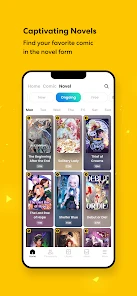
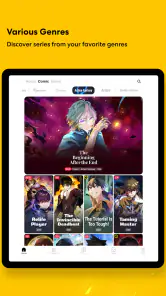
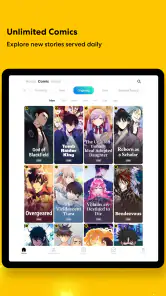
First things first, Tapas is like a treasure trove for anyone who loves to immerse themselves in stories. Whether you're into comics, novels, or both, this app has something for everyone. From romance and fantasy to horror and action, the variety is pretty impressive. I found myself scrolling through endless options, and trust me, it was hard to pick just one to start with!
Choosing a reading rhythm
The format mix is useful in a very practical way: a comic can make a quick pause feel complete, while a novel suits a stretch of time when I want to settle into prose. If I were browsing on a commute, I’d shortlist a couple of series in different formats rather than opening every promising title. That makes it easier to pick something that suits the time I actually have, instead of spending the whole break deciding.
More From Our News Desk

Weather by Xiaomi Review: Clear at a Glance, Less Clear Up Close

X Under Pressure: Can It Recover When Posting Goes Wrong?

Clash of Clans Is Won Between the Battles

Android Auto Makes the Case for Quieter Car Software

MobiOffice: Transforming Mobile Productivity with Seamless Integration

EA SPORTS FC™ Mobile Soccer: Redefining Mobile Sports Gaming
Tapas is a comics app and a webnovel app from Tapas Entertainment Inc. It is free to download, has a Teen age rating, and includes in-app purchases ranging from $0.99 to $99.99 per item. Its 4.2 average comes from around 123,000 ratings, and it has over 10 million installs. Those figures suggest a sizeable audience, but they don’t tell me whether a particular story will suit my taste; I’d use the previews and early reading experience to make that call.
User-Friendly Experience
One of the things I loved about Tapas is its user-friendly interface. Navigating through the app is a breeze, even if you’re not a tech-savvy person. The layout is clean, and everything is neatly categorized, which makes finding your next read super easy. Plus, the app lets you customize your reading experience with features like night mode and adjustable font sizes. It’s all about making your reading as comfortable as possible.
Those reading controls matter most when the setting changes. I’d use night mode when winding down and adjust the font for a prose chapter if I’m reading on a smaller screen. A good habit is to test comfort early in a series, before getting invested: a layout that feels fine for a few panels may be less pleasant over a long session. For readers who mainly want traditional page-by-page books, a dedicated ebook reader may still feel more natural.
There is a useful format-specific trade-off here. Text settings can make prose more comfortable, but they do not turn illustrated episodes into conventional ebook pages. When I’m choosing what to read, I’d consider not only the genre but also whether I want to look at artwork or read a longer run of text. That small check can prevent a mismatch between the story I pick and the kind of attention I have available.
Community and Interaction
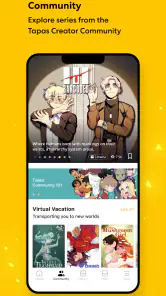
What sets Tapas apart from other reading apps is its strong community vibe. You can interact with other readers, leave comments, and even discuss plot twists and character developments. This interactive element adds a whole new layer of fun to the reading experience. It’s like being part of a massive book club where everyone shares your passion for stories.
Comments can make following an ongoing story feel social, especially when a chapter leaves a question hanging. I’d read the episode first and open the discussion afterward if I want to avoid having other readers’ reactions shape my own response. If I prefer a quiet, uninterrupted reading space, I can simply skip the conversation; the community is an extra, not a requirement for enjoying the stories.
I’d treat discussion as something to dip into on my terms rather than part of the reading itself. If I’m sensitive to spoilers, going to comments before finishing an episode is an easy way to weaken a reveal for myself. If I’ve just reached a cliffhanger and want to compare reactions, opening them afterward makes more sense. That order lets me enjoy the social side without giving up the chance to form my own first impression.
Finding a fit among reading apps
Compared with a comics-only service, Tapas has the advantage of keeping prose fiction alongside illustrated episodes. That breadth is valuable if my interests shift from one format to another, but someone who wants only a focused comic catalogue may prefer an alternative built around that narrower habit. Likewise, readers who want a conventional ebook library or a distraction-free reading tool may be better served by a dedicated book app. Tapas is strongest when discovery and variety are part of the fun, rather than when I arrive with one specific book already in mind.
It is also worth deciding how much participation and browsing I want. The range can lead to enjoyable discoveries, but it can also make choosing a first series feel like work. I’d start with one title that matches my mood and give it a fair try before collecting several ongoing reads. That small limit helps keep a growing reading list from turning into a pile of unfinished episodes.
The choice between Tapas and a more specialized reader comes down to what I expect to do most often. A comics-focused alternative makes more sense if I only want illustrated stories and would rather keep my browsing centered there. A dedicated ebook app is the more natural option if I mostly read long-form prose and want that experience to be the whole point. Tapas earns its place when I genuinely use both formats or like discovering a story without having to decide in advance whether I want panels or prose.
There is also a difference between browsing for a mood and searching for a known title. If I already know exactly what book I want, a broad discovery-oriented space may not be the quickest route to it. If I’m open to trying something new, the mix has more value: I can compare a comic premise with a novel premise and follow whichever one fits. I’d make that distinction before switching, because it affects whether the breadth feels like a benefit or just extra choice.
Monetization and Free Content
Now, let's talk about the moolah. While Tapas offers a good amount of free content, some stories do come with a price tag. The app uses an in-app currency called "Ink," which you can purchase or earn through various activities. It’s a fair system, and honestly, I didn’t mind spending a bit here and there to support the creators. Plus, there are always some promotions or free chapters available, so you can still enjoy great content without breaking the bank.
My practical advice is to check how a story handles access before settling into it: enjoy the free chapters, then decide whether continuing is worth the cost to you. Purchases can add up if I unlock episodes impulsively across several series, so I’d choose one story to support at a time and keep a personal spending limit. If I don’t want to pay, I can stick to available free reading, but I should be comfortable with the possibility that a series I like may ask for a purchase to continue.
A small budgeting habit makes the choice easier: I’d wait until I’ve read enough to care about a series, then decide whether I want to spend on that one rather than buying access in the middle of a browsing spree. The listed purchase range runs from $0.99 to $99.99 per item, so I would pay attention to the cost shown for the specific option I’m considering instead of assuming every unlock is alike. Free access is useful for sampling, but I wouldn’t mistake it for a promise that every episode of every story will stay free.
That also affects how I’d compare it with a subscription-style or book-library alternative. If I prefer one predictable way to access a broad collection, another service may fit my budgeting better. Tapas is more appealing when I’m comfortable making individual choices about which stories are worth supporting. The right approach depends on whether I value selective spending or would rather pay for a broader reading arrangement, not on which model is universally better.
Who should make room for it?
I’d recommend Tapas to readers who enjoy serial storytelling, like browsing across romance, fantasy, horror, or action, and don’t mind an app that mixes free access with optional spending. It also suits someone who wants comics and novels in the same place and enjoys seeing how other readers respond to a chapter. I’d suggest skipping it if I want every story to be available without purchases, dislike community discussion, or mainly need a traditional ebook experience.
The app was released on October 2, 2012, and version 7.11.1 supports Android 7.0 and later. For an everyday routine, I can imagine opening it while waiting for an appointment, reading a short section, and returning to a longer novel at home. Before changing phones or replacing a reading app, I’d make sure I know which series I’m following and how I want to manage purchases; moving to a different service may mean changing where I browse and read, rather than simply changing a display setting.
For a new reader, the easiest low-commitment approach is to test the reading experience with a small number of stories before making it part of a daily routine. I’d pay attention to whether I like the pace of serialized chapters, whether I actually use both comics and novels, and whether the available free reading is enough for my habits. If those answers are yes, the app has a clear role. If I mostly want uninterrupted access to complete books, or feel pushed to keep up with several paid stories, a more focused alternative may be a better fit.
Switching away later is mainly a change in habits: I’d need to find a new place to follow the stories I care about and decide whether I want to keep reading in the same format. I wouldn’t move just because another app has a narrower or broader selection; I’d first identify what is missing from my routine. If I’m happy with the mix, the reading controls, and my spending choices, staying put is simpler. If one of those points keeps bothering me, that is a clearer reason to try a different kind of reader.
In conclusion, if you’re a fan of compelling stories and engaging with a community of like-minded readers, Tapas is definitely worth checking out. Whether you’re on your daily commute or just lounging at home, this app provides a delightful escape into different worlds. Happy reading, folks!
Tapas – Comics and Novels Frequently Asked Questions
Can I read Tapas without creating an account?
Tapas brings webcomics and webnovels together in one mobile app, so it can appeal to readers who want to browse different kinds of serialized stories. Before downloading, consider whether you want to keep track of series and make purchases, since those activities are easier to manage when your reading choices are connected to an account. The app is free to install, and its content includes both free and paid options.
What kinds of stories can I find on Tapas?
Tapas is designed for readers interested in webcomics and webnovels, with stories across genres such as romance, fantasy, and action. Its mix of illustrated comics and written fiction gives you more than one format to explore in the same app. Individual series can differ in style and subject matter, so browsing the available stories is a good way to see whether its selection matches your tastes.
What devices and operating systems can run Tapas – Comics and Novels?
Tapas is a comics and novels app from Tapas Entertainment Inc. It is available for Android devices running version 7.0 or later, so it is worth checking your device’s software before downloading. The app is free to install, though some reading options involve in-app purchases. Its current version is 7.11.1.
What is Tapas – Comics and Novels and what does it offer?
Tapas – Comics and Novels is a digital platform that provides a wide variety of comics and novels for readers to enjoy on their mobile devices. It offers both free and premium content, allowing users to explore stories across different genres, including romance, fantasy, action, and more. The app also supports independent creators by allowing them to publish their works and reach a global audience.
Is Tapas free to use or do I need a subscription?
Tapas operates on a freemium model, meaning you can access a lot of content for free, but there are also premium stories that require in-app purchases or a subscription to unlock. Users can earn or purchase 'Ink,' the app's currency, to access premium episodes of their favorite series. In-app purchases range from $0.99 to $99.99 per item. This allows users flexibility in how they choose to enjoy content on the app.
Pros
- Wide variety of genres available.
- User-friendly and intuitive interface.
- Regular updates with new content.
- Option to download for offline reading.
- Interactive community features.
Cons
- In-app purchases can be pricey.
- Some comics are region-locked.
- Ads in the free version.
- Limited free content available.
- Occasional app crashes.
- Category
- Comics
- Version
- 7.11.1