Paystub Generator: Paycheck
- 681.00
- 4.0
- Installs
- 100.00K
- Price
- Free

Screenshots




Analysis by Reviewed
I found Paystub Generator: Paycheck most useful as a practical document-making tool rather than as a complete payroll system. It is aimed at people who need to prepare a payslip or paycheck stub and want payroll tax calculations included in the same workflow. That focus makes it appealing for small business owners, independent workers, landlords reviewing income paperwork, and anyone who needs a clear pay record without building one from scratch.
My overall view is positive but measured: this is a convenience app for producing pay documentation, not a substitute for professional payroll advice or a full accounting platform. When the task is occasional and straightforward, it can save time. When the task involves a larger workforce, complicated deductions, or strict compliance requirements, I would be more comfortable using dedicated payroll software and treating this app as a supporting tool at most.
What using the app feels like in practice
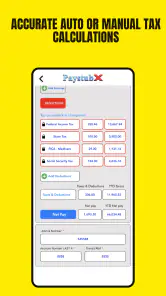
Paystub Generator: Paycheck comes from Paystubx and sits in the finance category. The basic idea is easy to understand: enter the relevant pay information, use the payroll tax calculator, and create a payslip or paycheck stub that can be reviewed or shared as a record. I like that the purpose is narrow. There is no need to search through unrelated budgeting tools or personal finance features before reaching the document I actually want.
The app is free to install, with optional purchases ranging from $1.99 to $199.99 per item. That makes it accessible for someone who wants to test the workflow before deciding whether it suits regular use. The age rating is Everyone, which fits the straightforward financial-document purpose, although adults will naturally be the main audience because the information being entered relates to employment and pay.
Its public reception is reasonably encouraging: the app holds a 4.0 average from around 3 thousand ratings, with 681 written reviews, and has passed 100 thousand installs. I would not treat those figures as proof that every generated document is correct, but they do suggest that the app has found a real audience beyond a handful of casual experiments.
Why the focused design is its strongest point
The biggest strength is the direct connection between calculation and document creation. In a normal do-it-yourself process, I might calculate gross pay in one place, estimate taxes elsewhere, then format a document manually. That approach creates opportunities for transcription mistakes. Keeping the paystub workflow together is more convenient and makes it easier to check whether the figures on the final document match the figures I intended to use.
This is especially useful for a small employer who pays one or a few people and does not need the broader machinery of a payroll service. A sole proprietor may want a record for internal files, while an independent worker may need a professional-looking pay document for a practical administrative task. In both situations, the value comes from reducing repetitive formatting, not from replacing an accountant.
I also see a useful role for people who need to prepare a sample document before committing to a longer payroll process. A user can think through the structure of earnings, deductions, and take-home pay in one place. That can expose missing information early, before a payment is finalized or a record is sent to another person.
A realistic everyday workflow
Imagine a small shop owner who pays a part-time assistant and wants a clear record after each pay period. Instead of opening a spreadsheet, rebuilding the same headings, and manually checking tax arithmetic, the owner can enter the pay details into the app and use the resulting stub as a starting point for record keeping. The important benefit is consistency: each document can follow the same general process rather than being recreated from a blank page.
I would still review every field before sharing the result. The owner should compare the pay period, gross amount, deductions, and final take-home amount against the actual agreement and payment record. A generated document can look polished while still containing an incorrect input. The app helps with preparation; it does not know whether the hours, rate, jurisdiction, or deduction information entered by the user is accurate.
A second practical use is preparing an income document for personal organization. Someone with irregular work may want to keep pay records in a more structured form than a collection of bank notifications. In that case, the app can help turn scattered information into a consistent document. I would use it as an organizing aid, while keeping original payment records and employer documentation as the authoritative evidence.
Where the tax calculator helps—and where caution matters
The payroll tax calculator is the feature that gives the app more value than a simple template. It can reduce the arithmetic burden and make the relationship between gross pay, deductions, and net pay easier to follow. For a user who is comfortable entering the necessary information but does not enjoy doing repeated calculations, that is a meaningful improvement over a blank document editor.
The trade-off is that tax calculations are sensitive to circumstances. Employment status, location, pay frequency, benefits, exemptions, and other details can affect the result. I would never assume that a number is correct simply because it came from a calculator. Before relying on a stub for filing, official reporting, lending, housing, or an employee dispute, I would compare it with current rules or ask a qualified payroll professional to review it.
This is also why I would avoid using the app as the only record for a growing business. Once several employees, different pay rates, overtime, leave, benefits, or changing tax situations enter the picture, the risk is no longer just a small typing error. A dedicated payroll service may offer stronger controls, employee histories, reporting, and compliance support. Paystub Generator: Paycheck is better suited to a simpler workflow where the user understands the figures being entered.
Useful habits that make the app safer to use
My first recommendation is to prepare the source information before opening the app. Have the pay period, gross earnings, deductions, and relevant worker details ready. Entering numbers while switching between messages, paper notes, and a bank account increases the chance of mixing periods or copying the wrong amount.
Second, check the document in two passes. On the first pass, look for identity and date details. On the second, focus only on the arithmetic: gross pay, individual deductions, taxes, and net pay. Separating those checks is more reliable than glancing at the whole document once, especially when the figures are similar from one pay period to the next.
Third, keep a simple external record of what was entered. A spreadsheet or accounting folder can preserve the underlying payment information and make later comparisons easier. This is an important trade-off: the app may make the final stub convenient, but an independent record protects against confusion if a document needs to be corrected later.
For repeated use, I would create a small routine rather than relying on memory. Use the same order of checks every time, review the calculated result before saving or sharing, and avoid treating a previous stub as a shortcut for a new one. Reusing old information can be efficient, but it can also carry an outdated pay rate or deduction into the next document.
What may frustrate experienced payroll users
The app’s narrow purpose is also its main limitation. A person looking for employee onboarding, time tracking, accounting reconciliation, benefits administration, or broad business reporting should not expect this tool to cover those needs. Its value is concentrated in creating pay documents and calculating payroll-related figures, so users wanting an all-in-one business platform will likely outgrow it quickly.
I would also be cautious about the difference between a professional-looking stub and a formally authoritative payroll record. Formatting can improve clarity, but appearance alone does not establish that taxes were calculated correctly or that an employer met every obligation. This distinction matters when a document is being prepared for someone else to rely on.
The optional purchase range deserves attention as well. The app can be installed without an upfront charge, but some items cost from $1.99 up to $199.99. Before using it for a regular business process, I would inspect the purchase screen carefully and decide whether the available workflow justifies the potential expense. A free starting point is helpful, but it should not be confused with an unlimited, cost-free payroll solution.
Another limitation is the responsibility placed on the user. The app can guide the preparation process, yet the quality of the output depends heavily on the information entered and the user’s understanding of payroll terms. Someone unfamiliar with deductions may find the result reassuring without knowing which parts deserve closer inspection. For that audience, a payroll professional or a service with built-in compliance guidance may be the better choice.
How it compares with common alternatives
Compared with a spreadsheet, Paystub Generator: Paycheck is more convenient for producing a consistent pay document and handling the calculation step in the same place. A spreadsheet remains more flexible for custom reporting, historical analysis, and business-specific formulas, but it also requires more setup and more discipline. I would choose the app for occasional, document-centered work and a spreadsheet when I need a broader financial record.
Compared with a blank document template, the app has a clearer advantage because the task is not limited to visual formatting. A template can look neat, but it leaves the user to calculate and verify the numbers independently. The app’s combined workflow is more useful when the calculation is part of the reason for creating the stub in the first place.
Compared with full payroll software, the decision depends on scale and responsibility. A payroll platform is usually the stronger option for recurring employer operations, multiple workers, detailed records, and compliance-sensitive work. Paystub Generator: Paycheck makes more sense for a small, uncomplicated situation where the user wants a focused tool and is prepared to review the result carefully.
Who should use it, and who should skip it
I would recommend trying it if you are a small employer, independent worker, or administrator who occasionally needs a payslip or paycheck stub and wants payroll calculations nearby. It is also a reasonable choice for someone replacing a repetitive manual document process with a more organized one.
I would skip it as a primary payroll system if your business has many employees, complicated compensation, frequent changes, or a strong need for automated compliance support. I would also avoid depending on it alone if you are preparing documents for a legal, tax, lending, or employment decision and do not have another way to verify the figures.
Device compatibility is fairly broad: the current version is 10.0.28 and it requires Android 5.0 or later. That makes it accessible on many older Android devices, which is useful for people who do not want to replace a phone just to handle a small administrative task. Still, I would keep the app updated when updates are available and review the final document on a larger screen if the details are dense.
My final assessment
After looking at the app as a real working tool, I see Paystub Generator: Paycheck as a focused and approachable option for preparing pay documents without starting from a blank page. Its strongest idea is the combination of paycheck-stub creation and payroll tax calculation. That pairing can make occasional administrative work faster and more consistent, particularly for a small operation.
My recommendation comes with a clear boundary: use it to assist with documentation, not to outsource judgment. Check the inputs, verify the calculations, preserve independent records, and use professional payroll help when the situation becomes complicated. The free entry point is attractive, while the in-app purchase range means regular users should consider the cost before building a long-term process around it.
For the right person, the app is practical and worth testing. For a growing company or anyone needing comprehensive payroll management, a dedicated service is the safer investment. Paystub Generator: Paycheck earns its place as a focused helper, provided you value convenience without mistaking convenience for complete payroll oversight.
Pros
- Creates professional-looking paystubs quickly from a phone.
- Useful for freelancers
- contractors
- and small business owners.
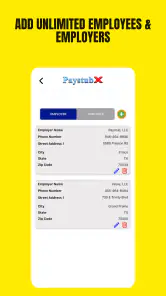
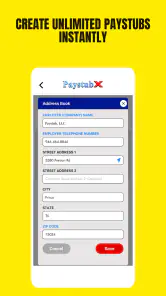
- Offers customizable employee and employer information.
- Calculates common earnings
- deductions
- and net pay.
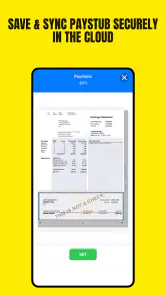
- Export options make documents easy to save or share.
Cons
- Advanced payroll features may require a paid subscription.
- Tax calculations may not reflect every state or local rule.
- Manual data entry can lead to mistakes in final documents.
- Templates may not satisfy every employer or official requirement.
- Requires careful review before using paystubs for financial applications.

- Category
- Finance
- Version
- 10.0.28











