Payout: Claim Class Actions
- 571.00
- 4.9
- Installs
- 100.00K
- Price
- Free

Screenshots

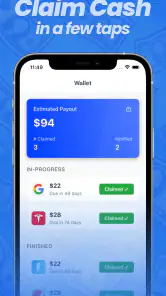
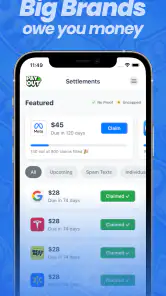


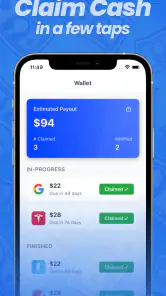
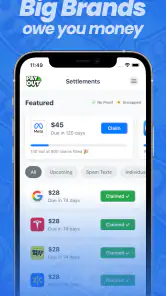

Analysis by Reviewed
I approached Payout: Claim Class Actions as a finance app for people who want to look for possible cash opportunities from their phone without turning the process into a full-time research project. The idea is straightforward: browse available class-action claims, read the relevant information, and decide whether a particular opportunity is worth pursuing. In practice, the quality of the experience depends less on flashy presentation and more on how clearly each claim is explained, how much checking you are willing to do, and whether your connection stays reliable while you work through the process.
That last point matters more than it may seem. This is not the kind of app I would open expecting a complete offline workflow. Claim-related information can change, pages may need to load before I can assess an opportunity, and any submission process is naturally more comfortable when the app can communicate properly with its services. I found the best way to use it was in short, deliberate sessions rather than tapping through quickly whenever I had a spare second.
How the app feels when every screen depends on a connection
The app comes from PAYOUT LLC and sits in the finance category, but it feels closer to a guided discovery tool than a conventional banking or budgeting application. Its purpose is not to track spending or move money between accounts. Instead, it puts attention on class-action opportunities and the steps needed to consider a claim. That distinction is important because someone expecting financial dashboards, account balances, or investment tools will be looking in the wrong place.
When the network is working well, the basic rhythm is easy to understand. I can open the app, review what is available, inspect the details that matter, and decide whether to continue. A stable connection makes this feel reasonably direct. A weak connection changes the mood completely: waiting for information to appear makes it harder to compare opportunities, and interruptions can break concentration just when I am checking an eligibility condition or a deadline.
I would not treat the app as a magic “free money” button. The store summary presents it as a quick way to seek extra money, but the realistic value is in helping users discover potential claims and act carefully. A claim can involve eligibility rules, documentation, dates, and other requirements. The app may make discovery more convenient, but it does not remove the responsibility of reading the terms attached to each opportunity.
That is my first practical recommendation: use a reliable Wi-Fi or mobile connection when you plan to review several listings, and avoid making a decision while a page is still loading. If a detail has not appeared completely, I would wait rather than assume that the visible portion tells the whole story. In a finance-related app, impatience is a poor substitute for clarity.
Why the mobile setting is useful
The strongest part of this concept is convenience. A class-action opportunity is easy to ignore when it requires searching across unrelated websites, remembering names, and checking whether a notice applies to you. Having a dedicated mobile destination gives the process a clearer starting point. I can imagine using it during a commute, while organizing email, or during a quiet moment at home when I am already sorting through personal paperwork.
Still, not every mobile moment is equally suitable. A quick glance is fine for deciding whether something deserves a closer look, but I would avoid completing an important form while walking, rushing between appointments, or relying on an unstable public connection. Claim information can include wording that deserves attention, and a small screen encourages fast scrolling. The app is convenient, but convenience should not turn into careless acceptance.
A useful workflow is to separate discovery from completion. On the first pass, I would note the opportunities that appear relevant and read enough to understand the basic requirements. On the second pass, preferably from a quiet place with dependable connectivity, I would revisit the strongest candidates and check every field before submitting anything. This two-step habit is more valuable than simply opening the app more often because it reduces the chance of confusing curiosity with eligibility.
Another mobile consideration is interruption. Calls, low battery, switching between apps, or moving from Wi-Fi to cellular service can all make a session less comfortable. I would keep any information needed for the process nearby before starting, rather than repeatedly leaving the app to search for documents. That does not make the app faster, but it makes the overall task less fragile.
What happens when loading or submission goes wrong
Connectivity problems are especially frustrating here because the user may not immediately know whether a delay comes from the network, the app, or the claim process itself. If a screen takes longer than expected, my first move would be to stop tapping repeatedly. Repeated taps can create uncertainty about whether an action was accepted once the connection returns. I would wait, check whether the screen changes, and then reopen the relevant section carefully if needed.
If the app becomes unresponsive during a review, I would record the claim name or the point I reached before restarting. That small habit prevents a vague “I think I submitted it” situation. After reopening, I would verify the status instead of assuming that closing the app cancelled everything. The safest approach is to treat every interrupted session as unfinished until the app clearly shows otherwise.
This is also where the app’s limitations become visible. A service built around current claim information is naturally less useful when connectivity is poor. I would not choose it for a place where I know the signal is unreliable, and I would not rely on a last-minute session before a deadline. If timing matters, reviewing the opportunity earlier gives room to recover from a failed load, an interrupted form, or the need to find supporting information.
There is a broader lesson for anyone using it: do not confuse a successfully opened screen with a completed financial task. The important moment is not seeing a claim in the app; it is understanding the requirements and confirming that your action went through. That distinction makes the experience feel slower, but it is the responsible way to use a tool in this category.
Using less data without making the process careless
I would be selective about when I use mobile data with this app. Browsing a few opportunities may be manageable, but repeatedly opening the same pages while a connection is unstable is inefficient and can consume data without improving my understanding. If I am on a limited plan, I would wait until I have Wi-Fi for a focused review rather than casually refreshing throughout the day.
My preferred routine would be simple. I would open the app once, identify the listings that appear relevant, read them carefully, and avoid reopening pages just because I am undecided. If I need time to think, I would make a private note of what I need to check and return later, instead of keeping the app active while doing unrelated tasks. This is particularly helpful when traveling, where a connection can change unexpectedly and mobile data may be more expensive or less dependable.
Data-conscious use also means being cautious with personal information. I would only enter details when I understand why they are needed for the claim process and when I am confident I am on the correct screen. A finance app can be convenient without deserving automatic trust. Reading before submitting is not unnecessary friction; it is part of protecting myself from mistakes.
The app is free to download, which lowers the barrier to trying it. It also includes in-app purchases ranging from around five dollars to around forty dollars per item, so I would pay attention to any purchase prompt and make sure I understand what I am agreeing to before continuing. Free access and optional paid items are not the same thing, and I would not assume that every action inside the app costs nothing simply because installation does not.
Who will get the most from it
I think this app suits people who want a convenient place to investigate class-action opportunities but are willing to read carefully. It can be useful for someone who rarely hears about settlements, does not want to search manually, and prefers a phone-based starting point. It may also help users who are organized enough to compare requirements rather than applying to everything that looks promising.
A realistic example would be someone reviewing household purchases after dinner. They open the app over home Wi-Fi, scan the available opportunities, and find one that might relate to something they bought in the past. Instead of submitting immediately, they read the eligibility language, check the relevant dates, look for any required purchase information, and return later with the details ready. In that situation, the app saves discovery time while the user still does the important verification work.
I would be more cautious about recommending it to anyone seeking guaranteed income, instant payment, or a replacement for professional legal advice. Class-action claims are conditional by nature, and the amount or outcome may depend on factors outside the app. Someone who dislikes reading terms, cannot reliably access the internet, or expects every opportunity to apply to them will probably find the process disappointing.
It is also not the best alternative for every financial goal. A budgeting app is better for controlling monthly spending, a banking app is better for managing transactions, and a dedicated legal information source may be better when I need deeper context about a specific case. The advantage here is focused convenience, not broad financial management.
What separates it from ordinary alternatives
The usual alternative is a web search followed by a trail of pages, notices, and forms. That method can provide more context, but it also demands more effort and makes it easier to lose track of which opportunities are current or relevant. This app’s appeal is that it gives the search a single mobile home. For a casual user, that reduction in friction may be the difference between investigating a possibility and forgetting about it.
The trade-off is that a dedicated app should not become the only source of judgment. I would still read the claim’s own terms and avoid treating the app’s presentation as a substitute for the underlying information. A search engine may be better when I want to investigate a case independently, while the app is better when I want a more focused first pass.
The public response is encouraging: it holds a 4.9 average from around ten thousand ratings, with several hundred written reviews, and has passed one hundred thousand installs. Those figures suggest that many users find the concept worthwhile, but they do not guarantee that every claim will fit every person or that every connection will behave perfectly. I see the rating as a reason to try it, not a reason to skip careful reading.
The current version is 4.0.4, and the app runs on Android 7.0 or later. That makes it accessible to people using older Android devices, although the quality of a session will still depend on the phone, the network, and how comfortably the screen handles detailed reading. It is rated for Everyone, which makes the presentation broadly approachable, but an all-ages rating should not be mistaken for a promise that every financial decision is simple.
My connectivity verdict
After looking at the way the app fits into real mobile routines, I see its main strength as organized discovery. It can turn an easily ignored subject into something I can check in a few minutes, and it is most useful when I treat those minutes as the beginning of a careful process rather than the end of one. The connection is part of the experience: when it is stable, the app feels convenient; when it is unreliable, every interruption exposes how much the workflow depends on current online information.
My advice is to use it deliberately. Start on a dependable connection, shortlist rather than rush, read the conditions, and return later to complete anything important. Keep track of what you have already reviewed, and confirm the result after any interruption. These habits make a bigger difference than simply installing the app and hoping it will identify money automatically.
My bottom line is that Payout: Claim Class Actions is worth trying for careful users who want a mobile way to explore possible claims, but it is not a guaranteed-cash shortcut. I would recommend it to a friend who is patient, organized, and comfortable checking details. I would point that friend toward a different finance tool if the real goal were budgeting, banking, investing, or dependable income. Used within its proper role, and with a reliable connection, it offers a practical starting point without pretending that the important decisions can be automated.
Pros
- Simple interface for browsing and tracking eligible class actions.
- Search and filtering tools help narrow claims by category or status.
- Claim details typically include deadlines
- eligibility
- and payout estimates.
- Useful notifications can remind users about important filing dates.
- Free access makes it easy to explore potential settlement opportunities.
Cons
- Eligibility information may require careful review of lengthy settlement terms.
- Payout estimates are not guaranteed and can change after claims are processed.
- Some settlements may have very low payouts after deductions or pro rata distribution.
- Availability and settlement listings may vary depending on your location.
- Users should verify deadlines independently before relying solely on app reminders.

- Category
- Finance
- Version
- 4.0.4











