PayMe - Claim Your Money
- 1.24K
- 4.5
- Installs
- 500.00K
- Price
- Free

Screenshots


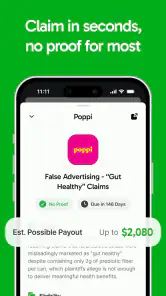
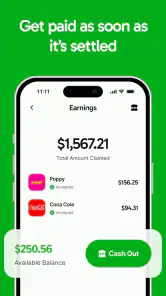
Analysis by Reviewed
If you have ever heard about a company settlement and wondered whether you were entitled to a payment, PayMe - Claim Your Money is built around that exact problem. I approached it as a practical finance app rather than a general money manager: its purpose is to help people identify settlements involving companies that may have harmed them and take the steps needed to claim money. That narrow focus is both its biggest appeal and the first thing to understand before installing it.
In my experience, the app makes most sense for someone who does not regularly follow legal news, consumer protection announcements, or class-action updates. Instead of expecting you to discover every possible claim on your own, it gives the process a dedicated place on your phone. PayMe is free to install, rated for Everyone, and developed by Prove It. Its current version is 4.7, and it runs on Android devices using Android 7.0 or later.
The important question is not whether it replaces a bank app or a budgeting tool. It does not. The better question is whether a focused settlement-claim service is more useful to you than searching the web, checking email notices, or waiting for information to reach you through the usual channels. For that decision, I looked at the app’s purpose, the effort involved, the possible costs, and the situations where another approach may be more suitable.
What I would check before relying on PayMe
The app’s real job is discovery and action
PayMe belongs in the finance category, but it is not designed for tracking spending, moving money, investing, or managing bills. Its role is closer to a personal claims assistant. The central workflow is about finding settlements that may apply to you, reviewing the relevant information, and deciding whether to continue with a claim.
That distinction matters because the value of the app depends on relevance. If you have no interest in consumer settlements, the app will not add much to your daily routine. If you have used many online services, bought products from large companies, or signed up for digital subscriptions over the years, a settlement-focused tool may be worth checking even if you only use it occasionally.
I would judge the app on four practical points. First, can I understand why a settlement might apply to me? Second, can I tell what information I need before starting? Third, does the process feel manageable on a phone? Finally, does the potential benefit justify the time spent reviewing claims? Those questions are more useful than treating the app like a conventional financial dashboard.
Who is most likely to benefit
The strongest audience is people who want to recover money but do not want to monitor dozens of websites. It may also help users who are comfortable completing forms on a phone but tend to postpone claims because the process feels obscure. Having a dedicated app can turn an occasional opportunity into something visible enough to act on.
A realistic example would be a person who sees a notification after dinner, recognizes a company they have used, and opens the claim details while the purchase history is still easy to remember. Rather than searching for the settlement independently, they can decide whether the claim appears relevant and gather the required details while the task is fresh. That small reduction in friction is where the app can earn its place.
I also see value for households where one person usually handles consumer paperwork. PayMe can serve as a reminder to discuss possible claims with other family members, especially when different people used different products or services. The useful habit is not opening the app constantly; it is checking it at a sensible interval and acting on claims that genuinely match your history.
What I would prepare before submitting anything
One of the less obvious lessons with settlement apps is that recognition is not the same as eligibility. Seeing a familiar company does not automatically mean you qualify. I would read the claim description carefully, check the relevant dates or purchase conditions shown in the app, and avoid guessing when the form asks for information I cannot support.
A simple preparation routine helps. I would keep receipts, order emails, account records, or other proof in an easy-to-find folder before beginning a claim. I would also avoid starting several forms at once. Completing one carefully is less frustrating than creating a collection of half-finished submissions that may later require sorting out.
Another useful tip is to separate “possibly relevant” from “worth claiming.” Some settlements may involve a small amount or require more effort than I consider worthwhile. Others may be easy to complete but only apply to a very specific situation. The app can help surface opportunities, but I still need to make the final judgment instead of treating every listing as an automatic payment.
Privacy and attention deserve practical consideration
Any app that helps with claims can involve information about purchases, accounts, or personal identity. I would read each screen before entering details and provide only what the claim process actually requests. I would not upload documents casually, and I would avoid using a shared device without protecting access to personal records.
There is also an attention cost. Notifications about possible money can encourage impulsive decisions, especially when the wording makes an opportunity sound urgent. My approach would be to open the claim, understand the conditions, and then decide calmly. A settlement is not a reason to ignore normal caution about personal data or unfamiliar requests.
Where the app feels more useful than ordinary searching
The clearest advantage is concentration. Searching the web for settlements can produce scattered results, outdated pages, advertisements, and confusing legal language. PayMe gives this particular task a dedicated home, which may make it easier to remember that these opportunities exist at all.
It also changes the timing of the task. With a search engine, I need to think of the right phrase, know where to look, and repeat the process later. A dedicated app can bring the subject back into view without requiring me to start from an empty search box. For someone who is willing to review claims but unlikely to conduct regular research, that is a meaningful difference.
The app’s scale suggests that it has reached a substantial audience, with more than half a million installs and an average rating of 4.5 from roughly seventeen thousand ratings. I treat those figures as a sign of interest rather than proof that every user will receive money. The experience still depends on whether a person matches a settlement and completes the requirements correctly.
A focused workflow beats a broad finance app for this task
Budgeting apps are excellent when the goal is to understand spending patterns, set limits, or plan monthly cash flow. They are not usually built to help users notice consumer settlements. Banking apps may show transactions, but they generally do not turn those transactions into a claim-filing workflow. PayMe’s advantage is precisely that it does not try to be all of those things.
That focus can make the app easier to understand. I do not have to navigate through budgets, investments, credit tools, or financial education sections to reach the reason I installed it. If my goal is specifically to check possible settlement claims, a narrow tool is more appropriate than a large financial suite.
There is a trade-off, though. A broad finance app may be more valuable every week, while PayMe may be useful only when a relevant claim appears. I would not install it expecting a daily money-management habit. I would install it as a specialized resource that can occasionally recover money or at least help me determine whether a claim deserves attention.
When a different alternative may fit better
Some people will prefer official settlement websites, government consumer resources, or direct notices from a company or administrator. Those sources may be the better choice when I want to verify details independently, especially for a claim involving sensitive information or a significant amount. PayMe can make discovery easier, but I would still compare important details with the official instructions before submitting.
Manual research may also suit users who enjoy keeping their own records and checking primary sources. If I already follow consumer-rights news and maintain a careful purchase archive, the app may not save enough time to justify another notification stream. In that case, the direct route can be clearer.
On the other hand, users who routinely miss deadlines or forget where they saw a claim may benefit more from PayMe’s dedicated presentation. The best option depends less on technical sophistication than on personal behavior: organized researchers may prefer direct sources, while busy users may value a central place to review opportunities.
What the free download does and does not mean
PayMe is free to download, which lowers the barrier to trying it. However, the app includes in-app purchases ranging from $4.99 to $299.99 per item. That is the most important cost detail I would keep in mind. I would not assume that every part of the claim experience is free simply because installation costs nothing.
Before confirming any purchase, I would look closely at what it pays for, whether it is optional, and whether the benefit is clear for my situation. I would also avoid treating a paid feature as a guarantee of approval or payment. A claim’s outcome depends on eligibility and the settlement process, not merely on spending inside an app.
This is where the cost of switching becomes relevant. Trying PayMe may be inexpensive at the download stage, but moving from free browsing to a paid in-app option requires a deliberate decision. If I can complete a suitable claim through an official channel without paying for assistance, that alternative may be preferable. If the app saves substantial time and clearly explains the value of a purchase, some users may consider it worthwhile.
How I would use it without creating extra work
I would begin by reviewing the available claims slowly rather than tapping through every prompt. For each one, I would ask whether I used the company or product in the relevant way, whether I can provide accurate information, and whether the expected effort feels reasonable. This three-step check prevents the common mistake of treating recognition of a brand as proof of eligibility.
Next, I would gather supporting details before filling out a form. Searching old email receipts while a submission is open can be awkward on a phone, so I would collect the likely information first. If a claim requires an account number, order reference, or address history, having those details ready makes the process less error-prone.
Finally, I would keep a private note of claims I submitted and any follow-up action needed. I would not rely on memory alone, especially if I submit more than one claim over time. This workflow is a practical improvement that does not depend on using the app every day: review, verify, submit carefully, and record what happened.
Small frictions that can change the experience
The app’s narrow purpose can also make it feel quiet between relevant opportunities. Users expecting a constant stream of financial tools may interpret that as a weakness, but I see it as a consequence of the category. Settlement claims are occasional by nature, so the app should be judged by the quality and clarity of useful opportunities rather than by how much activity it creates.
There is also an unavoidable legal and administrative layer. Claim language can be more complicated than ordinary shopping or banking screens, and no app can remove every condition imposed by a settlement. I would be cautious about rushing through a claim simply because the interface feels simpler than a legal notice. The app may organize the process, but it cannot make an ineligible claim valid.
Another limitation is personal fit. Someone who dislikes entering information on a mobile device may find a computer or official website more comfortable. Likewise, a user with a strict preference for dealing directly with administrators may see PayMe as an extra step rather than a shortcut. Those are sensible reasons to choose another route.
Who should skip it
I would skip PayMe if I am looking for budgeting, bill reminders, investing, credit monitoring, or a way to manage bank accounts. Those needs belong to different finance tools. Installing this app will not turn it into a general-purpose money center.
I would also skip it if I am unwilling to review eligibility conditions or protect sensitive information carefully. The app may make discovery more convenient, but it still requires attention from the user. Anyone expecting automatic money with no verification or paperwork is likely to be disappointed.
People who already use official sources successfully may not gain much from adding another layer. In that situation, the app’s value depends on whether its organization and reminders uncover opportunities I would otherwise miss. If they do not, staying with a trusted direct source is the cleaner choice.
My recommendation for different kinds of users
For a busy person who has used many consumer services and wants a convenient way to check possible settlements, I think PayMe is worth trying. The free installation makes experimentation straightforward, and the dedicated purpose is easier to understand than a broad finance app that hides this task among many unrelated tools.
For a careful researcher, I would recommend using it as a discovery layer rather than the only authority. Find a potentially relevant claim in the app, then read the official terms and confirm the submission route before sharing sensitive details or paying for anything. That approach combines convenience with sensible verification.
For someone who wants an everyday financial dashboard, I would recommend a budgeting or banking alternative instead. PayMe is too specialized to replace those tools. Its strength is not constant financial management; it is helping a user notice and act on a particular kind of opportunity.
After using it with that expectation, my view is positive but measured. PayMe - Claim Your Money is most useful when it reduces the effort of discovering settlements without encouraging careless claims. Its free entry point, Everyone age rating, and established audience make it approachable, while the in-app purchase range means I would review costs before accepting any paid option.
My bottom line: use PayMe as a focused claims checker, not as a promise of effortless cash. Keep your records nearby, confirm that each opportunity genuinely matches your experience, and compare important instructions with official sources. If that workflow fits the way you handle consumer paperwork, the app can be a practical addition to your phone. If you prefer direct research or need broader money-management features, another category of app will serve you better.
Pros
- Simple way to request repayment from friends or contacts
- Useful for tracking shared expenses and unpaid balances
- Clear payment reminders can reduce awkward conversations
- Convenient for splitting bills after meals
- trips
- or events
- Helps keep personal payment requests organized in one place
Cons
- Requires contacts to be comfortable receiving digital payment requests
- Availability of payment features may vary by country or region
- Some users may find repeated reminders intrusive
- Transaction processing times can depend on the linked payment service
- Privacy settings should be reviewed before sharing financial information

- Category
- Finance
- Version
- 4.7











