OBDocker - OBD2 Car Scanner
- 233.00
- 4.3
- Installs
- 1.00M
- Price
- Free
Screenshots
Analysis by Reviewed
If you want to understand a warning light before deciding what to do next, a phone-based scanner can be useful. OBDocker - OBD2 Car Scanner is an Auto & Vehicles app from Motorsure INC. that gives drivers a way to inspect vehicle information through an OBD2 adapter. I see its appeal less as a replacement for a mechanic and more as a practical first check: it can help you arrive at a repair conversation with better questions.
What to consider before you install it
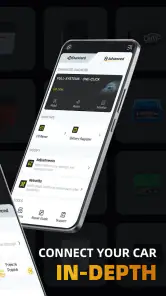
The key decision is whether you already have, or are willing to buy, a compatible Bluetooth OBD2 adapter. The app works with that separate piece of hardware, so installing it alone will not scan a car. Before buying an adapter, check that it suits your vehicle and phone; compatibility depends on the connection between the car, adapter, and app, not just on the app itself.
OBDocker is free to download, rated for Everyone, and currently at version 3.2.6, with Android 7.0 listed as the minimum operating system. It has a 4.3 average from around 31,000 ratings and more than a million installs. In-app purchases range from $0.99 to $119.99 per item, so I would look at the purchase details in the app before relying on a paid function. The headline price is free, but that does not mean every possible use is included at no cost.
Who will get the most from a phone scanner
This setup suits drivers who like to understand a problem before choosing a next step, especially people who already own an adapter or expect to use diagnostic readings more than once. It can also be handy if you maintain several vehicles and want a portable way to check codes and view selected engine readings, provided each vehicle and adapter work with the app. The phone is convenient because it is already with you; the useful part is having a repeatable process for checking information rather than relying on memory after a warning appears.
I would be more cautious if you rarely work with vehicle information, do not want to pair hardware, or simply need a shop to identify and repair a fault. An app can make data accessible, but it still asks you to interpret what you see. If that sounds like extra work rather than useful context, a repair professional or a straightforward code reader may be a better fit.
Latest News
Getting Started with Your Car's New Best Friend
First things first, the setup is a breeze. All you need is an OBD2 Bluetooth adapter, which you can easily find online or at your local auto parts store. Once you've got that, just plug it into your car's OBD2 port—usually located under the dashboard—and fire up the OBDocker - OBD2 Car Scanner app on your phone. The app's interface is quite user-friendly, and even if you're not a tech-savvy person, you'll find it straightforward to navigate.
Features That Make It Stand Out
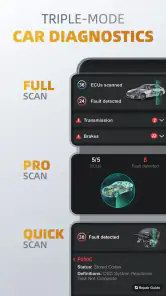
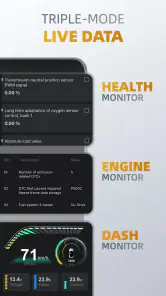
So, what makes this app a must-have for car enthusiasts and everyday drivers alike? For starters, it gives you real-time data straight from your car's engine control unit (ECU). You can monitor everything from engine RPM, fuel consumption, and coolant temperature to more advanced metrics like throttle position and O2 sensor readings.
But it doesn't stop there. The app also allows you to read and clear diagnostic trouble codes (DTCs), which means you can identify the cause of that pesky "Check Engine" light. Plus, with its ability to create custom dashboards, you can keep an eye on the parameters that matter most to you.
How to make the information useful
A code is a starting point for investigation, not a complete diagnosis or proof that a particular part has failed. I would note the code and the circumstances in which the warning appeared before clearing anything. If the light returns, that record gives you a more useful account to share with a technician than “the car had a warning, but I reset it.” Clearing a code can also remove a helpful clue, so I would not do it just to make the dashboard look normal.
Live readings are most useful when you have a question in mind. For example, checking coolant temperature after the engine has warmed up may help you spot an unusual reading, while watching several gauges at once on a phone while driving is distracting and not worth the risk. Set up a simple dashboard before you set off, then ask a passenger to observe it or check the figures while parked. Customization is a strength, but a crowded screen can make the useful signal harder to see.
Making a useful check without turning it into guesswork
A practical approach is to begin with one symptom and a short list of relevant readings instead of treating every available gauge as equally important. If the car feels different when warm, for instance, note when that happens and compare the readings under similar conditions later. A single number without context can be misleading; a pattern tied to a repeatable situation is more useful to you and to a technician.
I would also keep a simple note outside the app of the date, warning, driving conditions, and code before changing anything. That small habit can make a second scan much more informative: you can tell whether the same issue returned or whether the circumstances changed. This is especially worthwhile if you clear a code after a repair, because the useful question is whether the warning comes back, not merely whether the screen is temporarily clear.
A Few Tips to Maximize Your Experience
To get the most out of your OBDocker experience, make sure your car is compatible with OBD2 protocols. Most cars manufactured after 1996 should be good to go, but it's always a good idea to double-check. Also, keep your app updated to benefit from the latest features and improvements.
One of the coolest features is the ability to log your trips. This can be particularly useful if you're trying to improve your driving habits or keep a record for business purposes. It's like having a personal driving assistant right in your pocket!
Using trip records with a purpose
Trip logging is most valuable when you decide in advance what you want the record to answer. A driver comparing their own habits could use it as a prompt to look for changes across similar journeys, rather than judging one trip in isolation. Someone tracking work travel should check that the records are easy to find and fit their existing paperwork before depending on them for reimbursement or bookkeeping. I would treat the log as a helpful record, not assume it replaces whatever documentation an employer or business requires.
There is a trade-off here: more data does not automatically mean more insight. If you collect trips without reviewing them, the feature can become digital clutter. A quick routine—save only what you need, review it at a regular time, and keep any relevant notes with it—makes logging more practical than turning every drive into an experiment.
Choosing between scanners and standard service tools
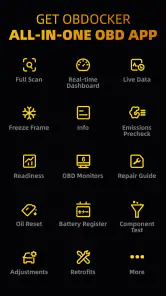
For a routine service reminder or a question about scheduled maintenance, a carmaker’s manual or service app may be the more direct source; those tools are organized around recommended intervals rather than live diagnostic readings. A basic handheld code reader can be simpler if you only want to retrieve a fault code occasionally. OBDocker makes more sense if you want to combine code checks with live data, custom gauges, and trip records in one phone-based workflow.
There are trade-offs. A Bluetooth adapter is another item to source and keep with the car, and the experience depends on the adapter communicating properly with your vehicle. The app’s readings can help you notice patterns, but they do not replace a hands-on inspection, and a code alone rarely tells the whole repair story. If you need a definitive diagnosis, have a safety-related problem, or do not want to interpret vehicle data, a qualified mechanic is the better choice.
Where a different tool is the sensible choice
The main alternatives solve different problems. A printed owner’s manual or a manufacturer’s service tool is usually easier for maintenance schedules and vehicle-specific operating guidance. A simple handheld reader can suit a driver who wants occasional code retrieval without building a phone-based dashboard routine. A workshop diagnostic visit is the stronger option when a fault is persistent, affects safe operation, or needs inspection beyond what an OBD2 connection can reveal.
That makes the choice less about which tool is universally best and more about how much interpretation you want to do. OBDocker occupies the middle ground: more flexible than a basic code-only check, but not a substitute for professional testing. If you are choosing an adapter as well, avoid assuming that a connector fitting the port guarantees a smooth session. Check compatibility for your car and phone first, and test the connection while parked so a pairing issue does not become a roadside distraction.
When it earns a place in your routine
Picture a check-engine light appearing on the way home. Once parked safely, you can connect the adapter, read the code, and write down what happened—such as whether the engine felt different or the warning appeared after a cold start. That information can help you decide whether to arrange service promptly and can make the first conversation with a repair shop more focused. It is not a reason to ignore a serious warning or keep driving a car that feels unsafe.
Trip logging may also suit someone who wants to compare their own driving over time, or who needs records for work. I would first confirm that the log captures the details you actually need and that you can retrieve them in a convenient way; a feature is only helpful when it fits your record-keeping routine. For a driver who only wants occasional code checks, by contrast, a simple reader may involve less setup.
What the first few sessions can teach you
For a first scan, I would choose a quiet moment at home rather than trying to learn the controls beside a busy road. Locate the port, connect the adapter, and give yourself time to see whether the phone and vehicle communicate. Then take note of what the app can read on your particular car. This turns compatibility into something you can assess calmly, before you need the tool in response to an urgent warning.
If the connection fails, avoid repeatedly changing settings while the car is moving or assuming the vehicle itself has a fault. Check the adapter’s fit and its compatibility information, then retry while parked. The app depends on a chain of components, so isolating the phone, adapter, and vehicle connection is more sensible than treating one unsuccessful attempt as a diagnosis.
Wrapping Up
In conclusion, the OBDocker - OBD2 Car Scanner app is a game-changer for anyone looking to take control of their car's maintenance and performance. It's easy to use, packed with features, and adds a layer of transparency that every car owner will appreciate. Whether you're a gearhead or just someone who wants to save a few bucks, this app is definitely worth checking out. And who knows? You might just find yourself becoming the go-to car guru among your friends!
Remember, knowledge is power, especially when it comes to understanding the ins and outs of your vehicle. So why not give it a try and see what your car has been trying to tell you all along?
How to judge whether the cost is worthwhile
The free download makes it possible to explore the app before deciding whether its wider use belongs in your routine, but the adapter is a separate consideration and some in-app items cost extra. I would not pay for an option until I knew what it unlocks and had confirmed that the core connection works with my setup. If your only goal is to read a code once, compare that total effort with borrowing a reader or asking a repair shop; if you expect to use live data and records repeatedly, the phone workflow may be more worthwhile.
The cost of switching from a simple reader is not only financial. You also need to get used to pairing, selecting useful readings, and keeping track of the adapter. In return, you gain a more adaptable view of vehicle information. For me, that trade makes sense when I actually want to learn from repeated checks, not merely because a dashboard offers more gauges.
My recommendation
OBDocker is a good fit if you enjoy learning what your car’s data means, already have a suitable adapter, and are comfortable treating diagnostic codes as clues rather than verdicts. I would skip it if you expect a phone app to identify every fault automatically, want maintenance advice without interpreting readings, or need a guaranteed fix. For the right driver, it offers a useful middle ground between doing nothing and booking a diagnostic visit immediately; its real value is helping you make a better-informed next decision.
OBDocker - OBD2 Car Scanner Frequently Asked Questions
How much storage space and mobile data does OBDocker use?
Before downloading OBDocker, consider whether you have enough room on your phone and a reliable connection for the installation. The app is designed to work with an OBD2 adapter, which connects it to your vehicle’s diagnostics system. Your phone’s available storage and connection quality can affect the download and setup experience, so check those basics before getting started.
Can I use OBDocker without an internet connection?
OBDocker communicates with your vehicle through an OBD2 adapter, but whether every feature works offline can depend on the task you want to perform. It is sensible to install the app and set up your adapter while you have a dependable connection, then check which functions are available in your situation. For vehicle data, the adapter and car connection are essential parts of the setup.
Is OBDocker suitable for professional mechanics as well as everyday drivers?
OBDocker is an Auto & Vehicles app intended to help users access vehicle diagnostics and performance information. Everyday drivers may find its error-code and maintenance functions useful, while experienced users can use diagnostic data to support their own checks. It should be treated as a tool for monitoring and understanding vehicle information, rather than a substitute for professional inspection when a repair requires specialist expertise.
Can OBDocker fix problems with my car automatically?
OBDocker can help you read diagnostic information and, where supported, clear error codes, but that does not mean it repairs the underlying mechanical or electrical issue. A code can point toward an area that needs attention, and the actual cause may require further investigation. Use the app to inform your next steps, and seek qualified help when a warning or vehicle problem needs diagnosis or repair.
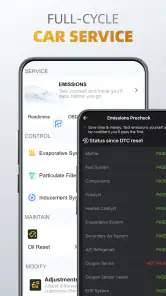
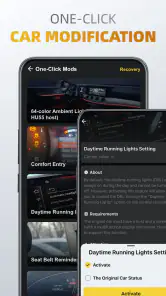
Does OBDocker support vehicle modifications and service tasks?
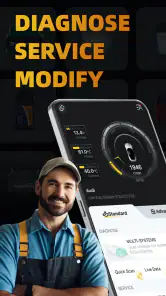
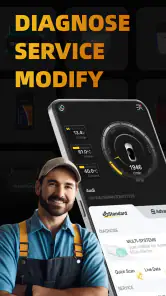
OBDocker is presented as a diagnostics, service, and modification tool, so it may appeal to drivers interested in more than simply reading fault codes. What you can do depends on your vehicle, the adapter, and the functions available in the app. Check compatibility and review the relevant feature details before relying on it for a particular service or modification task.
Pros
- User-friendly interface for beginners
- Supports multiple car makes and models
- Real-time diagnostic data available
- Affordable compared to other scanners
- Easy to set up and connect to car
Cons
- Limited advanced feature set
- Occasional connectivity issues
- Requires additional hardware purchase
- Limited support for older car models
- App updates are not frequent

- Category
- Auto & Vehicles
- Version
- 3.2.6











