Nuki Smart Lock
- 52.00
- 4.2
- Installs
- 1.00M
- Price
- Free

Screenshots
Analysis by Reviewed
I judge a smart-lock app by what happens on an ordinary rushed morning, not by how futuristic it sounds. The Nuki app is meant to manage a compatible Nuki lock from your phone, so it can help when you’re carrying groceries, letting someone in, or wondering whether you locked the door. It’s a free House & Home app made by Nuki Home Solutions GmbH. The key question is whether phone-based access fits your door and everyone who uses it.
Where users can get stuck
The app is only one part of the setup: the lock itself has to fit and work with the door. That distinction matters if a setup step fails. I’d first check that the physical lock is installed as intended and that the door can close and lock normally by hand; a phone command cannot fix a stiff door or a mechanical problem. If other people in the household rely on the door, it’s worth having them try the ordinary key or lock operation too, rather than assuming the app is the source of every issue.
There is also a habit change to consider. With a conventional key, you can feel and see what you are doing. With a phone, you need to open the app and pay attention to its status. I like the convenience, but I would not treat a tap as proof that the door has physically latched without checking the app’s feedback and, when it matters, the door itself.
Setup checks that save frustration
Before starting, I’d make sure the phone can run the app: its minimum operating-system requirement is version 8.0. Then follow the in-app instructions in order, keeping the phone close enough to the lock for the pairing steps. If the process pauses, I would avoid repeatedly tapping controls at random; first check the screen for the step it expects, then retry that step calmly.
Think through the household routine before sharing access. A guest who only needs entry during a visit does not need the same arrangement as someone who comes and goes regularly. Time-limited access can help keep those situations distinct, but I’d still explain how the person should use the app and agree on a backup plan for a late arrival or a phone that is unavailable.
Recovering the workflow
If a command does not seem to work, I’d separate the problem into three checks: is the door mechanically ready to move, is the phone communicating with the lock, and does the app show the expected state? That simple order can prevent wasted effort. I’d also check whether another household member has just used the lock, since the current physical state may differ from what someone expects based on an earlier action.
Remote control needs a little more thought than standing by the door. The original article describes a Nuki Bridge for connecting the lock to Wi-Fi, so I would not assume phone control from outside the home works simply because local app control does. If remote entry is part of your plan, test the complete arrangement before depending on it for a visitor. Before leaving for a trip, for instance, I’d confirm the lock works locally, make sure the intended person has the right access, and check the remote workflow rather than discovering a snag after they arrive.
More From Our News Desk

Weather by Xiaomi Review: Clear at a Glance, Less Clear Up Close

X Under Pressure: Can It Recover When Posting Goes Wrong?

Clash of Clans Is Won Between the Battles

Android Auto Makes the Case for Quieter Car Software

MobiOffice: Transforming Mobile Productivity with Seamless Integration

EA SPORTS FC™ Mobile Soccer: Redefining Mobile Sports Gaming
When the app may not be the cause
Smart access does not make a door more reliable mechanically, and it does not remove the need for a sensible fallback. If the door sticks, the lock is misaligned, or someone cannot use their phone, a regular key may be the better option. I would keep that possibility in mind instead of treating phone access as the only way into the home.
Compared with a traditional key, the app is more convenient for checking status and coordinating access, but a key is simpler when you want a tool that needs no app routine. Compared with a keypad-style approach, phone-based access avoids having to pass around a shared code, while a keypad may suit a household member who does not want to rely on a smartphone. The right choice depends on who needs entry and how comfortable they are with connected devices.
Using a phone as part of the front-door routine
I find that a phone-based door routine works best when the household agrees on what counts as confirmation, rather than relying on a quick tap and assumption. A calm trial with another person can reveal whether the app’s status, the lock’s movement, and everyone’s expectations line up. From there, I’d look at how access should be arranged for people who visit regularly.
Why the small details matter
What I find most useful is not simply replacing a key with a screen. It is being able to make the access routine fit the household. For example, if one person usually leaves first and another comes home later, app-based control can reduce the need to coordinate a spare key. But it works best when everyone agrees on the basic routine: who checks the lock, who can share access, and what to do if a phone is unavailable. Without that conversation, convenience can turn into uncertainty about who is responsible for the door.
A practical tip is to test the routine at a quiet time rather than during a rushed departure. Try the lock while standing at the door, watch for the app’s response, and make sure you understand what it shows after the action. Then have another household member try the same sequence. This catches mismatched expectations early, especially if one person assumes a tap completes the job while another expects to verify the door physically.
Choosing the right access arrangement
Digital access is particularly helpful for people who regularly let in a cleaner, a relative, or a trusted visitor. Instead of passing around a physical key, you can arrange access for the person’s actual needs and duration. The trade-off is that sharing becomes something to manage: when a visit is over or plans change, review who should still be able to enter. I would keep the group small and avoid treating easy sharing as a reason to grant access automatically.
For a one-off visit, I would also make the person’s instructions simple. Tell them which app-based step to use, ask them to confirm the door is shut behind them, and agree on what they should do if entry does not go as expected. This is more useful than assuming that a digital invitation alone explains the whole process. If a visitor is uncomfortable using a smartphone, arranging a conventional key may be the more considerate option.
That distinction helps answer a common buying question: is the app useful if I live alone? It can be, if you want phone control or like checking the lock’s state after leaving. The sharing tools matter less in that case, so I would weigh the convenience against the extra device dependence. If your only concern is having a dependable way to lock the door, a standard key and a well-maintained lock may be all you need.
How it compares with familiar alternatives
Against a regular key, the app’s strongest case is coordination and checking, not that it makes the door inherently safer. A key is immediate, familiar, and does not depend on a phone routine; the app can be more convenient when several people need access or you want to manage entry without physically handing over a key. I would choose based on the problem I actually have, rather than treating smart access as an upgrade everyone needs.
A keypad offers a different compromise. It can work for someone who does not want to carry or use a smartphone, but a code has to be shared and kept private. Phone-based access avoids distributing one common code, yet depends on the person being comfortable with the app and having a usable phone. For a household with mixed comfort levels, the best arrangement may be to keep a physical-key fallback rather than insist that every person adopt the same method.
Setting Up the Future
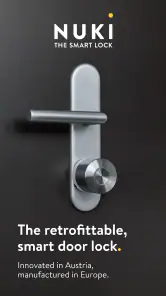
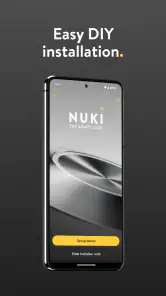
First things first, getting the Nuki Smart Lock installed was a breeze. If you’re anything like me, the thought of installing new tech might give you a bit of anxiety. But fear not! The setup process is straightforward and doesn’t require any drilling or wiring. Simply attach the lock over your existing lock on the inside of your door, and you’re good to go. The app walks you through the entire process, making it almost foolproof. I was pleasantly surprised at how easy it was.
Unlocking Convenience
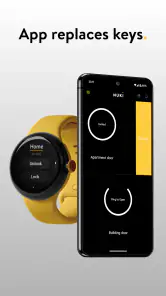
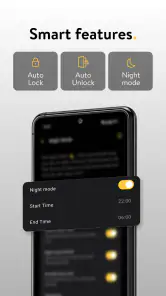
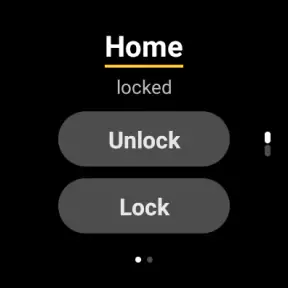
Once installed, the magic really begins. With the Nuki app, your smartphone becomes your key. You can easily lock or unlock your door with a simple swipe on your phone. And if you’re like me, always worried about whether you locked the door, the app’s activity log lets you check the lock status anytime. Plus, the auto-lock feature is a game-changer; it automatically locks your door after you’ve left, providing that extra peace of mind.
That convenience still depends on a routine that makes sense for your home. I would not rely on auto-lock without first checking how it behaves in the situations that matter to me, such as carrying something through the doorway or stepping outside briefly. A feature that is reassuring in one household can be inconvenient in another if people often go in and out. Treat the first few uses as a chance to learn the behavior, not as a reason to stop paying attention.
Sharing Access Made Easy
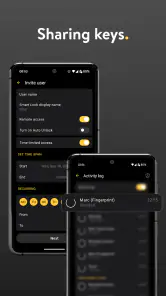
Another fantastic feature is the ability to share access with family and friends. Gone are the days of hiding keys under the doormat! You can send virtual keys to anyone you choose, and the best part is, you can set time restrictions. Trust me, this is perfect for when you have guests or need to let someone in while you’re away.
That flexibility is especially useful for recurring arrangements, such as a relative who helps out occasionally or a visitor with a defined stay. I’d keep access limited to what the person actually needs and review who still has permission when plans change. Digital sharing is convenient, but it also creates a small household-admin task: everyone should know who can enter, and access should not be handed out casually just because sending it is easy.
Security at Its Best
One might wonder about the security of a smart lock. Rest assured, the Nuki Smart Lock uses state-of-the-art encryption protocols, making it as secure as online banking. It integrates seamlessly with other smart home devices, ensuring you have full control over your home’s security. I felt confident knowing that my home was protected with such advanced technology.
For me, the useful security habit is less about assuming any connected product is invulnerable and more about keeping access deliberate. I would protect the phone itself, avoid sharing access more widely than necessary, and check the lock’s state when something feels off. It has an average rating of 4.2 from around 18,000 ratings, and has been installed over a million times; those figures suggest plenty of people use it, but they do not replace checking whether its routine works for your home.
Beyond the basics, Nuki also offers a bridge that connects your smart lock to your WiFi, allowing you to control your lock from anywhere in the world. Imagine being able to let a friend in while you’re on vacation! The possibilities are endless.
I would treat that as a feature to test, not a reason to skip preparation. Before relying on a remote unlock for a delivery or a guest, try the process with someone you trust and confirm they know what to do if the door does not open as expected. If you only need to operate the lock while standing nearby, remote access may add complexity without much benefit.
Who is likely to appreciate it
I can see this app working best for people who already want a compatible smart lock and often coordinate entry: a household sharing responsibilities, someone who receives visitors, or a person who likes checking the lock after leaving. It is less compelling if you are happy with a physical key, rarely share access, or do not want a phone to become part of the process of getting through your front door. The app is free and rated for Everyone, but the lock-based setup is still a commitment to a particular way of managing access.
The app itself was released on May 23, 2016, and its long presence in the category makes it feel like a focused companion rather than a general home-control dashboard. I would choose it for the specific job of managing a Nuki lock, not as a reason to buy smart-home equipment you do not otherwise need. If your priority is a simple backup-free routine, a conventional key may remain the more reassuring choice.
Final Thoughts
All in all, the Nuki Smart Lock is a revolutionary product that blends convenience and security with ease. Whether you’re tech-savvy or not, this smart lock is designed to fit seamlessly into your lifestyle. I found it incredibly satisfying to use and would highly recommend it to anyone looking to upgrade their home security. So why not ditch the keys and embrace the future with open arms? The Nuki Smart Lock is ready to welcome you home.
My recommendation is more measured: I’d consider it if phone control and controlled guest access solve a real problem for you, and I’d keep a physical fallback while learning the routine. The most useful test is a normal week at home: try the app when leaving, returning with your hands full, and arranging access for someone else. If those moments feel simpler without making entry less dependable, it earns its place; if they add another thing to troubleshoot, sticking with a key is perfectly reasonable.
Nuki Smart Lock Frequently Asked Questions
Is Nuki Smart Lock suitable for someone who wants to use a phone as a house key?
Nuki Smart Lock is designed around that simple idea: its app turns a compatible smartphone into a key for a Nuki Smart Lock. It may suit households looking for app-based access as part of their home routine. The app is free to download, but its usefulness depends on having the compatible Nuki lock system as well as a supported phone.
What does the Nuki Smart Lock app do?
The app is described as a smart, simple, and secure way to turn your smartphone into a key. It is the software companion for Nuki’s smart-lock system, letting you manage access through your phone. Nuki Smart Lock is a House & Home app, so its main purpose is practical home access rather than general phone security or a standalone digital wallet.
Is the Nuki Smart Lock app free, and what devices can run it?
The Nuki Smart Lock app is free to download and is intended for use with Nuki’s smart-lock system, turning a compatible smartphone into a key. The app is listed for users of all ages, and it requires Android 8.0 or later. Before downloading, check that your phone meets that requirement and that you have a Nuki Smart Lock to use with the app.
Who develops Nuki Smart Lock, and what do users think of the app?
Nuki Smart Lock is developed by Nuki Home Solutions GmbH and is a House & Home app. It has an average rating of 4.2 from around 18,000 ratings, with over 1 million installs. These figures offer a quick sense of its reach and reception, but your experience will also depend on whether the app suits your phone, household, and preferred way of managing access.
What is the Nuki Smart Lock and how does it work?
The Nuki Smart Lock is an innovative device that transforms your smartphone into a smart key. It attaches to your existing door lock, allowing you to lock or unlock your door via a smartphone app, voice commands, or automatically through geo-fencing. The system is designed to offer convenience and enhance home security. It works with various smart home systems, making it a versatile choice for modern households.
Pros
- Easy installation process
- Remote access via app
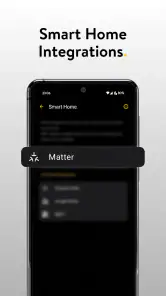
- Integrates with smart home systems
- Auto-lock and unlock features
- Secure encryption technology
Cons
- Requires stable internet connection
- Battery replacement needed
- Limited compatibility with some doors
- Subscription needed for full features
- Initial cost is high
- Category
- House & Home
- Version
- Varies with device