NovelUP — Novel Downloader
- 244.00
- 3.7
- Installs
- 5.00M
- Price
- Free

Screenshots





Analysis by Reviewed
I like the idea of keeping a novel ready on my phone for the quiet gaps in an ordinary day: a commute, a waiting room, or a lunch break when I would rather read than scroll. NovelUP is a free reading app from Colorful Point Pte Ltd, and its focus on finding novels and saving them for offline reading gives it a clear purpose. I would consider it most useful for readers who enjoy browsing for their next story and want access even when a connection is unreliable.
What free access means in practice
The app is free to download, but it also offers in-app purchases ranging from $0.49 to $79.99 per item. That makes it sensible to try the basic experience before spending anything. I would treat optional purchases as a separate decision: first see whether the available reading and discovery experience suits you, then decide whether any paid option is worthwhile for your habits. The price range alone does not tell me what each purchase includes, so I would check the details shown in the app before buying.
Finding stories and making them useful offline
Have you ever been on the hunt for a good book but just couldn't find the right one? Well, let me introduce you to NovelUP — Novel Downloader. This app is a game-changer for all book enthusiasts out there, especially if you're someone who enjoys reading on your phone. Let me tell you why this app might be your next best friend.
Discovering a World of Novels
One of the most impressive features of NovelUP — Novel Downloader is its vast library. Whether you're into romance, sci-fi, mystery, or fantasy, this app has got you covered. I was pleasantly surprised by the range of novels it offers. The search function is straightforward and efficient, making it easy to find exactly what you're looking for.
Easy Navigation and User Experience
Let's talk about the user experience. The app's interface is sleek and intuitive. I found it incredibly easy to navigate through different sections. With just a few taps, you can download your favorite novels and start reading within seconds. The design is minimalist, which I personally love because it makes the reading experience more immersive without unnecessary distractions.
A practical way to use the app is to search for a few different kinds of books before settling on one. I would compare the descriptions and opening pages, if available, rather than downloading a long list based only on a title or cover. That small pause can prevent a crowded reading list full of stories that looked appealing at first but do not hold my attention. If I am choosing a novel for a trip, I would also download it while connected to a stable network, then open it before leaving to make sure it is ready for offline reading.
Offline Reading? Yes, Please!
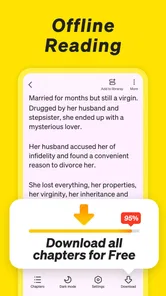
One standout feature is the ability to download novels for offline reading. This is perfect for those times when you're on a plane or somewhere with spotty internet. Just download your books beforehand, and you're good to go. I can't stress enough how convenient this feature is for avid readers like myself who are always on the move.
More From Our News Desk

Weather by Xiaomi Review: Clear at a Glance, Less Clear Up Close

X Under Pressure: Can It Recover When Posting Goes Wrong?

Clash of Clans Is Won Between the Battles

Android Auto Makes the Case for Quieter Car Software

MobiOffice: Transforming Mobile Productivity with Seamless Integration

EA SPORTS FC™ Mobile Soccer: Redefining Mobile Sports Gaming
Offline access is especially valuable when a reading routine depends on small pockets of time rather than a long evening at home. I might keep one current story for a commute and choose another for a weekend, instead of saving everything I browse. It is a simple way to keep my choices manageable and make it easier to return to the book I actually want. I would still check that a downloaded title opens before relying on it in a place with no signal; preparing in advance is more dependable than assuming every item will be available at the exact moment I need it.
Making recommendations work for you
Another aspect worth mentioning is the app’s recommendation system. Based on your reading habits, the app suggests novels that might pique your interest. I found this particularly helpful because it introduced me to authors and genres I hadn't considered before. It's like having a personal librarian in your pocket!
Recommendations are useful when I want inspiration, but I would not let them replace deliberate searching. Suggestions can help break a familiar reading pattern, while a direct search is better when I already know the genre or type of story I want. If the recommendations start feeling repetitive, switching between browsing and search is a practical way to regain control over what I read rather than endlessly following the next suggestion.
How it compares with other ways to read
Compared with an ebook reader built around books you already own, this app puts more emphasis on discovering novels and getting them ready for offline reading. That difference matters: it may suit someone who wants an easy route from browsing to reading, but it is not automatically a replacement for a personal ebook library or a dedicated reading tool. If you mainly organize books from other sources, prefer a particular reading ecosystem, or want a broad reference collection rather than serialized fiction, your usual reader or a general digital library may fit better.
NovelUP is a Books & Reference app, with a Teen content rating. Its average rating is 3.7 from around 68,000 ratings, and it has more than 5 million installs. Those figures suggest that it has found a sizable audience, though they do not guarantee that its catalogue or reading style will match yours. The current version is 5.8.5.965, and it requires Android 7.0 or later. I would check those requirements before installing, especially on an older device. The app was released on August 2, 2024.
Small habits that make offline reading smoother
For me, the strongest workflow is to separate discovery from preparation. When I have a reliable connection and a few spare minutes, I can look for a story, read enough of its description to understand the premise, and decide whether I want to commit to it. Later, I can use the downloaded title for a commute or a low-signal stretch without turning the moment into another search session. This is more useful than treating every browse as a reason to save another book.
I would also think about the kind of reading session I am preparing for. A short break calls for a story I can pick up again without spending time remembering where I left off; a longer trip gives me room to try something less familiar. Keeping the choice intentional helps with one common trade-off in discovery-focused apps: browsing can be enjoyable, but it can also consume the time I meant to spend reading. Choosing a title before I leave makes the app serve the routine instead of competing with it.
Who is likely to get the most from it?
I would recommend trying it if you read novels on your phone, enjoy exploring unfamiliar stories, and value having something ready offline. It is also a reasonable option for a reader who wants to sample a free app before deciding whether any optional purchase is useful. A realistic routine might be to browse at home, choose one or two promising novels, download them, and read during a daily train ride without depending on mobile data.
It can also suit someone who has trouble choosing a new book from a large conventional catalogue. Search and recommendations offer two different starting points: one is useful when I have a clear preference, while the other gives me a chance to stumble across a story I would not have sought out. I would use both, but keep an eye on whether the suggestions are genuinely broadening my choices or simply steering me toward the same kinds of plots. That distinction matters if variety is the reason I am trying a discovery-led reading app.
When another option is the better fit
I would skip it if what you need is a highly controlled library for books you already own, a reference app for factual research, or a reading experience that must fit a very specific workflow. Readers who dislike browsing, prefer to choose every title from a separate bookstore, or do not want to consider in-app purchases may be happier with a different option. The Teen rating is also worth keeping in mind when deciding whether the app is suitable for a younger reader; I would not assume that every story is right for every age simply because the app can be used by teens.
There are a few practical questions I would answer before making it part of my routine. Can I rely on a chosen story without a connection? I would download it in advance and open it once while online, rather than treating the download button as proof that everything is ready. Do I need to pay to start reading? The app is free to download, so I would first explore what is available without purchasing anything, then judge any optional offer on its own terms. Will the suggestions suit a particular taste? I would use search as a fallback whenever recommendations miss the mark, rather than assuming one discovery route has to do everything.
My buy-or-skip verdict
For cost, my advice is simple: try the free app first and do not treat the existence of in-app purchases as a reason to spend before you know what you will use. Paid value depends on the specific option presented and whether it solves a problem for your reading habits; I would inspect its in-app details before confirming a purchase. If all you want is a convenient way to discover novels and prepare a few for offline reading, you can first see whether the free experience is enough. If your priority is a collection you curate independently, a reader built around your existing books is likely the more direct choice.
In conclusion, NovelUP — Novel Downloader is an app that truly caters to the needs of book lovers. Whether you're an occasional reader or a voracious one, this app is designed to enhance your reading experience. The combination of a vast library, user-friendly interface, and offline capabilities make it a must-have for anyone who loves to read. So, if you're looking to dive into a new novel or discover a new favorite author, give this app a try. Happy reading!
NovelUP — Novel Downloader Frequently Asked Questions
Can I read every novel in NovelUP for free, or are there paid options?
NovelUP is free to download, and its focus is downloading and reading web novels. In-app purchases are also available, with prices ranging from $0.49 to $79.99 per item. You can explore the app before deciding whether to make a purchase, and it is sensible to check the price shown for any item before confirming it.
Who develops NovelUP, and how can I tell I have the right app?
NovelUP is a Books & Reference app developed by Colorful Point Pte Ltd. Its store short description is “NovelUP,” while its summary describes it as a web novels downloader for offline reading. Checking the app name and developer when choosing a download can help distinguish it from other reading apps with similar names.
Is NovelUP suitable for readers who want to read without an internet connection?
NovelUP is presented as a web novels downloader, with offline reading at the center of its appeal. The app’s summary promises unlimited novels to read offline, so it may suit readers who want to keep stories available when they are away from a connection. Download novels while online, then open the saved content in the app. As with any reading app, downloaded files still use your device’s storage.
What is NovelUP — Novel Downloader?
NovelUP is a dedicated application designed for novel enthusiasts, allowing users to effortlessly download and read their favorite novels. It supports a wide range of formats and provides a seamless reading experience with customizable settings. Users can explore a vast library, ensuring they have access to the latest and most popular titles in the literary world.
Is NovelUP free to use?
Yes, NovelUP offers free access to its basic features, allowing users to download and read novels without any cost. However, the app may offer in-app purchases or premium subscriptions that provide additional features or an ad-free experience. It's advisable to check the app's store listing for detailed pricing information and available packages. In-app purchases range from $0.49 to $79.99 per item, so review any purchase details before confirming.
Pros
- User-friendly interface enhances reading experience.
- Supports multiple novel formats for flexibility.
- Offline reading available for convenience.
- Regular updates with new features and fixes.
- Fast download speeds for quick access.
Cons
- Limited to certain novel sources only.
- Occasional ads may disrupt reading flow.
- Some features locked behind paywall.
- Interface customization is minimal.
- No cloud sync across multiple devices.