Navy Federal Credit Union
- 43.18K
- 3.7
- Installs
- 10.00M
- Price
- Free

Screenshots
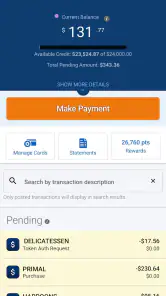
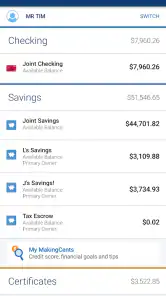

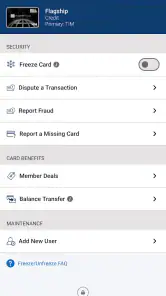
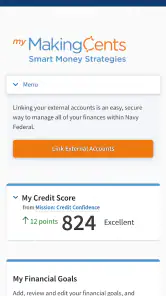
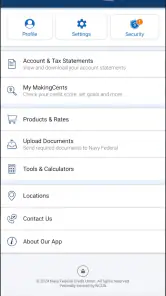
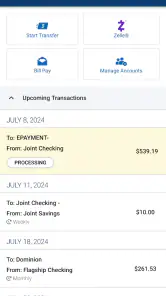
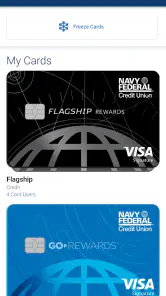
Analysis by Reviewed
Choosing a banking app is different from choosing a game or a casual utility. I want the first sign-in to feel clear, the important account details to be easy to find, and everyday money tasks to take fewer steps rather than more. Navy Federal Credit Union is the finance app from Navy Federal, the developer behind the service, and its focus is straightforward: give members a mobile way to manage their credit union relationship.
I approached it as a first-time user would, starting with the basic questions: what should I expect after installing it, how quickly can I reach a useful account screen, and where might a new member hesitate? The app is free, carries an Everyone age rating, and has built a substantial audience on Android, with over ten million installs. Its average rating is 3.7 from around one hundred ten thousand ratings, so the overall picture is positive but not flawless.
That combination tells me something useful before even opening it. Navy Federal Credit Union is established enough to be a serious option for existing members, but the rating suggests that convenience can depend on the device, the account situation, and the task being attempted. I would recommend approaching it as a practical banking companion rather than expecting a polished financial dashboard that replaces every other money tool.
Getting from installation to a useful first session
I’d use the first session to establish a safe, repeatable route to the information I check most, rather than trying every menu at once. I’d also note how to return to the account overview so a later quick check doesn’t turn into a search through unfamiliar screens. Once that basic path feels comfortable, it’s easier to decide which everyday tasks are worth bringing into the app.
What to expect when you open it
The first thing to understand is that this is not a general-purpose budgeting app. It is tied to Navy Federal and is most valuable when you already use the credit union. That makes the audience narrower than apps designed to connect accounts from many institutions. If your accounts, cards, or other financial products are with Navy Federal, the app has a clear reason to be on your phone. If you are looking for a single place to combine unrelated banks, you may find a dedicated aggregation or budgeting service more suitable.
The store summary, “Our Members Are the Mission,” gives the app a member-service emphasis, but I would judge it by the practical experience rather than the slogan. The useful question is whether it helps you complete a routine task without needing a desktop browser. For a member checking a balance before paying a bill, reviewing recent activity after a purchase, or confirming available funds while away from home, that mobile access is the main attraction.
Navy Federal Credit Union has been available since July 29, 2011, and the current Android release is version 2026.8.1. The listed minimum operating system is Android 11, which is important if you are using an older phone or keeping an aging device for occasional banking. I would check the operating-system requirement before planning an installation, especially on a spare handset. The app itself is free, but normal account rules and any service-related costs belong to the financial relationship, not to the download price.
More From Our News Desk

Weather by Xiaomi Review: Clear at a Glance, Less Clear Up Close

X Under Pressure: Can It Recover When Posting Goes Wrong?

Clash of Clans Is Won Between the Battles

Android Auto Makes the Case for Quieter Car Software

MobiOffice: Transforming Mobile Productivity with Seamless Integration

EA SPORTS FC™ Mobile Soccer: Redefining Mobile Sports Gaming
One practical limitation is that an app cannot make an account relationship disappear. You still need to be an eligible Navy Federal member and have the appropriate sign-in details. Someone who installs it expecting immediate access without an existing connection to the credit union may be disappointed. In that situation, the better first step is understanding membership and account setup through Navy Federal’s official channels, then using the app once the relationship is ready.
Preparing for the first setup
I would begin the setup when I have a stable connection, my Navy Federal credentials available, and enough time to deal with an identity check if one appears. Banking is not the place to rush through screens while standing in a checkout line. A calm first session makes it easier to notice whether I am signing in to the correct account and whether the information on screen matches what I expect.
For a first-time user, the best goal is not to explore every corner immediately. I would aim to reach the main account view, identify the balance and recent activity areas, and learn how to return to that screen. This creates a reliable starting point for later visits. It also prevents a common mistake: changing settings or beginning an unfamiliar financial task before understanding the app’s navigation.
Use a private moment for the initial login rather than relying on a public network or handing the phone to someone else. I would also avoid saving sensitive details in a place that another person can easily access. These are simple habits, but they matter more for a finance app than for most categories. The app’s Everyone rating describes its content suitability; it does not remove the need for careful account security.
Once signed in, I would spend a minute identifying the areas that matter most to me. A person who mainly uses a debit card will care about current funds and transactions. Someone managing a loan or credit card will look for those accounts and their payment information. A member who travels may value quick access to account status and recent activity. The right first layout is therefore personal, and I would not judge the app until I had found the screens connected to my actual routine.
The first meaningful success
My recommended first success is a simple verification loop: sign in, inspect the account information, open recent activity, and match one visible transaction with something I recognize. That is more useful than merely opening the app because it confirms that I can navigate to information I will probably need later. It also gives me a way to spot an unfamiliar entry early instead of ignoring it for weeks.
A realistic example is checking the app before moving money for a weekend expense. I would open Navy Federal Credit Union, confirm the available account information, review the latest transactions, and decide whether the planned purchase fits my current situation. The value is not that the app makes the decision for me. The value is that I can make it using current account information without waiting until I reach a computer.
Another good first workflow is reviewing activity after a recurring payment. Rather than assuming a payment went through because it normally does, I would use the app to look for the corresponding transaction and confirm that the account balance changed as expected. This habit can be especially helpful when several household payments happen close together. It turns the app into a quick checking tool instead of something I open only when a problem has already developed.
I would keep the first session deliberately narrow. If the app presents several financial areas, learning one dependable route is better than memorizing everything. The first meaningful success should leave me thinking, “I know where to look next time.” That feeling is more important than how many menus I visited.
Where new users may get confused
The biggest source of confusion is likely the difference between what the app can display and what a member is authorized or prepared to do. A mobile banking app may show several account relationships, but a new user may not immediately know which balance is relevant to a particular payment or transfer. I would read the labels carefully and avoid acting on a guess, especially when multiple accounts have similar names.
Balance terminology can also trip people up. The number that looks most prominent is not always the same number a person should use for a pending purchase or scheduled payment. I would treat recent activity and account status as part of the same check rather than relying on one figure in isolation. If something looks different from my own records, I would pause and investigate instead of repeatedly refreshing.
Transactions can be confusing when a purchase is recent, recurring, or still being processed. A new user may assume that an item is missing simply because it does not appear where expected, or may think a duplicate entry is an error without considering timing. The app can help me review what is visible, but it cannot replace careful judgment about when a transaction was made and how the merchant processed it.
Another point of friction is the boundary between the app and support. If I forget credentials, question an account decision, or need help with a sensitive issue, I should use the official recovery or support path rather than experimenting with repeated sign-ins. A finance app is not improved by guessing. I would also avoid asking another person to use my credentials to “take a look,” even if that seems quicker.
The rating of 3.7 suggests that some users encounter friction, and I would not dismiss that possibility. Mobile banking experiences can vary with phone software, account complexity, and the exact feature being used. My advice is to keep a second route available for important deadlines: know how to reach Navy Federal through its official web or support options if the app is unavailable or a screen does not behave as expected.
Using it as part of a larger money routine
Navy Federal Credit Union works best when it has a defined job in my routine. I would use it for quick account awareness and member-related banking tasks, while keeping a separate spending plan if I need category budgets, long-term goals, or a combined view of accounts at different institutions. Expecting this app alone to provide every kind of financial planning would be unfair and could lead to a poor choice.
Compared with visiting a branch or using a desktop site, a mobile app is more convenient for short checks during the day. Compared with a general budgeting app, it should offer a closer connection to the Navy Federal relationship, but it may not provide the same cross-bank overview. Compared with a simple card wallet, it serves a broader account-management purpose. The trade-off is focus: the closer the tool is to one financial institution, the less useful it may be for someone whose money is spread widely elsewhere.
One non-obvious benefit of this focused approach is reduced decision-making during a stressful moment. If I notice a suspicious purchase or need to verify a balance before an urgent payment, I do not have to sort through unrelated accounts first. I can open the Navy Federal relationship directly and examine the relevant activity. The limitation is equally important: that convenience depends on the account being with Navy Federal in the first place.
I would also use the app as a record-checking habit, not as a substitute for reading statements or understanding account terms. A quick mobile view is excellent for noticing what changed today. It is less appropriate for making a major financial decision based on one glance. For larger commitments, I would slow down, review the full information available, and contact the credit union when the situation is unclear.
Who should install it, and who should skip it
I think the app is a sensible choice for Navy Federal members who want convenient mobile access to their accounts and who prefer checking information from a phone. It is particularly useful for people who frequently travel, manage money between errands, or want to review activity soon after a purchase. The free download removes one barrier, and the broad installation base shows that mobile access is important to many members.
I would be more cautious recommending it to someone who does not use Navy Federal, needs a unified dashboard across several banks, or wants detailed financial coaching and budgeting as the main experience. A different finance app may be better for tracking spending across institutions, while a bank’s website or direct support may be preferable for complicated account questions. The correct choice depends less on the app’s popularity than on whether Navy Federal is central to your finances.
It is also not the right tool for someone unwilling to keep their phone’s operating system reasonably current. Android 11 is the minimum listed requirement, so an older device may not be a practical home for the app. I would not install it on a phone shared casually with other people unless I had a clear way to protect access. Convenience should never outweigh control over financial information.
What to do after the first successful action
After I have confirmed that the sign-in and account view work, I would choose one repeatable weekly habit. That might be reviewing recent transactions, checking an account before a scheduled payment, or confirming that an expected deposit or charge appears correctly. The key is consistency. A finance app becomes useful when it helps me notice changes early, not when it sits unused until I need to solve a crisis.
I would then learn one additional route at a time. For example, after becoming comfortable with the account screen, I might explore how the app organizes other Navy Federal products I already use. I would not start unfamiliar financial actions solely to test the interface. Learning by observation first is safer and gives me a clearer sense of what information is available before I need it.
Keep the app updated through the normal platform process so the current release remains available on a supported device. The present version is 2026.8.1, and that is a useful reference when checking whether an installation is current. I would also keep an alternative way to reach my account for time-sensitive situations, because no mobile app should be the only path to important financial information.
My final view is that Navy Federal Credit Union is a focused, practical finance app rather than a universal money-management solution. I like the idea of using it for quick member account checks, transaction awareness, and everyday decisions that benefit from current information. I would recommend it most confidently to existing Navy Federal members who want a mobile companion and are comfortable keeping their account security in their own hands.
The experience is less compelling for people seeking sophisticated budgeting, multiple-bank aggregation, or a finance app independent of one credit union. Its average rating indicates room for friction, so I would install it with realistic expectations and keep a backup route for urgent needs. Still, if Navy Federal is already where you bank, the path to value is simple: install it on a supported phone, sign in carefully, verify one familiar transaction, and build a small routine around the screens you genuinely use.
Navy Federal Credit Union Frequently Asked Questions
Can I use the Navy Federal app without opening an account?
The app is designed for Navy Federal members to manage their accounts and banking activities. You can download it before becoming a member, but account access and many features depend on membership and account eligibility. If you are considering joining, review Navy Federal’s current membership requirements and determine whether you qualify before relying on the app for banking services.
Does the Navy Federal app support biometric sign-in?
The app may offer biometric authentication, such as fingerprint or face recognition, depending on your device and the options available for your account. This can make returning to the app more convenient, but it does not replace the need to protect your phone and login details. Check the app’s security settings after installing, and use a strong device passcode as an additional safeguard.
Can I deposit checks using the Navy Federal app?
The Navy Federal mobile app supports check deposits by taking photos, which can save a trip when the feature is available for your account. You will need to follow the in-app instructions and photograph the check clearly. Deposit availability and any applicable limits or processing details may depend on your account and current policies, so review the terms shown in the app before submitting a deposit.
Can I manage my Navy Federal card through the app?
The app includes card-management capabilities, letting eligible members handle certain card-related tasks from a mobile device. The specific controls available can depend on the type of card and account. After signing in, review the card section to see which options are available to you. For urgent account concerns, use Navy Federal’s official support channels rather than relying on an unfamiliar message or link.
Does the app work on older Android phones?
For Android, the app requires Android 11 or later, so phones running earlier versions are not compatible. Before downloading, check your device’s operating-system version and whether an update is available. Compatibility also depends on the device’s condition and available storage. The app is free to download, but banking products and services accessed through it may have their own terms or charges.
Pros
- No monthly maintenance fees on many checking accounts.
- Strong mobile app security with biometric login options.
- Access to a large network of fee-free ATMs.
- Competitive rates on savings
- loans
- and certificates.
- Excellent support for military members and their families.
Cons
- Membership is limited to eligible military-affiliated applicants.
- Some products require additional eligibility or account conditions.
- Branch access may be limited outside military communities.
- Certain transactions can have fees or daily limits.
- App features may feel less complete than major-bank alternatives.
- Category
- Finance
- Version
- 2026.8.1











