myQ Garage & Access Control
- 58.66K
- 3.6
- Installs
- 10.00M
- Price
- Free

Screenshots
Analysis by Reviewed
I find the most useful thing about a connected garage app is not opening the door from across town; it is being able to check its status before a small doubt turns into a trip back home. myQ Garage & Access Control is built around that practical reassurance, with phone-based monitoring and control for compatible garage equipment. The catch is that the experience depends on a working connection, so I think of it as a convenient layer on top of a garage setup, not a replacement for the physical controls you already rely on.
When the connection matters
A remote command is only helpful if it reaches the opener and the app can report what happened. That makes the quality of the connection at home part of the everyday experience: if Wi-Fi or mobile service is unreliable, checking the app may be less reassuring than looking at the door yourself. I would test the setup from the places I expect to use it, rather than assuming that a successful installation guarantees a dependable signal everywhere.
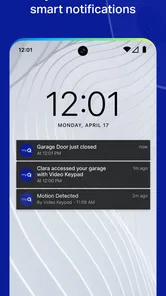
Notifications can also change how you use the garage. Instead of remembering to check manually, I can use an alert as a prompt to look at the door’s status after someone has come or gone. For a household, it is worth agreeing on who should pay attention to those alerts; otherwise, several people may receive information without anyone taking responsibility for acting on it.
Setup, access, and everyday routines
Getting started with myQ Garage & Access Control was surprisingly straightforward. After downloading the app from the App Store, I was guided through a step-by-step setup process. It felt like the app was holding my hand through the entire process, which is always a win in my book. The app is compatible with most garage door brands, and all it required was a quick connection to my home Wi-Fi.
Control at your fingertips
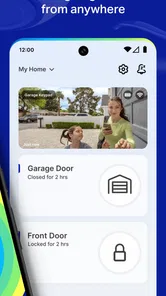
Once set up, the app opened up a world of convenience. Imagine being able to open or close your garage door from anywhere—whether you're at home, at work, or even on vacation. It's all possible with a simple tap on your phone. Plus, the app sends you notifications every time your garage door is accessed, so you're always in the loop.
One useful routine is to check the door before leaving for a long day, then use a notification as a reason to verify a later arrival or departure. That is different from relying on a neighbor to look in, and it can be more convenient than returning home just to check. Still, I would not treat a phone display as a substitute for confirming the door physically when safety or an unusual situation makes certainty important.
Making shared access deliberate
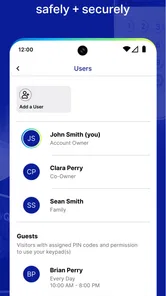
Security is a big deal for me, and I was pleased to see that myQ takes it seriously. The app offers a feature called "Guest Access," which allows you to share access with family or friends without giving away your physical keys or remotes. It's perfect for when you're expecting a delivery or have visitors coming over. And don't worry, you can set permissions and revoke access anytime you need to.
More From Our News Desk

Weather by Xiaomi Review: Clear at a Glance, Less Clear Up Close

X Under Pressure: Can It Recover When Posting Goes Wrong?

Clash of Clans Is Won Between the Battles

Android Auto Makes the Case for Quieter Car Software

MobiOffice: Transforming Mobile Productivity with Seamless Integration

EA SPORTS FC™ Mobile Soccer: Redefining Mobile Sports Gaming
I would keep shared access limited to the people and periods when it is genuinely useful, and review it after a visitor no longer needs entry. That is a small habit, but it makes digital sharing easier to manage than handing out a remote and later wondering where it went. For a delivery, I would also consider whether the person needs access to the garage at all; sharing convenience should not mean granting more entry than the task requires.
There is a practical distinction between letting someone in once and making garage entry part of an ongoing arrangement. Before sharing, I would decide who is responsible for checking that the door is closed afterward and how the person should contact me if the app or connection does not behave as expected. Those details matter more than the convenience of sending access quickly, especially when several household members use the same entrance.
Using it away from home
The strongest fit is a household that already uses compatible equipment and has a dependable home connection, especially when family members come and go on different schedules. A realistic example is leaving for work, noticing the garage may have been left open, and checking the app before deciding whether to turn around. If a trusted visitor needs to enter while you are out, shared access can avoid coordinating a physical key handoff.
By contrast, if you rarely use the garage, prefer a simple wall button or remote, or have patchy connectivity where the opener is installed, the app may add more steps than value. A standard remote is immediate and does not require a phone workflow; the app’s advantage is visibility and remote management, not replacing every simpler option.
For a busy household, the value is less about issuing a remote command every day and more about resolving small uncertainties without disrupting the day. If one person leaves early and another returns later, a status check can help everyone coordinate without a string of texts. I would still agree on a simple household rule: if the app status is unclear, verify in person or contact someone at home rather than assuming the last command succeeded.
It is also worth considering the phone context. When I am driving, I would not try to operate the app; I would pull over safely or ask a passenger to handle it. At work or while traveling, remote access is most useful when I have time to watch for confirmation and react if something looks wrong. The convenience is real, but it works best as a deliberate action, not as a substitute for attention around a moving garage door.
Smart-home links and data-conscious use
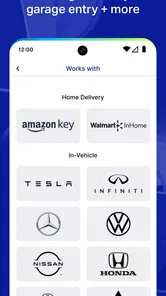
If you're into smart home technology, you'll be thrilled to know that myQ Garage & Access Control integrates smoothly with various smart home systems like Amazon Alexa and Google Assistant. This means you can control your garage with voice commands, adding another layer of convenience to your daily routine.
For data-conscious use, I would start with the controls needed for ordinary garage access and avoid enabling extra connections just because they are available. Sharing access and connecting a smart-home service can make routines easier, but each additional route to control the door deserves a quick review of who can use it and whether it is still needed. If a command or status update does not appear as expected, I would first check the phone’s connection and the home Wi-Fi, then verify the door directly before trying again. That practical order helps avoid repeatedly sending commands when the underlying connection may be the issue.
One trade-off with connecting a garage to a broader smart-home setup is that convenience can spread across more devices and accounts. I would add integrations only when they solve a routine problem—for example, making access simpler for someone who already uses voice controls—rather than treating every possible connection as essential. If you prefer to keep access straightforward, using the app on its own may be easier to understand and manage.
When something fails, I would avoid assuming that a closed-looking screen proves the door is secure. First, check whether the phone has a usable connection; then consider whether the home network is working where the garage equipment sits. If the status still seems uncertain, look at the door directly or ask someone on site before issuing another command. This is a cautious recovery habit, not a guarantee that every connection problem can be fixed from the app.
What to check before choosing it
The app is free, sits in the lifestyle category, and comes from The Chamberlain Group LLC. It has a 3.7 average from around 121,000 ratings, with over 5 million installs. It is rated for Everyone, and version 5.297.0.90924 supports operating systems from 7.1 onward. Those details make it easy to assess availability, but the deciding factor for me is still whether your opener and home network suit a connected setup.
Before relying on it, I would confirm that the garage equipment is compatible and try the connection from the spots where I would actually check or control the door. A good signal beside the router does not necessarily tell you how the phone will behave on the driveway or how well the garage equipment communicates from its installed location. Testing the normal routine early gives you a chance to notice friction before you depend on it during a rushed departure.
People often wonder whether an app like this makes a physical remote unnecessary. I would keep the remote or wall control available, because phone access brings a different set of dependencies: the phone needs power, the relevant connection must work, and you need to be able to check the result. The app’s value is adding remote visibility and management, not making every other way of operating the garage redundant.
Another reasonable question is whether shared access is suitable for a delivery or a short visit. It can help when the person genuinely needs to enter, but I would weigh that against the amount of access the task requires and remove permissions when they are no longer useful. For a brief drop-off that does not need garage entry, a less expansive arrangement is the more sensible choice.
Who should choose it
Compared with a basic remote, this app is more useful when you want to check access while away or coordinate entry with other people. Compared with a general smart-home control app, its appeal is its focus on garage access rather than managing a whole home. I would choose it for a compatible garage that gets frequent use; I would skip it if dependable phone connectivity is a persistent problem or if a simple remote already meets every need.
It is especially suited to people who share a garage, have visitors who sometimes need access, or often leave home wondering whether the door was closed. It is less compelling for someone who lives alone, rarely uses the garage, and has no reason to check it remotely. In that case, the app may add a login and another point of maintenance without changing the routine in a meaningful way.
My overall take is that connectivity is both the app’s reason to exist and its main limitation. When the phone, home network, and compatible garage equipment work together, remote checks and shared access can remove small hassles. When any part of that chain is unreliable, a familiar remote and a direct look at the door may be more dependable. myQ Garage & Access Control is worth considering if those connected conveniences match your routine, as long as you keep a practical backup and treat uncertain status with care.
myQ Garage & Access Control Frequently Asked Questions
How can I check whether my garage equipment will work with myQ before installing?
Compatibility is worth checking before you download, because myQ’s features depend on connecting supported garage equipment. The app works with a wide range of openers, but some older models may need additional hardware, such as a myQ Smart Garage Hub. Look up your opener’s model on myQ’s compatibility information and consider whether you are willing to add hardware if your equipment requires it.
What should I consider before sharing garage access with someone else?
The app can let you share access with trusted people, which is useful for household members or others who need to use the garage. Think about who genuinely needs access and whether temporary or ongoing access suits them. Activity alerts can help you stay informed when the door is used, so sharing access does not have to mean giving up visibility into garage activity.
Is myQ Garage & Access Control suitable for someone who only wants occasional remote access?
It can be useful even if you do not plan to manage your garage every day. Remote access lets you check or control compatible equipment from your phone, while alerts can keep you informed about door activity. The app may be less worthwhile if you rarely need these features, have unreliable Wi-Fi in the garage, or do not have equipment that works with myQ.
What is the difference between remote control, alerts, and scheduling in myQ?
Remote control lets you manage compatible garage doors or gates through your phone, while alerts notify you about activity such as a door opening or closing. Scheduling is intended for routine actions, such as setting a door to close at a particular time. Together, these features offer different ways to manage access, but their usefulness depends on your equipment, network, and preferred routine.
Is myQ Garage & Access Control an app for garage doors only, or can it manage gates too?
The app is designed to provide remote access to compatible garage doors and gates, so it can be relevant to more than one kind of entrance. The key consideration is whether the specific equipment is compatible with myQ. Check that before relying on the app for a gate or opener, since compatibility can vary and older equipment may need an additional hub.
Pros
- Easy installation and setup process.
- Compatible with multiple garage door brands.
- Allows remote access and control.
- Real-time alerts and notifications.
- Integration with smart home devices.
Cons
- Requires a stable Wi-Fi connection.
- Subscription needed for advanced features.
- Limited support for older garage models.
- App interface can be confusing.
- Initial hardware cost is high.












