myQ Community
- 521.00
- 4.4
- Installs
- 100.00K
- Price
- Free

Screenshots
Analysis by Reviewed
Managing access to a shared residential property is one of those jobs that looks simple until several people need different things at the same time. A resident may need to enter the garage, a property manager may need to coordinate access for a building, and both sides want fewer calls, messages, and awkward handoffs. That is the situation where myQ Community makes the most sense. I reviewed it as a lifestyle app from The Chamberlain Group LLC, and my impression is that its value comes less from entertainment or customization and more from putting community access in one place.
The app is free, carries an Everyone age rating, and is designed specifically for property managers and residents rather than for general smart-home control. It has built a solid audience, with an average rating of 4.4 from around 6.7 thousand ratings and more than 100 thousand installs. Those figures suggest that the basic idea is easy for many users to understand, but they do not remove the need to think about whether the app fits the way a particular building operates.
From a shared-access problem to a usable daily routine
The starting condition is usually not “I want another app on my phone.” It is something more practical: access to a community or property needs to be organized between the people who manage it and the people who live there. In a small building, that might mean avoiding repeated explanations about entry. In a larger property, it can mean giving residents a clearer digital path instead of relying entirely on a front desk, paper instructions, or scattered messages.
I like that the app is aimed at this specific relationship. A typical smart-home application is often built around one household and its own devices. A messaging app can coordinate people, but it is not designed around property access. A building portal may handle notices, payments, or maintenance requests while treating entry as a secondary concern. myQ Community sits closer to the access workflow itself, which gives it a more focused purpose than those alternatives.
The first useful question for a resident is whether the property manager has actually set up the community experience for the building. This is not an app that becomes meaningful simply because anyone downloads it. Its usefulness depends on the property and resident sides being connected through the intended arrangement. That is an important practical distinction: installing the app is the beginning of the process, not the result.
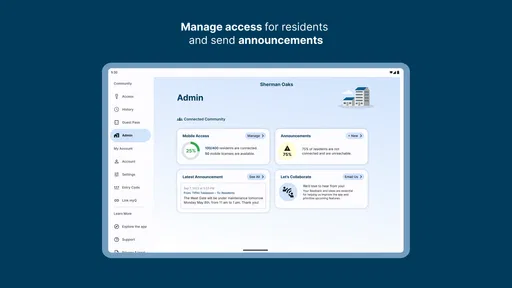
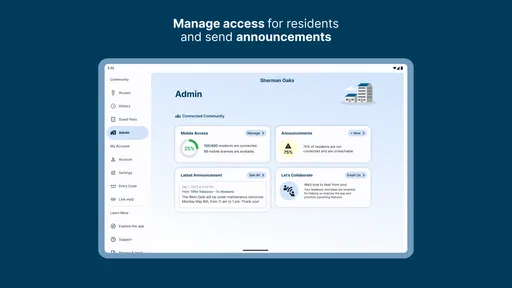
For a property manager, the starting point is different. The manager is not only looking for a personal convenience tool; they are trying to support a shared environment. That means the app has to fit existing communication habits and responsibilities. If the building still depends on a separate system for identity, resident records, or general administration, myQ Community should be viewed as an access-focused layer rather than an automatic replacement for every property-management task.
What the resident experience is trying to simplify
From the resident’s perspective, the appeal is straightforward. Instead of treating access information as something buried in an email or remembered from move-in, the app gives the resident a dedicated place to work with the community access process. That can be especially helpful after changing phones, moving into a new property, or trying to handle an access-related task while away from a desk.
More From Our News Desk

Weather by Xiaomi Review: Clear at a Glance, Less Clear Up Close

X Under Pressure: Can It Recover When Posting Goes Wrong?

Clash of Clans Is Won Between the Battles

Android Auto Makes the Case for Quieter Car Software

MobiOffice: Transforming Mobile Productivity with Seamless Integration

EA SPORTS FC™ Mobile Soccer: Redefining Mobile Sports Gaming
The strongest use case is a resident who wants less uncertainty in the ordinary routine of leaving and returning home. The app does not need to be flashy to be useful here. A focused interface can be better than a broad property portal if the immediate goal is to deal with community access without searching through unrelated menus.
There is also a useful handoff between the manager and resident. The manager establishes the property-side context, while the resident uses the app within that context. When that handoff is clear, the application can reduce the amount of explanation needed each time someone has a question. When it is unclear, the app may feel incomplete even if it is working correctly, because the user does not know which step belongs to them and which belongs to the property team.
A realistic everyday workflow
Imagine a resident arriving at a building after a long day. They are not trying to explore settings or compare smart-home products. They want to deal with the community access process quickly and get on with the evening. The useful workflow begins with opening the app, identifying the relevant community context, and checking what access-related action or information is available to them.
The next step is where clear organization matters. A resident should be able to distinguish between something they can handle personally and something that requires the property manager. That boundary is easy to overlook in a general-purpose portal. In a community-focused app, it is central to the experience. If the resident can complete the task independently, the app saves a handoff. If not, the resident at least has a more precise reason to contact the property team.
For example, a resident may be preparing for a move, dealing with a new phone, or trying to understand how access works after joining a property. The practical benefit is not just speed. It is reducing the chance that the resident sends a vague message such as “my access is not working” when the real issue is that the community setup, resident information, or expected process has not been completed.
My first non-obvious tip is to treat the app as part of a two-sided checklist. Before assuming the application is malfunctioning, confirm that the property-side setup and the resident-side setup have both been completed. This sounds basic, but shared-property tools often fail at the handoff rather than at the final screen. Knowing that can save a resident from repeatedly reinstalling an app when the real next step belongs to the management office.
Where property managers fit into the process
The manager’s role is the other half of the workflow. A resident may see only the phone interface, but the experience depends on how the property is organized behind it. The app’s store summary describes seamless access for property managers and residents, and that promise is most convincing when both groups understand their responsibilities.
For managers, the benefit is the possibility of giving residents a consistent access channel instead of explaining the same process separately to every person. That can be valuable during move-ins, resident changes, and routine questions. It also creates a clearer point of reference when a resident needs help, because the conversation can begin with what the app shows rather than with a completely open-ended description of the problem.
However, I would not recommend presenting it to residents as a magical replacement for property staff. A digital access workflow still needs human support when the underlying property information is wrong, when a resident is associated with the wrong community, or when a building’s own rules create an exception. The app can make the handoff cleaner, but it does not eliminate the responsibility to maintain the property-side process.
My second practical insight is to use the app as a troubleshooting language. When a resident reports a problem, ask them to describe the exact point where the flow stops: before the community appears, while trying to use an access-related function, or after the action seems complete. That separates account or setup friction from a broader building issue. It is a much more useful support habit than asking only whether the app “works.”
The handoffs that determine whether it feels seamless
The word “seamless” is easy to understand from the user’s side and harder to achieve in practice. There are several handoffs in this experience. The property manager has to establish the community relationship. The resident has to use the correct account or app context. The phone has to be ready for the task. Finally, the user has to know when an action is complete and when they still need to contact someone.
Each handoff is a possible source of friction. A resident may expect the app to know which property they belong to immediately. A manager may assume that downloading the app is enough for the resident to begin. A support conversation may become confusing if neither side knows whether the issue is personal setup or property configuration.
This is where myQ Community compares favorably with informal alternatives such as email threads or chat groups. Those tools are flexible, but they scatter the process across messages and people. A resident can lose an instruction, reply to an old thread, or misunderstand which access detail applies to them. A focused app gives the workflow a more stable home.
At the same time, a general property portal may still be better for someone who wants one place for every building-related task. If the main need is rent, maintenance, announcements, documents, and community communication, a broader portal can feel more complete. myQ Community is more attractive when access is the urgent or recurring problem and the property already supports the app’s intended role.
What success looks like after setup
The result is not simply that a resident has installed an application. The real result is a shorter path from “I need to deal with community access” to “I understand what to do next.” That is a modest goal, but it is a meaningful one in a shared property where unclear instructions quickly become repeated support requests.
For residents, success means opening the app with a clear purpose and finding the relevant community relationship without having to reconstruct the process from old messages. For managers, success means fewer ambiguous handoffs and a more consistent way to direct residents. The value becomes especially visible when several people need help around the same period, such as a change in occupancy or a wave of new arrivals.
My third useful insight is that the app is best judged by the number of unnecessary conversations it removes, not by how many features appear on screen. If it lets a resident complete a routine access step without contacting the office, that is a real improvement. If every small action still requires a manager to intervene, then the app may still be useful as a reference point, but its efficiency advantage is reduced.
There is also a trust benefit to a focused tool. Residents are more likely to follow a process when they can see that it is tied to their community rather than being a generic collection of unrelated smart-home controls. That focus makes the app easier to explain to someone who is not especially comfortable with technology. The trade-off is that users who want broad device management or advanced home automation may find the experience too narrow.
Where the workflow can break down
The main weakness is dependency. myQ Community cannot independently solve a property-side setup problem, an incorrect resident association, or a communication gap between the building and the user. If the handoff is incomplete, the resident may experience the app as confusing even when the underlying issue is outside the phone.
Another limitation is that the app is not the obvious choice for every kind of property-management need. Someone looking for a full resident portal may prefer a broader service that combines access with payments, maintenance, notices, and documents. Someone looking for a personal smart-home hub may prefer an app designed around all their devices. The focused design is a strength only when the user’s main problem matches it.
There can also be friction when a resident changes circumstances. Moving between properties, changing phones, or dealing with a temporary access question creates moments where the normal workflow may no longer feel obvious. My advice is to keep the property manager involved early when the issue concerns the community relationship itself, rather than repeatedly trying local fixes on the phone.
Performance expectations should also be realistic. An access app is used at inconvenient moments: while arriving, leaving, carrying bags, or standing outside. That makes clarity more important than a long feature list. If the screen does not make the next action obvious, even a technically capable app can feel slow. The best experience comes when the resident already knows the property’s process and uses the app as the direct route through it.
The current version is 7.0.45.478333, and the app requires Android 10 or later. That requirement is reasonable for users with newer phones, but it matters in communities where some residents keep older devices. Before recommending it across a property, a manager should consider whether every resident can use the required mobile operating system. A resident with an older phone may need another communication route, and that exception should be planned rather than discovered during an urgent access problem.
Who should use it and who should look elsewhere
I would recommend myQ Community to residents whose property manager actively uses it and who mainly need a clear, dedicated route for community access. It is also a sensible option for managers who want to reduce repeated explanations and give residents a consistent starting point for access-related tasks.
I would be more cautious if the building has not established a clear support process. In that case, downloading the app may create expectations that the property team is not ready to meet. I would also suggest looking elsewhere if the primary requirement is a complete property-management suite or a broad smart-home dashboard. A specialized access app should not be judged as though it were designed to replace those categories.
For families or shared households, the important question is not simply whether one person can use the app. The household should understand who is expected to manage the resident-side process and how other occupants receive help. That avoids a common failure mode in which one person becomes the unofficial support desk for everyone else.
For property managers, I would use it alongside a short written onboarding instruction rather than relying on the app alone. Tell residents when to install it, what community relationship they should expect to see, and whom to contact if that relationship is missing. That small amount of preparation improves the handoff and makes the app feel much more dependable.
My final view after following the full workflow
myQ Community is a focused lifestyle app with a practical purpose: connecting property managers and residents around community access. I found its strongest quality in that focus. It is not trying to be a social network, a complete building portal, or a universal smart-home controller. When the property is properly configured and both sides understand the handoff, that narrow purpose can make everyday access tasks easier to organize.
The app is free, available for an Everyone audience, and has earned a 4.4 average from a substantial group of users. Those details make it easy to try, but the more important decision is whether the building supports the workflow. If it does, the app can replace scattered instructions with a clearer routine. If it does not, the experience may stop before the resident ever reaches the useful part.
My honest recommendation is to use it when community access is the specific problem you want to solve, especially if your property manager already works with it. Go in knowing that the most important step may happen outside the app: the manager and resident must complete their handoff correctly. Once that expectation is clear, the app works best as a dependable access pathway, not as a complete answer to every property-management need.
myQ Community Frequently Asked Questions
Is myQ Community free to download, and which devices can run it?
myQ Community is a free Lifestyle app from The Chamberlain Group LLC. It is intended for compatible mobile devices, and the current version requires iOS or Android 10 or later. Before downloading, check that your phone meets this requirement and that you can access the app store for your device. The app is rated for Everyone.
Who is myQ Community designed for?
myQ Community is aimed at residents and property managers in communities that use myQ services. Its purpose is to provide access to community features through an app, rather than serve as a general-purpose home-access tool for anyone. Whether it is useful for you depends on your property’s participation and the services it has enabled.
What is myQ Community, and what can I use it for?
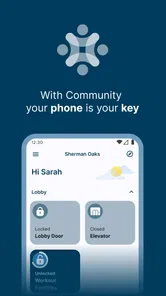
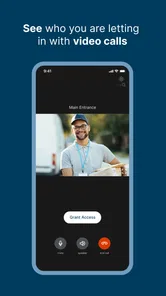
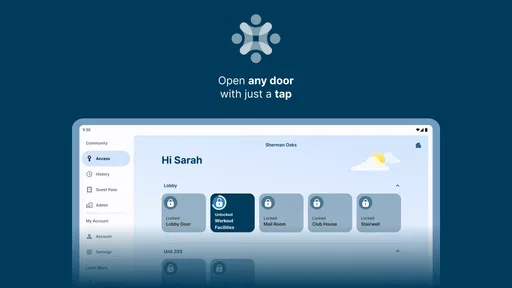
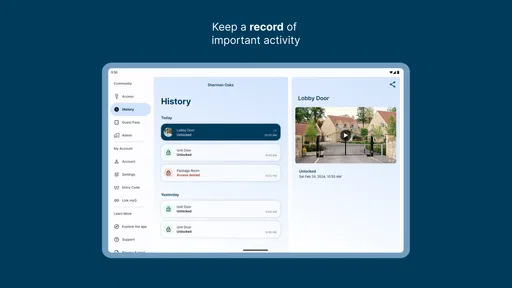
myQ Community is a resident-focused app designed for properties that use myQ smart access systems. After signing in, residents may be able to open community gates or doors, manage guest access, receive delivery notifications, and view access-related information. The exact features depend on whether your apartment, condominium, or managed community has enabled myQ services and which hardware is installed on the property.
Do I need to live in a participating community to use myQ Community?
Yes, myQ Community is generally intended for residents of properties that have partnered with myQ or an affiliated property-management provider. Downloading the app alone does not guarantee access to its functions. You will usually need an invitation, registration code, or approval from your property manager, and your phone number or email address must match the resident information stored by the community.
Can myQ Community open gates, doors, or other shared entrances?
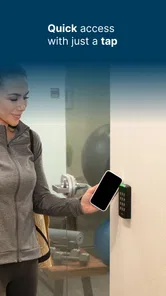
If your community supports mobile access, myQ Community can provide buttons or controls for approved entrances, such as vehicle gates, pedestrian doors, garages, or building lobbies. Availability varies by property, user permissions, Bluetooth or internet connectivity, and the installed access-control equipment. If a button is missing or does not work, the issue may require assistance from your property manager rather than an app reinstall.
Pros
- Conveniently manage access to participating community gates and doors.
- Digital credentials can reduce the need to carry physical keys or remotes.
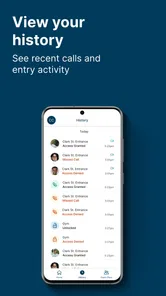
- Useful notifications help keep you informed about entry activity and updates.
- Clean interface makes common access controls easy to find.
- Can simplify visitor access in communities that support myQ features.
Cons
- Works only with communities and devices compatible with the myQ platform.
- Some features may require administrator setup or an active community subscription.
- Access depends on a reliable internet connection and properly configured hardware.
- Notification settings may need adjustment to avoid receiving too many alerts.
- Availability of features can vary significantly between properties and locations.












