MyHeritage: Family Tree & DNA
- 9.65K
- 4.4
- Installs
- 10.00M
- Price
- Free

Screenshots

Analysis by Reviewed
When family stories start to feel like loose threads, I like having a place to gather names, dates, and possible clues without pretending I already know the whole story. MyHeritage: Family Tree & DNA is built around that kind of exploration. It can help you organize a family tree, look for records, and consider DNA-based connections, but those activities involve personal details, so I’d approach it as a research tool that calls for care rather than as a casual quiz.
Exploring ancestry with a careful eye
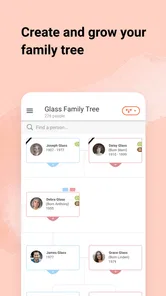
Right from the get-go, MyHeritage offers a fascinating dive into genealogy. The app provides tools to build a detailed family tree, and trust me, it’s incredibly engaging. I found myself lost for hours, adding relatives and discovering connections I never knew existed. You start by entering basic details about your family members, and the app does a lot of the heavy lifting, suggesting possible matches from its extensive database.
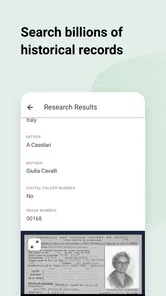
What's really cool is the way it connects you with historical records. I stumbled upon census data and old photographs that added layers to my family history. It’s like being a detective in your own family saga. And if you’re into history, you’ll find this part of the app utterly absorbing.
That detective feeling is also where I’d keep my expectations grounded. A suggested person or record can be a promising lead, not a confirmed link. Names repeat, dates can be approximate, and a record may describe someone who looks right at first glance but belongs to a different branch. I’d use the app to collect possibilities, then check the details against what relatives remember and any supporting documents I can find.
DNA can answer some questions and raise others
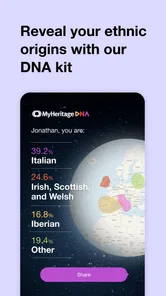
One of the standout features is definitely the DNA testing. After sending in a cheek swab (don’t worry, it’s painless), the app provides a comprehensive breakdown of your genetic background. I was amazed to see my ethnicities laid out in a colorful pie chart. It’s not just numbers; it’s a story of where you’ve come from, and that’s pretty powerful.
But it doesn’t stop there. The app also connects you with potential relatives. Imagine my surprise when I was matched with a second cousin I’d never met! We’ve since connected, and it’s all thanks to this nifty feature. It’s like Facebook for your genes, and personally, I think that’s awesome.
Even when a match feels exciting, I would treat it as an invitation to learn more rather than a complete family answer. A genetic connection does not automatically explain how two people are related, and family circumstances can be complicated. If you decide to contact a match, a polite message that leaves room for them not to respond is a considerate first step. I’d also think through whether I’m prepared for unexpected discoveries before choosing to explore DNA at all.
More From Our News Desk

Weather by Xiaomi Review: Clear at a Glance, Less Clear Up Close

X Under Pressure: Can It Recover When Posting Goes Wrong?

Clash of Clans Is Won Between the Battles

Android Auto Makes the Case for Quieter Car Software

MobiOffice: Transforming Mobile Productivity with Seamless Integration

EA SPORTS FC™ Mobile Soccer: Redefining Mobile Sports Gaming
A comfortable interface, with a few practical snags
The user interface is intuitive and sleek, which makes navigating through your family history a breeze. I appreciate how the app is organized; everything is just a tap away. The learning curve is gentle, so you won’t feel overwhelmed even if you’re a newbie.
The only hiccup I encountered was occasional lag when loading large family trees, but it’s a minor issue compared to the wealth of information you’re getting. Plus, the app is constantly being updated, which gives me hope for even smoother performance in the future.
For a smoother first session, I’d add a few relatives at a time instead of trying to map an entire extended family on a phone. Large trees can be harder to inspect on a small screen, and entering every branch in one sitting makes it easy to mix up people with similar names. A short note about why you added a connection can be surprisingly useful when you return later and no longer remember which clue led you there.
Build a tree before chasing every lead
I find the app most useful when I treat the family tree as a working notebook, not a finished family history. Start with relatives whose names and dates you already know, then add a source or a note whenever a record supports a new connection. That small habit makes it easier to revisit uncertain branches later instead of accidentally treating a suggested match as proven fact.
A realistic first session might be a quiet evening with a parent or grandparent: ask about full names, places, and family stories, then enter only what you can verify together. The app can make those details easier to organize, but family recollections can conflict, and records may refer to people with similar names. I would keep disputed details tentative until a second piece of evidence turns up.
This approach also helps when relatives use nicknames or remember the same event differently. I’d record the name a person is known by alongside any fuller name the family can confirm, rather than silently choosing one version. If someone remembers a place but not a date, I’d preserve that clue as uncertain instead of filling in a guess. The goal is to make the next conversation or search more focused, not to make the tree look complete.
How it compares with simpler research methods
Compared with a paper chart or a basic family-tree app, MyHeritage brings tree building, historical-record searching, and DNA-related discovery into one place. That combination is convenient if you want to move from a family story to a possible documentary clue without switching tools. A spreadsheet or notebook can still be better for someone who wants a private, fully manual record, while a dedicated archive or local library may be preferable when careful source work matters more than an all-in-one mobile experience.
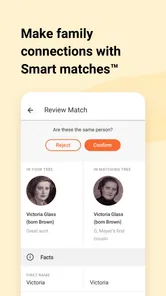
Suggested connections are a starting point, not proof of a relationship. I’d check names, locations, dates, and the original record before attaching a person to a branch. This is especially useful when a shared name or approximate age makes two people look like the same relative. Keeping a brief note about why you accepted a connection also saves time when you return to the tree months later.
The trade-off is convenience versus control over the research process. A paper chart gives you a clear view of a small family and makes it easy to keep the work offline, but it will not bring record searches and possible DNA connections into the same workflow. A spreadsheet offers flexible notes and sorting, yet it relies on you to maintain its structure. I’d choose the app when I want leads and family-tree organization together; I’d choose a manual method when simplicity, offline access, or full control over every entry matters more.
DNA is optional, and it changes the nature of the project
The family-tree tools can be meaningful even if you are not ready to explore DNA testing. Genetic results and relative matching may raise questions that a person did not expect, including family relationships that differ from the stories they grew up with. Before choosing that route, I’d consider whether I’m comfortable learning unexpected information and whether relatives whose details I add would welcome being included in a family project.
There is also a practical distinction between researching records and ordering a test: the latter involves a physical kit and a separate decision about sharing genetic information. I would not make that choice just because the app presents it alongside tree research. If your main goal is simply to preserve names and stories for relatives, starting with the family tree and conversations at home is a sensible, lower-commitment path.
That makes the app useful for different kinds of family projects, but not every feature needs to be part of yours. Someone assembling a family keepsake may be satisfied with names, photographs, and stories gathered from relatives. A person hoping to investigate unknown branches may be more interested in documentary clues or genetic matches, while needing to accept that those leads can take time to interpret. I’d decide what question I actually want to answer before spending money or sharing more personal information.
Trust, visible choices, and sensitive details
My approach to trust here is practical: I pay attention to what I choose to enter, which research path I take, and whether I’m comfortable with the implications of each step. A family tree can contain details about people besides the person holding the phone, and DNA research is more personal still. I’d ask close relatives before adding sensitive details about them, especially if those details could be unwelcome or expose a private family matter.
It is worth separating curiosity from consent. A relative’s name and a broad family connection may feel harmless to one person but private to another. I would avoid turning a disagreement or a delicate family story into a public-looking tree entry without checking with the people involved. For younger relatives, I’d be especially cautious about entering information simply because it is available to me.
When a feature involves a test or a possible match, I’d pause and read the choices presented in the app before proceeding. That small pause gives me a chance to decide whether I want to take the next step, rather than treating every prompt as part of ordinary tree building. If my aim is only to preserve family stories, I can stop at organizing those stories and leave more sensitive research for another time—or skip it entirely.
I also wouldn’t assume that an all-in-one genealogy app is automatically the best home for every record I own. For especially sensitive documents, I’d consider whether I need them in a family tree at all, and keep my own copies organized in a way that suits my comfort level. The useful question is not whether I can add another detail, but whether adding it helps the project enough to justify sharing it there.
Cost, access, and who will get the most from it
The app is free to install, and it is developed by MyHeritage.com. It sits in the books and reference category, is rated for everyone, and has an average rating of 4.4 from around 248,000 ratings, with more than 10 million installs. The current version is 7.4.36, and it requires Android 8.0 or later. Some in-app purchases are available, ranging from $0.99 to $299.00 per item, so I would check what a particular research or DNA option costs before committing rather than assuming every part of the experience is included at no charge.
The app is a stronger fit for someone who enjoys following family clues, keeping a growing tree organized, and returning to research over time. It may be less satisfying for a person who wants one quick ancestry verdict, or for someone who prefers to preserve family material entirely offline. If you are helping a relative get started, I’d keep the first visit focused on a small branch and explain that suggested matches are possibilities; that makes the experience less intimidating and helps prevent guesses from becoming accepted family history.
That distinction matters if you are comparing it with free note-taking or charting tools: those can be enough for a small family project, while a broader research workflow may make a paid option worthwhile to someone who will use it regularly. If you only want a quick, definitive answer about your ancestry, this is not a shortcut; research takes patience, and DNA results are one kind of clue rather than a complete account of identity.
For everyday use, I’d open the app after a family conversation, add the facts everyone agrees on, and leave unclear details for later. On another day, I might use a record clue to check a name or location before expanding the tree. That rhythm is more realistic than expecting a single evening to uncover a complete family history, and it gives me time to think before acting on surprising information.
A measured recommendation
My cautious recommendation is to begin with the relatives and records you can verify, then decide whether the wider research and DNA possibilities suit your goals. The app is a good fit for curious family historians who enjoy following leads and organizing what they find. It is less suited to anyone who wants a purely offline, manual archive or feels uncomfortable exploring sensitive family information. Used thoughtfully, it can turn scattered names and stories into a more organized investigation without asking you to treat every hint as the final answer.
In short, I’d try it if I wanted a guided place to collect family history and was willing to check leads carefully. I’d skip the DNA route unless I had considered the personal side as well as the research appeal, and I’d choose a notebook or spreadsheet if keeping everything under my own control mattered more than built-in discovery. Its real value is not instant certainty; it is having a structured way to ask better questions about where a family story came from and what evidence might support it.
MyHeritage: Family Tree & DNA Frequently Asked Questions
Can I use MyHeritage without creating a family tree?
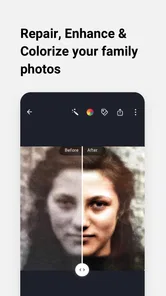
Yes. The app can be useful for exploring ancestry, researching genealogy, and bringing photos to life even if you are not ready to build a family tree. Tree-building is one part of its broader family-history focus, rather than the only reason to open it. If you are simply curious about your heritage or want to explore the app’s photo-related features, you can start with those interests.
Does MyHeritage include tools for old family photos?
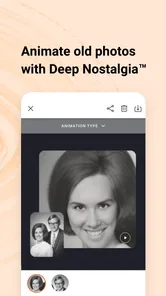
Yes. MyHeritage’s store summary highlights bringing photos to life, alongside discovering ancestry and researching genealogy. This makes the app relevant to people who want to explore family pictures as part of their history, not only organize names and relationships in a tree. If photos are your main interest, consider that feature as part of the app’s wider family-history experience.
Can I access MyHeritage on both Android and iOS?
MyHeritage: Family Tree & DNA is a mobile app for exploring family history and ancestry. Before downloading, check that your device meets the app’s operating-system requirements; the current version requires Android 8.0 or later. You can use the app to work with family-tree information and explore its genealogy features from a compatible device.
What is MyHeritage: Family Tree & DNA used for?
MyHeritage: Family Tree & DNA is an app designed to help users build their family trees, explore their ancestry, and connect with family members worldwide. It provides tools for genealogical research, offers DNA testing to trace ethnic origins, and allows users to discover historical records and photos that relate to their family history. Its store summary also highlights bringing photos to life, making it a broader family-history tool than a simple tree builder.
How does the DNA testing feature work in MyHeritage?
The DNA testing feature in MyHeritage allows users to take a simple cheek swab test, which they send back to the company's lab for analysis. The results provide detailed insights into one's ethnic background, potential relatives, and ancestral origins. Users can then explore their genetic matches and connect with newfound relatives through the app. This feature is distinct from building a family tree, so consider whether you want genetic insights as well as genealogy tools before deciding to use it.
Pros
- Easy-to-use interface for all ages
- Comprehensive family tree building features
- Access to historical records and documents
- DNA testing for deeper ancestry insights
- Multi-language support enhances accessibility
Cons
- Subscription required for full features
- Limited free trial period
- DNA testing can be costly
- Data privacy concerns with DNA info
- Occasional app performance issues











