myGMC
- 12.53K
- 4.7
- Installs
- 1.00M
- Price
- Free

Screenshots
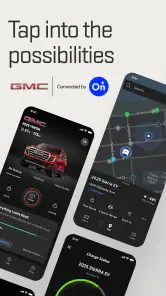
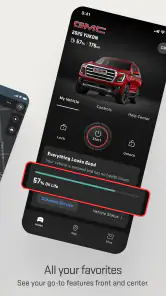
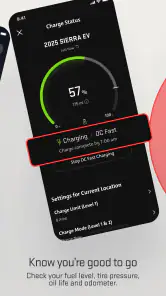
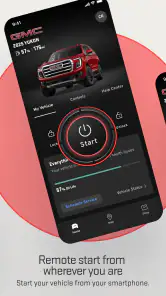
Analysis by Reviewed
When myGMC is useful, it’s usually because I can handle a small vehicle task from my phone instead of going back outside or hunting for information in the cab. For a GMC owner, that convenience can make the app a practical part of everyday ownership, especially when remote access and a quick look at vehicle status are the features you expect to use most.
Remote access is the everyday advantage
The most tangible benefit is being able to send a remote command when I’m away from the vehicle. Starting it from indoors before heading out on a cold morning is an easy example; locking or unlocking it and sounding the horn are useful in different situations. These controls don’t replace the key or make every errand effortless, but they can save a trip back to the vehicle when I’ve forgotten to check something.
I’d treat remote access as a convenience, not a guarantee that every command will suit every vehicle or moment. It makes sense to check that the command has completed before relying on it, particularly if I’m about to leave or need to locate the vehicle in a busy area. The app is most helpful when I use it as a quick connection to my GMC, rather than assuming a tap has solved a problem without checking.
How I’d fit it into a normal day
Picture a winter morning: I’m still getting ready, the vehicle is parked outside, and I can start it from indoors rather than step out first. Before a longer drive, I might also glance at the vehicle-status information, then use the app’s destination-sending capability to prepare a route without entering it while seated behind the wheel. Each action is small, but together they make the phone a useful ownership tool instead of just another place to check notifications.
That workflow also points to a practical tip: do the planning while parked or at home. Sending a destination before setting off is less distracting than typing into a navigation system once I’m already on the road. For a trip somewhere unfamiliar, that preparation is more valuable than expecting a phone app to replace attention to the road or the vehicle’s own controls.
What ownership information can—and cannot—do
The dashboard and diagnostic details can help me notice things such as tire pressure, oil life, and fuel level without first searching through vehicle menus. Alerts may also prompt me to follow up when something needs attention. I see that as an early heads-up, not a remote repair service: an app can make information easier to check, but it doesn’t inspect a tire for damage or decide what maintenance a particular warning requires.
Driving feedback about speed, braking, and acceleration is another feature I’d use selectively. It may help me reflect on habits over time, but it’s not a substitute for judgment, and a score or prompt should not become a distraction during a drive. If I’m simply looking for directions, a familiar navigation app may be the quicker choice; myGMC’s stronger case is the combination of vehicle-related controls and information in one place.
More From Our News Desk

Clash of Clans Is Won Between the Battles

Android Auto Makes the Case for Quieter Car Software

MobiOffice: Transforming Mobile Productivity with Seamless Integration

EA SPORTS FC™ Mobile Soccer: Redefining Mobile Sports Gaming

How Microsoft OneDrive Became a Mobile Productivity Giant

How Google Translate Breaks Language Barriers Effortlessly
A companion built around a GMC vehicle
Alright, let's dive into the world of myGMC. If you're a GMC vehicle owner, you're in for a treat. This app is like having a personal assistant for your car, right in your pocket. From checking your vehicle's health to remote starting it on a chilly morning, myGMC has got you covered.
General Motors (GM) makes this free Lifestyle app. It has a 4.7 average from around 83,000 ratings, and it has passed one million installs. It’s rated for Everyone, with version 7.22.0 listed for devices running Android 10 or later. Those figures suggest a well-established audience, but the real question is whether your own GMC and routine make its connected tools useful.
Getting Started with myGMC
The first thing I noticed about the myGMC app is how easy it is to set up. All you need is your vehicle’s VIN number, and you're ready to go. Once logged in, you're greeted with a sleek interface that's both intuitive and easy on the eyes. The dashboard gives you a quick overview of your vehicle's status, and trust me, it feels empowering to have all this information at your fingertips.
For a smoother first setup, I’d have the vehicle identification details handy and make sure I’m using the account I intend to keep associated with the vehicle. That matters most if more than one person in the household drives it: deciding who needs access before relying on the app can prevent confusion over whose phone is the one being used to check status or send a command. I’d also try the features I care about while parked, so I know where they are before needing them in a hurry.
Features That Stand Out
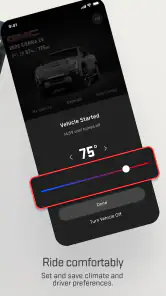
Now, let's talk features because this is where myGMC shines. One of the most impressive features is the remote access. Whether you want to lock or unlock your car, start the engine, or even sound the horn, you can do it all from your phone. It's like magic, especially when you can start your car from indoors on a freezing day.
In everyday use, those controls are most valuable when they solve a specific inconvenience: checking the locks after walking away, or using the horn to help find the vehicle in a large parking area. I wouldn’t install the app solely for novelty, though. If I rarely need remote commands and prefer doing everything at the vehicle, the benefit may be modest compared with simply using the usual key and dashboard controls.
Another nifty feature is the vehicle diagnostics. The app provides real-time updates about your car’s health, including tire pressure, oil life, and fuel level. It's like having a personal mechanic that never leaves your side. Plus, the app sends you alerts if something needs attention, so you're always in the know.
I’d use those readings as a prompt to check, not as a reason to skip a hands-on look before a long drive. For example, a tire-pressure reading can help me decide whether to investigate before loading up for a trip, while an alert can remind me to arrange follow-up. The advantage is having useful context together; the trade-off is that a phone display cannot replace a proper inspection or professional service when something seems wrong.
The Driving Experience
The integration of OnStar services takes the app to another level. You get access to turn-by-turn navigation, which is incredibly handy when you're on a road trip or exploring new places. The ability to send destinations directly to your vehicle's navigation system from the app is a game-changer. No more fiddling with GPS systems while driving!
For regular navigation, I’d choose whichever option is quickest and most familiar for the trip. The destination-sending workflow is particularly appealing when the vehicle has a navigation system I want to use and I can prepare the address before leaving. By contrast, someone who relies exclusively on a separate phone navigation app may gain less from this part of myGMC, even if the vehicle tools remain useful.
For those conscious about their driving habits, the app offers insights into your driving performance. It provides feedback on aspects such as speed, braking, and acceleration, allowing you to make adjustments and drive more efficiently. It's like having a coach who helps you become a better driver.
I’d think of that feedback as a private reflection tool rather than a definitive judgment of how well I drive. It may be useful if I want to notice patterns and make calmer, smoother choices, but it won’t suit everyone. Drivers who dislike performance summaries can ignore that side and focus on vehicle controls and status instead; the app doesn’t need to become a daily scorecard to earn its place.
A few useful habits before relying on it
I’d make a small routine of checking the vehicle screen when I’m already planning a departure, rather than opening the app repeatedly throughout the day. That keeps the information purposeful: fuel level can help me decide whether to stop before a longer drive, while a warning or tire reading can tell me whether I should inspect the vehicle before loading passengers or luggage. It also avoids treating a phone notification as a substitute for looking at the vehicle itself.
For remote commands, location and timing matter. If I’m in a crowded lot, the horn can help distinguish my GMC from similar vehicles, but I’d use it briefly and only when it is appropriate for the surroundings. Before relying on a remote start, I’d consider where the vehicle is parked and whether starting it is suitable in that setting. The useful lesson is to think of the app as a way to act from a distance, not as a reason to ignore what is happening around the vehicle.
When a different tool is simpler
The usual alternatives divide the job differently. A key fob handles basic access without needing me to open a phone, and a dedicated map app is often the straightforward choice for directions I want to follow on the phone. myGMC earns its place when I want vehicle-specific information alongside remote controls, or when sending a destination to the vehicle’s navigation system fits my trip. It is less compelling if all I need is a map or if I never use connected vehicle functions.
That distinction helps set expectations: I wouldn’t replace a navigation app I already trust just to consolidate everything, and I wouldn’t expect a vehicle dashboard to explain every diagnostic alert in enough detail to make a repair decision. Instead, I’d use myGMC as a companion to the key, in-car systems, and ordinary maintenance checks. Its value comes from reducing small bits of friction, not from making those other tools obsolete.
Who gets the most from it
I’d recommend trying it if you own a compatible GMC, want remote commands, or like checking vehicle information from your phone. It is especially handy for a household where someone can prepare the vehicle before another driver leaves, or for an owner who wants to send a destination before starting a trip. If you don’t own a GMC, mainly need general navigation, or prefer not to manage vehicle tasks through an app, a standard map app and the vehicle’s ordinary controls are likely a better fit.
One practical question is whether every feature will be available for every owner. I would check what appears after signing in and pairing the vehicle, then judge the app by the tools actually offered for that GMC rather than assuming every capability applies in every situation. The app is free, but connected services and vehicle compatibility can shape what is useful in practice; I’d confirm those details for my vehicle before making plans around a particular function.
What to expect from day-to-day use
A common question is whether this is an app I need to open every day. For me, that depends on the vehicle and routine. Someone who regularly uses remote start or checks status before commuting may naturally make it part of the morning; someone who parks close to home and rarely needs those controls may only open it occasionally. I’d judge it by whether it removes a real step, rather than by how often I can find a reason to tap it.
Another sensible question is whether the app makes a warning definitive. I would treat an alert or reading as a useful prompt to investigate, then use the vehicle’s own indicators and appropriate service advice to decide what to do. If the phone and vehicle information seem inconsistent, I’d avoid guessing and check directly before setting off. That cautious approach is especially worthwhile before a long journey, when a quick glance can help prioritize a check but cannot certify the vehicle as ready.
For a household with multiple drivers, I’d also agree on a simple handoff: who checks the status, who is responsible for acting on an alert, and whether the other driver knows how to use the features they need. That conversation is more useful than assuming everyone will discover the same controls on their own. It turns the app from a personal convenience into a shared reference point without making the phone the only way to access the vehicle.
Ending Thoughts
In conclusion, myGMC is not just an app; it's a companion for every GMC owner. The convenience it offers is unmatched, and the peace of mind knowing your vehicle's health status is invaluable. Whether you're tech-savvy or not, this app is user-friendly and packed with features that make owning a GMC an even more enjoyable experience. So, if you haven't already, give myGMC a try. You won't regret it!
My recommendation is more measured: it’s worth trying when the vehicle-specific tools match your routine, but it won’t replace every navigation app or a mechanic’s inspection. I’d start with the remote controls and status screen, keep the phone out of reach while driving, and let the features I actually use decide whether it deserves a regular spot on my home screen.
myGMC Frequently Asked Questions
Is myGMC intended for everyone, or mainly for GMC owners?
myGMC is a Lifestyle app focused on simplifying GMC vehicle ownership, so it is most relevant to people who own or use a GMC vehicle. Its age rating is Everyone, but that does not mean every feature will be useful to every user. If you are considering it for a particular vehicle, think about whether you want mobile tools for managing that GMC.
Is myGMC free to download, and what should I check before using its features?
The app is free to download, which makes it possible to try it without paying for the download itself. Before depending on a particular tool, check whether it works with your GMC and whether it requires an additional service or subscription. That distinction matters because a free app download does not necessarily mean every vehicle feature is available at no extra cost.
What phones and operating systems can run myGMC?
myGMC is a Lifestyle app for managing aspects of GMC vehicle ownership on a mobile device. Before downloading, check that your phone meets the app’s minimum operating-system requirement: it requires version 10 or later. The app is free to download, and its age rating is Everyone, so it is presented for a general audience.
What is myGMC and what features does it offer?
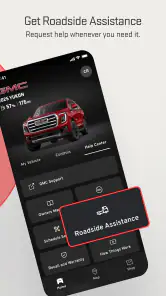
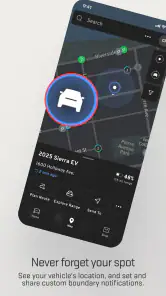
myGMC is a mobile application designed for GMC vehicle owners to enhance their driving experience. The app offers features such as remote vehicle access, including starting or stopping the engine, locking or unlocking doors, and checking vehicle status. It also provides navigation assistance, vehicle health monitoring, and maintenance scheduling, making it an essential tool for managing your GMC vehicle efficiently.
Can I use myGMC with any GMC vehicle model?
The myGMC app is compatible with most GMC models, but availability of specific features may vary depending on the model and year of your vehicle. It's important to check the compatibility of your specific GMC model with the app features before downloading. Typically, newer models have more comprehensive integration with the app's functionalities.
Pros
- Intuitive user interface for easy navigation.
- Remote access to vehicle functions via app.
- Real-time vehicle health updates provided.
- Integration with smart home devices available.
- Customizable alerts for maintenance reminders.
Cons
- Limited functionality without OnStar subscription.
- App may occasionally crash or freeze.
- Compatibility issues on older devices.
- Updates can be infrequent and delayed.
- Some features require strong internet connection.

- Category
- Lifestyle
- Version
- 7.22.0