myChevrolet
- 45.81K
- 4.6
- Installs
- 10.00M
- Price
- Free

Screenshots
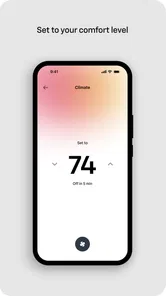
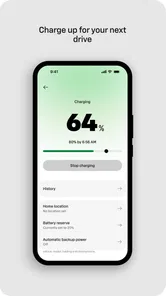
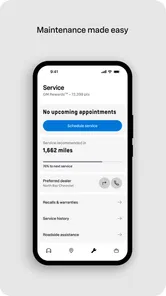

Analysis by Reviewed
When I decide whether a carmaker’s app is worth keeping on my phone, I ask a practical question: does it save me a trip outside or make ownership easier on an ordinary day? myChevrolet is General Motors’ free lifestyle app for people who own or use a Chevrolet. It has a 4.6 average from around 284,000 ratings, and more than five million installs, so it is clearly a familiar part of ownership for many drivers. I’d judge it less as a general driving app and more as a companion to a specific vehicle.
Start with the vehicle, not the download
Before setting it up, I’d check whether the app’s tools match the Chevrolet you actually drive and the tasks you want to handle. Remote commands and vehicle information are most useful when they work with your particular vehicle and account, so I wouldn’t assume every feature will be available to every owner. That is the key decision point: if you want a single place to check on your Chevrolet, it makes sense to try; if you only need maps or a generic logbook, a carmaker-specific app may be more than you need.
Getting Started with myChevrolet
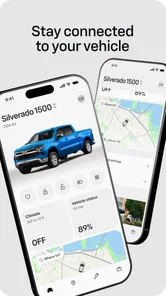
First things first, downloading and setting up myChevrolet is a breeze. Available on both Android and iOS, the app allows you to connect your phone to your Chevrolet vehicle in just a few easy steps. Once you're in, the dashboard greets you with a clean and intuitive interface. Trust me, you don't have to be a tech whiz to navigate through it.
Features That Make a Difference
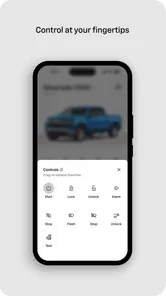
So, what makes myChevrolet stand out from the crowd? For starters, the app offers a range of remote features that make managing your vehicle as easy as pie. Ever been in a situation where you couldn't remember if you locked your car? With myChevrolet, you can lock or unlock your doors remotely. It's like having a magic wand for your car.
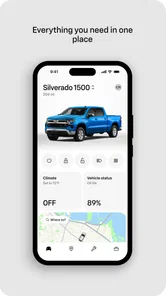
One of my favorite features is the vehicle status updates. You can check the fuel level, tire pressure, and even oil life from your phone. It's like having a mini mechanic in your pocket! Plus, for the environmentally conscious, the app provides efficiency tips to help you drive smarter and greener.
Navigation and Assistance
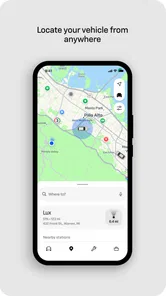
Getting lost is a thing of the past with the built-in navigation assistance. You can send destinations directly to your vehicle's navigation system. And if you're ever in a pinch, the app's Roadside Assistance is just a tap away. Whether it's a flat tire or a dead battery, help is always within reach.
Don't even get me started on the integration with Amazon Alexa and Google Assistant. Just imagine commanding your car with your voice. "Alexa, start my car!" How cool is that?
More From Our News Desk

Weather by Xiaomi Review: Clear at a Glance, Less Clear Up Close

X Under Pressure: Can It Recover When Posting Goes Wrong?

Clash of Clans Is Won Between the Battles

Android Auto Makes the Case for Quieter Car Software

MobiOffice: Transforming Mobile Productivity with Seamless Integration

EA SPORTS FC™ Mobile Soccer: Redefining Mobile Sports Gaming
Making it useful in everyday ownership
In practice, I’d treat remote controls as a convenience, not a guarantee that every command will suit every situation. On a cold morning, for example, I might check whether a remote action is available before leaving the house, rather than walking back to the driveway to inspect the vehicle. If a command is unavailable or takes longer than expected, the app is best used as a helpful extra—not as the only way to secure or manage the car.
The status screen can also shape a simple routine. Before a longer drive, checking the readings in one place may help me decide whether to stop for fuel or look more closely at a warning. I would still use the vehicle’s own alerts and normal maintenance advice for decisions that affect safety; a phone display is convenient context, not a substitute for inspecting a problem. That distinction keeps the app useful without asking it to do the job of a mechanic.
For roadside trouble, I’d open the assistance option when I need help, but I would not rely on an app as my sole emergency plan. Keep the relevant vehicle and account details accessible, and use the appropriate local emergency service if the situation calls for it. That is a sensible trade-off with any digital assistance tool: it can reduce friction when available, while a driver should still know what to do if the phone has no connection or battery.
When another kind of app is a better fit
Compared with general navigation apps, this one is aimed at ownership tasks rather than being a universal route planner. If your main priority is comparing routes, finding places, or navigating in a rental or another make of car, a dedicated maps app is likely the better everyday choice. Likewise, drivers who want to record expenses across several brands may prefer a neutral vehicle logbook. Those alternatives are not replacements for Chevrolet-specific controls; they simply serve a different purpose.
The app makes the most sense for someone who regularly drives a compatible Chevrolet and values remote access, vehicle status, or a direct route to assistance. It is less compelling if you rarely use those tools, share a car without managing its account, or expect a single app to control vehicles from different manufacturers. I’d install it for the convenience, then keep only the features I actually use in my routine.
Experience It Yourself
At the end of the day, the myChevrolet app is more than just a tool—it's an extension of your driving experience. It's designed to make life easier, safer, and a bit more fun. Whether you're a seasoned driver or a newbie, the app offers something for everyone.
So, if you own a Chevrolet, do yourself a favor and give myChevrolet a whirl. It might just change the way you look at driving. With all these features packed into one app, you'll wonder how you ever managed without it!
Who should give it a try
The app is free, rated for Everyone, and General Motors lists version 7.22.0 for devices running Android 10 or later. Those details make it easy to try if your phone meets the requirement, but the real payoff depends on your vehicle and habits. I’d start by linking the car and checking which tools are relevant, rather than expecting every feature to matter from day one. If the app saves you a repeated walk to the car or gives you a useful ownership check before a trip, it has earned its place; if not, a basic maps app may be all you need.
A few practical checks before relying on it
I’d make the first setup session a small test rather than trying to build a new routine around every button. Sign in, connect the vehicle, then try one low-stakes task while you’re near the car. That lets you see whether the account recognizes the vehicle and how the app responds before you’re counting on remote access from across town. If someone else in the household also drives it, agree on who manages the account and who needs access; shared use is much smoother when everyone knows what the app can and cannot do.
A useful everyday example is a rushed school pickup or grocery run. Before heading out, I could check the fuel reading and tire-pressure information, then use a remote command if the car is parked somewhere inconvenient. That does not replace a glance at the dashboard once I’m driving, but it can help me decide whether I need to leave early or make a stop first. The benefit is less about a dramatic rescue and more about removing small uncertainties from a familiar routine.
For a trip to an unfamiliar address, sending a destination to the vehicle’s navigation system can bridge the gap between planning on the phone and driving. I’d still confirm the destination in the car before setting off, especially if the address has several entrances or a similarly named location. This is a small but worthwhile habit: the app can make handoff convenient, while a quick check helps prevent a mistaken destination from becoming a frustrating detour.
Where convenience has limits
Remote features are appealing, but they are not the same as standing beside the vehicle. A displayed status can be useful for a quick check, yet I would avoid treating it as a live inspection or as proof that a mechanical issue is harmless. If a warning appears in the car, follow the vehicle’s guidance and get appropriate service rather than relying on a phone screen to diagnose it. That boundary matters most when the app makes information feel reassuring simply because it is neatly presented.
There is also a practical dependency on the right vehicle, account, phone, and connection. If one part of that chain is unavailable, a command may not help at the moment you want it. I would keep ordinary habits—checking that the car is locked when leaving, carrying the keys, and knowing how to arrange help—rather than letting a remote control become the only plan. For some owners, that may make the app feel less essential; for others, it remains a useful backup and time-saver.
Voice control is best treated as another way to reach selected tasks, not a reason to interact with a phone while driving. I’d set up and test any assistant connection while parked, then use it only in a way that keeps attention on the road and follows local rules. If voice commands are unreliable in your home or car environment, tapping through the app before a trip may be simpler than troubleshooting a phrase when you are already in a hurry.
Choosing between a brand companion and general tools
The main trade-off is focus. A Chevrolet-specific app can bring vehicle controls and ownership information together, while a general maps app is built to serve many cars and everyday journeys. Neither replaces the other particularly well: I’d use maps for planning, traffic, and exploring places, and keep the GM app for tasks tied to the Chevrolet itself. If you change vehicles often or drive several makes, a general app may deserve more attention because it follows your routines across cars.
A paper maintenance folder or a simple notes app can still be preferable for someone who wants a manual record they control and can use without signing into a vehicle account. On the other hand, those options do not offer the same connection to Chevrolet-specific status or remote functions. The right choice depends on whether you want digital access to the car, a portable record of ownership, or just directions. I would not install a branded app expecting it to replace every tool in that mix.
One non-obvious way to get value from the app is to decide in advance which checks matter to you. For example, a driver who often parks outdoors may care most about remote access, while someone who mainly takes longer drives may find the status information more useful before setting off. Picking a small number of recurring tasks makes it easier to tell whether the app is genuinely helping instead of leaving it as another icon you open once and forget.
What to expect from the first week
I’d give the app a few ordinary opportunities before judging it. Try a vehicle check before a drive, see whether a destination handoff fits your navigation routine, and test a remote feature while you can confirm the result in person. If those tasks are easy and relevant, the app has a clear role. If your vehicle does not expose the tools you care about, or you find yourself opening it only out of curiosity, there is little reason to force it into daily use.
The app’s release history began on October 27, 2010, and its current version is 7.22.0. I take that longevity as context, not a promise that every screen will feel perfect on every phone or that every owner has the same experience. General Motors has built a focused ownership companion, and the practical question remains whether its available tools line up with your particular Chevrolet and your habits.
There are reasonable questions to settle before depending on it. Does it work with the exact vehicle you use? Which account details or setup steps will you need? Are the tasks you care about available for that vehicle? I’d answer those by checking the app after signing in and linking the car, then testing the features directly. If a capability matters to you—especially a remote command—verify that it works in your circumstances rather than assuming the same setup applies to every Chevrolet.
My recommendation
I recommend trying it if you own or regularly use a Chevrolet and want vehicle-specific information or remote convenience in one place. It is particularly appealing to drivers who make repeated short trips, share household responsibilities around one car, or like checking basic status before a longer drive. The free download lowers the risk of trying it, and the Everyone age rating makes the audience broad, though the useful experience still depends on the vehicle and account rather than age alone.
I would skip it if you need only navigation, prefer not to manage a manufacturer account, or mainly want a record keeper that works across different brands. Those needs are better served by general-purpose tools. For Chevrolet owners, though, I’d install it, test the functions that matter, and keep it if it saves time or gives you a convenient ownership check. My view is positive but practical: it can be a helpful companion, not a substitute for the car’s controls, sound maintenance judgement, or a backup plan when technology is unavailable.
myChevrolet Frequently Asked Questions
Can I use myChevrolet on both Android and iPhone?
myChevrolet is available for mobile devices, and its operating-system requirement is version 10 or later. Before downloading, check that your phone meets that minimum and that you are installing the app for the platform you use. Keeping the app and your device’s operating system up to date can also help you get the most consistent experience.
Will myChevrolet work without an internet connection?
The app is intended to connect you with information and services related to your Chevrolet, so an internet connection is important for many of its functions. Vehicle controls, location tools, and diagnostic information depend on communication between your phone, the app, and the vehicle’s connected services. If you are away from reliable connectivity, access to some app features may be limited.
Can more than one person use myChevrolet for the same vehicle?
myChevrolet is built around connecting a Chevrolet vehicle with app-based ownership tools. If several people share a vehicle, each person should follow Chevrolet’s account and vehicle-access instructions rather than assuming that access is automatically shared. The available controls may depend on the vehicle, connected services, and account setup, so confirm the appropriate arrangement before relying on the app.
Does myChevrolet replace the vehicle’s key or owner’s manual?
No. The app offers useful connected tools, but it should be treated as a companion to the vehicle rather than a replacement for its physical key, controls, or owner’s manual. Remote functions depend on vehicle compatibility and connected-service access, while the manual remains the place to consult for vehicle-specific operating guidance and instructions.
Can I use myChevrolet before buying a Chevrolet?
You can download the app, but its main purpose is to support Chevrolet ownership. Most of its useful tools are connected to a vehicle, so you will get more from it once you have a compatible Chevrolet and can set up access. If you are shopping for a car, consider checking whether the specific vehicle supports the features you expect to use.
Pros
- User-friendly interface for easy navigation.
- Remote start and lock feature for convenience.
- Vehicle diagnostics for maintenance updates.
- Integrated with OnStar for safety services.
- Customizable notifications for vehicle alerts.
Cons
- Limited functionality in some regions.
- Requires stable internet connection.
- Occasional app crashes reported.
- Some features require OnStar subscription.
- Battery drain issues on older phones.












