myAudi
- 2.06K
- 4.7
- Installs
- 1.00M
- Price
- Free

Screenshots
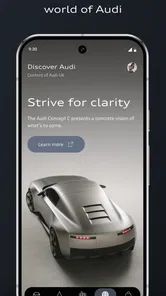
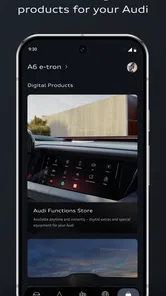
Analysis by Reviewed
I’d decide whether myAudi belongs on my phone by asking one practical question: do I want a direct digital link to an Audi I drive, or do I mainly need a general motoring tool? The difference matters. This is an Audi app from Audi, not a universal dashboard for every make, so its appeal depends on your car and the services available to it. For an owner who likes checking vehicle information and keeping connected services close at hand, that focus can be useful. For someone shopping for a vehicle-independent trip planner or maintenance tracker, it is a narrower fit.
Start with the car, not the app
Before relying on any connected-car app, I’d pair it with the specific Audi I use and check which functions are available for that vehicle. The app’s overall appeal is clear, but remote controls and connected services can depend on the car’s capabilities. That is why I would treat features such as locking or starting as possibilities to verify, not promises that apply to every Audi. This small check can save frustration later, especially if remote access is the main reason you want the app.
It is free, rated for Everyone, and has reached over a million installs. Its average rating is 4.1 from around 82,000 ratings, with roughly 1,800 written reviews, which gives prospective users a sizeable body of public feedback to consider. The current release is version 5.0.3, and the app first appeared on September 17, 2018. Those details establish that it is an established Audi companion, but they do not tell me whether a particular service will work with a particular car; vehicle compatibility is the more important decision point.
Connecting You to Your Audi
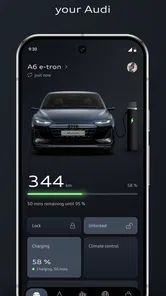
First things first, let's talk about connectivity. With the myAudi app, you can seamlessly connect your smartphone to your vehicle. It’s like magic. The app allows you to access a bunch of cool features directly from your phone. We're talking about checking your fuel level, range, and even your service schedule. I mean, who needs to get their hands dirty when you have all this info at your fingertips?
Remote Control Like a Boss
Now, one of the features that truly blew my mind is the remote control function. Imagine being able to lock or unlock your car from afar. Yep, you read that right. No more panic attacks wondering if you left your car unlocked. Plus, you can even start the engine remotely if your car supports it, which is perfect for those chilly mornings when you want to warm up the car before stepping out. How convenient is that?
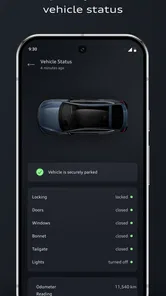
For me, the sensible habit is to use remote access as a convenience, then confirm the car’s status in the app rather than assuming a tap worked. That is especially helpful when I’m leaving a busy parking area and cannot see the vehicle clearly. I would also keep ordinary keys as the dependable fallback: a phone app is useful, but it should not become the only way I expect to access a car. If more than one person drives the Audi, it is worth agreeing on who checks its status and handles service reminders, so information does not get overlooked between drivers.
Navigation and Maps
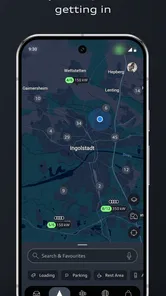
Another standout feature is the app's navigation system. The integration is smooth, and it allows you to plan your route beforehand. You can send destinations directly to your car’s navigation system, making your driving experience even more streamlined. It's like having a personal travel assistant who’s always ready to guide you through traffic.
More From Our News Desk

 Remini - AI Photo Enhancer
Remini Is Our App of the Week for Bringing Old Photos Back to Life
A quick AI restoration tool earns its place by making faded portraits and soft, older photos feel vivid again—provided you know where its polish ends.

 PayPal - Pay, Send, Save
PayPal Reviewed: Who Benefits from Its Reach, and Who Should Skip It
PayPal is most useful when its reach and familiar checkout solve a real payment problem. These reader-by-reader recommendations show where it earns a place—and where friction wins.

 Millionaire 2026 Quiz & Trivia
 Makes Every Answer Count
A familiar quiz-show format succeeds or falters on tiny design decisions: how clearly the game guides a first answer, handles hesitation, and invites one more round.

 Decor Life - Home Design Game
Decor Life Turns Short Breaks Into Bite-Sized Decorating Jobs
A room-by-room decorating game built for quick sessions gains from modern phone habits, but its gentle pace still depends on patience, repetition, and a steady stream of design jobs.

 Sniper 3D:Gun Shooting Games
Sniper 3D’s Quick-Shot Appeal Faces the Upgrade Treadmill
The appeal is immediate: line up a target, steady your aim, and fire. The harder question is whether Sniper 3D can keep players returning after the first rush.

 Blockudoku®: Block Puzzle Game
Blockudoku vs. the Puzzle Pack: A Quick Puzzle With a Repetitive Edge
Blockudoku turns a clean grid into a quiet test of foresight. Against match-three polish and head-to-head simplicity, its lasting appeal is also its biggest limitation.
Latest News



A useful workflow is to set a destination before setting off, then treat the car’s navigation as the driving-time guide rather than trying to make changes while moving. This makes the phone helpful during planning without turning it into another distraction behind the wheel. If I already use a general maps app for walking, public transport, or trips in different cars, I would keep using that for those jobs; myAudi makes more sense for passing a planned destination into an Audi’s own navigation setup.
Stay Updated and Informed
With myAudi, staying updated on your car’s status is a breeze. You receive notifications about service requirements and can book appointments directly through the app. It’s all about making your life easier and keeping your car in top-notch condition without breaking a sweat.
In everyday use, those reminders are most valuable when I turn them into a quick routine: check the vehicle status occasionally, note an upcoming service prompt, and deal with it before it becomes a last-minute errand. A notification is a nudge, not a substitute for paying attention to the car or arranging maintenance when needed. If I manage several vehicle makes, a general maintenance log may be easier for keeping everything together; if I mainly drive an Audi, the closer connection between vehicle information and service planning is the stronger reason to keep this app.
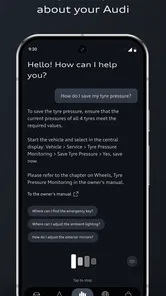
Additionally, the app provides access to Audi’s digital services, which means you can enjoy entertainment and information services while you're on the go. It's like turning your Audi into a smart car, fully equipped to keep you connected at all times.
Where the alternatives fit
The main trade-off is focus. A manufacturer’s app is the natural place to look for Audi-specific vehicle details and connected services, while a general navigation app is usually the more flexible companion across cars and travel modes. A dealer or service contact can still be the better route when you need a conversation about a repair rather than a reminder or appointment workflow. I would not replace those alternatives with myAudi; I would use each for the task it handles best.
There is also a practical cost to switching your routine: you need to connect the app with your vehicle, learn where its useful status and service information live, and remember to open it when you need them. If you only drive an Audi occasionally, or prefer not to manage vehicle services on a phone, that effort may outweigh the convenience. If you own or regularly use a compatible Audi and want one place to check its information, the setup is easier to justify.
A routine that makes the connection worthwhile
Picture a weekday morning when I am leaving for an unfamiliar appointment. I can prepare the destination before I go, pass it to the Audi’s navigation system, and check the car’s displayed range while deciding whether I need to stop first. Once parked at the destination, a quick status check can help settle the small uncertainty about whether the car is locked. None of those steps replaces driving attention or the vehicle’s own instruments; the value is that planning and follow-up happen around the trip instead of requiring me to remember every detail later.
This kind of use is a better test than opening the app once, browsing its screens, and deciding based on novelty. I would try it during the first week I regularly drive the car: connect the vehicle, look for the information I actually care about, and test the destination handoff while parked. Then I would decide whether those steps save enough effort to earn a place in my routine. If I rarely check vehicle status and already plan routes directly in the car, the app may remain an occasional convenience rather than something I need daily.
What to check before depending on it
A practical first check is whether the vehicle is properly associated with the account and whether its available services match the reasons I installed the app. I would verify this before a trip, not while standing in a hurry at the car. If the goal is remote access, I would test the relevant control nearby and confirm the resulting status rather than treating the button itself as proof. If the goal is navigation, I would send a simple destination in advance and make sure it appears where expected in the car. These small tests distinguish a useful setup issue from a function the particular vehicle does not offer.
It is also worth thinking about who will use the app. A household with one regular Audi driver may find it easy to keep vehicle information and service prompts in one personal routine. With several drivers, decide whose account or phone will be used for checks and who is responsible for acting on a service reminder. That is less glamorous than remote controls, but it prevents the common problem of assuming another person has seen a notification. I would keep any essential service records and appointment details somewhere I can retrieve them independently too, rather than relying on a single phone workflow.
Where a different tool is the better choice
If I need a map that works consistently across rental cars, walking routes, and public transport, a general navigation app is the more natural primary tool. If I maintain vehicles from multiple manufacturers, a neutral service log is likely to make comparison and record keeping simpler. And if I have a complicated fault, a conversation with a service professional is more useful than an app reminder or a digital status screen. myAudi’s strength is not that it replaces every motoring tool; it is that it can make Audi-specific tasks more convenient when the car and available services line up.
That distinction matters for people considering the app before buying or borrowing an Audi. Installing it does not turn a vehicle into a connected model with every remote feature, and the app should not be the deciding reason to choose a car until you have checked the functions supported by that exact vehicle. For an existing owner, the decision is simpler: try the free companion and keep it if the vehicle information, route handoff, or service workflow genuinely helps. For someone without regular access to an Audi, its narrow focus gives little reason to keep it installed.
Who I’d recommend it to
My recommendation is straightforward: Audi drivers should give it a try, especially if they want a convenient way to check vehicle details, plan a destination for the car, and stay on top of service. I would be more cautious if remote functions are the sole draw, because support depends on the vehicle. The app is free and has broad reach, but the right choice still comes down to what your Audi supports and whether you will actually use its connected services.
Final Thoughts
In conclusion, the myAudi app is not just an app; it’s an essential tool for Audi owners. It transforms the way you interact with your vehicle, making it more convenient and enjoyable. Whether you’re a tech enthusiast or just someone who loves their Audi, this app is definitely worth having. It’s like having a piece of the future right in your pocket, and honestly, I wouldn’t want to drive without it anymore.
My bottom line
I would treat myAudi as a useful companion, not a requirement for owning an Audi. Its appeal is strongest when I have a compatible vehicle, want a convenient view of vehicle information, and will use its connected services often enough to justify setup. The free price makes trying it a low-commitment decision, but convenience is personal: if it does not fit the way I drive, there is no need to force it into my routine.
The app is developed by Audi and sits in the auto and vehicles category, with an Everyone age rating. For a focused manufacturer companion, its 4.1 average from around 82,000 ratings suggests plenty of drivers have formed an opinion, while the roughly 1,800 written reviews offer additional perspectives. I would still make my own judgment by checking the specific car’s capabilities and testing the tasks I care about. That is the difference between downloading an app because it sounds useful and knowing it actually earns its place on my phone.
myAudi Frequently Asked Questions
Is myAudi available in my country and language?
myAudi is developed by Audi for Audi drivers, and its services are intended to support access to Audi and Audi connect services. Before downloading, consider whether those services are offered for your location and vehicle, since availability can vary. The app’s language and regional options can also affect how comfortable it is to use for your everyday needs.
Do I need an Audi account or vehicle details to get started?
myAudi is designed around Audi ownership and access to Audi services, so you should expect to use account and vehicle information when setting it up. Having your Audi details ready can make it easier to connect the app with the vehicle and explore the services available to you. The app’s usefulness will depend on the information and services associated with your Audi.
Can I use myAudi if I do not own an Audi?
myAudi is aimed at Audi drivers and provides access to Audi services and Audi connect services. If you do not own or drive an Audi, the app is unlikely to offer much practical value for your needs. Its main purpose is to support a connected experience for Audi owners, rather than provide general vehicle tools for drivers of any make.
What devices can I install myAudi on?
myAudi is an Auto & Vehicles app from Audi, available for Android and iOS. Before downloading, check that your device runs a supported operating system; the Android version requires Android 11 or later. The app is free to download and is intended for Audi drivers who want to use Audi services and Audi connect services from a mobile device.
Is myAudi free to download, and what does that mean for its services?
The myAudi app is free to download. Some services may depend on your vehicle or the Audi connect services available to you, so the app’s free download does not necessarily mean every service is included for every driver. If you are considering a particular feature, check the terms for that service and ask an Audi dealer about any costs before relying on it.
Pros
- Seamless integration with Audi vehicles.
- User-friendly interface and design.
- Real-time vehicle status updates.
- Comprehensive navigation features.
- Remote control capabilities for vehicle settings.
Cons
- Limited compatibility with non-Audi cars.
- Requires stable internet connection.
- Some features may drain phone battery.
- Occasional syncing issues reported.
- Subscription required for premium features.