

My Earthquake Alerts Pro
- 403.00
- 4.8
- Installs
- 50.00K
- Price
- $2.99

Screenshots
Analysis by Reviewed
I find earthquake apps most useful when they answer a practical question quickly: where did shaking happen, and is it relevant to me? My Earthquake Alerts Pro is a paid weather app from JRustonApps B.V. focused on earthquake reports, alerts, and maps. Its worldwide scope is helpful if I travel, follow activity in another region, or simply want a clearer view than a general weather app offers. It has a 4.7 average from around 5,500 ratings, but I would treat that as a sign of broad appeal, not proof that every alert arrives instantly or suits every situation.
Information is not the same as assurance
Earthquake reporting is a subject where trust matters more than a polished screen. I use an app like this to get oriented: to see which area a report concerns, how it appears alongside other activity, and whether I should look for more information. I do not treat a notification as confirmation that a particular building or street is safe. For urgent decisions, advice from local authorities and emergency services has to take priority.
The app’s appeal is its narrow purpose. Rather than asking a general forecast app to make seismic activity easy to follow, I can open a dedicated feed and map. That focus is useful, but it does not remove the need to think critically about reports or to distinguish an informational tool from an official warning channel. I would install it for awareness, not as a personal safety guarantee.
What the earthquake feed is good for
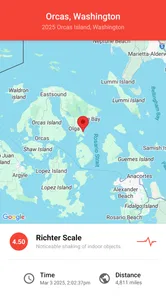
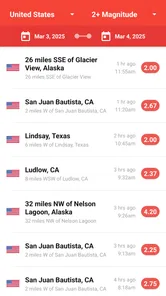
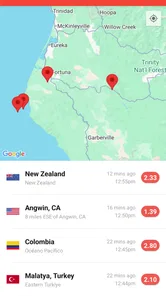
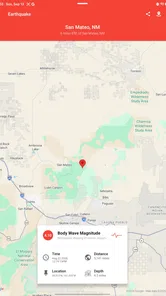
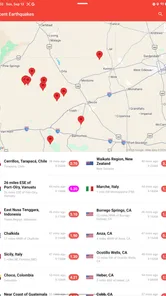
The central value here is keeping earthquake information together: a feed for recent activity, alerts, and a map for geographic context. That combination matters because a list alone can make distant events feel confusing. I can use the map to see where a report sits in relation to a city or travel route, then look at the feed for a quick overview. The app has more than 50,000 installs, and its Everyone age rating makes it broadly accessible.
Making alerts useful rather than noisy
Earthquake notifications are only helpful if they match what I care about. If the available alert settings let me narrow events by magnitude or distance, I would start with a range that fits my situation instead of enabling every possible notification. A person living near an active fault may want a different balance from someone checking conditions for a trip. I would also keep in mind that an alert is information to investigate, not an official instruction or a substitute for local emergency guidance.
The map is especially useful when I am planning a journey through a region I do not know well. I can check the broader pattern before departure, then use the feed to follow new reports without assuming that every event will affect my route. For day-to-day use, I would avoid repeatedly refreshing out of habit; checking at a sensible moment is less distracting and makes the information easier to interpret.
Where it fits among weather tools
Most general weather apps put forecasts, rain, and temperature first, so earthquake information may be limited or harder to follow there. This app is a more focused choice when seismic activity is the reason I am checking. On the other hand, if I mainly need tomorrow’s forecast and only occasionally wonder about earthquakes, a regular weather app may be a simpler fit. The trade-off is focus: this app’s purpose is clear, but it is not a replacement for a full weather service or an emergency alert system.
More From Our News Desk

 Gmail
GmailGmail in a Busy Inbox: Who Benefits Most?
From first account to crowded workday, Gmail earns its place through dependable search and flexible sorting—but its best fit depends on how much inbox maintenance you can tolerate.

 Prime Video
Switching to Prime Video: What Changes in Your Viewing Routine
Prime Video can make a compelling second home for streaming, but switching means learning a different catalog, rental layer, and route from browsing to playback.

 Universal TV Remote Control
Universal TV Remote Control Works Best as a Reliable Backup
A phone remote earns its place through quick setup and reliable habits. Here is how to get more from Universal TV Remote Control—and where its limits show.

 Weather - By Xiaomi
Weather by Xiaomi Review: Clear at a Glance, Less Clear Up Close
Xiaomi’s weather app makes everyday forecasts quick to scan, but its calm surface can leave useful details and recovery paths harder to find than they should be.

 X
XX Under Pressure: Can It Recover When Posting Goes Wrong?
A resilience-focused review of X, examining setup, mistaken posts, interruptions, weak connections, and the gaps that matter when recovery needs to be dependable.

 Clash of Clans
Clash of Clans Is Won Between the Battles
Its raids are quick; its community is a long-term project of coordination, teaching, rivalry, and shared responsibility—with all the friction that entails.
Latest News



For a realistic example, imagine I am staying in a city during a trip and hear that a nearby area has had shaking. I can open the feed, compare the report’s location on the map, and decide whether it is relevant to where I am. That is a useful way to orient myself, but I would still follow instructions from local authorities and check trusted official sources before changing plans. The app helps me understand reports; it cannot tell me what is safe inside a particular building.
Deciding what deserves a notification
A useful setup starts with a question: what would I actually do differently if I received an alert? If I am monitoring a home area, I might want fewer, more relevant notifications rather than a steady stream of reports from around the world. If I am traveling, temporarily broadening what I follow could help me understand activity around several stops. I would revisit that choice when the trip ends, instead of leaving a travel-oriented setup running indefinitely.
That approach also helps answer whether alerts should stay on all the time. They make sense for someone who actively follows seismic activity and can use the information calmly. Someone who checks the app only out of curiosity may find that manual visits are enough. Notifications can interrupt work or sleep, and an interruption is not automatically useful just because the subject is important.
Cost, setup, and sensible expectations
The app costs $2.99, with in-app purchases listed at $0.99 per item. I would check the purchase details before confirming anything and decide whether the focused earthquake feed is worth paying for compared with the tools I already use. Its current version is 25.1.8, and it requires Android 7.0 or later. Those details make it easier to judge compatibility and cost before installing, especially on an older phone.
One practical tip is to review notification choices after setup rather than leaving every option at its default. Another is to use the map for location context, not as a prediction tool: seeing a cluster of reports does not establish what will happen next. If I am especially sensitive to alerts, I would also consider whether frequent updates could create anxiety without improving my decisions. In that case, occasional manual checks may be a better routine.
What the app can—and cannot—settle
A natural question is whether a feed can tell me if I am in immediate danger. I would not use it that way. A mapped report can help me understand where an event was recorded, but it cannot assess my building, local conditions, or personal circumstances. If I feel shaking or receive an official warning, I would follow local emergency guidance rather than wait for an app to interpret the situation for me.
Another practical question is whether a worldwide view is useful when I mostly care about one place. It can be, provided I keep the scope manageable. I would focus my routine checks on the area that matters to me and use the broader map when travel or a particular event gives me a reason. That keeps global coverage from becoming a distraction and makes the location context easier to read.
I would recommend this app to people who regularly monitor earthquakes, travel across regions where seismic activity matters, or want a dedicated map-and-feed view. I would skip it if I only want everyday forecasts, or if I expect an app to guarantee advance warning or replace official safety advice. JRustonApps B.V. has built a focused tool, but the most responsible way to use it is as one source of situational information, not as a promise of protection.
A focused tool for curious, prepared users
My Earthquake Alerts Pro is like having a mini seismograph right in your pocket. The app provides real-time notifications about earthquakes around the globe, ensuring that you're always aware of what's happening beneath the Earth's crust. The interface is super intuitive, making it easy to navigate even if you're not a tech whiz.
Features That Rock
One of the best things about this app is its comprehensive set of features. You can customize alerts based on the magnitude of the earthquake and the distance from your location. If you're a data geek, you'll love the detailed statistics and historical data the app provides. It even includes a personalized list of significant earthquakes that you can access at any time.
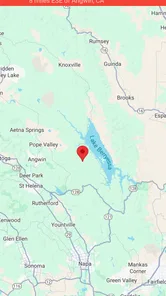
Another cool feature is the map interface, which gives you a visual representation of recent seismic activity. You can zoom in and out to see earthquakes of varying magnitudes all over the world. Plus, the app supports multiple languages, so it's accessible to users around the globe.
Practical trade-offs before installing
The audience I see benefiting most is someone who has a specific reason to check earthquakes: perhaps a resident who follows activity in their wider region, a traveler who wants geographic context, or a curious reader who likes seeing reports collected in one place. If I only need a broad weather forecast, a standard weather app is the more direct choice. If I need authoritative emergency instructions, I would look to official local channels instead. Those alternatives serve different needs, and the dedicated feed is most valuable when its focused view is what I want.
I would also separate the app’s convenience from claims about reliability that I cannot personally verify just by looking at a feed. A notification arriving on my phone is useful only as a prompt to check context; it should not be treated as proof that I will receive advance notice or that an event has been fully assessed. That is an important distinction for anyone deciding how much confidence to place in a phone alert.
Why You Should Download It
In a world where being informed can make a difference, My Earthquake Alerts Pro is a must-have for anyone living in or traveling to earthquake-prone areas. It's not just an app; it's a tool that empowers you with information that could be crucial in an emergency situation.
The app's reliability and accuracy in delivering timely alerts have made it a favorite among users. It's like having a personal alert system that fits in your pocket. Whether you're a frequent traveler, a resident of an earthquake zone, or just someone interested in seismic activity, this app has something for you.
So, if you haven't already, give My Earthquake Alerts Pro a try. It's more than just an app; it's peace of mind. Stay safe, stay informed, and let technology keep you one step ahead of Mother Nature.
My Earthquake Alerts Pro Frequently Asked Questions
Who develops My Earthquake Alerts Pro, and what is it designed for?
My Earthquake Alerts Pro is a weather app developed by JRustonApps B.V. Its focus is earthquake information: it presents a feed covering the United States and locations worldwide, along with earthquake alerts and maps. If you want an app centered on monitoring seismic activity rather than general forecasts, its purpose is straightforward and easy to understand before downloading.
What devices and software versions can run My Earthquake Alerts Pro?
My Earthquake Alerts Pro is available for Android and iOS devices. For Android, the listed minimum operating-system requirement is version 7.0, so it is worth checking your device settings before installing. The app is also offered through the Apple App Store for iOS users. Checking the relevant store page on your device can help ensure that your operating system meets its current compatibility requirements.
What features does My Earthquake Alerts Pro offer?
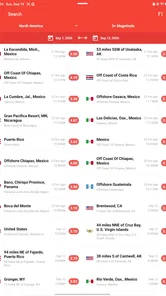
My Earthquake Alerts Pro provides real-time earthquake alerts and updates, sourced from multiple seismic networks worldwide. The app offers customizable alert settings, allowing users to receive notifications based on their preferred earthquake magnitude and regions. Additionally, it includes a comprehensive search feature to explore past earthquakes and detailed information, such as depth and distance from the user's location.
How accurate are the earthquake alerts provided by the app?
The app utilizes data from reputable seismic networks, ensuring high accuracy in earthquake detection and alerts. While it strives for precision, users should consider that no app can guarantee 100% accuracy due to the unpredictable nature of earthquakes. However, My Earthquake Alerts Pro is designed to deliver timely and reliable information to help users stay informed.
Can I customize alert notifications in My Earthquake Alerts Pro?
Yes, My Earthquake Alerts Pro allows you to customize alert notifications based on your preferences. Users can set parameters for earthquake magnitude and choose specific regions they wish to monitor. This customization ensures that you only receive notifications that are relevant and important to you, helping to avoid unnecessary alerts.
Pros
- Real-time alerts for global earthquakes.
- Customizable alert settings for user needs.
- User-friendly interface with detailed maps.
- No ads for uninterrupted experience.
- Comprehensive data with historical analysis.
Cons
- Limited free features
- subscription needed.
- Occasional minor app stability issues.
- Limited language support for non-English users.
- Requires internet for real-time updates.
- May drain battery with constant alerts.













