

My Aurora Forecast Pro
- 133.00
- 4.8
- Installs
- 50.00K
- Price
- $3.99
Screenshots
Analysis by Reviewed
Are you fascinated by the northern lights? Do you dream of witnessing the magical dance of the aurora borealis lighting up the night sky? If so, let me introduce you to My Aurora Forecast Pro, your handy guide to chasing the auroras wherever you are in the world.
A focused tool for planning a rare sighting
I see the app’s main value as focus: it is built around aurora watching rather than trying to cover every part of the weather. That matters when you are deciding whether to stay outside, head somewhere darker, or simply check again later. It is a specialist companion, not a substitute for a general forecast when rain, cloud cover, or road conditions will decide whether an outing makes sense.
For a practical routine, I would check the aurora outlook before making plans, then use local weather information separately to judge comfort and visibility. A strong aurora signal does not guarantee a clear view from your exact spot. Keeping those two questions separate helps avoid treating an encouraging forecast as a promise.
What the forecast can—and cannot—settle
An aurora forecast is most useful when it helps me narrow down when to pay attention, rather than when I expect it to answer every question about a night outdoors. I would treat it as one part of a decision: first, whether activity looks promising; then, whether the sky and my location make viewing practical. That distinction is especially useful for visitors who have only one evening free. It prevents the app’s specialist information from being mistaken for a complete travel or weather plan.
For a first-time viewer, the most actionable approach is to check early enough to make a calm plan, then check again closer to the time you might go out. If the outlook is uncertain, staying flexible is better than committing to a long drive or an uncomfortable wait. If conditions do look encouraging, I would still use a separate local forecast for cloud and general weather, and decide in advance how far I am willing to travel. The app can focus my attention; it cannot remove the ordinary uncertainties of seeing something in the sky.
What Makes My Aurora Forecast Pro Shine?
First things first, this app is available for both Android and iOS, so no matter your device, you’re good to go. The interface is neat and user-friendly, which is something I personally value. No one wants to fumble through clunky menus while trying to catch a glimpse of something as elusive as the northern lights!
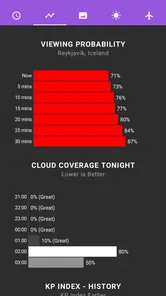
My Aurora Forecast Pro provides detailed forecasts of aurora activity. It gives you a heads-up on the best time to see the auroras based on your location. The app uses data straight from NOAA (National Oceanic and Atmospheric Administration), ensuring you get accurate and up-to-date information. Now, I don’t know about you, but I find it pretty cool to have science in the palm of my hand guiding me to one of nature’s greatest spectacles!
More From Our News Desk

 Gmail
GmailGmail in a Busy Inbox: Who Benefits Most?
From first account to crowded workday, Gmail earns its place through dependable search and flexible sorting—but its best fit depends on how much inbox maintenance you can tolerate.

 Prime Video
Switching to Prime Video: What Changes in Your Viewing Routine
Prime Video can make a compelling second home for streaming, but switching means learning a different catalog, rental layer, and route from browsing to playback.

 Universal TV Remote Control
Universal TV Remote Control Works Best as a Reliable Backup
A phone remote earns its place through quick setup and reliable habits. Here is how to get more from Universal TV Remote Control—and where its limits show.

 Weather - By Xiaomi
Weather by Xiaomi Review: Clear at a Glance, Less Clear Up Close
Xiaomi’s weather app makes everyday forecasts quick to scan, but its calm surface can leave useful details and recovery paths harder to find than they should be.

 X
XX Under Pressure: Can It Recover When Posting Goes Wrong?
A resilience-focused review of X, examining setup, mistaken posts, interruptions, weak connections, and the gaps that matter when recovery needs to be dependable.

 Clash of Clans
Clash of Clans Is Won Between the Battles
Its raids are quick; its community is a long-term project of coordination, teaching, rivalry, and shared responsibility—with all the friction that entails.
Latest News



Features That Capture the Magic
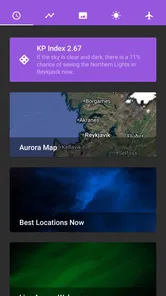
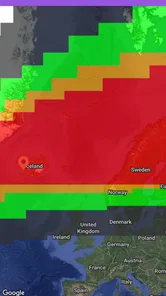
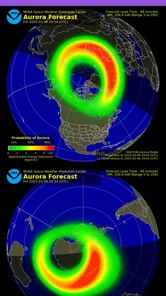
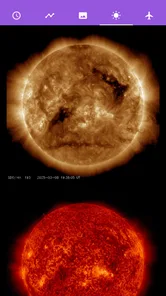
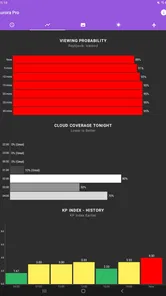
One of the standout features of this app is its ability to show you the aurora oval on a map. This is super handy because it lets you visualize where the auroras are most active at any given time. Plus, if you’re a bit of a data nerd like me, you’ll appreciate the detailed solar wind statistics and sun imagery included in the app. It’s like having a mini space observatory right in your pocket!
Another feature worth mentioning is the alert system. You can set up notifications to alert you when aurora activity is high. Imagine getting a ping on your phone saying, “Hey, the lights are out tonight!” It’s like having a personal aurora guide.
Using the map and alerts wisely
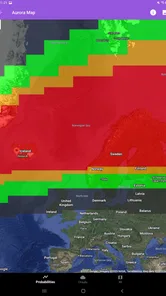
The map is most useful as a planning aid, not a pin-point guarantee. I would compare the aurora oval with the places I can realistically reach, rather than make a long drive on the strength of one promising screen. If you are already near a viewing area, it can help you decide whether to wait or check again later; if you are far away, transport, darkness, and cloud conditions still matter more than a hopeful notification.
Alerts also work best as a prompt to look, not as a reason to drop everything. I would set them at a level that suits my plans and keep the phone accessible, while avoiding the expectation that every alert means a visible display where I am standing. That small shift in mindset makes the app more helpful and less frustrating, especially for a first attempt.
Making the information work in practice
There is a useful difference between checking the app at home and checking it while travelling. At home, I would use the map and solar information to learn what a promising period looks like, without treating every detail as a signal to head out. On a trip, I would use the location outlook to decide whether to stay alert that evening, then check nearby weather and access before choosing a viewing spot. This turns the forecast into a decision aid rather than a spectacle to watch on the screen.
One small but practical habit is to decide your fallback before you start waiting. If activity does not develop, or cloud makes the view poor, you can return indoors instead of refreshing repeatedly in the cold. The app is most helpful when it reduces uncertainty about when to check, while your own comfort and local conditions determine how long to stay. That matters for families and casual visitors as much as for dedicated aurora watchers.
Who will get the most from it?
This is a good fit for aurora enthusiasts, travellers who have a northern-lights evening built into a trip, and curious beginners who want more context than a simple “maybe tonight” forecast. The solar-wind details and sun imagery give interested users something to explore while waiting, and the location-based outlook makes the information easier to connect to a real plan.
I would skip it if you only want an everyday forecast for temperature and rain, or if you expect an app to guarantee a sighting. A standard weather app is the better first stop for ordinary outdoor planning; this one makes sense when auroras are the specific reason you are checking conditions. Its specialist focus is a strength for that audience, but unnecessary for everyone else.
Choosing between a specialist forecast and everyday weather
Compared with a usual weather app, this one is aimed at a narrower question: whether aurora activity may make watching worthwhile. A general forecast remains the more useful choice for deciding what to wear, whether rain is likely, or how a normal day outdoors will feel. I would not replace one with the other. For a trip where the lights are a major goal, the two tools have different jobs: the aurora app helps me decide when to pay attention, while local weather information helps me decide whether being outside is sensible.
There is also a trade-off between depth and simplicity. Someone who only wants a quick yes-or-no answer may not care about solar-wind statistics or sun imagery, and may prefer a basic forecast or a quick glance at a general weather app. Someone who enjoys understanding why an outlook is changing has more reason to explore those details. The specialist focus is valuable only if that extra context is interesting or useful to you.
Sharing the Experience
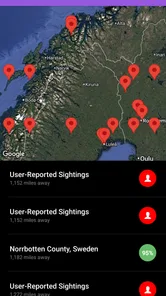
The app also encourages sharing your aurora experiences with others. There’s a community feel to it, with options to share photos and sightings. It’s a nice touch that adds a social element to this otherwise solitary pursuit of chasing the lights.
On a trip, I can imagine checking the outlook after dinner, using the map to decide whether a nearby darker spot is worth trying, and letting an alert bring me back to the app later. I would still dress for the weather, check local conditions, and keep a flexible plan rather than assume the lights will appear on schedule. That is a more realistic way to use an aurora forecast than building an entire evening around one notification.
What to consider before paying
My Aurora Forecast Pro is a paid weather app from JRustonApps B.V. It costs $3.99, is rated for Everyone, and has an average rating of 4.7 from around 3,600 ratings, with over 50,000 installs. Version 25.2.3 supports OS 7.0 and later, and in-app purchases are listed at $0.99 per item. Those details make the purchase decision worth considering: I would choose it for repeated aurora planning, not just a passing curiosity. Before buying, it is sensible to think about how often you will use specialist forecasts and whether you want the extra solar and map context.
For someone travelling to northern regions for several nights, the purchase may feel easier to justify because there are multiple chances to check the outlook and learn from it. For a person who is merely curious from a place where aurora viewing is unlikely to be part of regular plans, a general weather app and occasional free information may be enough. I would also consider whether the solar details are a genuine draw for you; if you only want an everyday forecast, the specialist emphasis is unlikely to earn its place on your phone.
The app has a 4.7 average from around 3,600 ratings and 126 reviews, which gives prospective users some indication of how it has been received. It was released on February 18, 2016, and the current version is 25.2.3. I would view those details as context, not as a guarantee that a forecast will match conditions at one particular viewing spot. For me, the better test is whether its location-based outlook, map, alerts, and supporting solar information suit the way I plan to chase the lights.
In conclusion, My Aurora Forecast Pro is a must-have for anyone with a passion for the northern lights. Whether you’re a seasoned aurora chaser or a newbie hoping to catch your first glimpse, this app provides all the tools you need to make your aurora hunting a success. With its reliable forecasts, intuitive interface, and community features, it’s more than just an app; it’s your ticket to an unforgettable experience.
My recommendation
I would recommend it most to people who will actively plan around aurora viewing and want a dedicated place to follow the outlook, map, alerts, and solar context. The strongest reason to choose it is not that it can promise a display, but that it gives an aurora-focused routine more structure. I would not recommend it as a replacement for everyday weather, nor as a purchase for someone expecting certainty from a naturally unpredictable sighting.
My advice is to decide what you need before installing or buying: if you want specialist guidance for a trip or a recurring interest in auroras, this app has a clear purpose. If your priority is simply knowing whether it will rain tomorrow, choose a regular weather app instead. Used with realistic expectations and a separate check of local conditions, this is a focused companion that can make waiting for the lights feel more informed without pretending to control the outcome.
My Aurora Forecast Pro Frequently Asked Questions
Who is My Aurora Forecast Pro designed for?
My Aurora Forecast Pro is aimed at people interested in the Northern Lights and Aurora Borealis, whether they are planning a dedicated viewing trip or simply want to follow aurora activity. It is a weather app from JRustonApps B.V. Its Everyone content rating makes it suitable for a broad audience, although the forecasts are most useful to people with an interest in aurora watching.
What features does My Aurora Forecast Pro offer for tracking aurora borealis?
My Aurora Forecast Pro provides an array of features for aurora enthusiasts, including real-time aurora forecasts, alerts for when auroral activity is high, and interactive maps to pinpoint the best viewing locations. Additionally, it offers comprehensive weather forecasts and notifications to ensure optimal viewing conditions. The app is designed with a sleek interface that is both user-friendly and informative.
Is My Aurora Forecast Pro available for both Android and iOS devices?
Yes, My Aurora Forecast Pro is available for download on both Android and iOS platforms. Users can find the app on the Google Play Store for Android devices and the Apple App Store for iOS devices. This cross-platform availability ensures that users can access aurora forecasts and alerts on their preferred devices, making it a versatile tool for all sky watchers.
Does My Aurora Forecast Pro require an internet connection to function?
While some features of My Aurora Forecast Pro require an internet connection, such as real-time updates and interactive maps, the app also provides offline capabilities. Users can access saved forecasts and previously downloaded data even without an internet connection, making it a reliable companion for travelers or those in remote areas with limited connectivity.
How accurate are the aurora predictions provided by My Aurora Forecast Pro?
My Aurora Forecast Pro is renowned for its accuracy, utilizing data from multiple sources, including NOAA and other meteorological organizations. The app analyzes solar activity and geomagnetic conditions to provide precise predictions. While no forecast can be 100% accurate, the app's advanced algorithms and comprehensive data sources ensure highly reliable information for users planning their aurora sightings.
Pros
- User-friendly interface
- Accurate aurora forecasts
- Customizable alerts
- Detailed weather info
- Ad-free experience
Cons
- Limited free features
- Occasional location errors
- Battery drain issues
- Lack of offline mode
- Some data requires premium













