MP3 Downloader - Music Player
- 18.52K
- 4.3
- Installs
- 100.00M
- Price
- Free

Screenshots
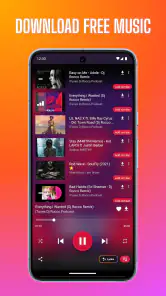
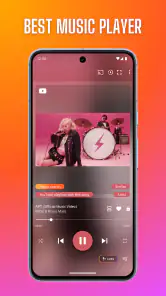
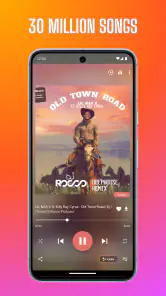
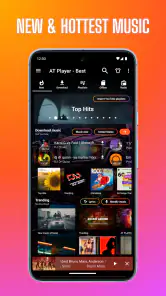
Analysis by Reviewed
I tend to judge a music app by what it helps me do between other parts of the day, not by how many buttons it can fit on a screen. MP3 Downloader - Music Player is aimed at people who want to find tracks, keep music available offline, and play it from one place. It is a free music and audio app from Super Music Player Downloader, with optional in-app purchases ranging from $0.99 to $99.99 per item. Its Teen age rating is also worth noting if you are choosing apps for a younger listener.
What the app is like to use now
The app has been around since December 1, 2016, and its current version is 20251129. That tells me it is an established product with ongoing versioning, rather than a brand-new player. It has a 4.3 average from around 612,000 ratings and more than 100 million installs, so it has clearly reached a large audience. Those figures offer context, but they are not a substitute for checking whether its approach to finding and saving music suits you.
Finding music and keeping it handy
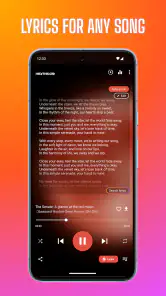
In practical use, the appeal is the combination of searching, listening, and offline access. I would reach for it when I want to build a small collection for a commute or a workout rather than switch between several separate tools. Lyrics can also make a casual listening session more engaging, especially when I am trying to follow a song or remember a line. The key trade-off is that an app built around finding and downloading tracks may feel less predictable than a personal library where I already know exactly what is available.
The Latest on MP3 Downloader - Music Player
For a realistic everyday example, I might search for a few songs before leaving home, save the ones I want available offline, and then use the player during a train ride where I would rather not rely on a steady connection. I would check that the tracks are actually available offline before setting out; that small habit avoids discovering mid-journey that I only saved a search result or an online item. Lyrics and playback in the same app can make this kind of quick preparation convenient.
How it fits beside other music options
Compared with a standard streaming service, this app’s draw is its downloader-and-player focus, not simply browsing a large catalogue or following a paid subscription routine. Compared with a basic phone music player, it adds a way to search for music and lyrics alongside playback. That combination is useful if you want discovery and listening close together, but it may not replace a service whose familiar playlists, collection management, or listening habits you already depend on. I would treat it as a practical extra rather than assume it needs to become my only music app.
One useful workflow is to search with a specific track or artist in mind, then make a short offline playlist instead of downloading indiscriminately. It keeps a commute or workout set easier to manage and makes it simpler to notice whether a result is actually the version you wanted. If lyrics are your main reason for opening the app, I would check them while connected before relying on them later; the player’s offline purpose does not necessarily mean every related element behaves offline in the same way.
Discovering New Beats
Let's dive into the first thing that caught my attention—the vast library of music. The app allows you to search and download millions of tracks with a few taps. Whether you're into pop, rock, jazz, or even indie, there's something for everyone. The search feature is pretty intuitive, and I found myself lost in a sea of new artists and albums to explore.
More From Our News Desk

Clash of Clans Is Won Between the Battles

Android Auto Makes the Case for Quieter Car Software

MobiOffice: Transforming Mobile Productivity with Seamless Integration

EA SPORTS FC™ Mobile Soccer: Redefining Mobile Sports Gaming

How Microsoft OneDrive Became a Mobile Productivity Giant

How Google Translate Breaks Language Barriers Effortlessly
Easy as Pie
One of the most appealing aspects of the MP3 Downloader - Music Player is its user-friendly interface. As soon as you open the app, you're greeted with a clean, straightforward design that makes navigation a breeze. Even if you're not tech-savvy, you'll find it super easy to download your favorite tracks and create playlists. It’s as simple as pie!
Sound Quality That Hits Home
Now, what's a music app without great sound quality, right? This app doesn’t disappoint in that department. The audio quality is top-notch, and you can choose from different formats depending on your preference and device compatibility. Whether you're blasting tunes through your headphones or car speakers, the sound remains crisp and clear.
Jam-Packed with Features
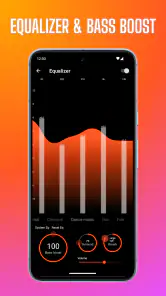
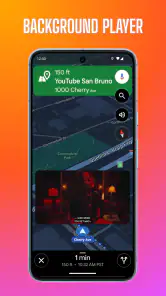
Aside from downloading and playing music, the app comes with a bunch of cool features. You can create and manage playlists, adjust the equalizer to suit your mood, and even set a sleep timer for those who love drifting off to music. Plus, it supports background play, so you can multitask while enjoying your favorite beats.
For an existing user, a version change is most useful when it preserves the routines that already work: familiar playlists, a preferred equalizer setting, and the habit of starting music in the background. I would check those basics after installing an update rather than assume every setting or screen behaves exactly as before. Since the version number alone does not tell me what changed, I would separate that practical check from any expectation of specific new features.
Where I would be cautious
Search and downloads are only as useful as the results you can identify and play. Before building a big collection, I would try a few searches for artists with similar names and confirm that the selected track is the intended one. This is a simple way to avoid clutter and is especially helpful when preparing music for offline listening. I would also consider whether the app’s download-focused approach fits how I listen: people who want a tightly curated subscription catalogue or a familiar streaming ecosystem may be happier with a conventional streaming app.
The app is free to start, but purchases are available, so I would explore the everyday features I actually need before paying for anything. The listed purchase range is broad, and that makes it sensible to review each purchase option in the app rather than assume a paid item is essential. If all I need is playback of music already stored on my phone, a simpler local player may be the less complicated choice.
Who is likely to enjoy it
I see the best fit as someone who likes searching for tracks, wants a player and downloader together, and values having selected music ready for offline listening. It can also suit a listener who uses lyrics, playlists, background playback, an equalizer, or a sleep timer as part of a flexible routine. Someone who prefers an ad-free subscription experience, relies on a carefully maintained streaming library, or only wants a no-frills player should compare alternatives before settling in.
Easy as Pie
One of the most appealing aspects of the app is its user-friendly interface. As soon as you open it, you're greeted with a clean, straightforward design that makes navigation a breeze. Even if you're not tech-savvy, you'll find it super easy to download your favorite tracks and create playlists. It’s as simple as pie!
Sound Quality That Hits Home
Now, what's a music app without great sound quality, right? This app doesn’t disappoint in that department. The audio quality is top-notch, and you can choose from different formats depending on your preference and device compatibility. Whether you're blasting tunes through your headphones or car speakers, the sound remains crisp and clear.
Jam-Packed with Features
Aside from downloading and playing music, the app comes with a bunch of cool features. You can create and manage playlists, adjust the equalizer to suit your mood, and even set a sleep timer for those who love drifting off to music. Plus, it supports background play, so you can multitask while enjoying your favorite beats.
Making a small collection work well
I would keep the first batch of downloads deliberately small and practical: a few reliable commute tracks, a workout sequence, or something relaxing for the end of the day. That gives me a chance to learn how the app distinguishes saved music from items I have only found or played online. It also makes it easier to spot an incorrect version before it becomes buried in a long collection. Once that routine feels dependable, adding more music is less likely to turn into a cleanup job.
Playlists are especially useful here because they let me give downloads a purpose instead of treating the app as a search box with an ever-growing pile of tracks. I might keep one short list for exercise and another for travel, then use the equalizer only when the listening situation calls for it. For example, a setting that suits headphones may not be the one I prefer through a car system. Trying changes on a familiar track makes it easier to tell whether an adjustment helps or simply makes the sound louder.
Small checks that prevent offline surprises
Before relying on saved music for a long trip, I would do a quick test at home: open the playlist, start a track, and confirm that it continues without depending on a fresh search. I would also leave enough time to resolve a result that is unavailable or not the recording I expected. This is more useful than downloading a large batch at the last minute, because it tests the whole routine—finding, saving, organizing, and playing—rather than just the search step.
If I use lyrics, I would treat them as a companion feature, not as the reason to assume every song has them ready whenever I want. Checking a couple of tracks during an ordinary connected listening session gives me a realistic sense of how well lyrics fit my own music choices. That matters most if I plan to use them for learning a song or singing along away from a connection. It is a small bit of preparation, but it keeps expectations grounded.
Choosing it for the right listening habit
This is most appealing to listeners who like to assemble a personal selection rather than hand every choice to a streaming service. If I already know what I want to hear and enjoy preparing a few tracks in advance, its search-plus-player approach can be more direct than opening a broad streaming catalogue and navigating through recommendations. On the other hand, someone who wants ready-made mixes, a stable subscription library, and synchronized listening habits across devices may find a conventional streaming service better suited to daily use.
There is also a useful distinction between this app and a local-only player. A local player is often the simpler option when my music is already organized on the phone and I have no interest in searching for more. Here, discovery and offline listening are part of the appeal, alongside playback tools such as playlists, lyrics, background play, an equalizer, and a sleep timer. If those extras do not solve a real problem for me, the additional search-and-download workflow may be unnecessary.
Questions worth answering before settling in
Can I use it for a trip without an internet connection? That is the point of preparing offline music, but I would verify each chosen track by opening and playing it before leaving. Does the app replace a streaming subscription? Not necessarily: its strengths are different, and listeners who depend on curated catalogues and established streaming playlists may prefer their usual service. Can I use it just to play files already on my phone? A basic local player may be a more straightforward fit if that is the only task I need.
Is it a sensible choice for a younger listener? The Teen age rating is a useful signal for families, but I would still review the app together and decide whether its search and download features fit the listener’s needs. Do I need to pay to try it? It is free to start, while optional purchases are available; I would first see whether the everyday listening routine works for me and read each purchase choice carefully before spending. Those are practical questions to resolve early, rather than after building a large library around the app.
What I would keep an eye on
The version history gives existing users a reason to stay attentive, but a current version number by itself is not a feature changelog. After an update, I would verify the parts of my routine that matter most—whether my playlists remain convenient, offline tracks still play, and background playback behaves as I expect. That approach is useful without assuming that a particular update introduced a specific tool or changed how downloads work.
I would also watch whether the app continues to suit the way I actually listen. A downloader-focused player can be handy when I want a compact selection ready for a journey, yet less attractive if I increasingly rely on recommendations or want one carefully synchronized library everywhere. The right choice can change with a listener’s habits. Keeping a small test playlist makes it easy to reassess without committing my whole music routine at once.
Wrapping It Up
So, is the app worth your time? I’d say absolutely! It’s perfect for anyone who wants a reliable, easy-to-use app for downloading and listening to music. With its vast library, superb sound quality, and a plethora of features, it’s a must-have for any music enthusiast. Give it a shot, and you might just find your new favorite jam!
Happy listening!
MP3 Downloader - Music Player Frequently Asked Questions
Does MP3 Downloader - Music Player need an internet connection to play music?
The app’s store summary highlights offline-song downloads, so you can save music and listen later without relying on an active connection. An internet connection may still be useful when browsing for music or downloading tracks. If offline listening is important to you, download the songs you want while connected and check that they appear in the app’s player before heading somewhere without internet access.
Can I organize downloaded songs into playlists or view their lyrics?
The app’s store summary mentions lyrics alongside its music-player and offline-download features, which may appeal if you like following along while listening. Playlist organization can also be useful for keeping a personal library tidy, though the exact tools available may depend on the app version. Explore the player after installation to see how its listening and library features fit your habits.
Is MP3 Downloader - Music Player suitable for a younger listener?
The app has a Teen content rating, so parents and caregivers may want to consider whether that rating is appropriate for the person using it. The app is focused on music and audio, with features related to playing and downloading songs. As with any app that lets users browse content, it is sensible for families to discuss suitable use before installing it for a younger listener.
Does MP3 Downloader - Music Player work on Android and iOS?
MP3 Downloader - Music Player is a music and audio app, and its Android version requires Android 6.0 or later. Before downloading, check that your device meets this requirement and has enough free storage for the app and any music files you choose to save. The app is free to install, though some in-app purchases are available.
What should I know about the app’s age rating and popularity before installing it?
The app has a Teen content rating, which is worth considering if you are choosing music apps for a younger user. It has been available since December 1, 2016, and has more than 100 million installs. Those figures suggest that many people have tried it, but your experience will still depend on your device and whether its features suit the way you listen to music.
Pros
- High-quality audio downloads
- Fast download speed
- User-friendly interface
- Supports multiple formats
- No subscription required
Cons
- Contains ads
- Limited offline features
- Occasional download errors
- Requires internet connection
- No playlist customization
- Category
- Music & Audio
- Version
- 20251129











