Moshi Kids: Sleep, Relax, Play
- 1.71K
- 4.6
- Installs
- 1.00M
- Price
- Free

Screenshots

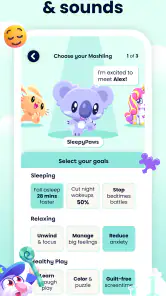






Analysis by Reviewed
Getting a child settled for sleep can be harder than it sounds, especially when the usual routine suddenly stops working. I tried Moshi Kids: Sleep, Relax, Play as an education app built around stories, sounds, music, and games, and my first impression was that it is less about teaching through lessons and more about making calm moments easier to begin. That distinction matters: this is not a replacement for a full learning platform, but it can become a useful part of a family routine.
The app comes from Mind Candy Ltd and is free to install, with optional purchases ranging from $0.99 to $239.99 per item. It is rated for Everyone, which makes the presentation approachable for shared family use. Its store average is 4.6 from around 7,100 ratings, and it has passed one million installs, so it is clearly not an obscure experiment. Still, popularity does not remove the need to check whether its style fits your child, your device, and the way your household handles screen time.
Where families usually get stuck
The first difficulty is often expectation. A parent may open the app hoping for a single button that immediately solves bedtime, while a child may expect an ordinary game. Moshi Kids sits between those ideas. It offers playful content, but its strongest use is usually as a guided transition: something to listen to, explore, or play briefly before the room becomes quiet. If I treat it like an instant sleep switch, I am likely to judge it unfairly.
The mix of content can also create a choice problem. Stories, relaxing audio, music, and games serve different moods, and a child who is already tired may not want to browse through several possibilities. I found it more practical to choose a small rotation in advance rather than hand over the device and ask a child to decide. Too much choice can turn a calming activity into another negotiation.
That is one of the app’s less obvious trade-offs. The variety gives it more life than a simple audio player, but variety can work against bedtime if the child keeps switching activities. I would use the playful parts earlier in the evening and reserve the quieter material for the final stage. This makes the app part of a routine instead of the routine itself.
Another sticking point is the difference between a child using the app independently and an adult guiding the session. Younger children may need help finding suitable content, understanding controls, or stopping at the agreed time. The Everyone rating describes the broad audience, but it does not mean every child will navigate the experience without supervision. In my view, the best results come when a parent introduces the app first and decides how much independence makes sense.
What I would decide before handing over the device
I would first ask what problem I am trying to solve. If the goal is a short, gentle activity while a parent prepares dinner, the games may be more relevant. If the goal is winding down, stories, music, or relaxing sounds are a better starting point. If the child needs structured academic practice, I would choose a dedicated learning app instead, because this product is centered on mood, imagination, and routine rather than a visible curriculum.
I would also decide whether the device is staying in the child’s hands. For bedtime, I prefer starting playback and placing the device out of reach when possible. That small change removes the temptation to browse and keeps the screen from becoming the most stimulating part of the experience. For daytime use, supervised exploration makes more sense because the games can be enjoyed as an activity rather than treated as background audio.
The most useful setup is not “open the app and hope”; it is choosing the purpose first. That simple step prevents many of the complaints people may otherwise blame on the app itself.
Setup checks that prevent avoidable frustration
The current version is 10.12.0 and requires Android 8.0 or newer. Before troubleshooting anything complicated, I would check the device’s operating system and make sure the app has finished installing properly. An older phone or tablet may be the real reason an installation fails or the experience feels unreliable. On a family device, I would also close unrelated apps before starting a longer listening session, especially if the device is not recent.
Because the app includes several kinds of media, I would prepare the device before the child is ready for bed. A stable internet connection during initial setup is sensible, and I would avoid beginning the first session at the exact moment everyone is already tired. Installing earlier gives me time to open the app, look through the available choices, and understand the basic flow without a child waiting beside me.
In-app purchases deserve a deliberate check as well. The app is free to download, but individual purchases can range from $0.99 to $239.99. I would review the device’s purchase controls before giving it to a child, particularly if the device is shared. This is not a criticism of the content itself; it is ordinary good practice whenever a child-facing app includes optional paid items.
I would also test sound at a low volume. Relaxing audio that feels pleasant to an adult can be surprisingly loud in a quiet bedroom, and a child may not adjust it thoughtfully. Checking the volume before the session avoids a jarring start and makes it easier to keep the atmosphere calm. If the device is connected to another audio output, I would test that connection before relying on it.
One practical tip is to create a repeatable sequence outside the app: wash, pajamas, story or sound, lights down. The application can occupy the audio or activity step, but the surrounding actions give the child clearer signals. Without that structure, the app may become just another screen request rather than a cue that the evening is slowing down.
Small preparation choices that matter
I would begin with one type of content rather than sampling everything. A short story can show whether the child responds to narration; relaxing sounds can reveal whether background audio helps or distracts; music may work better during quiet play than immediately before sleep. Testing these separately gives a clearer answer than changing several things at once.
For daytime use, I would set a clear stopping point before opening a game. The app’s playful side may be exactly what keeps a child engaged, which is useful when the aim is a calm distraction but less useful when the next task is leaving the house. A verbal warning and a visible household routine are more dependable than expecting the app alone to manage the transition.
If several children share one device, I would avoid assuming that one choice suits everyone. One child may prefer a story while another finds music more comfortable. Alternating turns or using the app with one child at a time can reduce arguments and makes it easier to see which content is genuinely helping.
Recovering when a session goes wrong
When playback does not behave as expected, I would start with simple checks: confirm the device is not muted, raise the volume carefully, check the selected audio output, and close and reopen the app. If the problem happens only once, restarting may be enough. If it repeats, I would restart the device and check whether the operating system meets the Android 8.0 minimum.
I would separate installation trouble from content trouble. If the app will not install, the operating system, available storage, or connection may be involved. If it opens but a particular item does not behave correctly, I would try another piece of content. That comparison helps identify whether the problem is broad or limited to one session. I would not immediately delete the app, because doing so can create extra setup work without explaining what went wrong.
Another useful recovery method is to simplify the routine. If a child becomes excited by switching between stories, sounds, music, and games, I would close the session and try one quiet option the next time. If the child dislikes the first story, that does not prove the entire app is unsuitable. The content types have different purposes, so a controlled second attempt is more informative than repeatedly browsing.
Purchase prompts can also interrupt the flow. If one appears, I would stop and handle the account decision myself rather than allowing the child to continue tapping. Since optional items are available at different prices, the adult should decide what, if anything, belongs in the household’s plan. A free installation does not mean every part of the experience should be treated as automatically included.
For a bedtime session, I would avoid troubleshooting for too long in front of the child. After one or two basic checks, switching to a familiar non-screen part of the routine is usually better than turning sleep preparation into technical support. The app should make the evening easier, not become the evening’s main event.
When a different workflow works better
If the child is already overstimulated, I would not begin with the games. I would choose the least interactive audio option that the child accepts, keep the device stationary, and let the room do most of the calming. If the child is bored during a quiet afternoon, the games may be a better fit, but I would keep the activity separate from the bedtime sequence so the two purposes do not compete.
If a parent wants a completely hands-off experience, this may require more involvement than expected. The app can provide content, but it cannot know whether a child is tired, anxious, restless, or simply seeking more screen time. A parent still has to choose the moment, set boundaries, and notice whether the result is genuinely calming.
For formal education, I would look elsewhere. The app belongs in the education category, but its value is experiential rather than lesson-based. It can support listening, imagination, and a calm routine; it is not the tool I would choose for spelling practice, mathematics exercises, language progression, or measurable classroom revision.
When the app is not the cause
Sometimes the real issue is the environment. A bright room, late snack, uncomfortable temperature, household noise, or an inconsistent bedtime can overwhelm any relaxing audio. If the child remains unsettled, I would change one surrounding factor before concluding that Moshi Kids has failed. An app can support a routine, but it cannot compensate for every source of discomfort.
The same applies to device behavior. Weak sound may come from the tablet speaker, a connected accessory, or a low volume setting rather than the content. Interruptions may come from notifications or another person using the device. I would put the device on a stable surface, silence unrelated alerts where appropriate, and check the audio path before judging the app’s stories or music.
Children also respond differently from one evening to another. A story that works on a quiet weekend may not help after an exhausting day. That does not make the response meaningless, but it does mean I would judge the app over a reasonable routine rather than one difficult night. The useful question is whether it helps often enough to earn a place in the household, not whether it works perfectly every time.
There is also a screen-time trade-off. Even calm content is still accessed through a screen, and some children become more alert simply because a device is present. In that case, audio played with the display out of sight may be preferable if the device allows the family to use it that way. If the child keeps asking to browse, a traditional book, a parent’s spoken story, or a standalone audio solution may be the better choice.
Families should also consider whether the app’s tone matches the child. Some children enjoy imaginative characters and gentle entertainment; others prefer plain music, silence, or a familiar book. I would not push the app because it is popular or because its rating is strong. The right test is the child’s behavior before and after use: calmer transition, easier listening, or smoother quiet play are meaningful signs; repeated excitement and negotiation are signs to change approach.
My practical verdict after using it
I see Moshi Kids: Sleep, Relax, Play as a flexible routine companion rather than a complete education system or guaranteed sleep solution. Its combination of stories, sounds, music, and games gives parents several ways to match a moment, and the free entry point makes it easy to try. The 4.6 average and more than one million installs suggest that many families find the concept worthwhile, but my recommendation still depends on how your child reacts to audio, imagination, and screen access.
I would recommend it to parents who want a child-friendly way to add variety to quiet time and who are willing to guide the first sessions. It is especially suitable when a family can separate energetic play from the final wind-down and keep purchases under adult control. The strongest workflow is simple: prepare the device earlier, select one suitable content type, keep the volume gentle, and connect the session to familiar offline steps.
I would skip it if I needed a structured academic course, a completely screen-free bedtime, or an app that manages boundaries without adult involvement. I would also be cautious if a child becomes more excited whenever a device appears. In those situations, a book, ordinary music, or a dedicated curriculum-focused product may fit better than a mixed entertainment-and-relaxation app.
Mind Candy Ltd has made something that can be useful precisely because it is not limited to one narrow moment. The challenge is using that flexibility carefully. If I let the child browse endlessly, the calming purpose weakens; if I choose intentionally and keep the routine bigger than the app, the experience becomes much more practical. For families looking for gentle stories, audio, and occasional games in one place, Moshi Kids: Sleep, Relax, Play is worth trying, provided the adult remains in charge of the setting and the stopping point.
Pros
- Calming audio stories help create a consistent bedtime routine.
- Includes relaxing music
- meditations
- and soundscapes for different moods.
- Child-friendly design is easy for young users and parents to navigate.
- Content can support quiet time
- travel
- naps
- or winding down.
- New activities and stories give families variety beyond bedtime favorites.
Cons
- Many stories and features require a paid subscription to access.
- Some content may feel repetitive after frequent daily use.
- Requires a stable connection for streaming much of the library.
- Limited interactive play may disappoint children seeking active games.
- Parents may need to manage screen time despite the app’s relaxing purpose.

- Category
- Education
- Version
- 10.12.0











