MoonPay: Buy Crypto & Bitcoin
- 897.00
- 4.5
- Installs
- 1.00M
- Price
- Free

Screenshots
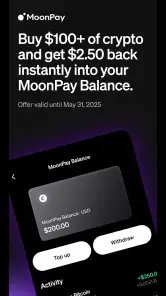
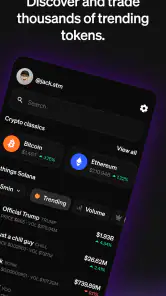
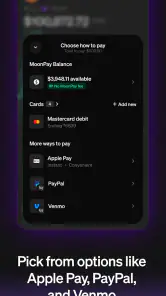
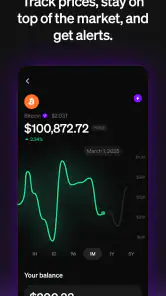
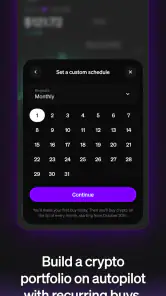
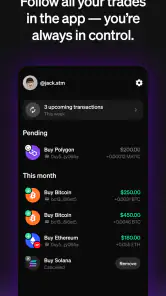

Analysis by Reviewed
Sharing a phone at home can make even a simple finance task feel less simple. I would keep crypto activity personal rather than treat it like a shared household app: one person should make decisions, review the purchase details, and handle the account. That boundary matters because a crypto purchase is a financial choice, not just another item everyone can tap through together.
A household routine that keeps decisions clear
Imagine checking a coin’s price while making dinner, then deciding to buy a small amount after you have time to think. I’d use that moment to compare the amount, payment method, and final confirmation on my own screen, rather than passing a logged-in phone around. If someone else in the household wants to participate, talk through the plan first and let that person use their own account and device where appropriate. This avoids confusion about whose money is being spent and who is responsible for the transaction.
That approach also helps when a shared device is used for ordinary tasks. I would sign out when finished, avoid saving financial details on a device other people use, and make sure notifications or account screens are not casually visible. Those are practical habits, not special MoonPay family controls; I would not assume the app offers a shared-wallet mode or household permissions.
Setting expectations before a first purchase
Before buying, I’d decide whether the goal is to learn how a crypto purchase works or to make a considered investment. Those are different intentions. For a first try, keeping the amount within a personally comfortable budget makes it easier to learn the purchase flow without letting a price swing pressure the decision. I would also pause to review the payment details rather than treating a quick checkout as a reason to skip basic financial judgment.
MoonPay is most appealing if you want a straightforward route to buying crypto and prefer an app-led process. If you already use a broader exchange for research, trading tools, or managing several parts of a portfolio, that established setup may suit you better. A dedicated purchase app can feel simpler, but simplicity is not the same as having every tool an experienced trader wants.
Making a purchase fit real household routines
A realistic use case is a person who has decided in advance to make one small purchase, checks the details privately during a quiet moment, and then returns the phone to its usual shared use. I would not make the decision while someone else is waiting to use the device or while distracted by household tasks. A pause is useful: it separates the convenience of opening a finance app from the judgment involved in spending money on a volatile asset.
If a partner wants to understand the decision, I’d discuss the amount and the risks without handing over an active session or treating a second person’s agreement as authorization to spend. Each adult should be clear about which funds are being used and who is responsible for the account. This is especially important when household budgets are shared but accounts are not: agreement about a budget does not make account credentials safe to share.
More From Our News Desk

Clash of Clans Is Won Between the Battles

Android Auto Makes the Case for Quieter Car Software

MobiOffice: Transforming Mobile Productivity with Seamless Integration

EA SPORTS FC™ Mobile Soccer: Redefining Mobile Sports Gaming

How Microsoft OneDrive Became a Mobile Productivity Giant

How Google Translate Breaks Language Barriers Effortlessly
That distinction is one reason I see this kind of app as better suited to an individual’s chosen purchase than to coordinated household investing. It may help one person complete a buy, but it should not be treated as a recordkeeping system for a couple’s combined finances. I would keep any household budgeting and decision-making outside the purchase screen, then use the app only if the person responsible is comfortable with the transaction.
Keeping the setup personal on a shared device
Before signing in on a phone other people use, I’d think about what is visible when the device is unlocked: account screens, messages, saved payment details, and notifications can all reveal more than intended. I would avoid leaving the app open and would make a habit of checking that I have returned to a neutral screen after finishing. These are ordinary device habits, not a claim that MoonPay has special household privacy tools.
I’d also avoid letting someone else complete the last purchase step “just to help.” The person who understands the amount, payment choice, and consequences should be the one to review and confirm the transaction. If a family member is curious, showing them general information is different from giving them access to an account or letting them make a financial decision on your behalf.
On a device used by several people, the best workflow is deliberately unhurried: decide what you want to do before opening the purchase flow, check each detail yourself, and close out when done. That reduces the chance of confusing one person’s plans with another’s. It also makes it easier to notice when you are acting impulsively or under pressure rather than following a decision you made beforehand.
Questions I would settle before buying
A common practical question is whether a quick payment method is automatically the best choice. I would not assume so. Convenience may reduce friction, but I’d compare the amount charged with the amount of crypto shown for receipt before confirming. That check is more useful than judging a purchase by how few steps it takes, and it gives me a reason to stop if the final terms do not match what I expected.
Another question is whether this is the right place to research a coin. I would use a purchase-focused app for the transaction only after doing my own research elsewhere; an easy checkout is not a substitute for understanding an asset. If I wanted charts, deeper market analysis, or several trading tools, I would compare a broader exchange instead of expecting a streamlined buying route to cover those needs.
People also wonder whether an app rated for Everyone is appropriate for a child to use. I would distinguish the content age rating from permission to handle money: adults should retain control of account access and purchase choices. For younger household members, I’d explain crypto as a risky financial topic without making the app itself a shared activity or implying that a rating removes the need for adult judgment.
Finally, I would ask whether using a familiar payment option makes the purchase risk-free. It does not. The payment step and the market risk are separate questions, so I’d only buy an amount I could tolerate seeing fluctuate. If I could not explain why I wanted the asset or felt rushed to act, I would close the app and reconsider later.
Ever found yourself scrambling to figure out how to buy cryptocurrency without the headache? Well, welcome to my world, and let me introduce you to MoonPay: Buy Crypto & Bitcoin. This app promises to make your crypto-buying journey smoother than a freshly buttered pancake. I took it for a spin, and spoiler alert: it’s pretty darn good.
Getting Started with MoonPay
First things first, downloading the app is a breeze. Available on both Android and iOS, it doesn’t matter if you’re team Android or a die-hard Apple fan; they’ve got you covered. Once installed, the sign-up process is straightforward. They do ask for some personal info, but that’s just part of keeping everything legit and secure. Within minutes, I was all set up and ready to dive into the world of crypto.
The User Experience
Now, let’s talk about the user interface. It’s like walking into a minimalist’s dream. The design is clean, intuitive, and dare I say, quite stylish. Everything is where you’d expect it to be, so you don’t need a degree in rocket science to navigate through. I particularly appreciated the real-time price updates, which kept me in the loop with the latest market trends.
MoonPay makes it super easy to buy a variety of cryptocurrencies. Whether you’re looking to snag some Bitcoin, Ethereum, or any other altcoins, it’s all just a few taps away. You can use various payment methods, including credit cards, Apple Pay, or even a good old-fashioned bank transfer. I went with my credit card, and the transaction was as smooth as silk.
Practical checks before you tap to buy
For a more deliberate workflow, I’d check the price and amount first, then choose the payment method only after I know what I intend to spend. A fast purchase path is convenient, but it can also make an impulsive decision feel effortless. I would treat a displayed market price as a snapshot rather than a promise that the price will stay still while I complete the steps.
Payment convenience is useful, yet it is worth comparing the total shown at checkout with the amount of crypto you expect to receive. That gives you a clearer sense of the trade-off between speed and cost than focusing only on the headline price. If the total does not feel right, I’d stop and reconsider instead of rushing through just because the app makes buying easy.
Security and Support
In the crypto world, security is king, and MoonPay doesn’t skimp on it. They employ top-notch security measures to ensure your transactions and personal data stay safe and sound. That peace of mind is invaluable when you’re dealing with digital coins.
I did have a few questions along the way, and the customer support team was quick to respond. They’re friendly, knowledgeable, and didn’t make me feel like a complete noob, which was a relief. Whether you’re a crypto novice or a seasoned pro, knowing help is just a click away is pretty reassuring.
Age, trust, and who should use it
The app is rated for Everyone, but that rating should not be mistaken for a recommendation that children make financial decisions. I’d keep account access and purchase choices with the responsible adult in a household, explain the risks in age-appropriate terms, and avoid sharing sign-in details. Crypto values can move sharply, so trust should come from understanding what you are buying and staying in control of the account—not from assuming any app removes financial risk.
MoonPay is free to download, and MoonPay is developed by MoonPay. It has an average rating of 4.5 from around 11,000 ratings, with over 1 million installs. The app launched on April 18, 2023, and version 2.0.28 requires Android 7.0 or later. Those details make it an established option to consider, though popularity alone cannot tell you whether its purchase flow or supported choices fit your needs.
The Final Verdict
So, what’s the bottom line? The app delivers on its promise of making cryptocurrency accessible to everyone. It’s user-friendly, secure, and offers a seamless buying experience. Whether you’re looking to make your first crypto purchase or you’re adding to your digital portfolio, this app is a solid choice.
In a world where cryptocurrency can seem daunting, MoonPay simplifies the process beautifully. It’s like having a friendly guide leading you confidently through the crypto jungle. So, if you’re ready to dip your toes into the exciting world of crypto, give MoonPay a whirl. You won’t regret it!
When I’d choose another route
I would skip this app if I wanted advanced trading controls, detailed portfolio analysis, or a place to manage every aspect of crypto activity in one interface. In that case, comparing established exchanges or a dedicated wallet may be more useful, depending on whether buying, trading, or holding is the priority. I’d also avoid buying through any app when I have not checked the payment total or cannot comfortably accept the possibility of losing money.
For a household, my verdict is simple: use it as an individual purchase tool, not as a family account or a shared financial decision-maker. Keep access private, agree on spending boundaries before acting, and take time to review each transaction. If that careful, personal approach matches what you need, MoonPay offers an approachable starting point; if you need more control or a shared investing arrangement, another option is likely a better fit.
MoonPay: Buy Crypto & Bitcoin Frequently Asked Questions
Is MoonPay free to download, and what device requirements should I know about?
MoonPay is free to download and is listed for everyone, making it straightforward to try without paying for the app itself. The listed current version is 2.0.28, and it requires Android 7.0 or later. Keep in mind that free installation does not mean that crypto purchases are free: transaction fees may apply, and the app’s supported features can depend on your location and payment method.
What is MoonPay and how does it work?
MoonPay is a popular application that allows users to easily buy cryptocurrencies such as Bitcoin, Ethereum, and many others using traditional payment methods like credit and debit cards, bank transfers, and even Apple Pay. The app simplifies the process with a user-friendly interface, guiding users through a step-by-step purchasing process. Users can also track their transactions and view their purchase history within the app. This makes MoonPay an excellent choice for both beginners and experienced crypto enthusiasts.
Is MoonPay safe to use for purchasing cryptocurrencies?
Yes, MoonPay is designed with user security in mind. It employs industry-standard security measures, including data encryption and fraud prevention tools, to ensure the safety of your financial and personal information. Additionally, MoonPay is compliant with regulatory requirements in the regions it operates, providing an extra layer of trust. However, users should always practice general online safety precautions, like using strong passwords and enabling two-factor authentication.
What fees does MoonPay charge for transactions?
MoonPay charges a fee for each transaction, which can vary depending on the payment method used and the type of cryptocurrency being purchased. Typically, fees are a percentage of the transaction amount, and users are informed of the exact fee before they finalize their purchase. While these fees are generally competitive, it's important for users to be aware of them in order to make informed buying decisions. Comparing MoonPay's fees with other similar platforms can help users determine the best option for their needs.
Does MoonPay support all cryptocurrencies?
MoonPay supports a wide range of cryptocurrencies, including major ones like Bitcoin, Ethereum, Litecoin, and many others. However, it may not support every single cryptocurrency available on the market. Users interested in purchasing less common cryptocurrencies should check MoonPay's current list of supported assets on their website or within the app to ensure their desired crypto is available for purchase before proceeding with a transaction.
Pros
- Easy and quick account setup.
- Supports a wide range of cryptocurrencies.
- User-friendly interface.
- High transaction speed.
- Strong security features.
Cons
- High transaction fees.
- Limited customer support options.
- Not available in all countries.
- Requires ID verification.
- No option for recurring purchases.

- Category
- Finance
- Version
- 2.0.28











