MoneyGram® Money Transfers App
- 51.86K
- 4.6
- Installs
- 5.00M
- Price
- Free

Screenshots


Analysis by Reviewed
I would choose a money-transfer app by starting with the recipient’s needs, not the sender’s screen. Can they receive funds in a way that works for them, and can I see the total cost and delivery options before I commit? Those questions matter more than a polished interface. MoneyGram® Money Transfers is worth considering when you need to send money internationally and want to manage the process from a phone, but the best fit still depends on the destination and how the other person plans to collect or use the money.
Start with the receiving end
Before making a transfer, I’d confirm the recipient’s preferred method and the details they need to provide or show when receiving it. A transfer can be easy to initiate yet inconvenient if the recipient has to travel, wait, or use a collection method that doesn’t suit them. Treat the recipient’s access as part of the decision, rather than assuming that “sent” automatically means “available in the most useful way.”
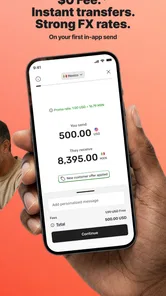
I’d also check the displayed exchange rate, fees, delivery estimate, and payment choices for the specific transfer before confirming. These can vary with destination and transaction details, so a general impression from a previous transfer is not a reliable substitute. For a recurring family payment, compare the full amount the recipient will get each time; for an urgent one-off, weigh the total cost against the value of speed and convenience.
A Seamless Experience
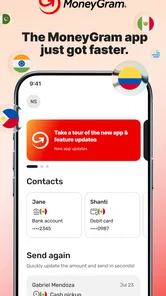
The first thing you notice when you fire up the MoneyGram® Money Transfers app is its slick, user-friendly interface. Navigating through the app feels intuitive, almost like it knows what you’re thinking. Whether you’re tech-savvy or a complete newbie, you’ll find your way around with ease. The layout is clean, and the options are straightforward, making it super easy to send money to your loved ones in just a few taps.
Where it can be useful in everyday life
Imagine a relative abroad needs help with an unexpected household expense. You can check the available transfer choices on your phone, enter the recipient details carefully, and review the transaction before sending. My practical tip is to confirm the spelling and identifying information directly with the recipient first; a small mismatch can create avoidable delays or extra coordination. Keep the transfer confirmation somewhere you can find it, too, so you can answer a follow-up question without searching through old messages.
This kind of workflow suits people who send support across borders often enough to value a familiar process, as well as someone arranging a one-time transfer while away from home. It is less compelling if you mainly move money between your own accounts in the same country, or if the recipient needs a particular bank-to-bank route that another service handles more naturally. The useful question is not whether an app can send money, but whether its available route matches this recipient and this occasion.
Choosing the right routine for repeat transfers
If you send money to the same person regularly, I’d treat each transfer as its own decision rather than relying on memory. Recipient details, destination, payment choice, and the amount ultimately received are all worth checking again on the review screen. A simple habit that helps is to keep a private note of the recipient’s preferred receiving method and the questions you want to verify before sending, without storing sensitive payment details in an insecure place.
More From Our News Desk

 Bolt: Request a Ride
Bolt and the Shift from One-Tap Rides to More Legible Trips
Bolt shows how ride-hailing is shifting from a one-tap taxi request toward a more legible, choice-driven trip, while leaving the hardest questions of price and reliability unresolved.

 Farm Land - Farming life game
Farm Land Review: A Small Island Farm with a Satisfying Loop
A bright, breezy island farm turns a few quick chores into a satisfying cycle of planting, harvesting, expanding, and deciding what to build next.

 Android Auto
’s Community Takes Shape in the Passenger Seat
Its most valuable network is not a public feed but a shared set of routes, voice habits, app integrations, and advice that make driving less isolating—and sometimes more complicated.

 My Talking Angela
 Makes the Virtual Pet Feel Personal
A polished pet-raising game built on small rituals, playful customization, and a character who gives everyday screen time a surprisingly personal rhythm.

 Google Translate
 Review: A Pocket Tool for the Small Frictions of Travel
From menus and signs to quick conversations, Google Translate earns its place by cutting the little delays that make unfamiliar language feel like a barrier.

 Shazam: Find Music & Concerts
Shazam’s Best Trick Is Turning a Song Into a Night Out
A few seconds of recognition can settle an argument, rescue a half-remembered chorus, and point toward a live show. Shazam’s real trick is what happens after the match.
Latest News



For a family member who needs predictable support, consistency may matter as much as speed. Agree in advance on when they can collect or use the funds, and tell them when you have submitted the transfer so they know what to expect. If the app presents a delivery estimate, use it as a planning aid rather than a guarantee. This avoids asking the recipient to make a trip before the transfer is ready and gives both of you a clearer way to coordinate.
Speed and Reliability
Speed is where this app really shines. In today’s fast-paced world, nobody wants to wait around for their money to arrive, and with MoneyGram, you don’t have to. Transactions are processed quickly, and the recipient can collect the money in a matter of minutes, depending on the destination country. I’ve used it to send money to friends far and wide, and it’s always been a timely delivery.
That speed should be treated as a possibility, not a promise for every transfer. The destination, chosen delivery route, payment review, and recipient’s ability to collect can all affect how quickly money is usable. If the payment is urgent, check the estimate shown for that particular transaction and make sure the recipient is ready to act; sending outside their practical availability can erase the advantage of a fast service.
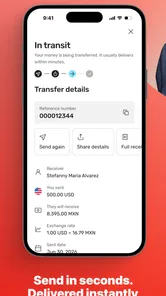
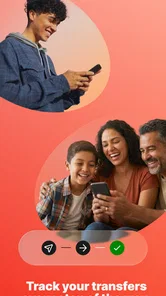
Reliability is another big tick in the box. The app provides real-time tracking so you can keep tabs on your money every step of the way. Plus, you get notifications once the transaction is complete, which adds an extra layer of peace of mind. No more sleepless nights wondering if your hard-earned cash made it to its destination!
How it compares with other ways to send
Compared with a bank’s international transfer, MoneyGram is a more purpose-built option for arranging an overseas remittance from a phone. A bank may be the more natural choice when both people want money to move directly through their existing accounts; a transfer service is more relevant when the recipient’s available collection route is central to the plan. I’d compare the final recipient amount and arrival estimate rather than assuming either category is automatically cheaper or quicker.
Digital wallet services can be convenient when both people already use the same wallet and can access it locally. They are not interchangeable with every international transfer route, though, so check that the recipient can actually receive and use the funds. For a regular payment, I’d compare the same destination and amount across the options I can access, then consider whether a small difference in cost is worth a different collection process or less familiar workflow.
When a bank, wallet, or in-person service may suit you better
The strongest alternative depends on what the recipient already knows how to use. If they want money deposited into an account they check every day, a bank transfer or a service focused on account deposits may be the simpler fit, provided its quoted terms work for both of you. If both sides already rely on the same digital wallet, keeping the payment there could reduce extra steps. Those options are not automatically better; they simply make sense when their receiving method matches the recipient’s routine.
An in-person transfer can also be a reasonable choice for someone who prefers help face to face or does not want to manage the process on a phone. The trade-off is that this may require a visit, while an app lets you arrange a transfer remotely. I would not choose solely by brand familiarity: compare the amount the recipient gets, the practical collection or deposit route, and the time each option requires. If any part of the process is unclear, a route you both understand is worth more than a marginal convenience.
Security Features
Let’s talk about security because, let’s face it, we all want to know our money is safe. The MoneyGram app employs top-notch security features to protect your transactions. It uses encryption technology to safeguard your personal information and payment details, so you can send money with confidence. I felt secure using it, and I’m sure you will too.
Even with a protected transaction, careful habits matter. I would avoid sending money based only on a sudden message claiming to be from a relative, and I’d verify any urgent request through a separate, trusted channel. Before submitting, review the recipient and amount once more; after sending, use the in-app transaction status to guide your next step rather than relying only on a notification preview.
Handling an unexpected delay or mistake
If a recipient says the money has not arrived, I would first check the transaction status in the app and compare the recipient details with what they gave me. Then I’d ask whether they have followed the agreed receiving process and whether the displayed timing has passed. Keeping the confirmation and transaction information accessible makes it easier to explain what happened if you need to seek help. I would avoid sending a second transfer simply because the first one is taking longer than expected; confirm its status first to reduce the risk of paying twice.
For a first transfer to someone, I’d also agree on a simple check-in: the recipient can tell me when they have successfully received the funds, and I can verify the status on my side. That small step is useful when people live in different time zones or are coordinating around work and travel. It is not a special feature; it is a practical way to make a cross-border transfer less stressful for both people.
Convenience at Your Fingertips
One of the standout features of the MoneyGram app is its convenience. You can send money from anywhere, at any time, as long as you have your phone handy. No more queuing up at a store or dealing with cumbersome paperwork. It’s as easy as pie, and let me tell you, that’s a game-changer.
The app also supports multiple payment methods, so whether you’re using a debit card, credit card, or bank account, you’re covered. It’s all about making life easier, and this app does just that.
Convenience does not remove the need to check the payment method and final quote for each transfer. I’d avoid assuming that a choice used before will always be available or equally suitable for another destination. If you’re deciding between paying in the app and using an in-person option, consider whether managing the transaction remotely is worth more to you than speaking with someone face to face.
What to expect before switching
If you already use another service, switching is less about learning a new button layout and more about checking the route, recipient details, and cost again. Don’t assume a saved contact or a familiar destination makes every future transfer identical. Start with a modest, non-urgent transfer when practical, confirm that the recipient can receive it as expected, and only then make the app part of a routine. That cautious first run is especially sensible if you are sending to someone who has not used the receiving method before.
MoneyGram is a free app to install, developed by MGI, and is rated for Everyone. It has a 4.6 average from around 121,000 ratings and more than 5 million installs, which suggests that it has reached a broad audience, though those figures cannot tell you whether a particular route suits your needs. The current version is 25.12.2, and it requires Android 8.0 or later. I’d check that your device meets the requirement before planning a transfer around it.
Who should skip it, and what switching really costs
I would skip this app if my main need were routine domestic payments, moving money between my own accounts, or paying someone who expects a particular account or wallet route that is not offered for the transfer I need. It is also not the right choice if I cannot confirm the recipient’s details or receiving plan before sending. In those cases, a familiar bank service, an established wallet, or an in-person option may fit better—not because one category wins every time, but because the receiver’s normal way of accessing money should guide the choice.
The app itself is free to install, but that does not mean an individual transfer has no cost. Before switching, I would compare the quote for the same recipient, amount, and destination in the services available to me, including the exchange rate and any displayed fee. I’d also consider the effort of teaching a recipient a new collection process. A slightly different price may not be worth changing routines if it makes the money harder for them to access.
Final Thoughts
All in all, the MoneyGram® Money Transfers app is a solid choice for anyone looking to send money quickly, safely, and conveniently. It’s packed with features that make the whole process a breeze, and the peace of mind it offers is truly invaluable. If you’re in the market for a reliable money transfer solution, this app is definitely worth a shot.
So, next time you need to send money across borders, give it a whirl. You might just find that it’s the easiest and most efficient way to get money where it needs to go. Happy transferring!
My recommendation is to consider it when an international transfer is the actual need, the available receiving route works for your recipient, and the transaction’s displayed cost and timing meet your expectations. If the recipient would rather receive funds through an account or wallet they already use, compare those options first. The app’s strongest case is practical access to a transfer workflow on your phone; the sensible choice is the one that gets usable money to the right person on terms both of you understand.
MoneyGram® Money Transfers App Frequently Asked Questions
Who develops MoneyGram® Money Transfers App, and what is it intended for?
MoneyGram® Money Transfers App is a finance app developed by MGI. Its focus is sending global currency, money, and wire transfers abroad online, so it is designed around transferring money rather than serving as a general-purpose banking app. If you are looking for a way to manage broader banking tasks, consider whether this transfer-focused purpose matches what you need before downloading.
Is MoneyGram® Money Transfers App free to download, and what age rating does it have?
The app is free to download and is rated for Everyone. That makes it possible to install without paying for the app itself, although individual transfers may involve fees depending on their details. Review the transfer information shown before confirming a payment, and keep in mind that a free download does not mean every service offered through the app is free.
What should I know about downloading MoneyGram® Money Transfers App?
MoneyGram® Money Transfers App is a finance app from MGI for sending global currency, money, and wire transfers abroad online. It is free to download and is rated for Everyone. Before installing, check that your device runs a compatible operating system; the app requires version 8.0 or later. Its purpose is focused on money transfers rather than general banking.
Can I use MoneyGram® Money Transfers App on my device?
The app is available for mobile devices, with a minimum operating system requirement of version 8.0. It is listed as MoneyGram® and developed by MGI. Check your device’s operating system before downloading, and make sure you select the official app so you are using the intended service. As with any finance app, consider whether you are comfortable managing transfer activity from your phone.
What is MoneyGram® Money Transfers App and how does it work?
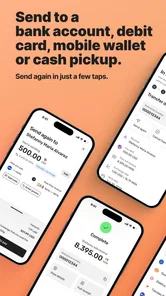
MoneyGram® Money Transfers App is a mobile application that facilitates easy and secure international and domestic money transfers. Users can send money to friends and family across the globe by simply using their mobile devices. The app provides real-time exchange rates, tracking of transactions, and options to send money directly to bank accounts, mobile wallets, or for cash pickup at MoneyGram agent locations worldwide.
Pros
- Fast international transfers
- User-friendly interface
- Multiple payment options
- Real-time exchange rates
- Global reach with many supported countries
Cons
- High fees for some destinations
- Occasional app glitches
- Limited customer support
- Exchange rate mark-ups
- Requires account verification