Money Network® Mobile App
- 36.10K
- 3.1
- Installs
- 5.00M
- Price
- Free

Screenshots
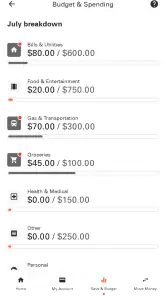
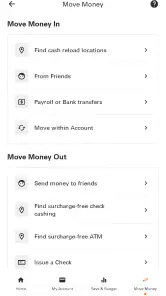
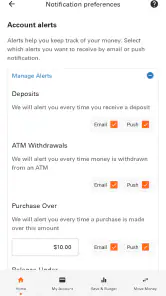
Analysis by Reviewed
When I open Money Network® Mobile App, I am not looking for a full replacement for every financial service on my phone. I want a focused way to check my Money Network account while I am away from a computer. That narrow purpose is also the app’s main strength: it keeps the experience centered on account access rather than trying to become a general banking, budgeting, investing, or bill-management platform.
In my experience, the app makes the most sense for someone who already uses a Money Network account and needs a convenient mobile checkpoint during the day. It is free, rated for Everyone, and belongs to the finance category. Fiserv, Incorporated is the developer, and the app has been available since March 26, 2013, so it is an established product rather than a brand-new experiment.
The current version is 20.0.1 and it supports Android 7.0 or later. That broad compatibility is useful if you keep an older phone, although I would still check that your device runs a supported version before depending on it for an urgent account task. The app has passed the five-million-install mark, with an average rating of 3.1 from roughly seventy-two thousand ratings. Those numbers suggest a widely used service with a mixed experience, not a universally smooth one.
Following a payment-related task from sign-in to outcome
Starting with the actual need
A realistic use case is simple. I am away from home, I need to know what is available in my Money Network account, and I do not want to wait until I can reach a desktop browser. The mobile app gives me a direct place to begin. That is different from opening a general-purpose banking app and hoping it supports the particular account I use.
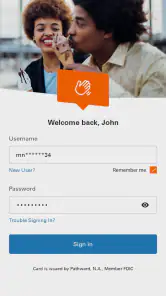
Before I start, I would make sure I have my account credentials available and that I am using a private, reliable connection. This is not because the app is complicated; it is because financial access is a poor place to improvise. I also prefer to avoid signing in while someone is looking over my shoulder, especially when I am checking information in a public setting.
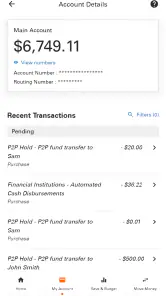
The first useful habit is to treat the app as an account-information tool, not as a substitute for reading every message or document connected with the account. A balance check can answer one immediate question, but it does not automatically explain why a transaction appears, whether an item is still pending, or what action may be required elsewhere. I find that distinction prevents overconfidence after a quick glance at the screen.
Moving through the app one decision at a time
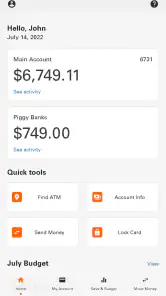
My usual workflow is deliberately short: open the app, sign in, review the account information I came for, and then decide whether I need to do anything else. I do not browse aimlessly through a financial app. A focused sequence reduces the chance of confusing an old memory of my balance with the information currently displayed.
The value here is speed of access rather than a deep financial dashboard. If I am checking whether I have enough available funds before making an everyday purchase, a mobile view is more practical than waiting for a computer. If I am trying to understand a longer spending pattern, however, I would want a broader budgeting tool or a more detailed account-management experience. Money Network Mobile App is better at answering an immediate account question than helping me build a complete financial plan.
One practical tip is to record the reason for the check before opening the app. For example, I might be verifying available funds, confirming that an expected transaction is reflected, or preparing to contact support about an account issue. That small step gives the session a clear endpoint. It also helps me notice when the displayed information does not answer the question I actually had.
Another useful habit is to separate viewing from acting. I first confirm what the account shows, then pause before taking any related step. That matters when I am working from a phone in a hurry. A small screen and a rushed decision can make it easier to overlook a detail, so I prefer to review the information twice when the consequence of an error would be inconvenient.
Where handoffs become important
The app is only one part of the workflow. The first handoff is between the phone and the account itself: the app can present account information, but the information still depends on the account system behind it. If a transaction has not appeared yet or the displayed status needs explanation, the app may not be the final place where I can resolve the issue.
The second handoff is from the app to my own records. I may check the account on the phone, compare it with a receipt or a note, and then decide whether the numbers make sense. This is especially useful when I am checking a purchase made earlier in the day. I do not treat a quick mobile view as a replacement for keeping receipts or remembering what I have already spent.
A third handoff can involve customer assistance or another official account channel when the screen does not settle the matter. That is not necessarily a defect in the app; financial questions often require context that a compact mobile interface cannot provide. Still, it is important to understand the boundary. If I need a full explanation of a disputed item or a problem with access, I should be prepared for the process to continue outside the app.
This is where the average rating of 3.1 becomes meaningful to me. It does not tell me exactly which situation every reviewer experienced, but it does make me cautious about assuming that every sign-in or account-checking session will feel effortless. I would install it because I need Money Network access, not because I expect a polished all-purpose finance experience.
What a successful session looks like
In the best-case scenario, the outcome is modest but useful: I get the account information I needed, compare it with the situation in front of me, and leave with a clear next step. For a quick purchase decision, that may be enough. For a routine check before organizing my day, it can save the effort of finding a computer.
I also like the fact that the service is free to install. That removes one barrier for existing Money Network users who simply want mobile access. The free price does not mean every account question disappears, though. It only makes the app an accessible entry point for checking the account from a compatible phone.
The app is most valuable when the question is narrow and time-sensitive. I can imagine using it before paying for groceries, while commuting, or after receiving a receipt and wanting to compare it with the account information. In each case, the result I want is confirmation, not a long financial consultation.
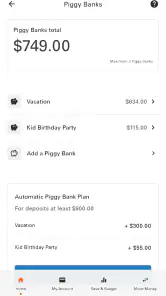
For someone who manages several accounts, the result may feel less complete. A general banking app or a dedicated budgeting app can bring more financial information into one place, depending on the services that person uses. Money Network Mobile App is the more sensible choice when the Money Network account itself is the center of the task. It is less compelling when I want one screen for unrelated accounts, investments, detailed spending categories, and long-term planning.
Specific strengths that are easy to overlook
The first strength is focus. Because the app is built around Money Network account information, I do not have to turn a simple account check into a larger budgeting session. That can be helpful for people who want a quick answer without the distractions found in broader personal-finance products.
The second is continuity across situations. A desktop browser may be comfortable at home, but a phone is available when I am standing in a store or away from my desk. The app turns that change of location into a practical advantage. Its usefulness is not about adding elaborate financial tools; it is about making the existing account easier to reach at the moment I need it.
The third is compatibility with an older Android setup. Support beginning with Android 7.0 means the app is not limited to only recent devices. I would still test the current release on my phone before relying on it for an important task, but the stated minimum makes it more approachable for people who have not upgraded recently.
A less obvious trade-off is that focused access can also feel limited. I may appreciate a clean route to account information, then immediately wish for deeper explanation or broader organization when the question becomes complicated. That is not a reason to reject the app outright; it is a reason to decide in advance whether my need is a quick check or full financial management.
Where the workflow breaks down
The first possible failure point is access itself. If I cannot sign in, the app cannot help me reach the information I need, and the problem becomes more stressful when I am away from a computer. I would avoid making the app my only plan for an urgent account issue. Keeping the official account details and another way to seek assistance available is a sensible backup.
The next friction point is interpretation. Seeing an account figure does not always answer whether a transaction is final, expected, or correct. I would compare the displayed information with my receipt and recent activity rather than making a decision from one number alone. This is one of the most important practical limitations: mobile access improves convenience, but it does not remove the need for judgment.
There is also the question of device and software upkeep. The app requires Android 7.0 or newer, and older phones can behave differently from newer ones even when they meet the minimum requirement. If the app feels slow or unreliable on an aging device, I would first check the operating system and available updates before concluding that the account itself is the problem.
Privacy is another reason to use a deliberate routine. I would sign out or otherwise end the session when I finish, avoid leaving account screens visible, and keep my phone protected with its normal device security. These are everyday precautions, but they matter more for a finance app than for a casual shopping or entertainment app.
Finally, the app may not be the right choice for people who do not have a Money Network account. Its purpose is specific, so installing it merely to explore general finance features would probably lead to disappointment. Likewise, users who want investment tracking, detailed category reports, or a unified view of multiple financial institutions should look for a tool designed around those goals instead.
Who I would recommend it to
I would recommend Money Network Mobile App to an existing Money Network user who regularly needs account information while away from a computer. It is particularly suitable for quick checks before everyday purchases, reviewing an account after a transaction, or confirming information during a busy day. The free cost and broad Android support make trying it straightforward for compatible devices.
I would be more cautious if the person expects a complete money-management suite. The app should not be judged as though it were a budgeting planner, an investment dashboard, or a replacement for every account service. Its best role is a convenient mobile doorway to Money Network information, with the understanding that complicated issues may require another step.
My final view is balanced. I like the practical purpose and the ability to check a Money Network account from a phone, especially when the alternative is waiting until I reach a computer. At the same time, the mixed average rating tells me to keep expectations realistic and to maintain a backup plan for access or support problems. If your everyday workflow begins with a Money Network account and ends with a quick, informed decision, this app is worth considering. If your workflow demands broad financial analysis, another category of app will serve you better.
Pros
- Quick access to balances
- transactions
- and available funds
- Mobile check deposit can reduce the need for branch visits
- Card controls help users manage spending and security settings
- Transaction alerts make it easier to monitor account activity
- Supports convenient money transfers and bill payment options
Cons
- Some features may depend on your employer or card program
- Identity verification can be lengthy during registration
- Check deposits may involve limits and processing delays
- Support availability and response times may vary
- App performance can differ across devices and network connections

- Category
- Finance
- Version
- 20.0.1











