Monarch: Budget & Track Money
- 2.32K
- 4.8
- Installs
- 500.00K
- Price
- Free

Screenshots




Analysis by Reviewed
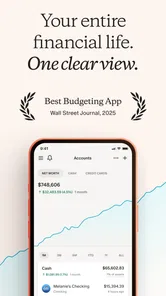
When I choose a money app, I care less about an impressive dashboard than about whether it helps me make a useful decision on an ordinary Tuesday: can I see what is due, understand where spending has drifted, and keep a longer-term goal in view without turning budgeting into a second job? Monarch: Budget & Track Money is built for people who want those pieces together. It is a finance app from Monarch Money, and its broad view of spending, net worth, and investments makes it more than a simple expense log.
What I would decide before setting it up
The first question is whether you want a connected overview or a hands-on ledger. Monarch’s appeal is that it can bring accounts and spending into one place, then let you review trends and goals. That is useful if your money is spread across everyday banking, cards, and investments. If you prefer to enter every purchase yourself, or want a lightweight tracker that does only one job, its wider approach may feel like more than you need.
I’d also think about how comfortable you are linking financial accounts to an app. That convenience is central to the experience described here, but it is a personal trade-off: connected accounts can reduce manual work, while a notebook or spreadsheet keeps the process entirely in your hands. I would start by deciding which accounts genuinely help answer your questions, rather than trying to build a complete financial map on day one.
Who benefits most from a connected view
I see the strongest case for this kind of setup when someone has several financial priorities competing for attention. A person balancing everyday spending, a savings target, and investments may find it useful to review those pieces side by side instead of jumping between separate apps. It is also a reasonable fit for someone who wants to discuss shared plans with a partner using the same broad picture.
By contrast, the person who wants to record cash purchases manually and keep a strict, self-maintained ledger may not gain much from connecting accounts. The same is true if all you want is a quick way to check one account balance. The key decision is not whether a fuller overview sounds attractive in theory; it is whether you will actually use it to make choices you currently find difficult.
Setting Up Your Financial Kingdom
First things first: setting up Monarch: Budget & Track Money is a breeze. You’ll be greeted with a sleek interface that makes entering your financial details feel less like a chore and more like designing your own little kingdom. You can link your bank accounts, credit cards, and investments with just a few taps. I was amazed at how quickly the app pulled in all my data, giving me a clear picture of my financial landscape.
One of the best parts? The categorization of expenses is top-notch. Monarch uses intelligent algorithms to sort your spending automatically. It’s like having a personal accountant who never sleeps. If you’re a control freak (no judgment here), you can also manually adjust categories to suit your unique style.
More From Our News Desk

 Bolt: Request a Ride
Bolt and the Shift from One-Tap Rides to More Legible Trips
Bolt shows how ride-hailing is shifting from a one-tap taxi request toward a more legible, choice-driven trip, while leaving the hardest questions of price and reliability unresolved.

 Farm Land - Farming life game
Farm Land Review: A Small Island Farm with a Satisfying Loop
A bright, breezy island farm turns a few quick chores into a satisfying cycle of planting, harvesting, expanding, and deciding what to build next.

 Android Auto
’s Community Takes Shape in the Passenger Seat
Its most valuable network is not a public feed but a shared set of routes, voice habits, app integrations, and advice that make driving less isolating—and sometimes more complicated.

 My Talking Angela
 Makes the Virtual Pet Feel Personal
A polished pet-raising game built on small rituals, playful customization, and a character who gives everyday screen time a surprisingly personal rhythm.

 Google Translate
 Review: A Pocket Tool for the Small Frictions of Travel
From menus and signs to quick conversations, Google Translate earns its place by cutting the little delays that make unfamiliar language feel like a barrier.

 Shazam: Find Music & Concerts
Shazam’s Best Trick Is Turning a Song Into a Night Out
A few seconds of recognition can settle an argument, rescue a half-remembered chorus, and point toward a live show. Shazam’s real trick is what happens after the match.
Latest News



Make the overview useful, not just impressive
A connected money picture is only valuable when you know what you want it to answer. I’d use the first review to check whether everyday purchases are landing in sensible categories, then correct the ones that matter for my decisions. That small bit of attention pays off later: a useful spending report depends on consistent labels, and a misclassified recurring expense can make a category look healthier or worse than it really is.
For example, if I’m trying to rein in takeout, I would not spend time perfecting every old transaction first. I’d check recent meals, fix obvious errors, and compare the next few weeks against that baseline. This is a more practical workflow than treating setup as a one-time chore. It also keeps automated categorization in perspective: it saves effort, but I would still review important transactions rather than assuming every label is right.
Planning for the Future
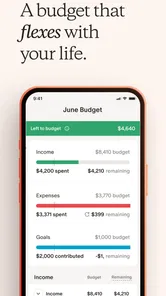
Now, we all know the importance of setting financial goals. Monarch makes this not only easy but actually enjoyable. You can set short-term goals like saving up for a new gadget, or long-term ones such as retirement planning. The app gives you a clear path to achieve these goals, complete with milestones to celebrate along the way. It’s like having a cheering squad in your pocket.
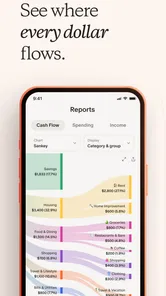
What I love is how Monarch provides insights into your spending habits. With detailed reports and visual graphs, you can see exactly where your money is going. I was shocked to see how much I was spending on takeout! The app nudges you gently towards making smarter choices, and the impact on my wallet was almost immediate.
Use goals to make day-to-day choices easier
A goal becomes more useful when I connect it to a choice I am about to make. If I’m saving for a trip, I can review discretionary spending before booking something else, rather than vaguely promising to “save more” at the end of the month. A goal can also make an irregular expense easier to think about: I can separate a planned purchase from an emergency and judge whether its timing fits my other priorities.
That does not mean an app can decide what matters most. A graph can show a pattern, but it cannot tell me whether a dinner out was worth it or whether a savings target is realistic for my household. I see Monarch’s reports as prompts for a conversation with myself, not instructions. If you only want a simple monthly spending limit and dislike reviewing trends, a basic budget tool may be a better fit.
Your Money, Your Rules
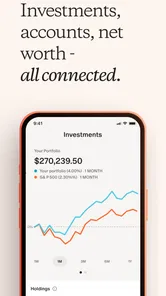
One of the standout features of Monarch is its flexibility. Whether you’re a seasoned investor or just getting started, the app caters to all levels of financial savvy. For those dabbling in investments, Monarch offers a comprehensive view of your portfolio, making it easier to track performance and make informed decisions.
Another cool feature is how Monarch handles financial collaborations. If you’re managing joint finances with a partner, you can easily share access to your financial picture. My partner and I found this incredibly useful for planning vacations and big purchases without the usual back-and-forth.
Where other approaches can be better
For a couple, a shared overview can reduce the awkward routine of comparing balances and asking who paid for what. I’d use it before a planning conversation, not as a substitute for one: agree which shared goals matter, then look at the same picture together. Someone managing entirely separate finances, or a household that prefers cash envelopes and a weekly manual check-in, may get more control from that familiar method than from connecting accounts.
Monarch’s investment view is useful for seeing investments alongside the rest of a financial picture, but I would not confuse a tracker with a specialist investment service. If your main need is researching securities, placing trades, or getting detailed portfolio analysis, use a dedicated investment platform for that work. Likewise, someone who wants only a quick bill reminder may find a calendar or banking app simpler. The best alternative depends on the job: Monarch’s strength is bringing several kinds of money information together.
The everyday test and the switching effort
Picture a payday week: rent is coming up, a card payment has posted, and you are deciding whether a weekend purchase fits. I’d open the app to review the account picture, check recent categories, and see whether the purchase competes with a savings goal. That is a concrete advantage over scattered statements, but it works only if the accounts and categories you rely on are kept in reasonable shape. A quick weekly review is more realistic than expecting one setup session to keep everything tidy forever.
Switching from a spreadsheet or another tracker is not just a matter of installing an app. I would first list the questions I currently use my system to answer, such as monthly spending, shared costs, or investment visibility. Then I’d connect only the accounts needed for those questions and compare the first summaries with records I already trust. This gives me a chance to spot category differences before I rely on the new picture. If manual control is important to you, keeping a spreadsheet as your main record may be preferable; if seeing a consolidated view is the priority, the setup effort can be worthwhile.
A practical first-month routine
I would avoid trying to judge the app by the first screen after connecting accounts. A better test is to pick one recurring question—whether dining out is crowding out a savings goal, for example—and review it consistently for a few weeks. Correct only the categories that affect that question, then see whether the resulting picture changes a decision. This keeps setup manageable and makes it easier to tell whether the app is genuinely helping rather than merely displaying information.
For shared finances, I’d also agree with a partner on what belongs in a joint conversation before using the overview to plan. A combined picture can be helpful, but different expectations about personal spending or savings priorities can still cause friction. The app can make the numbers easier to discuss; it cannot settle the household’s rules for you.
The Little Things That Matter
Monarch doesn’t skimp on the small details that make a big difference. The app offers customizable alerts, so you’re never caught off guard by a bill or an unexpected expense. I appreciate the peace of mind this provides, knowing I’m always one step ahead.
Plus, the app’s security features are top-notch. With bank-level encryption and biometric login options, you can rest easy knowing your financial information is safe. It’s like having a digital fortress protecting your wealth.
Cost, access, and who should pass
The app is free to download, though in-app purchases range from $14.99 to $99.99 per item, so I would check the available purchase details before committing to a paid option. Monarch has a 4.7 average from around 19,000 ratings, and it has passed 500,000 installs. It is rated for Everyone, runs on operating systems starting with version 7.0, and its current version is 2.0.77. Monarch Money released it on January 21, 2021.
Those figures may help establish that it has an established audience, but they do not tell me whether its style suits my habits. I would skip it if I do not want to connect accounts, if I prefer a very simple single-purpose tracker, or if I expect an app to make financial decisions for me. It is more compelling when I’m willing to review the picture it gathers and use that view to guide my own choices.
What to check before relying on the numbers
A useful money overview still depends on the information feeding it. If an account is missing, a transaction is categorized oddly, or a balance looks out of step with what you expect, I would pause before treating a chart as a complete account of the household. Checking a few familiar recent transactions against the source account is a sensible habit, especially during setup or after changing how you track spending.
I would also treat investment tracking as context rather than a signal to buy or sell. Seeing investments beside spending and other financial priorities can help with the bigger picture, but decisions about risk, research, and trades call for tools and judgement suited to those tasks. That distinction matters: a consolidated view is useful precisely because it connects information, not because it replaces every specialist service.
Final Thoughts
After diving deep into everything Monarch has to offer, I can confidently say this app is a game-changer for anyone looking to take control of their finances. The user-friendly interface, combined with powerful tools and insights, makes managing money less daunting and more empowering.
If you’re ready to become the ruler of your financial kingdom, give Monarch: Budget & Track Money a try. It’s time to ditch the spreadsheets and let Monarch guide you to financial freedom. Trust me, your future self will thank you.
My recommendation is more measured: I’d try it if I wanted one place to review spending, goals, net worth, and investments, especially if I manage money with a partner. I would keep a simpler tool if all I needed was manual expense entry, and choose a specialized service for a task like investment research. For the right person, the useful part is not a promise of perfect finances; it is having a clearer view that makes the next sensible decision easier.
Monarch: Budget & Track Money Frequently Asked Questions
Can I use Monarch to track investments and net worth as well as spending?
Yes. Monarch is presented as a tool for tracking spending, net worth, and investments, alongside budgeting and working toward financial goals. This broader view can be useful if you want to look beyond individual purchases and keep an eye on your overall financial picture. The app brings these money-management tasks together in one place.
Who develops Monarch: Budget & Track Money, and what is its age rating?
Monarch: Budget & Track Money is developed by Monarch Money and is categorized as a finance app. It has an Everyone content rating, so its stated age classification is broad. If you are choosing an app for someone else, it is still sensible to review the app’s features and purchase options together before installing or using it.
Is Monarch: Budget & Track Money suitable for beginners who are new to budgeting apps?
Yes. Monarch is designed to bring everyday money management tasks together, so you can review spending, follow your budget, and work toward financial goals in one app. Its budgeting and expense-tracking tools give you a way to start organizing your finances without needing a complicated setup. The app is free to download, with in-app purchases available.
What features does Monarch: Budget & Track Money offer?
Monarch provides comprehensive financial management tools, including budgeting, expense tracking, and goal setting. It integrates with your bank accounts to offer real-time updates, and features detailed spending insights to help manage your finances effectively. The app also offers collaborative tools for partners, making joint budgeting simpler.
Is Monarch: Budget & Track Money secure to use?
Yes, Monarch prioritizes user security by employing bank-level encryption to protect your financial data. The app does not store your bank login credentials, ensuring your information remains confidential. Additionally, Monarch adheres to strict privacy policies, giving users peace of mind while managing their finances.
Pros
- User-friendly interface for easy navigation.
- Customizable categories for personalized budgeting.
- Real-time sync across devices.
- Comprehensive financial reports.
- Secure data encryption.
Cons
- Limited offline functionality.
- Subscription required for premium features.
- No direct bank integration.
- Occasional sync delays.
- Limited customer support hours.