Mods&Skins for Melon
- 530.00
- 4.3
- Installs
- 1.00M
- Price
- Free

Screenshots
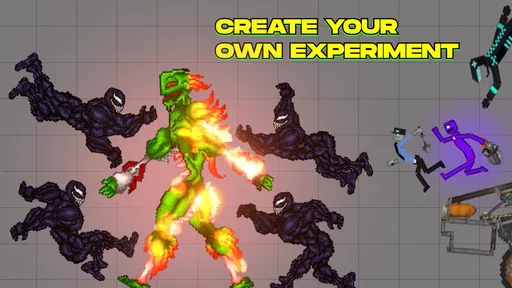

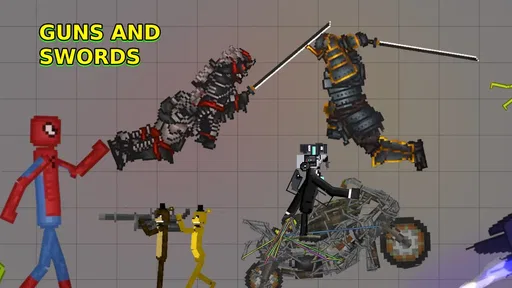

Analysis by Reviewed
When I want to try a new look or add something different to a Melon-style game, I usually want a quick route from browsing to seeing the change in play. Mods&Skins for Melon is aimed at that kind of discovery: it gathers customization ideas alongside mods, cars, and NPC-related additions. I’d treat it as a companion for exploring options, rather than assume every item will suit every game or setup.
Start with the change you actually want
Before opening a catalog, I find it useful to decide what would make my next session more enjoyable. If I’m tired of the familiar look, a skin is the smaller, easier-to-evaluate experiment. If I want to change what happens during play, I’d look at a mod or an addition such as a car or NPC-related content instead. Those are different goals, and separating them helps me avoid choosing an item just because its preview catches my eye.
This is where a focused catalog can be more convenient than searching the web or browsing a general collection of mods. The Melon-specific emphasis narrows the subject, so I can spend more of my time comparing relevant ideas and less time sorting through unrelated games. The trade-off is that a focused collection still needs the same careful checking as any other source: I’d read the item details, look for compatibility guidance, and make sure I understand how the content is meant to be used.
Choosing what to try
My first useful step is to browse with a specific goal in mind. If I’m looking for a fresh visual style, I focus on skins; if I want to change the feel of a session, I look at the other add-ons. That simple distinction helps keep browsing from turning into an endless scroll. Before committing to an item, I’d check its description and any compatibility guidance shown in the app, then choose one change at a time so it’s clear what made a difference.
That one-at-a-time approach is especially handy when I’m sharing a device or trying to keep a familiar setup available. It also makes troubleshooting less frustrating: if an addition doesn’t behave as expected, I can identify the latest change instead of retracing a long chain of installs. I wouldn’t assume that finding an item in a catalog guarantees it will work with every version or configuration.
From browsing to a playable result
The practical workflow is to find an item, review what it is meant to change, and follow the steps presented for getting it into the intended game. The handoff matters: a catalog can help me discover content, but the result depends on moving from that discovery to the right place in the game. I’d keep the app and the game’s own instructions in view rather than tapping through automatically, particularly if the process asks me to switch between screens.
For an ordinary after-school or evening session, I might browse for a car or character-related addition, pick just one, and then check the game before looking for another. That gives me a clear outcome to judge: does the new content fit the kind of sandbox play I wanted, or would a simple skin have been enough? It’s a more satisfying use of the app than collecting options without ever testing them.
More From Our News Desk

Weather by Xiaomi Review: Clear at a Glance, Less Clear Up Close

X Under Pressure: Can It Recover When Posting Goes Wrong?

Clash of Clans Is Won Between the Battles

Android Auto Makes the Case for Quieter Car Software

MobiOffice: Transforming Mobile Productivity with Seamless Integration

EA SPORTS FC™ Mobile Soccer: Redefining Mobile Sports Gaming
A small, deliberate test is more useful than a big collection
One practical habit I’d use is to keep track of the item I’m testing and what I expected it to change. I don’t need a complicated log: a short note or simply remembering the last selection is enough when I’m trying one addition at a time. If the result differs from what I pictured, that gives me a sensible next step—recheck the item’s description and instructions before adding anything else.
This approach also helps when I’m deciding whether an add-on is worth keeping in my routine. A visual change can be judged quickly by whether I like seeing it; a gameplay-oriented addition needs a little more attention because I want to see whether it actually suits the session I had in mind. I’d rather test one option properly than collect several and be unsure which one I enjoyed or which one caused confusion.
A Splash of Color and Creativity
First off, let's talk about what makes Mods&Skins for Melon such a standout. This app offers a treasure trove of skins and mods that let you transform the look and feel of your device. I mean, who doesn't love a bit of pizzazz on their screen? From quirky themes to sleek designs, there's something here for every taste.
The Installation Experience
Installing and navigating through the app is as smooth as butter. Even if you're not a tech guru, the user-friendly interface guides you like a breeze. I remember thinking, "Wow, this is almost too easy!" The app does a great job ensuring that every mod and skin is just a tap away, making the whole process super convenient.
Customization Galore
What really caught my attention was the sheer volume of customization options available. Whether you're into vibrant colors or minimalist styles, Mods&Skins for Melon has you covered. I spent hours just exploring the different themes, each one more captivating than the last. It's like having a mini art gallery on your phone!
Performance and Usability
No review is complete without talking about performance, right? In my experience, the app runs smoothly without any hiccups. It's optimized to ensure that your device doesn't lag, even with the fanciest of skins applied. This is a big win, especially for those of us who dread the spinning wheel of doom!
Picking the right fit for your routine
I’d see this as a better fit for curious players who enjoy changing their Melon-related experience now and then than for someone who wants a fixed, untouched setup. If you like browsing for a new visual idea before a short session, the app’s mix of customization and other additions gives you somewhere specific to start. If you mainly want a dependable source of instructions for every possible configuration, or you dislike checking details yourself, I’d choose a more hands-on community guide instead.
There’s also a useful distinction between discovery and installation. A catalog can make it easier to find an idea, but the item’s own instructions and the game’s response are what determine whether that idea turns into a satisfying result. I’d keep that expectation in mind rather than judging the whole app by one item that doesn’t suit my setup. Conversely, if I repeatedly find that the available options aren’t relevant to what I play, a broader mod community may offer a better match.
No matter how tempting the catalog looks, I find it’s worth deciding what I actually want before browsing. A visual change is an easy starting point; a gameplay addition is a better fit when I’m ready to test how it affects a session. Compared with searching broadly through general mod collections, a dedicated Melon-focused catalog can make discovery feel more direct. The trade-off is that a focused catalog is not the same as a guarantee of compatibility or a replacement for checking how an item is meant to be used.
The app is free to try, though it also offers in-app purchases at $4.99 per item, so I’d pay attention to any purchase prompt and make sure I understand what I’m selecting. If I only want to browse, I can take my time before deciding whether a particular item is worth paying for. That distinction matters for younger users too: the app is rated Teen, and I’d suggest that teens check purchases with a parent or guardian if that’s part of their household rules.
Who will get the most from it
I’d recommend this to someone who already enjoys experimenting with Melon-related content and likes having skins and other additions gathered in one place. It may also suit a player who wants a small change for a casual session without committing to a full overhaul. SincMobile Apps is the developer, and the app sits in the libraries and demo category; its appeal is chiefly as a way to explore and organize ideas for customization.
On the other hand, I’d skip it if I’m looking for a guaranteed one-tap installation path for every item, or if I don’t want to spend time checking whether a particular addition fits my setup. People who prefer to keep a game untouched may be happier with its standard content. And if I’m only after broad inspiration across lots of unrelated games, a general-purpose discovery app may be a better match than a Melon-focused one.
For context, the app has a 4.5 average from around 5,000 ratings and has passed 1 million installs. It’s free, rated Teen, and version 2.4 requires Android 6.0 or later. Those details make it accessible to many Android users, but they don’t replace the practical checks I’d make before choosing a specific item. I’d also avoid treating popularity as proof that every listing will work exactly as I expect.
Making the most of a short session
If I only have a little time, I’d browse with a single question in mind: do I want the game to look different, or do I want to try a different kind of content? That keeps the selection process from taking over the play time itself. I’d read the item details before switching away from the catalog, then test the result before browsing again. The payoff is modest but useful: I can tell whether the change improves that session instead of leaving with a list of possibilities and no clear outcome.
For a shared phone or tablet, I’d be even more selective. A small visual change is easier to explain and evaluate than several additions made in quick succession, and it reduces the chance that another player has to work out what changed. If other people use the device, I’d also make sure they know which game setup I’m testing and avoid spending on an item until I’m comfortable that it’s the one I want.
As someone who loves to keep things fresh and exciting, I found myself frequently changing skins just for the fun of it. Plus, the app's regular updates mean that there's always something new to try. It's like having a never-ending wardrobe for your device!
Where the flow can break
The main friction in this kind of workflow is the handoff between finding an add-on and seeing it work in the game. A clear description and a careful, single-item test make that transition easier to judge. If an item doesn’t produce the result I expected, I’d stop and revisit its instructions rather than install several more and make the cause harder to pin down. I’d also be cautious about spending on an item before I’m confident it matches what I want.
My overall take is that this is most useful as a focused place to explore Melon customization, not as a promise that every discovery will be effortless. I’d start with one free-to-browse option, follow the stated steps, and judge the result in the game before building a bigger collection. That keeps the experience fun and makes it easier to decide whether the catalog fits the way I play.
Final Thoughts
In a nutshell, Mods&Skins for Melon is a fantastic app for anyone looking to breathe new life into their device. It's user-friendly, packed with options, and performs like a charm. If you're someone who enjoys personalizing every aspect of your phone, then this app is definitely worth a download. So go ahead, give your device the makeover it deserves!
Mods&Skins for Melon Frequently Asked Questions
What devices can run Mods&Skins for Melon?
Mods&Skins for Melon is available for Android devices running version 6.0 or later. Before downloading, check your device’s operating system version in its settings to make sure it meets that requirement. The app is listed as a free download, so you can install it and explore its mod and skin library without paying an upfront price.
What is Mods&Skins for Melon and how does it enhance my gaming experience?
Mods&Skins for Melon is an application designed to enhance your gaming experience by providing a wide variety of modifications and skins for your favorite games on the Melon platform. With this app, you can customize characters, unlock new features, and personalize game elements to make gameplay more engaging and enjoyable. It's ideal for gamers looking to refresh their gameplay with unique visual changes and new functionalities.
Is Mods&Skins for Melon compatible with all devices and games?
While Mods&Skins for Melon supports a broad range of devices and games, compatibility can vary depending on the specific game and device model. It's essential to check the app's compatibility details on its download page or within the app itself to ensure it supports your particular device and the games you wish to modify. This step helps avoid any potential compatibility issues.
What kind of content can I find in Mods&Skins for Melon?
The app focuses on mods and skins, with its description also highlighting add-ons, cars, and NPCs. That makes it a library-style companion for browsing customization ideas and extra content connected with Melon. If you are mainly interested in changing the look of characters or exploring additional in-game elements, its collection is aimed at that kind of discovery.
Are there any costs associated with using Mods&Skins for Melon?
Mods&Skins for Melon is free to download, though it offers in-app purchases priced at $4.99 per item. These purchases may provide access to additional skins, mods, or features, so review the purchase details before confirming anything. The app is developed by SincMobile Apps and is rated Teen, which may also help you decide whether it is suitable for your household.
Pros
- Extensive variety of mods.
- User-friendly interface.
- Regular updates available.
- Supports customization.
- Easy installation process.
Cons
- Ads can be intrusive.
- Limited offline functionality.
- Some mods may cause crashes.
- In-app purchases required.
- Compatibility issues on older devices.










