MoBill Budget and Reminder
- 1.56K
- 4.0
- Installs
- 500.00K
- Price
- Free

Screenshots
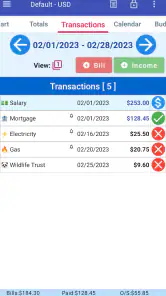
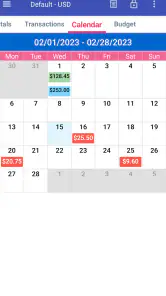
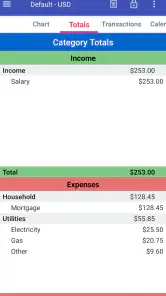
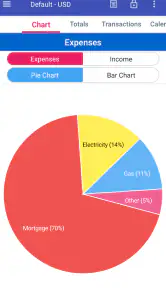
Analysis by Reviewed
Managing money is rarely difficult because people cannot add numbers. The harder part is remembering recurring bills, noticing where a budget is slipping, and keeping enough attention for the small decisions that affect the whole month. MoBill Budget and Reminder takes a focused approach to that problem. I see it as a practical personal finance app for people who want a clear place to record spending and keep upcoming obligations visible, without committing to a complicated financial platform.
It is a free finance app from MoBill Apps, with optional in-app purchases ranging from $2.50 to $10.99 per item. That distinction matters: you can start without paying, while the paid items create a separate value question for users who want more from the experience. The app is rated for Everyone, runs on Android 8.0 or later, and its current version is 5.3.1. It has been available since February 28, 2011, so it is not a brand-new experiment looking for its identity.
How MoBill fits into everyday money management
When I use a budgeting app, I do not want to feel as if I am preparing an accounting report every time I buy lunch or check what is due. I want the app to reduce mental clutter. MoBill’s appeal is its direct connection between two jobs that are often separated: watching a budget and remembering bills. That combination makes sense because a bill is not only a reminder; it is also a future demand on the money currently sitting in an account.
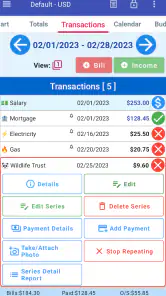
A realistic use case is a household that gets paid at the end of the month but has several obligations spread across the following weeks. Instead of relying on memory or scattered calendar entries, I would use the app to keep the recurring payments and day-to-day spending in the same personal finance routine. Checking that information before making a larger purchase gives a more useful answer than simply looking at the current bank balance.
The app is also suited to someone who wants to build awareness gradually. A person who has never maintained a budget may be discouraged by tools that begin with categories, accounts, goals, charts, and financial connections all at once. MoBill feels better matched to a manual, deliberate workflow: record what matters, review the effect on the budget, and use reminders to avoid preventable surprises.
That simplicity is both its attraction and its boundary. I would not approach it expecting a full financial dashboard that replaces every banking or accounting tool. Its strongest role is as a personal control panel for planned expenses and spending discipline. If you need investment tracking, tax preparation, shared household permissions, or automatic analysis across several financial institutions, a more specialized service may be a better fit.
What the free starting point means
The most important cost detail is straightforward: the app is free to download and use as an entry point, with optional purchases inside it. That makes trying the workflow low-risk. I can install it, decide whether entering and reviewing my own information fits my habits, and only then consider whether a paid item is worthwhile.
I would treat the free access as a chance to test consistency rather than as a promise that every possible convenience is included. The listed purchase range runs from $2.50 to $10.99 per item, but the useful question is not the largest number by itself. The question is whether a paid addition saves enough time or frustration to justify its cost for my particular routine. Someone who only needs a simple reminder and occasional budget check may find the free experience sufficient, while a heavier user may judge the optional value differently.
This is also where expectations should stay realistic. A purchase can improve the value of an app, but it cannot create a budgeting habit on its own. If I ignore the app for weeks, even a paid option will not make my financial picture accurate. I would first use the free version through a complete pay cycle, including at least one bill due date and several ordinary purchases, before spending anything.
That trial approach is especially sensible because the app’s average rating is 4.0 from around 3.8 thousand ratings, with roughly 1.6 thousand written reviews. Those figures suggest a meaningful user base and generally positive reception, but they do not guarantee that every person will enjoy the same workflow. Finance apps are highly personal: one user’s welcome simplicity can feel like another user’s lack of automation.
Where the app delivers practical value
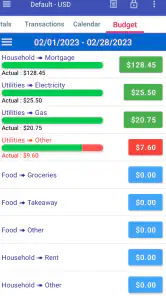
The first real benefit is visibility. A budget is useful only when it is connected to decisions I actually make. Recording an expense immediately, or soon after it happens, gives me a more honest view than trying to reconstruct the month from memory. The app’s focus on personal finance and reminders encourages that regular check-in instead of leaving budgeting as a once-a-month exercise.
The second benefit is the relationship between timing and affordability. A purchase may look harmless when viewed alone, yet become uncomfortable when several scheduled payments are approaching. Keeping reminders close to budget information helps me ask a better question: not just “Can I pay for this?” but “Will paying for this leave enough room for what is already coming?” That is a small change in thinking, but it is one of the most useful habits a budgeting tool can support.
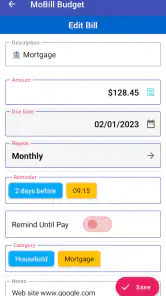
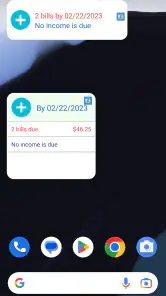
A third strength is its potential as a low-friction memory aid. People often miss bills not because they lack money, but because a due date is buried in an email, paper statement, or forgotten calendar entry. A dedicated reminder system gives those obligations a more deliberate place. I would still verify important payments through the relevant provider, but I would rather use MoBill as an early warning than depend on memory alone.
One non-obvious workflow I would recommend is separating setup from maintenance. On the first session, I would enter only the bills and spending categories I can maintain reliably. After that, I would create a short daily or every-other-day review habit rather than trying to build a perfect financial history in one sitting. This reduces the common failure point where a budget becomes so detailed that updating it feels like work.
Another useful approach is to review the app before discretionary spending, not only after it. A quick look at upcoming obligations can change the decision before money leaves the account. That makes the app preventive rather than merely descriptive. It is a better use of reminders than opening them only after a payment has already become urgent.
I also see value for people with irregular income, although they need to be more careful. A fixed monthly budget can give a false sense of security when earnings change. In that situation, I would use the app primarily to protect essential bills and mark flexible spending separately. The trade-off is that the user must interpret the numbers actively; the app cannot know whether an unusually strong month will be repeated.
Trade-offs that may affect your routine
The clearest trade-off is manual responsibility. A manual finance routine can be more intentional and may avoid the complexity of connecting financial accounts, but it depends on accurate, timely entries. If I forget several purchases, the budget becomes optimistic. That is not a minor issue: a budgeting app is only as useful as the information I continue to give it.
This makes MoBill less attractive to users who want automatic transaction importing or effortless categorization. Someone who already uses a bank application with strong spending analysis may prefer to keep everything there. MoBill makes more sense when the user values a separate, focused space for planning and reminders, or when the bank’s own tools do not provide the desired structure.
There is also a learning trade-off. A focused app can be easier to understand than a large financial suite, but it may require the user to decide how to organize personal money without being guided through every financial goal. I would consider that a benefit for someone who already knows what they want to track, and a limitation for a beginner looking for a complete financial education system.
Reminder tools can create their own friction if they are not maintained. A bill that changes date, amount, or frequency should be updated promptly. Otherwise, the reminder remains present but becomes less trustworthy. My practical advice is to review recurring obligations whenever a provider changes its statement or payment schedule. The app can help me remember; it cannot verify every change on my behalf.
Privacy expectations are another reason to choose carefully. I would be comfortable starting with limited, non-sensitive information while learning the workflow, but I would avoid entering details I do not need for budgeting. Since the app’s main value does not require me to turn it into a complete record of every aspect of my financial life, restraint is sensible. A smaller, accurate budget is more useful than an ambitious one that I stop maintaining.
The age rating of Everyone makes the app approachable for a broad audience, but that should not be confused with financial suitability for every situation. A young user learning to manage allowance or regular expenses may find the basic idea useful. A family managing multiple people’s spending, however, may need collaboration features and controls beyond the individual focus I would expect here.
Who is most likely to get their money’s worth
I would recommend trying MoBill to someone who repeatedly forgets due dates, wants a simple personal budget, or feels that a bank app shows past transactions without helping enough with future planning. It is particularly appealing to a person who is willing to enter information manually and wants reminders to be part of the same routine as expense tracking.
It can also suit a user who is moving away from paper notes or scattered phone reminders. The important improvement is not merely replacing one list with another; it is putting planned obligations beside the spending decisions they affect. That context can make a basic budget more actionable.
For couples or families, I would be more cautious. One person can certainly use it to manage a household view, but that is different from having a genuinely shared system. If several people need to add transactions, approve changes, or see synchronized information, I would compare MoBill with a service built specifically around collaboration before committing to it.
I would also suggest skipping it if automatic data collection is non-negotiable. Users with many accounts, frequent transactions, business expenses, or complicated income streams may spend more time maintaining the app than benefiting from it. In those cases, a dedicated accounting platform or an integrated banking tool may offer better efficiency, even if it feels less personal.
People who want investment performance, debt payoff modeling, detailed reports, or advanced forecasting should likewise look beyond this app unless the core budgeting-and-reminder workflow already covers their needs. The value here is focus, not breadth. Buying optional items will not necessarily change that fundamental character.
My recommendation after weighing the cost and limits
My verdict is to try MoBill Budget and Reminder before paying for anything. The free entry point makes that decision easy, and the app’s long presence since February 28, 2011, along with more than 500 thousand installs, gives it the feel of an established option rather than a temporary novelty. I would judge it by one practical test: does it help me remember bills and make spending decisions with less guesswork?
If the answer is yes after a full routine, the optional purchases may be worth considering, especially for someone who uses the app frequently enough to notice a meaningful improvement. I would not buy simply because a feature sounds convenient. I would identify the specific annoyance it solves, compare that benefit with the listed purchase range, and keep the free setup if the difference is minor.
My strongest recommendation is to keep the system maintainable rather than impressively detailed. Enter the obligations that matter, record spending consistently, and check the upcoming picture before discretionary purchases. That approach gives the app a fair chance to prove its value while protecting you from the most common budgeting mistake: building a system too complicated to keep current.
For a person seeking a focused, approachable finance companion, MoBill is a sensible option to test. For someone expecting automatic, collaborative, or professionally detailed financial management, I would skip it and choose a tool designed around those priorities. Its value is real when reminders and personal budgeting are the problem; outside that lane, the simplicity that makes it approachable can become the reason it falls short.
Pros
- Simple interface makes expense tracking quick and approachable.
- Custom reminders help prevent missed bill payments.
- Useful budget categories provide a clearer view of spending.
- Supports planning recurring bills and regular financial commitments.
- Lightweight design should work well on most modern devices.
Cons
- May lack advanced investment or debt-management tools.
- Manual transaction entry can become time-consuming for active users.
- Limited sharing options may not suit couples or families.
- Some features may require payment or contain in-app advertising.
- Budget insights depend on users entering accurate
- up-to-date data.

- Category
- Finance
- Version
- 5.3.1











