Mission Lane
- 10.15K
- 4.8
- Installs
- 1.00M
- Price
- Free

Screenshots
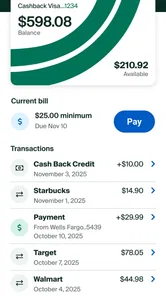
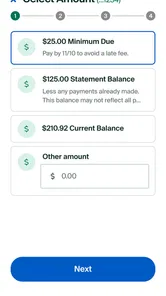
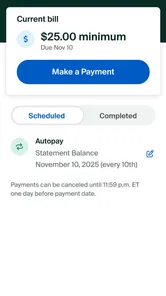
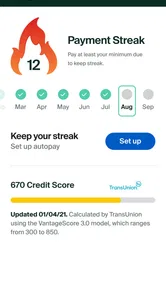
Analysis by Reviewed
Before making this a daily habit, I’d decide what job I want the app to do. Mission Lane makes the most sense as a phone-based window into a Mission Lane credit-card account, not as the place where I manage every part of my finances. That distinction affects what I check, when I trust a screen, and whether I need another tool alongside it.
A card app, not a complete money picture
If most of my questions are about this card—what has appeared, whether a payment is reflected, or what activity I should review—one focused account app can be more convenient than opening a general-purpose budgeting service. The trade-off is scope: spending on another card, cash purchases, and bills held elsewhere will not become part of a complete household picture just because I check this account often.
I’d use the app to keep an eye on this card and maintain a separate budget for the rest. That split is especially useful if I share expenses with someone or move money between several accounts. It prevents a common planning error: mistaking a clear view of one card for a complete view of what I can afford.
Make account checks answer a question
My practical tip is to open the app with a specific question in mind rather than browsing whenever I have a spare second. After a purchase, I might check whether the activity is visible; before a planned expense, I might review the account and leave room for transactions that have not appeared. A short, purposeful check is easier to interpret than repeatedly refreshing a screen and guessing what a delay means.
For a weekly review, I’d look at the activity in context instead of reacting to one transaction in isolation. A larger purchase may be expected, while several small ones can be easier to overlook. The app can help me inspect the card account, but the decision about whether a spending pattern fits my budget still belongs to me.
Who may prefer another option
This is a sensible fit for someone who already has a Mission Lane card and wants direct mobile access to that account. It is a weaker choice for someone who has not opened an account, wants to compare card offers, or needs one dashboard for finances spread across multiple providers. In those cases, a bank app, a broader budgeting tool, or the card issuer’s account website may better match the task.
I would also think about how I prefer to handle financial information. If I rarely use my phone for account management, or if I prefer reviewing statements on a larger screen, mobile access may not change much for me. The app is most useful when a quick check genuinely fits my routine—not simply because managing money on a phone is available.
More From Our News Desk

 Bolt: Request a Ride
Bolt and the Shift from One-Tap Rides to More Legible Trips
Bolt shows how ride-hailing is shifting from a one-tap taxi request toward a more legible, choice-driven trip, while leaving the hardest questions of price and reliability unresolved.

 Farm Land - Farming life game
Farm Land Review: A Small Island Farm with a Satisfying Loop
A bright, breezy island farm turns a few quick chores into a satisfying cycle of planting, harvesting, expanding, and deciding what to build next.

 Android Auto
’s Community Takes Shape in the Passenger Seat
Its most valuable network is not a public feed but a shared set of routes, voice habits, app integrations, and advice that make driving less isolating—and sometimes more complicated.

 My Talking Angela
 Makes the Virtual Pet Feel Personal
A polished pet-raising game built on small rituals, playful customization, and a character who gives everyday screen time a surprisingly personal rhythm.

 Google Translate
 Review: A Pocket Tool for the Small Frictions of Travel
From menus and signs to quick conversations, Google Translate earns its place by cutting the little delays that make unfamiliar language feel like a barrier.

 Shazam: Find Music & Concerts
Shazam’s Best Trick Is Turning a Song Into a Night Out
A few seconds of recognition can settle an argument, rescue a half-remembered chorus, and point toward a live show. Shazam’s real trick is what happens after the match.
Latest News



What to do when timing is uncertain
If a transaction or payment is time-sensitive, I would distinguish between seeing an entry and knowing that the underlying account action is complete. A connection interruption, a delayed refresh, or a moment of app lag can make that distinction harder to judge. I’d give the account view time to load, check again when the connection is steadier, and avoid tapping through a payment flow repeatedly just because the first screen was slow.
If I need a dependable record for a specific decision, I’d keep any confirmation or account message and check the account itself. That routine is more cautious than relying on a glance, but it is appropriate for money. The app is a convenient way to review the relationship; it should not encourage me to treat every screen as an instant settlement receipt.
I judge a credit-card app less by how polished it looks than by whether it helps me answer ordinary questions quickly: Has a payment gone through? What did I spend? Is there something I need to deal with before I put the phone away? Mission Lane is built around managing a card from a phone, so its usefulness depends on making those small checks feel straightforward. I’d think of it as a companion to a Mission Lane account, not a general-purpose finance hub that replaces every banking or budgeting tool.
When a network connection matters
Card information is only useful when it is current, which makes connectivity part of the experience rather than a background detail. If I’m checking an account while out, I’d want to know whether the balance or recent activity has refreshed before making a decision. A screen that opens is not necessarily the same as information that has just updated, so I’d avoid relying on a displayed figure as proof that a recent transaction or payment has settled.
That distinction matters in practical moments: before making another purchase, I can use an account check to get a better sense of my available room, but I would still leave a margin for transactions that have not appeared yet. When service is weak, I’d wait until I have a reliable connection before treating an account view as current. This is a modest habit, but it prevents the common mistake of assuming a mobile screen is always live.
Useful in brief mobile moments
The strongest fit is someone who already uses a Mission Lane credit card and wants to check in without sitting down at a computer. A quick look during a lunch break can be more realistic than trying to reconstruct a week’s spending later. The app is also a natural place to make account checks part of a routine: I’d review activity after a larger purchase, then take a slightly longer look when I have time to understand the pattern.
For example, imagine I buy groceries on the way home and later wonder whether a second stop will fit my budget. I can open the app, review what is visible, and make a more informed choice. I would not treat that glance as a complete budget, though. People who need to combine several bank accounts, cards, and cash expenses may still prefer a dedicated budgeting service or a spreadsheet that brings everything together.
Small screens encourage quick decisions, but finance deserves a little care. I’d avoid checking sensitive account details over an unfamiliar public connection, and I’d make sure the phone itself is protected. Those are sensible precautions for any financial app, not special capabilities I’d assume this one provides.
If something stalls or looks out of date
The published experience has included occasional lag, and that kind of friction is more noticeable in a finance app than in a casual game. If a page takes longer than expected, I’d first check the connection, then reopen the app and give the account view another chance to load. If the information still looks stale, I would not repeat a payment or make a financial decision based only on uncertainty; I’d use the appropriate account support route instead.
This is also why I would keep payment records and important account messages in view rather than assuming a notification alone settles the matter. A notification can prompt me to check, but the account itself is where I’d verify what happened. That extra step is mildly inconvenient, yet it is better than confusing a reminder with confirmation.
Keeping mobile data use sensible
I would use the app for deliberate account checks rather than leaving it open and refreshing repeatedly. That makes the experience easier to fit around a busy day and avoids spending attention—and potentially mobile data—on updates I don’t need. If I’m travelling or on a limited plan, I’d wait until a trusted connection is available for a longer review, especially if I want to inspect several parts of the account.
The app is free, and its Everyone age rating makes it broadly accessible, but a credit-card account still calls for responsible adult judgment. It is not a substitute for reading the card’s terms or understanding how balances and payments work. If I were helping someone new to credit, I’d use the app alongside a clear monthly plan rather than treating convenient access as financial guidance by itself.
Getting Started with Mission Lane
First things first, let’s talk about the installation and setup process. Downloading the Mission Lane app is as easy as pie - just head over to the Google Play Store or Apple’s App Store, and you’re good to go. The installation is straightforward and doesn’t require much time, which is always a plus in my book.
Once you’ve got it up and running, the app greets you with a sleek and user-friendly interface. I was immediately impressed by how intuitive it felt. You know how some apps make you feel like you need a degree in rocket science just to navigate them? Well, that’s definitely not the case here. With Mission Lane, everything is laid out clearly, so even a complete newbie can find their way around with ease.
Features that Stand Out
Now, let’s dive into what makes this app tick. One of the standout features for me is its ability to track your spending habits. The app provides insights and trends on your spending, helping you understand where your money goes every month. It’s like having a financial advisor right in your pocket!
Another feature that caught my attention is the credit score monitoring. Keeping tabs on your credit score can be a daunting task, but Mission Lane simplifies it by providing real-time updates. This is a game-changer for anyone looking to improve their financial health.
Additionally, the app offers personalized financial advice. It’s almost like having a little financial guru whispering tips and tricks to you, guiding you towards better financial decisions. This personalized touch is something I really appreciate.
Using Mission Lane Daily
Incorporating this app into my daily routine was seamless. I found myself checking it every morning, eager to see how my spending was shaping up and what advice it had in store for me. It’s become a bit of a ritual, and I must say, it’s a healthy one!
The app’s notifications are super handy too. They serve as gentle reminders to keep you on track, ensuring you don’t miss any important updates. I mean, who doesn’t love a little nudge in the right direction?
However, like any app, it’s not entirely free from hiccups. There were a few instances where the app lagged a bit, but it wasn’t anything too troublesome. The developers seem quite responsive to feedback, so I’m optimistic that these minor issues will be ironed out soon.
Who will get the most from it
My recommendation is strongest for cardholders who want a convenient view of their Mission Lane account and are comfortable checking their finances on a phone. Mission Lane, LLC develops the finance app, which is free to install. It has a 4.8 average from around 164,000 ratings and has passed one million installs, signs of broad use rather than a guarantee that every person will find the same experience.
It is less compelling if you are shopping for a card-neutral money manager. A traditional bank app may be a better daily home if most of your activity happens elsewhere, while a standalone budget tool can be more useful when you need a joined-up picture across multiple accounts. I’d choose this app for access to its own card relationship, not expect it to replace those broader tools.
There are a few practical questions I’d answer before making it part of my routine. The app is listed as version 6.1.0 and requires Android 8.0 or later; iPhone users can find it through Apple’s App Store. It was released on June 25, 2019, and its Everyone content rating describes the app’s general audience, not whether a user is eligible for or should apply for a credit card. I’d also separate app access from card approval: installing a management app is not the same as opening an account.
If you’re deciding whether to rely on it, start with a simple test: use it to check recent activity and see whether the information is clear enough for your everyday decisions. Keep your broader budget elsewhere if you need to track money beyond this card, and verify anything time-sensitive in the account before acting. That gives the app a useful role without asking it to do more than a card-management tool should.
Final Thoughts
All in all, Mission Lane is a fantastic tool for anyone looking to take control of their financial life. It’s user-friendly, packed with useful features, and makes financial management feel less like a chore and more like an empowering experience. Whether you’re a financial novice or a seasoned pro, this app has something to offer.
If you’re still on the fence about trying it out, I’d say give it a shot. Who knows, it might just become your new favorite financial companion. Happy budgeting!
Mission Lane Frequently Asked Questions
Does Mission Lane let me check my account activity from my phone?
Mission Lane is a finance app for managing a credit card directly from your phone. It may suit you if you want to use a mobile app for card management. Before downloading, consider whether that purpose matches what you need and review your card terms separately, since app access and the terms of a card are different things.
Who publishes Mission Lane, and is the app free to download?
Mission Lane is published by Mission Lane, LLC, and the app is free to download. Its purpose is to help users manage a credit card from a phone, so it may be worth considering if you want card-management tools in a mobile app. Before installing, check that the app’s features fit your needs and review any applicable card terms separately.
What devices and operating systems can run Mission Lane?
Mission Lane is available for Android and iOS, so users can look for it in the relevant app store for their device. The current version is 6.1.0, and Android users need version 8.0 or later. Checking your device’s operating system before downloading can help avoid compatibility issues and ensure you can install and use the app as expected.
What is Mission Lane and what does it offer?
Mission Lane is a financial app designed to help users manage their credit and finances effectively. It offers features like credit score monitoring, personalized financial tips, and a streamlined credit card management system. The app aims to provide users with tools to improve their financial health and make informed financial decisions.
Is Mission Lane available for both Android and iOS devices?
Yes, Mission Lane is available for download on both Android and iOS platforms. Users can find the app on the Google Play Store for Android devices and the Apple App Store for iOS devices. This ensures that users on either operating system can access the financial tools and features offered by Mission Lane.
Pros
- User-friendly interface for easy navigation.
- Quick and secure account setup process.
- Offers free credit score tracking.
- Provides personalized financial tips.
- Real-time transaction alerts enhance security.
Cons
- Limited customer service availability.
- High-interest rates on credit products.
- Occasional app crashes reported by users.
- No budgeting tools available.
- Limited integration with other financial apps.