Mileage Tracker & Log - MileIQ
- 29.72K
- 4.6
- Installs
- 1.00M
- Price
- Free
Screenshots
Analysis by Reviewed
I judge a mileage tracker by one practical question: how much driving admin does it remove without making me distrust the record? Mileage Tracker & Log - MileIQ focuses on automatic trip detection, which is a sensible approach for anyone who regularly forgets to note a journey until the details have faded. I’d consider it most useful when work drives are frequent enough to become a paperwork chore, but not so predictable that keeping a manual log feels effortless.
Automatic trip detection in everyday use
The app is a free finance tool from MileIQ, with optional in-app purchases. Its appeal is not that it turns mileage into a complicated business system; it is that it aims to notice drives in the background and leave you to review and classify them later. That shifts the task from remembering every trip in the moment to checking a record while the route is still familiar.
How the driving log fits into a routine
In the original hands-on experience, the app’s setup felt straightforward, and its interface was easy to approach. Location access matters to automatic tracking: it helps the app identify trips, but it also means this is not the right tool for someone who would rather avoid location-based logging altogether. I’d check the phone’s location and battery settings if trips are not appearing as expected, since background tracking depends on the app being able to do its job while you are not actively looking at it.
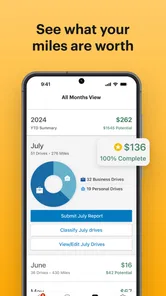
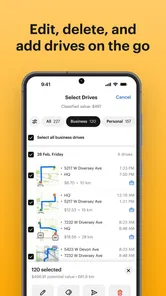
Once drives appear, the useful habit is to classify them promptly rather than letting a long queue build up. A quick review at the end of a workday can help distinguish a client visit from a personal errand before the destination becomes hard to remember. If a day includes mixed-purpose travel, I would treat each leg carefully instead of assuming the entire outing belongs in one category. That small bit of attention is what turns an automatically collected route into a record you can actually use.
For example, imagine a self-employed tradesperson driving to a morning job, stopping at a supplier, then heading home after a personal appointment. Automatic detection can reduce the chance of forgetting that first work journey, but it cannot decide the business purpose of every stop with human certainty. Reviewing and categorizing those drives is still essential. In my view, that is a fair trade: the app can take away much of the remembering, while the user remains responsible for the judgement.
Where it differs from a manual log
A notebook or spreadsheet gives you direct control and does not depend on automatic detection, but it asks you to record details consistently, often at exactly the moment you are busy. A dedicated mileage tracker such as MileIQ reverses that balance: it tries to capture the trip first, then asks you to sort it. That can be a real advantage for people with changing schedules, though anyone who drives only occasionally may find a simple manual note less intrusive than maintaining another app.
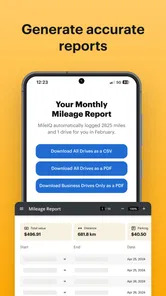
The app’s weekly summary email, noted in the original experience, can serve as a useful checkpoint rather than just an inbox report. I would use it to spot drives that still need classification and to compare a busy week with a quiet one before preparing a reimbursement or tax record. It is better to review the log regularly than to treat a summary as proof that every trip has been categorized correctly.
More From Our News Desk

 Bolt: Request a Ride
Bolt and the Shift from One-Tap Rides to More Legible Trips
Bolt shows how ride-hailing is shifting from a one-tap taxi request toward a more legible, choice-driven trip, while leaving the hardest questions of price and reliability unresolved.

 Farm Land - Farming life game
Farm Land Review: A Small Island Farm with a Satisfying Loop
A bright, breezy island farm turns a few quick chores into a satisfying cycle of planting, harvesting, expanding, and deciding what to build next.

 Android Auto
’s Community Takes Shape in the Passenger Seat
Its most valuable network is not a public feed but a shared set of routes, voice habits, app integrations, and advice that make driving less isolating—and sometimes more complicated.

 My Talking Angela
 Makes the Virtual Pet Feel Personal
A polished pet-raising game built on small rituals, playful customization, and a character who gives everyday screen time a surprisingly personal rhythm.

 Google Translate
 Review: A Pocket Tool for the Small Frictions of Travel
From menus and signs to quick conversations, Google Translate earns its place by cutting the little delays that make unfamiliar language feel like a barrier.

 Shazam: Find Music & Concerts
Shazam’s Best Trick Is Turning a Song Into a Night Out
A few seconds of recognition can settle an argument, rescue a half-remembered chorus, and point toward a live show. Shazam’s real trick is what happens after the match.
Latest News



Accuracy, privacy and practical limits
Automatic logging is convenient, but convenience is not the same as a perfect record. A trip may need checking if the phone was unavailable, the app was restricted in the background, or the journey included an unusual stop. The safest workflow is to treat detected drives as a draft log: confirm that the route makes sense, correct its purpose, and keep any supporting records your workplace or tax process requires. I would not rely on an app’s classification alone to settle a disputed business expense.
There is also a personal trade-off in location-based tracking. Some drivers will gladly allow it because they want fewer missed journeys; others may prefer to log only work trips manually and keep routine movements out of an automatic history. If privacy is your priority, that preference matters more than the convenience of hands-off capture. If you do enable tracking, making a habit of reviewing classifications is a more useful safeguard than assuming the app knows why you travelled.
The original review describes cloud storage and access across devices as part of its experience. That can make records easier to reach if you use more than one device, but it also makes account access and careful handling of work information worth considering. I would avoid sharing a device login casually and would check that the records you need are available before relying on them for a deadline.
Making the log useful at reporting time
A drive history is most useful when it supports a decision, not when it simply accumulates. Before a reimbursement deadline or tax preparation, I would review the period in manageable batches and make sure each work trip has a clear purpose. If I cannot remember why I went somewhere, that is a sign to improve the routine: add a brief note while the visit is fresh, or keep a separate calendar entry for appointments that explain the journey.
This distinction matters because mileage records and expense evidence are not always interchangeable. A route may show that you travelled, but the business reason still comes from your own knowledge and records. For anyone who needs to explain a trip later, pairing regular classification with a calendar or job record is more dependable than expecting the mileage log to tell the whole story.
Who is most likely to benefit
This is a stronger fit for self-employed people, field workers and employees who make repeated work trips in changing patterns. If you drive to several locations each week and often forget to record mileage until later, automatic detection addresses that exact friction. The app has a 4.6 average from around 69,000 ratings and more than a million installs, which suggests it has attracted a substantial user base, though popularity cannot guarantee that its tracking will suit every phone or routine.
It is less compelling for someone who makes only an occasional reimbursable journey, dislikes background location tracking, or needs a fully manual process with complete control over every entry. A spreadsheet may be better for a small number of predictable trips, while a broader expense-management tool may suit someone who wants mileage alongside other business records. The choice depends on whether forgotten drives are your main problem or just one small part of a larger accounting workflow.
It also suits people whose workday is interrupted by travel rather than built around a single commute. A salesperson visiting several prospects, a mobile service worker moving between appointments, or a consultant splitting time among client sites can benefit from having journeys gathered for later review. By contrast, a person who drives to one office and back along the same route may gain little if the log creates more checking than it saves.
Cost, compatibility and my verdict
The app is free to start, with in-app purchase options ranging from about six to ninety dollars per item. Before paying, I would first see whether the free experience fits my actual driving volume and review routine, then compare the available plan details in the app with how many trips I need to keep. The original review mentions a limited number of free drives and a subscription option, so frequent users should check the current terms rather than assume the free tier will cover every work pattern.
It is rated for everyone, was released in 2015, and the current version is 5.23.0.244267; Android compatibility begins with version 6.0. Those details make it worth checking device compatibility before installing, especially on an older phone. They do not change the central question: will automatic capture save you enough effort to justify location-based logging and a regular classification habit?
On a typical busy day, I would let the app gather the journeys, then take a few minutes after the last appointment to identify which visits were work-related and which were personal. If I had stopped at a shop on the way home, I would make sure that detour did not blur the purpose of the earlier client trip. That small end-of-day routine is more practical than trying to reconstruct the whole day on Friday, when destinations and reasons can run together.
My recommendation is conditional but positive. For someone whose work depends on frequent driving, the central benefit is catching journeys that a manual log might miss, while leaving the final business-versus-personal decision to the driver. I would use it with a short end-of-day review and a weekly check, not as a set-and-forget tax authority. If you rarely drive for work or would rather keep a deliberately manual record, a simpler method may be a better match.
What stood out in the original experience
Let's dive into the world of Mileage Tracker & Log - MileIQ, an app that promises to make tracking your drives as easy as pie. If you're like me and hate the hassle of jotting down every single trip, this app might just be the game-changer you've been waiting for.
Setting Up and First Impressions
Installing the app was a breeze. Available for both Android and iOS, it’s a quick download from the respective app stores. Once installed, the app greets you with a clean and intuitive interface. It's like opening a fresh notebook, but without the fear of messing up the first page. The setup process is straightforward, asking for basic permissions to access your location. Don't worry, it's not nosy—it just needs to know where you're going to track your mileage accurately.
How It Works
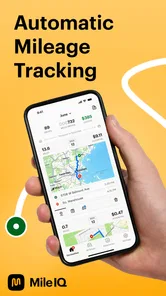
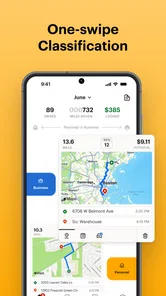
The magic begins once you start driving. The app automatically detects when you're on the move and logs your trips without needing any manual input. It's like having a silent co-pilot who never misses a beat. You can categorize trips as personal or business with a simple swipe, making it easy to keep your records organized. This feature is a lifesaver for anyone who needs to submit mileage reports for work or tax purposes.
One thing I particularly love is the weekly summary email. It’s like getting a little report card in your inbox, showing you how many miles you’ve driven each week. It's a neat way to keep track of your travel habits and make informed decisions about your driving patterns.
Features that Stand Out
What sets the app apart from other mileage tracking apps is its smart drive detection. The app uses advanced algorithms to differentiate between your various modes of transport. It knows when you're driving, cycling, or even when you're just a passenger. This attention to detail ensures that your mileage log is as accurate as possible, which is crucial for anyone who relies on these records for reimbursement or deductions.
Another standout feature is the cloud-based storage. All your data is securely stored in the cloud, meaning you can access your logs from any device. Lost your phone? No worries, your mileage data is safe and sound. Plus, the app syncs seamlessly across multiple devices, so you can start a trip on your phone and finish it on your tablet without missing a mile.
A Few Personal Thoughts
After using the app for a while, I can confidently say that it is a must-have for anyone who spends a lot of time on the road. It's like having a personal assistant dedicated solely to your mileage tracking needs. The app's ability to automatically log trips without any manual input is a huge time-saver and removes the stress of keeping track of every single journey.
The only downside? It's a subscription-based model. While the basic version is free with a limited number of drives per month, frequent drivers might find themselves needing to upgrade to the premium version. But honestly, the peace of mind and efficiency it provides could well be worth the cost.
In conclusion, it is a polished and reliable app that delivers on its promises. It's like having a trusty sidekick by your side, ensuring that every mile you drive is accounted for. Whether you're self-employed, a business traveler, or just someone who likes to keep tabs on their driving, this app is definitely worth a spin.
Mileage Tracker & Log - MileIQ Frequently Asked Questions
How much phone battery and data does MileIQ use while tracking drives?
MileIQ uses your phone’s GPS to detect when you’re driving, so its tracking depends on location services being available. GPS activity can affect battery use, and the impact may vary with your device and driving habits. If you are concerned about battery life or mobile data, check your phone’s usage settings after using the app and adjust location permissions to suit your needs.
Do I need to start or stop MileIQ manually for each trip?
MileIQ is designed to detect driving and log trips automatically, so you do not have to open the app to start and stop every drive. This can make routine mileage tracking easier, especially when you have several journeys to record. You will still need to review and categorize your trips so the log reflects whether each journey was for business or personal use.
Does MileIQ work on my phone?
MileIQ is a mileage-tracking app for Android and iOS. On Android, it requires version 6.0 or later. Its automatic tracking uses your phone’s GPS to detect driving, so you’ll need to allow the app to use location services for that feature to work. Check that your device meets the operating-system requirement before downloading.
What is Mileage Tracker & Log - MileIQ and how does it work?
Mileage Tracker & Log - MileIQ is an app designed to automatically track your mileage for work or personal use, offering a simple way to log your trips. It works by using your phone's GPS to detect when you're driving, and it logs your trips without you needing to start or stop the app manually. Users can categorize trips as business or personal with a swipe, making it easier to manage expenses for tax deduction or reimbursement purposes.
How accurate is MileIQ's mileage tracking?
MileIQ is known for its precision in tracking mileage, utilizing advanced GPS technology to ensure accuracy. However, like all GPS-based apps, its accuracy can be affected by certain factors such as signal strength and environmental conditions. Users generally find it reliable, but it’s always a good idea to occasionally double-check against vehicle odometers, especially for critical business trips.
Pros
- Automatic trip logging saves time.
- Accurate mileage tracking for tax purposes.
- Syncs seamlessly with cloud storage.
- User-friendly interface for easy navigation.
- Customizable settings for personalized use.
Cons
- Subscription required for full features.
- Limited free version capabilities.
- Occasional syncing issues.
- Battery consumption can be high.
- No real-time customer support available.