Everlance: Mileage Tracker
- 10.52K
- 4.7
- Installs
- 1.00M
- Price
- Free

Screenshots
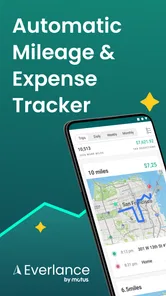

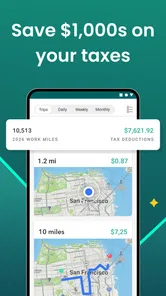
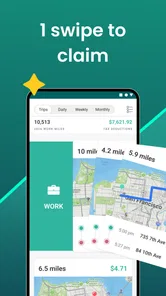
Analysis by Reviewed
I find a mileage tracker most useful when it prevents small record-keeping chores from piling up into a stressful end-of-month task. Everlance is a finance app built around that practical need: logging work journeys and organizing expenses. It is free to download, though it also offers in-app purchases, so I’d check the available options in the app before relying on a particular paid plan or assuming every feature is included at no cost.
What “free” means in practice
The no-cost download lowers the barrier to trying a mileage-and-expense workflow, but it does not tell me which paid option is right for a particular driver. In-app purchases range from $6.99 to $239.99 per item, a wide spread that makes it worth checking the terms and included tools before committing. I would compare those options with the actual time I spend logging trips and receipts, rather than choosing based on the headline price alone.
A useful test is to track how often you would use the app during a normal work week. If you make regular client visits and collect business receipts, reducing repeated admin may justify paying for an option that fits your needs. If you only need a mileage record once in a while, the free access or a simpler manual method may be enough. I would confirm what is included at the point of purchase and avoid treating a paid plan as necessary until the free experience has shown a real benefit.
Where the value comes from
The main payoff is consistency. A trip recorded close to when it happens is easier to classify and explain later than one reconstructed from a calendar, memory, and scattered notes. I’d treat automatic logging as a starting point, then make a quick habit of reviewing trips and marking their purpose. That small check helps keep personal errands from being mixed into a business record.
A useful workflow is to review recent trips at the end of a workday, while the reason for each stop is still fresh. If a route repeats, categorization rules can reduce routine sorting, but unusual days still deserve a manual look. This is especially helpful for someone who alternates between client visits, a regular commute, and personal stops: the app can organize the record, but your judgment is what makes the categories meaningful.
When a different approach may suit you
Automatic GPS tracking is convenient, but it is not the same as a record that never needs attention. You may need to correct a classification or check a trip that does not fit your usual pattern. Anyone who rarely drives for work may find a simple mileage note or spreadsheet less effort than maintaining another app. Likewise, if you prefer not to use GPS-based tracking, a manual method may feel more comfortable.
For regular work travel, the alternative is often a dedicated logbook or a general expense app paired with a separate mileage record. A logbook gives you direct control but asks you to remember every entry; a broader finance tool may keep spending together while leaving trip details less convenient to manage. Everlance’s appeal is having mileage and expense records in one workflow, although I would still check that its reporting and paid options fit your own reimbursement or tax routine before switching.
More From Our News Desk

 Bolt: Request a Ride
Bolt and the Shift from One-Tap Rides to More Legible Trips
Bolt shows how ride-hailing is shifting from a one-tap taxi request toward a more legible, choice-driven trip, while leaving the hardest questions of price and reliability unresolved.

 Farm Land - Farming life game
Farm Land Review: A Small Island Farm with a Satisfying Loop
A bright, breezy island farm turns a few quick chores into a satisfying cycle of planting, harvesting, expanding, and deciding what to build next.

 Android Auto
’s Community Takes Shape in the Passenger Seat
Its most valuable network is not a public feed but a shared set of routes, voice habits, app integrations, and advice that make driving less isolating—and sometimes more complicated.

 My Talking Angela
 Makes the Virtual Pet Feel Personal
A polished pet-raising game built on small rituals, playful customization, and a character who gives everyday screen time a surprisingly personal rhythm.

 Google Translate
 Review: A Pocket Tool for the Small Frictions of Travel
From menus and signs to quick conversations, Google Translate earns its place by cutting the little delays that make unfamiliar language feel like a barrier.

 Shazam: Find Music & Concerts
Shazam’s Best Trick Is Turning a Song Into a Night Out
A few seconds of recognition can settle an argument, rescue a half-remembered chorus, and point toward a live show. Shazam’s real trick is what happens after the match.
Latest News



Everyday mileage and expense tracking
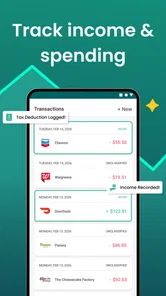
If you're anything like me, keeping track of all those miles for work can be a bit of a headache. That's where Mileage Tracker by Everlance comes in, and let me tell you, it's nothing short of a lifesaver for those of us who need to log our trips for tax deductions or reimbursements.
Effortless Tracking
One of the standout features of Mileage Tracker by Everlance is its automatic trip detection. You literally just drive, and the app does the rest. No more jotting down odometer readings or writing notes to remind yourself. The app uses GPS to track your trips, and it logs them with impressive accuracy. Whether you're a freelancer, a rideshare driver, or someone who just racks up a ton of mileage for work, this feature is a game-changer.
Easy Categorization
Once your trips are logged, categorizing them is a breeze. You can swipe to classify each trip as business, personal, or even charity. Plus, you can set up rules for frequent trips, so they get automatically categorized in the future. This means less time fiddling with your phone and more time focusing on what really matters—like getting your work done or just enjoying the drive.
Expense Management
But wait, there's more! The app isn't just a one-trick pony. It also offers robust expense tracking features. You can snap photos of your receipts and keep all your business expenses in one place. When tax time rolls around, you're not scrambling to find that crumpled receipt from months ago. Instead, you have everything neatly organized and ready to go.
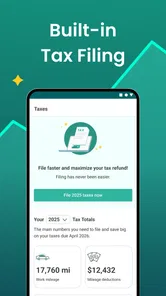
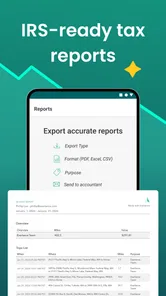
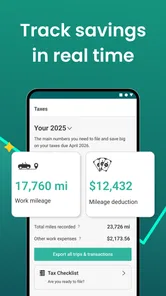
Speaking of taxes, Everlance has you covered there too. You can generate reports for your accountant with just a few taps. And if you're someone who needs to submit mileage and expenses for reimbursement, the app makes it super easy to create reports that you can email directly from your phone.
Keeping records useful, not just accumulated
For me, the most important part of a mileage record is being able to explain it later. A list of routes alone may not remind you whether a familiar stop was for a client, a personal errand, or both. I’d add context while the day is still in my head, especially when a journey includes a detour or an unusual destination. This is a small discipline, but it makes the difference between a tidy-looking log and one I can actually use with confidence.
Receipt photos benefit from the same care. I’d capture one soon after paying and make sure it is associated with the right business expense, rather than saving a pile of images for a later sorting session. On a busy day, a quick photo can preserve the evidence; it does not replace checking that the expense is relevant or that the record is complete. If you share reports with an accountant or employer, reviewing the details before sending them is a sensible final step.
User-Friendly Interface
The app's interface is intuitive and easy on the eyes. It's designed to be simple, so you don't have to be a tech wizard to navigate it. From setting up your account to generating reports, everything is straightforward. And should you run into any issues, their customer support is top-notch—always ready to help you out.
How I’d use it on a busy day
Imagine a self-employed worker driving from home to a client meeting, then stopping at a supplier before heading to another job. I’d review the day’s trips that evening, assign each one to its actual purpose, and photograph receipts while they’re still easy to match to a purchase. If one stop was personal, I’d keep it out of the work record rather than assume the whole route qualifies. That routine makes the app’s reports more useful because the details are checked while they’re still clear.
For someone who submits expenses to an employer, the same habit can make reimbursement paperwork less of a scramble. Still, a report is only as dependable as the classifications and receipts behind it; I wouldn’t treat an automatically recorded trip as proof that it belongs in a tax deduction or reimbursement claim. Keep the records accurate and follow the rules that apply to your situation.
Questions worth settling before making it part of your routine
One practical question is whether you need the app to capture every journey or only work-related driving. I’d decide how I want to handle personal trips before relying on automatic detection, then make trip review part of a regular routine. That way, a mixed day does not turn into a confusing batch of entries later. If your work pattern changes, revisit any recurring-trip rules rather than assuming they still fit.
Another question is whether it can replace the paperwork you already submit. Its mileage and expense records, receipt photos, and reports can bring several tasks together, but I would check the report format against what an employer or accountant actually needs before making it the only record. If a specific form, explanation, or supporting document is required, keep that requirement in your process instead of expecting a tracker to satisfy it automatically.
Finally, consider whether you are comfortable with location-based trip capture and the extra review it entails. Someone who does not want GPS tracking, or who prefers to record only a handful of work journeys manually, may be happier with a notebook or spreadsheet. Everlance is most convincing when regular driving makes the convenience worth the ongoing attention.
Who is likely to get the most out of it?
It makes the most sense for people who drive for work often enough that manual logging becomes a recurring nuisance: freelancers visiting clients, rideshare drivers, and workers who claim mileage or submit expenses. The developer is Everlance, and the app has a 4.7 average from around 32,000 ratings, with more than 1 million installs. It is rated for Everyone, and its current version is 5.0.7, which requires Android 5.0 or later.
Occasional business drivers may still appreciate having trips gathered in one place, but they should weigh that convenience against the time needed to review records. If you already maintain a careful spreadsheet and drive only now and then, changing systems may not save much effort. On the other hand, repeated routes and a steady stream of receipts are exactly where a dedicated mileage-and-expense workflow can earn its place.
What to check before you rely on it
GPS-based tracking can be less convenient when a day includes several short stops or a trip whose purpose is not obvious afterward. I’d build in a quick review rather than leave every decision until tax season. A practical tip is to use recurring-trip rules only for routes whose purpose is genuinely consistent; a familiar destination can sometimes serve both work and personal needs, and an overly broad rule may put a trip in the wrong bucket.
Also think about how you want to handle records if you change phones, alter your work routine, or need to explain a trip months later. The app can help organize information, but I’d keep a clear description of unusual journeys and retain whatever documentation your employer or tax situation requires. That is a sensible safeguard for any digital tracker, not a reason to expect the app to decide what counts as a valid claim.
My verdict on the cost and fit
The app is free to download, with in-app purchases listed from $6.99 to $239.99 per item. That range is broad, so I would not assume which features or plan suit me without checking the purchase choices directly. Its free access makes it reasonable to explore, while the paid value depends on whether the time saved on recurring mileage and expense work is worth the option you choose.
Everlance has been available since August 2, 2016, and its focus remains useful for people whose work regularly puts them on the road. I’d try it if automatic trip capture, quick categorization, receipt photos, and shareable reports would replace several separate chores. I’d skip it if I rarely drive for work, prefer manual records, or do not want GPS tracking involved. For the right routine, Mileage Tracker by Everlance can make record-keeping less of a burden, but a short review of each trip is still part of using it well.
Everlance: Mileage Tracker Frequently Asked Questions
Can Mileage Tracker by Everlance help me keep personal and work trips separate?
Yes. The app lets users categorize trips, which can help distinguish work-related driving from personal travel when reviewing mileage records. That can be useful if you drive for several reasons and need to keep your records organized for reimbursement or tax preparation. Take time to review how trips are categorized so the records reflect your own situation.
Does Mileage Tracker by Everlance track expenses as well as mileage?
Yes. Mileage Tracker by Everlance is designed to track mileage and related expenses, making it relevant for people who want to organize both types of records in one app. Its summary highlights automatic mileage and expense tracking for drivers. Expense tracking may be helpful alongside trip records when preparing financial reports or keeping work-related costs together.
Who is Mileage Tracker by Everlance designed for?
Mileage Tracker by Everlance is a finance app for people who want help keeping track of driving and related expenses. It may be useful to freelancers, business owners, and others who need mileage records for work, reimbursement, or tax preparation. The app’s summary describes automatic mileage and expense tracking for drivers, so it is worth considering if recording trips manually has become inconvenient.
What is Mileage Tracker by Everlance and how does it work?
Mileage Tracker by Everlance is an app designed to help users effortlessly track their mileage for work-related or personal trips. It uses GPS technology to automatically log trips and calculate the distance traveled. Users can categorize trips, generate detailed reports, and even sync with bank accounts to track expenses. This makes it an essential tool for freelancers, business owners, and anyone who needs to keep accurate records of their mileage for tax or reimbursement purposes.
Is Mileage Tracker by Everlance free to use?
Everlance offers a free version of its app which includes basic mileage tracking features. However, for more advanced features such as automatic trip detection, unlimited tracking, and detailed reporting, users need to subscribe to the Everlance Premium plan. The premium plan offers a comprehensive suite of tools for detailed financial tracking and is available at a monthly or annual subscription fee. The app is free to download, with in-app purchases ranging from $6.99 to $239.99 per item, so check the available options before choosing a plan.
Pros
- Automatic trip detection saves time.
- User-friendly interface.
- Supports multiple income sources.
- Accurate mileage tracking.
- Expense categorization helps budgeting.
Cons
- Premium features require payment.
- Battery consumption can be high.
- Limited free version features.
- Occasional GPS inaccuracies.
- No desktop version available.