Messenger Kids – The Messaging
- 41.59K
- 3.8
- Installs
- 50.00M
- Price
- Free

Screenshots



Analysis by Reviewed
I see Messenger Kids as a useful first step into digital communication, not a replacement for a parent’s judgment. Its child-focused approach makes it easier to introduce messaging without handing a young user an unrestricted version of a general-purpose chat app. That distinction matters most when a family wants a child to keep in touch with relatives or familiar friends, while an adult stays involved in who can reach them.
Where it fits into family life
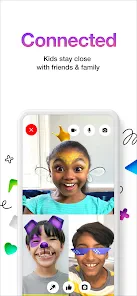
A practical use is keeping a child connected to grandparents who live far away. A parent can help set up the contact list, then the child can send a quick message or start a video call when there is something to share. For a younger child, that may be a drawing, a story about school, or simply a chance to say hello without needing an adult to pass along a phone every time.
It can also help when parents and children are in different rooms or a child is spending time with relatives. I would treat it as a shared family tool at first: sit together while the child learns how to start a conversation, end a call, and ask for help if something feels confusing. That small bit of coaching makes the app more useful than simply installing it and expecting the child to work everything out alone.
A useful routine, not a hands-off solution
For example, imagine a child staying with an aunt after school while a parent is still commuting. A quick call can let the child share how the day went, and the parent can check in without asking the aunt to hand over her own phone. The value is less about constant availability and more about giving a child a familiar, direct way to reach people their family has chosen.
I would make the first few calls together and agree on a simple routine: who the child can contact, when calls are appropriate, and what to do if nobody answers. That last point is easy to overlook. A child should know that a missed call is not an emergency and that they can ask the nearby adult for help instead of repeatedly trying to reach someone.
What parental controls change—and what they do not
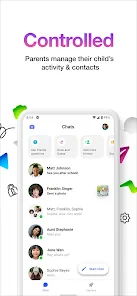
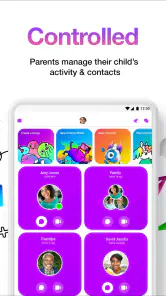
Contact approval and scheduled quiet periods give parents practical ways to shape how the app is used. One useful habit is to review the approved contacts with your child, explaining who each person is and why they are on the list. That turns a safety setting into a conversation about boundaries rather than a hidden control adults apply without explanation.
Quiet hours are most helpful when they match a routine the child already understands, such as homework or getting ready for bed. I would choose a predictable schedule and explain what happens when the app is unavailable, rather than using access as an unpredictable reward or punishment. These controls can reduce interruptions, but they do not replace family rules about screen time or a child’s need to talk to a trusted adult about uncomfortable interactions.
More From Our News Desk

Weather by Xiaomi Review: Clear at a Glance, Less Clear Up Close

X Under Pressure: Can It Recover When Posting Goes Wrong?

Clash of Clans Is Won Between the Battles

Android Auto Makes the Case for Quieter Car Software

MobiOffice: Transforming Mobile Productivity with Seamless Integration

EA SPORTS FC™ Mobile Soccer: Redefining Mobile Sports Gaming
A less obvious benefit of setting quiet periods in advance is that it removes the need to negotiate every evening. The child can learn that calls and messages have a place in the day, just as games or television do. I would still leave room for exceptions that make sense to the family, but I would avoid changing the schedule in the heat of an argument; consistency makes the rule easier to understand.
How it compares with ordinary messaging
Compared with mainstream messaging apps, the main appeal here is the parent-managed contact environment and a presentation intended for children. A regular chat app may be a better fit for adults or older teens who need broader communication options and can manage their own contacts. For a young child, though, those extra options can be unnecessary; the simpler, supervised setup is the point, provided the adults are willing to stay engaged.
There is a trade-off: a child’s communication is tied to the family’s setup and the people approved for contact. That can feel reassuring, but it may be less convenient if relatives or friends are not part of the child’s approved circle or if a household prefers not to manage communication through a parent’s Facebook account. I would check that this arrangement suits your family before making it the default way your child stays in touch.
Compared with handing over a parent’s phone for occasional calls, a child-oriented app can give a young user more ownership over starting a conversation. The phone-sharing option, however, is simpler when contact is rare or the child is not ready to use an app independently. I would not install another service just because it is available; if a supervised call on a family device already meets the need, that may be the better choice.
Who should consider it
I would recommend trying it for families introducing messaging to a younger child, especially when the main goal is contact with known relatives and close friends rather than joining broad online communities. It is also a reasonable option when parents want to establish basic digital habits gradually, with conversations about privacy, kindness, and asking an adult for help built into everyday use.
It is less suitable for a child who is ready for more independent communication, or for a family that wants one messaging app everyone can use without parent-managed contacts. In those cases, an age-appropriate alternative—or simply continuing with supervised calls on a parent’s device—may be a better match. The right choice depends on the child’s maturity and the amount of adult involvement the family can realistically provide.
It may also be a poor fit when the family’s relatives mainly use another service and are not willing or able to join the child’s approved contact circle. Before introducing it, I would ask whether the people the child actually wants to reach can be part of the arrangement. A carefully managed contact list is only helpful if it includes the relationships that matter in everyday life.
Small setup decisions that make a difference
There are also a few practical questions worth settling before setup: which adults will manage the account, who will be approved, and when should the app be quiet? Agreeing on those points first makes the experience clearer for the child and avoids treating parental controls as a substitute for a conversation. I would also show the child how to end a call and tell an adult if a message or interaction makes them uneasy.
Another helpful step is to keep the approved list understandable to the child. Rather than treating it as a long roster of names, talk through it in terms the child recognizes: grandparents, a particular cousin, or a close family friend. If the child asks to add someone, use that request as a chance to discuss how the family decides whom to contact, rather than making approval feel automatic or mysterious.
Parents may also wonder whether the app is worth introducing if a child is not yet comfortable typing. Video calling can make communication feel more natural for some children, while stickers and drawing tools offer ways to express themselves without relying on long written messages. I would let the child explore those options alongside an adult, then see which parts genuinely help them connect instead of assuming every playful feature will suit every child.
What the rating and history can tell you
For context, this free communication app is made by Meta Platforms, Inc. It is rated for Everyone, has an average rating of 3.8 from around 253,000 ratings, and has been installed over 50 million times. Those figures suggest that many families have tried it, but they do not tell you whether its parent-managed approach suits your own household.
Hey there, parents and guardians peeking into the digital world for your kids! Let’s talk about Messenger Kids – the app that’s here to make kids’ messaging safer and more fun. If you’re a parent like me, you know how tricky it can be to find the right balance between letting your kids enjoy tech and keeping them safe. This is where Messenger Kids steps in, designed especially for children to socialize in a secure environment.
The Fun Begins
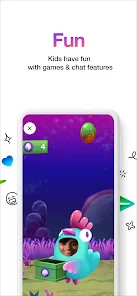
First off, let’s dive into the fun bits. Messenger Kids is brimming with vibrant colors and playful stickers, making every chat session a delightful experience for the little ones. The app doesn’t just stop at messaging; it offers a wide array of interactive elements like drawing tools and augmented reality masks. Remember those goofy selfies with dog ears? Yep, your kids can do that too! It’s a digital playground where creativity meets communication.
Safety First
Now, let’s talk about the peace of mind this app offers. As a parent, I love how Messenger Kids requires parental approval for each contact. It’s like having a digital gatekeeper ensuring your child connects only with approved friends and family. Plus, there are no ads, which is a big win. No more worrying about inappropriate content sneaking in. The app also gives parents the power to monitor and control the chat environment directly from their Facebook account, which is pretty neat.
One of the standout features is the sleep mode, allowing you to schedule times when the app will be off-limits. Got a homework deadline or bedtime? Just set it and forget it. It’s tools like these that make it a parent’s ally in managing screen time effectively.
The Learning Curve
For kids, diving into Messenger Kids is a breeze. The interface is intuitive and easy to navigate, which is great because who wants to spend hours explaining buttons and icons to an eager kid? However, if your child is new to messaging apps, they might need a little guidance at the start. But trust me, they’ll be sending stickers and calling their buddies in no time.
One thing to note, though, is that while the app is very child-friendly, it’s also essential to have regular chats with your kids about online safety. This app does a fantastic job at providing a secure platform, but nothing beats the good old advice from mom and dad about staying safe online.
Making the playful tools useful
The creative extras are most valuable when they give a child an easy reason to start a conversation. A young user who is unsure what to say can send a drawing or a playful image as a simple opener, then talk about it with a relative. I see that as a real advantage over a plain text chat, especially for children who are still finding their confidence with written messages.
There is a trade-off, though: entertaining effects can turn a quick check-in into a longer session. I would help the child distinguish between using the app to communicate and staying in it simply to experiment with every effect. That does not mean removing the fun; it means connecting the fun back to the person on the other end of the call.
Final Thoughts
In conclusion, Messenger Kids is a fantastic tool for kids to explore the digital world under the watchful eyes of their parents. It balances fun and safety effectively, making it a must-have for any parent looking to introduce their child to messaging apps safely. It’s like giving them a bicycle with training wheels – they get to enjoy the ride, and you get to ensure they’re safe. So go ahead, give it a whirl and see how it fits into your family’s digital routine!
Version and staying power
The app has been available since February 14, 2018, and its current version is 309.0.0.73.238. I would not choose a child’s messaging app based on version numbers alone, but it is useful to know this is an established product rather than a brand-new experiment. Its 42,000 reviews offer plenty of family feedback to read, although individual experiences will naturally differ depending on a child’s age, devices, and household routines.
My overall view is positive, with an important condition: parents need to treat the controls as support for active guidance, not as a guarantee that every online interaction will be effortless. The playful tools give children reasons to use it, while the approved-contact model makes the first step into messaging feel more manageable. If your priority is a simple way for a young child to keep in touch with people the family knows, I think it is worth considering. If you want independent, wide-open communication, I would choose something else or wait until your child is ready.
Messenger Kids – The Messaging Frequently Asked Questions
Does a parent need a Facebook account to set up Messenger Kids?
Yes. A parent’s Facebook account is used to set up and manage a child’s Messenger Kids account. This makes the app a family-managed option rather than a standalone messaging service that a child configures independently. Before downloading, consider whether you are comfortable using your own account for setup and taking an active role in managing your child’s contacts and communication.
Can children choose who they message on Messenger Kids?
Parents approve and manage the contacts a child can communicate with, so children do not have unrestricted access to choose anyone on the service. This parent-managed approach can help families set boundaries around who may call or message their child. It is still useful to discuss with your child what to do if a conversation feels uncomfortable and how to ask you for help.
Is Messenger Kids free, and what kind of app is it?
Messenger Kids is a free communication app from Meta Platforms, Inc. Its main purpose is to let children video call and message family and close friends. The app is intended for kids, while account setup and contact management involve a parent. That makes it worth considering both whether your child will enjoy messaging and whether you’re ready to help supervise their online contacts.
What age is Messenger Kids intended for?
Messenger Kids is aimed at children and is rated Everyone. That rating is a general content classification, not a substitute for a parent’s judgment about whether the app is right for a particular child. Before downloading, consider your child’s readiness to communicate online and talk through the family rules you want them to follow when messaging or making video calls.
What is Messenger Kids, and how is it different from regular Messenger?
Messenger Kids is a messaging app designed specifically for children to communicate with family and friends in a safe and controlled environment. Unlike regular Messenger, Messenger Kids does not require a phone number and is managed through a parent’s Facebook account. Parents have full control over their child’s contact list and can monitor their chats, ensuring a safe digital communication experience for kids.
Pros
- Safe communication for children
- Parental controls available
- No phone number required
- Fun filters and stickers
- Ad-free experience
Cons
- Limited features for older kids
- Requires Facebook account for parents
- No end-to-end encryption
- Can be addictive
- Limited to text
- video
- and voice
- Category
- Communication
- Version
- 309.0.0.73.238













