MarketWatch
- 10.91K
- 4.2
- Installs
- 1.00M
- Price
- Free

Screenshots

Analysis by Reviewed
I think a finance app earns trust less through a polished screen than through the choices it leaves in my hands: what I follow, which alerts I receive, and how carefully I treat information about my investments. MarketWatch is best approached as a way to keep up with market coverage and follow selected stocks, not as a substitute for checking important financial decisions through sources and tools suited to the task.
A news-first companion, not a trading desk
That distinction matters in daily use. When I have a few minutes between errands, I can check a watchlist and scan financial coverage without opening a brokerage account. If I’m deciding whether to buy or sell, though, I’d move to my broker’s own tools to review the actual order details and account information. Market news and investing analysis can add context, but they are not the same thing as executing a trade or receiving advice tailored to my circumstances.
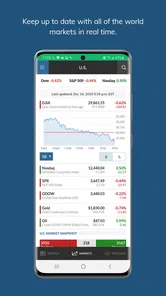
It also helps to set expectations about the word “real-time.” The app is built around market updates and data, but I wouldn’t treat a phone screen as the sole authority for a time-sensitive transaction. For a casual check-in, a watchlist is convenient; for a decision where timing or exact figures matter, I’d confirm the details in the service I use to trade.
Making a watchlist work harder
A useful habit is to keep the list focused on companies or market measures I genuinely want to follow, rather than adding everything that catches my eye. A shorter list makes it easier to notice meaningful movement and then read the related coverage. I’d also use the list as a prompt for questions—what changed, what news might explain it, and whether that news affects my own plans—rather than as a signal to act immediately.
There’s a practical trade-off here: tracking a holding in a news app can make market context easier to see, but it can also encourage frequent checking. If price swings make me anxious or tempt me into impulsive decisions, I’d keep the app for scheduled reading and rely on the brokerage account for a less reactive view of my actual position.
Where it fits among finance apps
Compared with a brokerage app, MarketWatch is more naturally a reading and monitoring companion than the place I’d go to manage a transaction. Compared with a general news app, its finance focus makes it easier to stay close to market stories and companies I follow. Neither comparison makes it the right single tool for everyone: a reader who wants broad headlines may prefer a general news feed, while an active trader may need more specialized execution and research tools.
MarketWatch is published by Dow Jones & Company, Inc. It’s a free finance app, with in-app purchases listed from around twenty to twenty-three dollars per item. I’d check the purchase screen carefully before choosing anything paid, especially if I only need occasional news access. The app has a 4.2 average from around fifty thousand ratings, and more than a million installs; those figures suggest a widely used product, but they don’t tell me whether its coverage or pace will suit my own routine.
More From Our News Desk

Weather by Xiaomi Review: Clear at a Glance, Less Clear Up Close

X Under Pressure: Can It Recover When Posting Goes Wrong?

Clash of Clans Is Won Between the Battles

Android Auto Makes the Case for Quieter Car Software

MobiOffice: Transforming Mobile Productivity with Seamless Integration

EA SPORTS FC™ Mobile Soccer: Redefining Mobile Sports Gaming
First Impressions
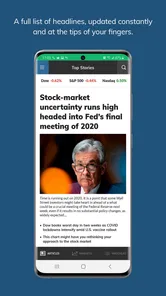
When you first open the app, it feels like stepping into a bustling financial hub. The interface is sleek and modern, yet it doesn't overwhelm you with information. I found it super easy to navigate, which is always a plus when you're trying to keep up with fast-paced market news.
Features That Stand Out
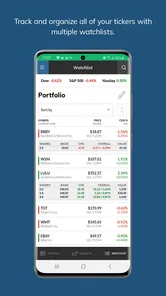
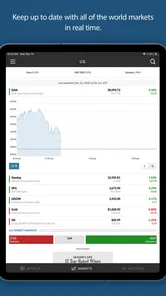
One of the standout features is the customizable watchlist. I loved being able to track my favorite stocks and see how they're performing in real-time. It's like having a personal stock tracker right in your pocket. You can add, remove, and rearrange the stocks with just a few taps.
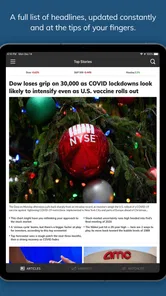
Another highlight is the news section. You get a comprehensive feed of the latest financial news, stories, and analysis. The app does an excellent job of curating content from a variety of sources, giving you a well-rounded view of the market. Plus, the articles are written in an engaging style, making even the most complex financial concepts digestible.
In-Depth Analysis
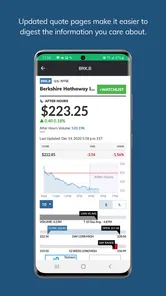
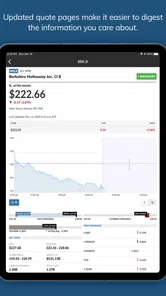
For those who love digging deeper, the app offers detailed analysis tools. You can view charts with multiple time frames, study historical data, and even compare stocks side by side. It’s like having a mini Bloomberg terminal at your fingertips, without the hefty price tag!
The portfolio sync feature is another gem. If you’re someone who likes to keep track of their investments, this tool allows you to input your portfolio and receive real-time updates on your holdings. It’s perfect for staying on top of your game and making informed investment decisions.
Notifications and Alerts
I appreciate the push notifications for breaking news and market alerts. It's crucial to stay informed in the investment world, and these timely notifications ensure you never miss a beat. You can customize what alerts you receive, which is great for tailoring the app to your specific interests.
What Could Be Better?
Now, no app is perfect, right? While MarketWatch does a fantastic job overall, I did notice that the app can be a bit sluggish at times, especially when loading detailed charts or during high market activity. This might be a minor hiccup, but it's worth mentioning if you're someone who values speed.
Also, while the app is free, there are some premium features that are locked behind a paywall. If you’re serious about investing, you might find the premium subscription worth it, but casual users might not feel the need to fork over the extra cash.
Trust, controls, and everyday choices
For me, trust also means being deliberate about what I connect and what I allow to interrupt my day. The app’s alerts can be useful when I want a prompt to check a major story, but I’d start with only the notifications that genuinely help me. If every market move arrives as a buzz, the signal gets buried and it becomes harder to read calmly.
The portfolio feature deserves a little thought before use. Adding holdings can make the app more personally relevant, but investment details are sensitive, so I’d enter only what I’m comfortable tracking there and review any account or privacy choices shown during setup. I wouldn’t assume that a portfolio view replaces secure account management at a brokerage, and I’d avoid treating a news app as the home for confidential financial records.
On Android, the app’s minimum operating system is version 8.0, and its content rating is Everyone 10+. The current version is 7.9.23, while the app itself has been available since August 13, 2013. That long presence can make it an easy option to consider, but I’d still judge the current experience by whether it loads reliably on my device and whether its coverage fits the way I follow markets.
A realistic routine and a few limits
Here’s how I’d use it on an ordinary workday: over breakfast, I’d glance at a focused watchlist, open one or two stories that explain a move, and leave deeper research for later. If an alert arrives while I’m busy, I’d treat it as a reminder to read, not an instruction to trade. That small boundary keeps market updates useful without letting every notification dictate my attention.
For someone new to investing, the combination of company tracking and readable coverage can help build a habit of asking why a market story matters. But a beginner should not mistake a clear article or a historical chart for a personalized plan. If the goal is to learn basic concepts step by step, a dedicated educational resource may be a better starting point; if the goal is to place trades, the broker’s app is the more appropriate tool.
There are a couple of practical questions worth answering before settling in. Can I use it without paying? Yes, the app is free to download, though in-app purchases are available. Do I need an account to get value from it? A reader can use its news and market coverage as a casual visitor, while portfolio-related use naturally involves entering information. Should I enable every alert? I wouldn’t; I’d begin selectively and adjust only if I find myself missing genuinely useful updates.
The app is not an ideal fit if I need a fast, highly specialized trading workspace, or if I prefer not to see market fluctuations throughout the day. Nor would I choose it as my only source when a decision depends on exact execution details. Its strongest role is narrower and more useful: a familiar place to follow finance stories, check chosen stocks, and decide what deserves a closer look.
Reading the market without letting it run the day
A useful way to get value from a market feed is to pair each check with a question. If a company on my list moves, I can look for coverage that explains the context, then decide whether the story is relevant to my time horizon. That is more useful than refreshing prices repeatedly, especially when I’m following a long-term investment and short-term movement would not change my plan.
I’d also separate reading from record-keeping. A watchlist can help me keep track of names I want to research, while a private note or my brokerage account remains the place for decisions and actual holdings. This division reduces the chance that a convenient news screen becomes an informal portfolio ledger I later rely on without checking.
Choosing what to follow
The app is a better fit for people who already know which companies or market topics they want to monitor. A focused list gives the news feed a purpose: I can connect a headline with a name I follow rather than browse an endless stream without a clear reason. If I’m only casually curious about business news, I may get enough from a general news app; if I want company-specific context, the finance focus here is more useful.
For a more deliberate routine, I’d review my watchlist occasionally and remove names I no longer care about. That small bit of housekeeping prevents stale interests from competing with current ones. I’d avoid treating a long list as a measure of research quality; a handful of relevant companies is easier to follow thoughtfully than a screen full of tickers I rarely open.
What to check before relying on it
Before using any finance app for personal tracking, I’d take a moment to inspect the choices presented in the app and on my device. In particular, I’d decide whether I want notifications at all and be thoughtful about what portfolio information I enter. Those are practical choices I can make directly; I would not infer broader privacy guarantees from a familiar brand or a polished interface.
If I’m comparing the free experience with an in-app purchase, I’d first identify the specific feature I expect to use and read the price and terms shown at the point of purchase. The listed items range from around twenty to twenty-three dollars each, so I wouldn’t buy anything simply because I follow markets. Occasional readers may be perfectly content with the free app, while someone who relies on a paid feature should judge its value against how often they will actually use it.
One more useful boundary is to treat charts as context rather than conclusions. Comparing companies or viewing different time frames can help me frame a question, but it cannot account for my finances, goals, or tolerance for risk. When I need a personal recommendation or have a decision with real consequences, I’d use a suitable professional resource rather than expecting an app’s analysis to decide for me.
Final Thoughts
Overall, MarketWatch is a solid choice for anyone looking to stay informed about the financial world. It’s user-friendly, packed with valuable features, and keeps you connected to the markets anytime, anywhere. Whether you're tracking your investments or just curious about stock market trends, this app has got you covered.
So, if you’re on the hunt for a reliable financial news and analysis app, give it a spin. It might just become your new favorite tool in navigating the ever-changing landscape of finance.
MarketWatch Frequently Asked Questions
Who develops MarketWatch, and what kind of app is it?
MarketWatch is a finance app developed by Dow Jones & Company, Inc. It brings financial news, market information, and investing analysis together, making it relevant to readers who want to follow business and financial developments. Its focus is on markets and personal finance rather than general-purpose news, so consider whether that subject matter fits what you want from an app before downloading.
How popular is MarketWatch among app users?
MarketWatch has an average rating of 4.2 from around 50,000 ratings, with roughly 11,000 written reviews and over a million installs. These figures can give prospective users a sense of its reach and reception, but they do not guarantee that its coverage or features will suit everyone. Your experience may depend on the financial topics you follow and how you prefer to read market news.
Who is MarketWatch designed for?
MarketWatch is aimed at people who want to follow financial news and market activity, whether they are investors or simply interested in business and personal finance. Its coverage can help readers keep up with developments and explore analysis, while the app’s finance focus may be less useful to someone looking mainly for general news or entertainment.
What does MarketWatch offer, and how can it benefit me?
MarketWatch brings together financial news, market data, and investing analysis in one app. Readers can follow stock quotes and financial stories, and explore personal finance coverage to better understand topics that may affect their decisions. It can be useful for keeping an eye on markets and building context, though its information should be considered alongside your own research and judgment.
What is MarketWatch and how can it benefit me?
MarketWatch is a financial news app that provides real-time updates on stock markets, financial stories, and personal finance advice. It's beneficial for investors and those interested in the financial world as it offers comprehensive insights, stock quotes, and analysis to help make informed financial decisions.
Pros
- Intuitive user interface for easy navigation.
- Real-time stock updates and alerts.
- Comprehensive market analysis and news.
- Customizable watchlists for tracking.
- Supports multiple stock exchanges globally.
Cons
- Requires subscription for premium features.
- Contains ads in the free version.
- Occasional delays in news updates.
- Limited offline functionality.
- Can drain battery quickly with frequent use.