The Wall Street Journal. News
- 21.56K
- 4.2
- Installs
- 5.00M
- Price
- Free

Screenshots






Analysis by Reviewed
If your reading day revolves around companies, markets, and the decisions that affect them, The Wall Street Journal has a clear purpose: bringing that coverage together with major world news in one app. I find that focus more useful than an undifferentiated stream when I want context, not just a quick succession of headlines. It is a better fit for a reader who makes room for considered reporting than for someone who only checks the news in passing.
Who benefits most from this newsroom?
I’d recommend this app most to readers who want business and market coverage alongside major global stories, rather than a feed built mainly around local updates or quick social posts. It is published by Dow Jones & Company, Inc., and its focus makes it particularly useful if you follow companies, economic developments, or the decisions that shape markets. If your daily reading is mostly celebrity news, neighborhood reporting, or a broad mix of lightweight headlines, a general news app may suit you better.
A practical routine is to check the app before work for the main headlines, then return when a story develops instead of trying to follow every alert as it arrives. For example, if a market-moving announcement breaks during a busy morning, I’d read the initial report when I have a moment and save deeper reading for a commute or lunch break. That keeps the app useful without turning every notification into an interruption.
First Impressions and Interface
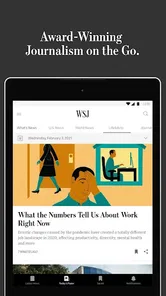
Upon launching the The Wall Street Journal app, I was immediately greeted by a sleek and modern interface that was both inviting and intuitive. The clean design makes navigation a breeze, with a straightforward menu that allows you to switch between sections effortlessly. Whether you're a finance guru or just someone catching up on the latest news, you'll find that the layout is designed to cater to all.
Content Quality and Variety
The app is a treasure trove of information. From breaking news to in-depth analysis, WSJ covers it all. The articles are well-researched and packed with insights that you won't find elsewhere. If you're a fan of business news, this app offers a comprehensive look at the financial world, with updates that are timely and relevant. It's like having a personal financial advisor, minus the fees!
That depth changes how I’d use it compared with a typical headline aggregator. An aggregator is handy when I want several publishers’ views or a quick sweep across unrelated subjects; here, the advantage is a more concentrated reading experience around business and the wider events that affect it. I would not treat any single publication as a substitute for every perspective, though. For a contentious story, comparing coverage elsewhere can help me distinguish the basic facts from interpretation.
Reading pace and heavier sessions
For a quick check, headlines and short reading sessions make more sense than opening the app expecting to finish a long queue of stories at once. When I have time to dig into several reports, I treat it as a focused reading session: choose a topic, follow the related coverage, and stop when I have the context I need. That approach is more useful than bouncing between alerts, especially when the news cycle is busy.
More From Our News Desk

Weather by Xiaomi Review: Clear at a Glance, Less Clear Up Close

X Under Pressure: Can It Recover When Posting Goes Wrong?

Clash of Clans Is Won Between the Battles

Android Auto Makes the Case for Quieter Car Software

MobiOffice: Transforming Mobile Productivity with Seamless Integration

EA SPORTS FC™ Mobile Soccer: Redefining Mobile Sports Gaming
There is a real difference between keeping up and trying to read everything. I’d pick one or two themes that matter to me—perhaps a company I follow and a broader economic issue—then use the day’s coverage to build a coherent picture. This is a more rewarding way to approach a publication with substantial analysis than scanning every headline and feeling that I have to finish the entire feed. If I only have a minute, I can still check what is developing and leave the deeper pieces for later.
Compared with free, broad-coverage news feeds, this app is a more deliberate choice for business reporting and analysis. A general aggregator can be better when I want many publishers’ takes side by side or a wider range of local subjects. The trade-off is focus: readers who value WSJ’s particular coverage may find that focus worthwhile, while someone who only wants a quick, varied headline scan may prefer an alternative.
Personalization and Features
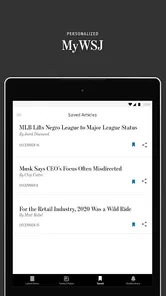
One thing that stands out is the personalization feature. The app learns from your reading habits and suggests articles that align with your interests. It's perfect for those moments when you just want to dive into something new but aren't sure where to start. Plus, the offline reading option is a lifesaver for when you're on the move and don't want to miss out on the latest stories.
Personalized recommendations are most useful once they reflect what I actually want to follow, but they should be treated as a starting point rather than a complete news plan. If I read one article about a company because it is suddenly in the headlines, I may not want every future suggestion to narrow around that single interest. I’d keep checking the main sections as well as recommendations so an accidental reading detour does not define the whole experience.
Another nifty feature is the alerts. You can customize notifications for the topics you care about the most. That way, you're always in the loop, whether it's breaking news or a significant market shift. It's like having your own newsroom that fits in your pocket.
Making alerts and saved reading work for you
I’d keep alerts selective rather than switching on every topic: a smaller set of genuinely relevant notifications is easier to act on and less likely to become noise. Offline reading is also best treated as preparation, not a promise that every new story will be available without a connection. Before a flight or a stretch with weak reception, I’d open the pieces I want to read while connected, then check that they are ready for later.
That preparation also makes offline reading practical for ordinary gaps in the day, not just travel. I might choose a few longer pieces while on Wi-Fi, then read them on a train where reception comes and goes. The useful habit is to decide what I want to take with me before leaving, rather than assuming the whole publication will be available on demand. For readers who primarily want live updates, offline preparation is less central; it matters most when reading time and a stable connection do not coincide.
Readers deciding whether to pay should know that the app is free to install, while in-app purchases range from $0.99 to $399.99 per item. I’d check the subscription or purchase terms shown in the app before committing, because access needs and costs matter more than simply having the app on a phone. Its 4.3 average across around 86,000 ratings suggests it has found an audience, but that number can’t tell you whether its coverage matches your interests.
In practical terms, I’d install it first to see whether the sections, writing, and reading flow suit me, then make a purchase decision only after checking exactly what access is being offered. Free installation does not mean that every article or service will necessarily be included without a purchase. That distinction is worth keeping in mind if you are comparing it with a free news feed: compare the access you would actually use, not just the initial download cost.
Reliability, access, and device fit
I’d expect a news app to be most useful when it opens quickly enough for a brief headline check, but perceived speed can vary with a device, connection, and the amount of content being loaded. If a story seems slow to appear, I’d first check the connection and try again before assuming the app itself is at fault. For travel, preparing offline articles ahead of time is a sensible fallback; it also avoids relying on live access at the exact moment you want to read.
For heavier use, such as moving between multiple reports while following a developing story, the main practical strain may be on attention rather than on the phone. I’d avoid treating every incoming alert as a reason to reopen the app; instead, I’d use notifications to identify what needs attention and read the detail when I can give it time. That keeps a busy news day from becoming a string of interrupted, half-read sessions. If the app feels sluggish, a stable connection and a less crowded reading session are sensible first checks before judging its everyday performance.
The app has over a million installs and is rated Everyone 10+. Its current version is 6.29.0.20714, and the listed minimum operating system is 7.0. Those details make it worth checking compatibility on an older phone before installing. I wouldn’t choose it solely for the smallest possible storage or data footprint, since those needs depend on your device and reading habits; keeping alerts focused and downloading only what you plan to read are practical ways to avoid unnecessary activity.
On an older device, the operating-system requirement is only one part of the decision: available space, connection quality, and how much content you keep for later also shape the experience. I’d begin with a small reading routine instead of downloading a large backlog or enabling every alert at once. That makes it easier to notice whether the app feels comfortable on your phone and whether its ongoing demands suit your habits. If you mainly read at home on a reliable connection, offline preparation may be an occasional convenience rather than a reason to choose it.
When another news option makes more sense
I would choose a general-purpose news app instead if local reporting, a broad range of publishers, or a highly varied collection of subjects is my main priority. Those services are often better suited to discovering what different outlets are saying at a glance. The Journal’s narrower editorial identity is valuable when I specifically want business and markets in the mix, but it can feel less useful if those subjects rarely hold my attention. Matching the app to the reason I open the news is more important than choosing the one with the busiest feed.
It may also be the wrong everyday choice for someone who wants only brief, free headline checks and has no interest in paying for expanded access. In that case, a freely available aggregator can cover casual browsing without asking the reader to build a routine around one publication. By contrast, if I repeatedly need detailed business reporting, the focused coverage may justify making it part of my regular reading, provided the available access terms fit my budget.
Conclusion
In a world where information is power, the The Wall Street Journal app stands out as a powerful tool for anyone looking to stay informed. Its user-friendly interface, high-quality content, and personalized experience make it a must-have for news enthusiasts and professionals alike. Whether you're sipping your morning coffee or commuting to work, it's the perfect companion to keep you updated and engaged with the world around you.
So, if you're on the hunt for a reliable news source that combines quality journalism with modern technology, give The Wall Street Journal app a try. Trust me, it's worth it!
My performance verdict is that the app’s strongest case is the combination of focused business coverage, customizable alerts, and reading that can be prepared for offline moments. It is less compelling if you want a free, all-purpose stream of varied publishers, or if you rarely read business and market news. With a 4.3 average and around 22,000 reviews, it is clearly used and discussed by many readers, but I’d still judge it by whether its reporting earns a regular place in your own routine.
The Wall Street Journal. News Frequently Asked Questions
Does The Wall Street Journal app require an account to read articles?
The app is free to download, but full access to articles and premium content typically requires a subscription. If you plan to read beyond the content available without a subscription, you may need to create or sign in to an account connected to your subscription. Checking the access options in the app can help you understand what you can read before choosing a plan.
Can I customize the news I see in The Wall Street Journal app?
The app is designed for readers interested in business, markets, breaking news, and global headlines. It also offers a customizable news feed and personalized alerts, so you can shape what appears around your interests and follow developing stories. These options may be useful if you want a more focused reading experience rather than browsing every section each time you open the app.
Who publishes The Wall Street Journal app, and what kind of news does it cover?
The Wall Street Journal app is published by Dow Jones & Company, Inc. It focuses on business and markets coverage, breaking news, and global headlines, making it relevant to readers who want to follow financial developments alongside broader news. Its News & Magazines category reflects that mix of reporting and analysis rather than a single-topic financial tool.
What is The Wall Street Journal app?
The Wall Street Journal app is a mobile application that delivers the latest news, business insights, and financial analysis from one of the most trusted names in journalism. Users can access a wide range of articles, videos, and podcasts, tailored to their interests, ensuring they stay informed about global events and market trends.
Is The Wall Street Journal app free to use?
While the app itself is free to download, access to full articles and premium content typically requires a subscription. The Wall Street Journal offers various subscription plans, which might include a free trial period. Users should review these options within the app to choose a plan that suits their reading habits and budget. The app also lists in-app purchases, so check the available terms before committing.
Pros
- Trusted source for financial news
- Real-time market updates
- Comprehensive global coverage
- Insightful analysis and opinions
- User-friendly mobile interface
Cons
- Requires subscription for full access
- Limited offline access
- Ads in free version
- Occasional app crashes
- High data usage for videos













