MagellanTV Documentaries
- 732.00
- 3.8
- Installs
- 1.00M
- Price
- Free

Screenshots
Analysis by Reviewed
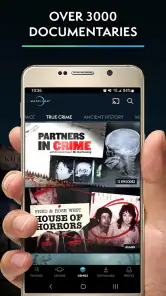
I approached MagellanTV Documentaries as an education app rather than something to leave playing in the background. That distinction matters. Its appeal is the chance to turn a spare half-hour into a focused look at history, science, true crime, paranormal subjects, and other documentary topics, all inside one service from MagellanTV Documentaries. I found it most useful when I arrived with a question or theme in mind, instead of opening it and expecting the perfect film to choose itself.
The app is free to install, carries an Everyone 10+ age rating, and has passed the one-million-install mark. Its average sits at 3.8 from roughly 3,700 ratings, so the public reaction is positive but not flawless. That feels fair to me: the subject range is attractive and the viewing experience can be rewarding, but the service is better for deliberate documentary watching than for people who want the effortless recommendation flow of a general entertainment platform.
How I use MagellanTV for purposeful documentary sessions
A simple starting routine prevents endless browsing
My baseline workflow is straightforward. I first decide whether I want a single topic or a broad mood. “Ancient history,” “space,” and “unsolved cases” lead to very different sessions, while a vague search for something interesting can quickly become a long scroll through choices. Once I have a subject, I read the description carefully and check whether the program suits the time I have available. This small habit makes the app feel much more educational and much less like a random video shelf.
I also treat a documentary as a starting point for learning, not automatically as the final word on a subject. That is especially important with historical interpretations, crime stories, and paranormal material. A polished production can create a strong impression even when the topic contains disputed claims or incomplete evidence. I enjoy the variety, but I keep a separate mental line between a compelling presentation and a fully balanced academic source.
For a realistic everyday example, I might open the app after dinner with forty minutes available. Instead of browsing every category, I choose one subject, read a few descriptions, and select a program that can be completed in that window or paused at a natural point. The result is more satisfying than starting a long film when I already know I will need to stop halfway through. This is one of the easiest ways to make the service fit ordinary routines.
Where it works better than ordinary video browsing
Compared with searching a general video platform, MagellanTV gives my attention a clearer direction. I am less likely to be pulled into unrelated clips, short videos, or creator content when my goal is a sustained documentary. That makes it a good companion for a quiet evening, a study break, or a weekend subject dive. The education category also sets the right expectation: I open it looking for context and explanation rather than quick entertainment.
Compared with a traditional television schedule, the advantage is control. I do not have to wait for a program about a subject I care about, and I can decide when to stop. Compared with a broad subscription service, the trade-off is focus. A general streaming catalog may offer more types of entertainment and a more mature discovery system, while this app is more appealing when documentaries are the main reason I am watching.
What the free entry point really means
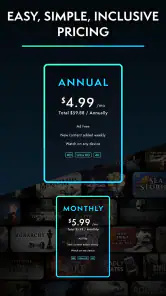
The app is listed as free, but in-app purchases range from $5.99 to $59.99 per item. I would therefore install it to explore the available experience before treating it as a long-term viewing service. That approach avoids assuming that every part of the catalog is included simply because the download costs nothing. It also gives me a chance to judge whether the subjects, presentation style, and viewing habits match my expectations.
This matters for households as well. An adult may be comfortable with intense crime material or unsettling paranormal themes, while a younger viewer may not be. The Everyone 10+ rating is a useful baseline, not a promise that every documentary will suit every child. I would preview descriptions and choose programs together when sharing the app with younger family members.
Settings and device checks worth doing first
Before settling into regular use, I check the app’s playback and account options rather than assuming the default setup is ideal. I look for the controls that affect how I watch, such as subtitle availability when offered, playback behavior, and any account or purchase prompts. The exact choices I need depend on my device and viewing situation, but this initial check reduces interruptions later.
Subtitle support is particularly important for documentary viewing. Narration can include unfamiliar names, technical terms, and place names that are easy to miss, especially when I am watching in a noisy room. If subtitles are available for a program, I prefer using them when studying a topic. They help me catch details, although I still avoid treating captions as a substitute for checking the context of a controversial claim.
I also pay attention to the operating-system requirement. The app needs iOS or Android software at version 8.1 or later, so I would check an older phone or tablet before planning to use it there. On a newer device, that requirement is unlikely to be a practical obstacle, but it is worth remembering if the app is intended for a spare family device or an older television setup.
My other useful setting habit is practical rather than technical: I decide where and how I will watch before beginning a long program. A phone is convenient for a short session, but a larger screen is more comfortable for maps, archival footage, and visual evidence. If I am watching to learn, I keep a note-taking app or paper nearby. Stopping briefly to record a name or question turns passive viewing into a more memorable session.
Repeatable patterns that make discovery faster
Experienced use is mostly about reducing choice overload. I create a short personal queue mentally or in my own notes by grouping possible programs under themes such as “background history,” “serious investigation,” or “science for a quiet evening.” I do not need a complicated system; even remembering two or three promising titles prevents me from restarting the search every time I open the app.
Another useful pattern is to alternate demanding and lighter subjects. A dense historical documentary may require concentration, while a paranormal program can be easier to watch casually. Mixing them keeps the service from feeling like homework, but I remain aware that an entertaining format may not offer the same evidential discipline as a more conventional educational production.
I also use a two-pass approach. On the first pass, I watch for the main argument and the structure of the story. On the second, if the topic matters to me, I revisit the sections that introduced names, dates, or competing explanations. This is more effective than pausing every few seconds, and it helps me decide which details deserve outside reading. The app is strongest as a gateway to curiosity; I would not use it alone for formal research or a high-stakes decision.
When watching with another person, I find it better to agree on the subject before opening the catalog. One viewer may want science while another expects true crime, and unplanned browsing can become the entire evening. Choosing the subject first turns the app into a shared activity. Afterward, discussing which parts were evidence, interpretation, or dramatic framing adds value that the video itself cannot provide.
Important limits behind the polished presentation
The main limitation is not a lack of topics; it is the uneven suitability of documentary styles for different viewers. Someone looking for rigorous, citation-heavy academic instruction may prefer specialist courses, university material, or reference works. MagellanTV is more suitable for accessible viewing and broad exploration. I appreciate that distinction because it prevents disappointment: an engaging documentary can introduce a subject without replacing a textbook or primary source.
True crime and paranormal programming also require personal judgment. These subjects can be absorbing, but they may include disturbing material, unresolved conclusions, or dramatic treatment. I would not recommend opening the app casually around children just because the overall rating is Everyone 10+. I would also skip certain themes when I want a calm bedtime watch, since the subject matter can linger after the screen is off.
Discovery can be another friction point. A large topic range is helpful, but it can make the first decision harder, particularly for new users. My solution is to search with a narrow idea and leave quickly once I find a reasonable match. I do not expect every recommendation to be perfectly tailored, and I would rather choose a good-enough documentary than spend more time optimizing the choice than watching it.
The purchase model deserves attention too. Since the app includes in-app purchases, I would review what an item unlocks before confirming anything and avoid treating a free download as a complete catalog guarantee. This is especially important when several people use one device. I prefer making the viewing plan first, then deciding whether a particular purchase genuinely supports repeated use rather than buying impulsively because a description sounds interesting.
Who will get the most from it
I think the app suits curious viewers who enjoy moving between subjects without maintaining several separate services. It is a good fit for someone who wants history on one night, science on another, and a more mysterious investigation when the mood changes. Students may also find it useful for discovering background topics, provided they verify important details through reliable sources before using them in assignments.
It is less suitable for a viewer whose priority is the newest mainstream entertainment, tightly personalized recommendations, or a completely passive experience. It is also not my first choice for children who need carefully controlled educational programming, because the broad topic mix includes material that parents should evaluate individually. Finally, people who dislike documentary narration, unresolved cases, or interpretive storytelling may find the catalog less satisfying than a structured course platform.
My verdict after building a regular habit
MagellanTV Documentaries has become more useful to me once I stopped judging it by the number of choices on the screen and started using a repeatable workflow: pick a subject, check the program details, prepare the viewing setup, and follow up on anything that matters. That approach brings out its real strength, which is making documentary exploration easy without forcing every session into the same topic.
The developer, MagellanTV Documentaries, has positioned the app clearly within education, while still covering entertainment-friendly areas such as true crime and paranormal stories. It has been available since January 18, 2019, and its broad reach shows that the format has found a substantial audience. The rating of 3.8 suggests I should keep expectations balanced, especially around discovery and the boundaries of the free experience.
My recommendation is conditional but positive. Install it if you want a focused documentary destination and are willing to choose programs thoughtfully, check the purchase details, and separate compelling storytelling from confirmed knowledge. Skip it if you want a general streaming replacement or a formal academic curriculum. Used with that awareness, it is a convenient way to turn spare time into a more intentional learning habit.
The best way to master this app is not to watch everything; it is to choose one question, watch with attention, and carry the useful questions beyond the screen.
Pros
- Extensive catalog focused on history
- science
- crime
- and real-world topics.
- Many titles are available with subtitles and multiple audio options.
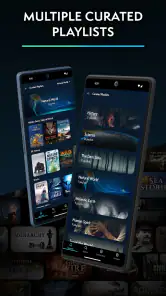
- Curated collections make it easy to discover related documentaries.
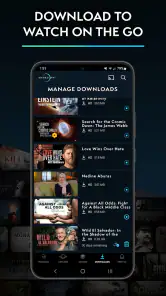
- Supports offline downloads for watching during travel or without internet.
- Generally offers a calmer
- ad-free viewing experience than free platforms.
Cons
- The catalog may feel limited if you mainly want scripted shows or blockbuster movies.
- Some documentaries have regional availability restrictions.
- New releases may arrive less frequently than on larger streaming services.
- Offline downloads can use considerable storage on your device.
- A subscription is required for full access after the trial period.

- Category
- Education
- Version
- Varies with device











