Lumosity: Brain Training
- 23.87K
- 4.5
- Installs
- 10.00M
- Price
- Free

Screenshots

Analysis by Reviewed
When I’m choosing a brain-training app, I look for more than a collection of puzzles. I want activities I can fit into an ordinary day, enough variety to keep the routine from feeling stale, and feedback that helps me reflect without pretending a score explains everything about my mind. Lumosity: Brain Training is strongest when I treat it as a guided, playful pause—not a shortcut to better memory or a substitute for learning a skill directly.
A useful routine, not a promise of transformation
I’d recommend this kind of practice to someone who enjoys puzzles and wants a focused break from scrolling. A short session can fit into a quiet moment before work or while waiting for an appointment. For example, I might open the app after lunch, play a few rounds, and use the results as a nudge to notice which tasks felt easy and which took more concentration. The value is in making that small pause feel purposeful, not in expecting a few games to transform everyday memory overnight.
It is also worth knowing what the scores can and cannot tell you. They show how you performed in the app’s activities, which makes them useful for spotting patterns in your own play. I wouldn’t treat a higher score as proof that I’m now better at remembering names or solving work problems. If your main aim is to build a specific real-world skill, practice that skill directly too: rehearse a presentation, learn a language, or use a planning method that addresses the challenge you actually face.
How to Decide Whether It Fits Your Day
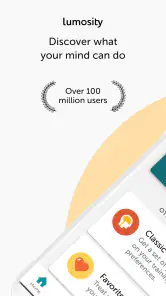
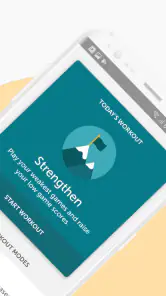
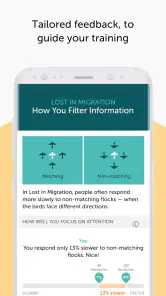
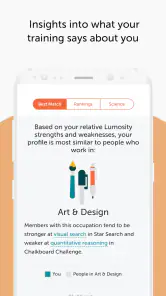
So, you download the app, and right off the bat, Lumosity: Brain Training greets you with a user-friendly interface. Setting up your account is a breeze, and it even offers a personalized training program. It feels like having a personal trainer but for your brain. The app assesses your strengths and weaknesses, then tailors the games to help you improve. How cool is that?
Short games suit small pockets of time
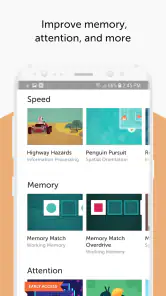
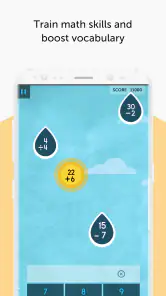
Here’s where the fun really begins. The app is jam-packed with a variety of games targeting different cognitive skills—think memory, attention, and problem-solving. Each game is designed to be quick yet challenging. It’s like your brain is doing push-ups, and trust me, it feels rewarding when you see your progress over time.
One of my personal favorites is the memory games. They’re crafted to test and improve your recall abilities. There’s something incredibly satisfying about beating your previous high score. Plus, the graphics are simple yet engaging, so you’re not overwhelmed with flashy distractions. Just pure brain work!
Match the format to what you want to practise
Compared with a book of logic puzzles, Lumosity is more guided: the app organizes activities around several cognitive areas and gives you a way to review your performance. A puzzle book may be the better fit if you want to work through one type of challenge at your own pace, without an account or a screen. Likewise, if you’re trying to improve at a particular subject, a course or direct practice is more relevant than a broad mix of brain games. I see this app as a convenient routine, not a replacement for those options.
More From Our News Desk

Clash of Clans Is Won Between the Battles

Android Auto Makes the Case for Quieter Car Software

MobiOffice: Transforming Mobile Productivity with Seamless Integration

EA SPORTS FC™ Mobile Soccer: Redefining Mobile Sports Gaming

How Microsoft OneDrive Became a Mobile Productivity Giant

How Google Translate Breaks Language Barriers Effortlessly
One practical tip is to play when you can give the games your attention rather than squeezing them into a distracting moment. If you are interrupted often, pause and return when you have a calmer few minutes; rushed attempts can make a score feel more like a measure of your surroundings than your thinking. I’d also focus on how the activities feel over several sessions instead of chasing every personal best. That keeps the routine useful without turning it into another performance target.
Use progress as feedback, not a verdict
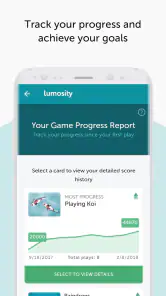
One of the standout features of Lumosity is the ability to track your progress. The app provides detailed insights into your performance, breaking down each cognitive area you’ve worked on. This feature keeps you motivated, as you can literally watch your brain get fitter. It’s like having a mental fitness tracker!
And here’s the kicker—Lumosity makes this process enjoyable. It’s not just about the numbers; it’s about seeing real improvement in your daily life. Whether it’s better focus at work or sharper memory recall, the benefits extend beyond the app.
Know what the free download includes for you
The app is free to download, with in-app purchases ranging from $0.99 to $159.99 per item, so I’d check what is included in the version you plan to use before paying. Its 4.5 average from around 298,000 ratings and more than 10 million installs suggest broad interest, but popularity alone does not tell you whether its style will suit you. Lumos Labs, Inc. makes this education app, which is rated for Everyone; version 10.19.70 requires Android 7.0 or later. It was released on June 8, 2014, and has accumulated around 24,000 written reviews.
If you are deciding whether to keep it, give the routine a fair but modest trial: choose a regular moment, notice whether you enjoy returning, and decide whether the progress view helps you stay engaged. If you prefer open-ended games, dislike score tracking, or want a structured lesson in a specific topic, another approach may serve you better. Switching away is straightforward in practical terms: you can replace the brain-game habit with puzzles, reading, or direct practice, though you may miss the app’s organized mix and performance summaries.
Try it in a realistic daily routine
For a practical test, I’d tie a session to something that already happens, such as the quiet stretch after lunch or the few minutes before leaving home. The point is not to squeeze in a workout whenever the phone is nearby; it is to find a moment when I can concentrate and then stop without feeling obliged to keep playing. If a session gets interrupted, I’d rather resume later than interpret a distracted result as a meaningful change in ability.
This approach also helps answer a common question: do you need to use it every day for it to be worthwhile? I wouldn’t make daily use a pass-or-fail rule. A routine is useful only if it fits your life and remains enjoyable. If you keep forgetting to open the app, try a more natural time of day; if the games start to feel like homework, take a break or switch to a different kind of mental activity. Consistency can make it easier to notice your own play patterns, but it should not become a source of guilt.
Choose an alternative when its strengths matter more
Brain-game apps sit between casual entertainment and deliberate study, and that middle ground is exactly why they appeal to some people and disappoint others. Lumosity gives you a prepared mix and a way to look back at performance. A crossword, chess puzzle, or logic book gives more control over the kind of challenge and may feel more satisfying if you like to stay with one problem for longer. For a learner who wants a new language, coding ability, or subject knowledge, a dedicated course and regular practice are more directly aligned with the goal.
There is a trade-off in choosing a guided mix: the app can make it easier to start, but you have less reason to assume that its activities match the exact skill you want to develop. I’d use it for variety, a structured pause, and personal engagement with the games—not as my sole plan for improving a specific ability. If you already enjoy making your own puzzle routine, the extra structure may not add enough to justify another app. If getting started is the hard part, that organization can be the feature that makes the habit stick.
Make the purchase decision slowly
The free download gives you a chance to judge the style before spending anything. Because individual in-app purchases can vary widely in price, I’d inspect the purchase details shown in the app and decide whether the added access is worth it to me, rather than paying simply because I have started a streak or want to protect a score. It is sensible to first learn whether you like the game format and whether the feedback is genuinely motivating.
It is also fair to ask whether switching later costs you much. In everyday terms, the main thing you give up is the app’s particular combination of short activities and organized performance tracking. You can continue a mental break with a paper puzzle, a book, or a task-specific learning tool, depending on what you want from that time. I’d avoid staying solely because I have accumulated scores; the better reason is that the sessions still feel worthwhile.
Who should pass, and who should give it a try?
I think it suits curious people who like quick challenges, enjoy seeing their own results, and want an easy activity to return to during small breaks. It may also work for someone who finds a blank page of puzzles daunting and prefers the app to choose a varied session. The simple presentation keeps attention on the tasks, which I appreciate when I’m looking for a focused alternative to casually scrolling.
I’d steer away from it if you dislike timed or score-oriented play, want long-form puzzles, or need instruction in a defined subject. It is also a poor match if you expect an app score to diagnose a problem or guarantee a change in daily cognition. In those situations, a different tool—or direct practice tied to the goal—makes more sense. I would keep expectations modest and judge the experience by whether I enjoy using it and whether it helps me spend a few minutes more intentionally.
Final Thoughts
In a world where we often forget to take care of our mental health, Lumosity offers a refreshing solution. It’s more than just an app; it’s a commitment to better brain health. Sure, it’s not a magic pill, but with consistent use, you’ll definitely feel a difference.
So, if you’re looking to give your brain a little TLC, why not give Lumosity a try? It’s a fun, engaging, and effective way to stay mentally fit. And hey, who doesn’t love a good challenge that also makes you smarter?
Lumosity: Brain Training Frequently Asked Questions
What skills can I exercise with Lumosity: Brain Training?
Lumosity is an education app built around fun brain games that target memory, problem-solving, and other mental skills. The activities give you a way to engage with different kinds of challenges in one place. It is best approached as a source of regular mental puzzles and entertainment, rather than as a guaranteed way to change your abilities.
Can I use Lumosity: Brain Training without an internet connection?
If you are planning to use Lumosity while travelling or away from a reliable connection, check how the app behaves on your device before you depend on offline access. Its games and training experience are presented through the app, and access can depend on how the app loads its content and account features. A quick test beforehand can help avoid interruptions.
Is Lumosity: Brain Training free to download, and are there optional purchases?
Lumosity: Brain Training is free to download, so you can try the app without paying upfront. It also offers in-app purchases, with prices ranging from $0.99 to $159.99 per item. Check the purchase details shown in the app before confirming anything, and review your device’s purchase settings if you want to avoid accidental charges.
Is Lumosity: Brain Training suitable for children and families?
The app has an Everyone age rating, making it broadly suitable for users of different ages. Its brain-training games focus on areas such as memory and problem-solving, so families can explore it together. As with any app, parents may want to look over its features and in-app purchase options with younger users before they begin.
What is Lumosity: Brain Training?
Lumosity: Brain Training is a cognitive training app designed to help users improve their mental skills through a variety of fun and engaging games. It focuses on enhancing memory, attention, problem-solving, and critical thinking abilities. The app offers personalized training programs that adapt to your unique strengths and weaknesses, making it suitable for users of all ages who are looking to boost their brain power.
Pros
- Enhances cognitive skills effectively
- User-friendly interface
- Wide variety of games
- Personalized training programs
- Tracks progress over time
Cons
- Requires subscription for full access
- Limited free content
- May not suit all learning styles
- Occasional technical glitches
- Can be repetitive over time
- Category
- Education
- Version
- 10.19.70











