Lingvano: Sign Language - ASL
- 5.95K
- 4.8
- Installs
- 1.00M
- Price
- Free

Screenshots

Analysis by Reviewed
When I want to learn a sign, the first question is not just what my hands should do; it’s how I’ll recognize it, remember it, and use it naturally in a conversation. That’s the practical challenge Lingvano: Sign Language - ASL is built around. It’s an education app from Lingvano for people starting American Sign Language, and its video-led approach gives beginners a visual place to begin. I’d treat it as a steady learning aid rather than a shortcut to fluency: signing involves watching carefully, practicing, and eventually communicating with other people.
Starting with a real reason to learn
A useful first step is to decide what you want ASL for. Maybe you’re hoping to greet a Deaf neighbor, communicate more comfortably with a relative, or explore a language that works through movement and visual attention. That starting point affects what you notice during practice. If your goal is a simple everyday exchange, you’ll benefit from learning to recognize and produce signs in context; if you need detailed communication for work, a beginner-focused app can be a beginning, but it won’t replace instruction suited to that setting.
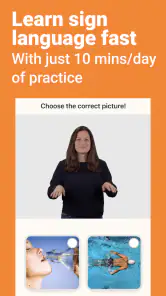
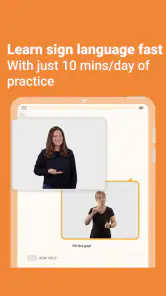
I’d also set a modest expectation before opening the first lesson: a short session can build familiarity, not conversational ease. The app’s store summary points to a daily routine of around 10 minutes, which is approachable when life is busy. But the time spent matters less than returning to the material and using it. A few signs remembered well are more useful than rushing through a longer session and forgetting the details the next day.
A useful place to begin, with realistic expectations
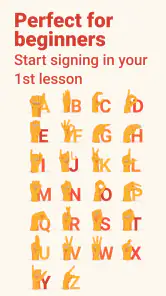
If you’re curious about ASL because you have a Deaf friend or relative, want to communicate more accessibly, or simply want to explore a visual language, short sessions can make it easier to build a habit. The app’s lessons are designed for beginners, and its store summary suggests a daily practice routine of around 10 minutes. That’s a manageable starting point, but I wouldn’t mistake a brief lesson for mastery. Signs need repetition, and comfortable conversation takes practice beyond recognizing a few individual movements.
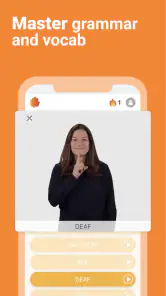
For a first-time learner, the video demonstrations are more useful than trying to memorize written descriptions alone. I can watch a signer, pause to look closely, and then try to reproduce the movement. A practical tip is to focus on one detail at a time: first the handshape, then where the sign is made, then how it moves. That makes practice less overwhelming than attempting to copy everything perfectly in one go.
Getting Started with Lingvano
First things first, downloading and setting up Lingvano: Sign Language - ASL is a breeze. Available on both Android and iOS, you can find it in the respective app stores. Upon launching the app, you're greeted with an intuitive interface that's easy to navigate. It's designed to get you started on your ASL journey without any fuss. I was up and running in just a few minutes, which is a big plus for those of us who are eager to jump right into learning.
Turning a lesson into a repeatable practice loop
My most useful workflow is simple: watch a demonstration once without signing, watch again while noticing one physical detail, then try the sign myself before replaying it. That brief attempt from memory is important. If I only follow along with the video, the model can carry me through the movement; trying first shows whether I can actually recall it. I then compare my handshape and movement with the example and repeat the part that feels uncertain.
More From Our News Desk

Clash of Clans Is Won Between the Battles

Android Auto Makes the Case for Quieter Car Software

MobiOffice: Transforming Mobile Productivity with Seamless Integration

EA SPORTS FC™ Mobile Soccer: Redefining Mobile Sports Gaming

How Microsoft OneDrive Became a Mobile Productivity Giant

How Google Translate Breaks Language Barriers Effortlessly
It helps to practice where the screen is easy to see and my hands are not cramped against a desk or coat sleeves. That sounds obvious, but a poor viewing angle can make a demonstration harder to copy, especially when I’m trying to inspect where a sign happens in relation to the body. I’d rather do a short, attentive session in a comfortable spot than squeeze in practice while walking or multitasking.
Interactive and Engaging Lessons
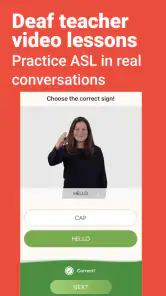
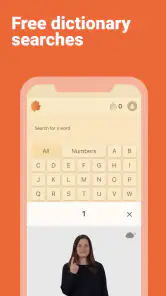
Now, let's talk about the lessons. Lingvano uses a variety of teaching methods to keep you engaged. There are video-based tutorials where you can watch fluent signers demonstrate the signs. It's like having a personal tutor right in your pocket! The app also includes interactive exercises that test your understanding and retention of the signs you've just learned. This mix of visual and practical learning is incredibly effective.
One thing I particularly enjoyed is the ability to practice at my own pace. Whether you're a complete beginner or someone looking to brush up on your skills, Lingvano's flexible learning structure makes it suitable for all levels. Plus, the app tracks your progress, so you can see how far you've come—which is always motivating!
Putting practice into an ordinary day
A realistic routine might be to complete a lesson during a quiet break, then revisit a few signs later that day without looking at the screen first. That small pause helps reveal whether I actually remember the movement or only recognize it when it appears in a video. I’d also keep a short personal list of signs I want to revisit, especially ones that look similar or feel awkward to form. The app can guide practice, but noticing which signs I personally confuse makes review more targeted.
For example, imagine I’m meeting an ASL user for coffee and want to make a simple introduction. I could use a lesson beforehand to rehearse a few relevant signs, but I’d avoid treating that preparation as a memorized speech. In the conversation, I need to watch the other person, take my time, and respond to what they actually sign. The app helps me prepare; the person I’m speaking with is the handoff into real communication, where pacing, facial expression, and mutual understanding matter.
Where the app hands learning over to people
That handoff is both a strength and a limit. A clear video gives me a repeatable visual model, and exercises can prompt me to retrieve what I’ve just studied. But solo practice cannot tell me with certainty whether my own signing is understandable, comfortable, or appropriately expressive. If I’m unsure, I can use the app to identify what to practice and then seek feedback from an ASL teacher, a class, or a willing practice partner.
I’d be thoughtful about that practice, too. A Deaf person is not automatically there to teach me, and a real conversation should not become an unasked-for test of my new vocabulary. When I have a relationship where practice is welcome, I can explain that I’m learning and accept correction without expecting someone else to carry the whole learning process. That makes the app a useful preparation tool rather than a substitute for reciprocal communication.
Making practice stick in daily life
A realistic routine might be to complete a lesson during a quiet break, then revisit a few signs later that day without looking at the screen first. That small pause helps reveal whether I actually remember the movement or only recognize it when it appears in a video. I’d also keep a short personal list of signs I want to revisit, especially ones that look similar or feel awkward to form. The app can guide practice, but noticing which signs I personally confuse makes review more targeted.
For a learner who has a specific conversation coming up, I’d use lessons as preparation, not as a script to rely on. For example, if I’m meeting an ASL user, I can practice basic introductions and everyday exchanges, then give myself time to watch and respond rather than trying to produce every sign quickly. The handoff from screen to real conversation matters: a lesson can help me recognize and rehearse, while a person provides the timing, expression, and back-and-forth that solo study cannot fully reproduce.
Why Lingvano Stands Out
What sets Lingvano apart from other language apps is its focus on real-life conversations. The app provides dialogues and scenarios you might encounter in everyday life, helping you to not only learn the signs but understand them in context. This practical approach ensures that you're not just memorizing signs, but also getting a feel for how to use them in real-world situations.
Another standout feature is the community aspect. Lingvano offers a platform where learners can connect, share experiences, and even practice signing with each other. It's like having a global classroom at your fingertips, which makes learning even more enriching and fun.
How it fits alongside other ways to learn
Compared with flashcards or text-heavy language tools, Lingvano’s visual demonstrations are a better match for a language learned through movement and seeing signs in context. Flashcards can still help me test recall away from a lesson, while a class or practice with an experienced signer is a stronger choice when I need direct feedback on how I’m signing. I’d use the app for structured individual practice and pair it with real interaction when that’s available, rather than expecting one format to do every job.
There are trade-offs. A phone screen gives me a repeatable model, but it can’t guarantee that my own signing is clear or natural, and practicing alone can leave mistakes unnoticed. I also need a quiet moment and enough screen space to watch the signer carefully; trying to learn while distracted makes visual details easy to miss. If I already know the basics and mainly need nuanced conversational feedback, a teacher or practice partner may be a better next step than another beginner lesson.
Who will get the most from it—and who may not
I’d recommend Lingvano to someone who wants a low-pressure entry into ASL, learns well by watching demonstrations, and is willing to revisit material rather than treating lessons like a checklist. It can also suit a family member who wants to make a more informed start before practicing with someone close to them. The best outcome comes when the app helps create momentum toward real communication, not when it becomes the only place the learner ever signs.
I’d look elsewhere, or add another learning route, if I needed structured feedback from a teacher, a course aimed at a particular job, or fluent interaction quickly. A live class can offer correction and conversation practice that a solo app cannot. A dictionary or reference resource may be more practical for someone who already knows ASL and only needs to check a specific sign. Those tools serve different purposes; Lingvano’s particular value is its guided beginner practice.
Cost, access, and who should choose it
Lingvano is free to download, with in-app purchases ranging from $17.99 to $134.99 per item. I’d start by deciding whether I can maintain a learning habit before paying for anything; the value depends on regular use, not simply having lessons available. The app has a 4.8 average from around 64,000 ratings, and more than a million installs. It is rated for Everyone, and version 5.0.4 requires Android 8.0 or later. Those details make it straightforward to check whether it suits your device and household, while the purchase range is worth considering if you’re comparing learning options.
Because the app is free to download but offers purchases, I’d first explore whether its teaching style fits the way I learn before deciding to spend. The listed purchase range is broad, so it is sensible to check the specific option and its terms in the app before committing. If I only have occasional curiosity, free access may be enough to decide whether I want to keep going; someone planning regular study should weigh the cost against a class or other learning resources they would actually use.
This is a good fit for a curious beginner who wants visual, self-paced ASL practice and can make room for short, repeated sessions. It’s less suitable if you need immediate fluency, personal correction, or a course tailored to a particular professional setting. ASL is a language used by a community, not just a collection of hand movements; I’d approach the app with respect and use it as one part of learning, not a substitute for listening to Deaf people and practicing with them when possible.
What progress can—and cannot—tell you
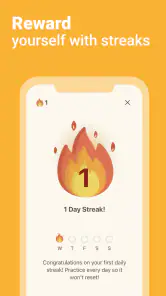
Progress tracking can be encouraging because it makes steady practice visible, but I wouldn’t use a completed lesson or a rising progress marker as proof that I’m ready for a conversation. A more meaningful check is whether I can recall a sign later, recognize it when it appears again, and produce it without copying the screen in real time. I’d revisit the signs that fail that test instead of moving on just to keep a streak of lessons going.
That distinction also answers a common beginner worry: “Am I learning correctly if I’m practicing alone?” I can build familiarity and improve recall alone, but I can’t fully assess clarity by looking at my own hands. When communication matters, feedback from a qualified teacher or an ASL user who is willing to help is valuable. The app is a place to prepare and review, not a guarantee of accurate communication in every situation.
Final Thoughts
In conclusion, Lingvano: Sign Language - ASL is more than just an app—it's a comprehensive learning tool that makes acquiring a new language accessible and enjoyable. Whether you're looking to learn ASL for personal reasons, professional development, or just for fun, this app is definitely worth checking out. The interactive lessons, real-life dialogues, and supportive community make it a top choice for anyone looking to dive into the world of sign language. So why wait? Give it a try and start signing today!
Lingvano: Sign Language - ASL Frequently Asked Questions
Can I learn ASL with Lingvano in short daily sessions?
Yes. Lingvano’s store summary presents it as a beginner-friendly way to learn sign language with about 10 minutes of practice a day. That makes it a practical option if you want to build a routine around brief sessions rather than setting aside a long block of time. Regular practice is still important, so choose a pace you can maintain.
Is Lingvano intended to teach American Sign Language or another sign language?
Lingvano: Sign Language - ASL focuses on American Sign Language. If your goal is to learn ASL, the app is aimed at that purpose; sign languages are not universal, so it is worth checking that ASL is the language you need before downloading. The app is an education resource for people who want to study ASL on a mobile device, including those beginning with the basics.
Is Lingvano: Sign Language - ASL free to download, and does it include purchases?
Lingvano is free to download, so you can install the app and explore its sign language learning experience without an upfront purchase. It also offers in-app purchases, with listed items ranging from $17.99 to $134.99 each. Check the purchase details in the app before subscribing or buying, and consider whether the available learning features and payment options suit your goals.
Who makes Lingvano, and what kind of app is it?
Lingvano is an education app developed by Lingvano, focused on learning American Sign Language. It is intended for people who want to study ASL through a mobile device, including learners starting from the basics. The app has an Everyone age rating, and its short store description is simply “Lingvano.” Its average rating is 4.8, based on around 64 thousand ratings.
What Android version is required to use Lingvano?
Lingvano requires Android 8.0 or later. Before downloading, check your device’s Android version in its settings to make sure it meets that requirement. If your phone or tablet runs an older version, the app may not be compatible. Keeping a compatible device system up to date can also help you get a smoother experience when using an education app.
Pros
- User-friendly interface for beginners
- Interactive learning modules
- Offline access available
- Daily practice reminders
- Comprehensive lesson plans
Cons
- Limited free content
- No support for other sign languages
- Occasional app crashes
- Requires constant updates
- Some features are premium-only
- Category
- Education
- Version
- 5.0.4











