Ling - Learn Languages Now
- 900.00
- 4.6
- Installs
- 1.00M
- Price
- Free

Screenshots
Analysis by Reviewed
When I’m learning a language I don’t already know, the first hurdle is often figuring out what to practise and how to keep going after the first burst of enthusiasm. Ling is an education app from Ling Learn Languages that puts beginner learning at the centre. I’d treat it as a guided way to build familiarity with a language, not as a shortcut to speaking fluently. Its best use is a manageable practice habit: a short lesson when I have a spare moment, followed by trying to notice or use a new phrase in real life.
Choose a language with a clear goal
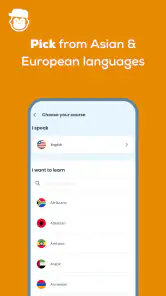
Before starting, I’d decide what I want the language for: greeting relatives, preparing for a trip, or simply exploring a language I’ve always been curious about. That matters because a broad language course can feel less focused if I expect it to solve a specific work or exam need. Ling’s range includes languages such as Thai, Tagalog, Serbian, and Khmer, which makes it especially interesting if the language I want is harder to find in the usual beginner apps. I’d check that my chosen course matches my goal, then start with the basics rather than jumping ahead to material that looks impressive but is hard to retain.
Make practice fit an ordinary day
A realistic routine is more useful than an ambitious one I abandon. For example, I could do a lesson during a commute or while waiting for an appointment, then spend a minute recalling a phrase without looking at the screen. That small pause is a practical test of whether I remember anything beyond tapping the right answer. If I’m learning for an upcoming visit, I’d keep a short personal list of situations—ordering food, asking for directions, introducing myself—and use the app’s beginner practice as a starting point for those needs. Ling is most helpful when it supports that routine, rather than becoming the whole routine.
Getting Started with Ling
Downloading Ling - Learn Languages Now was a breeze, and setting it up was surprisingly straightforward. The app greets you with a clean, user-friendly interface that doesn’t overwhelm you with options. You can choose from a wide range of languages, including popular ones like Spanish, French, and German, to the more exotic options like Thai and Vietnamese. It's perfect for anyone looking to broaden their linguistic horizons.
Interactive Learning Experience
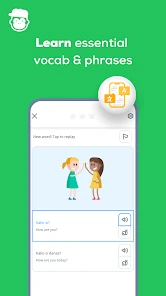
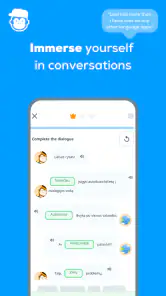
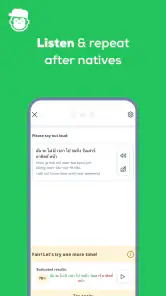
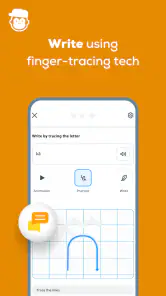
One of the standout features of Ling is its interactive learning modules. Forget about boring vocabulary lists and tedious grammar rules. Instead, Ling offers engaging exercises that include listening, speaking, and reading. The app uses a chatbox-style teaching method, making it feel like you're having a real conversation. This interactive approach not only makes learning fun but also incredibly effective.
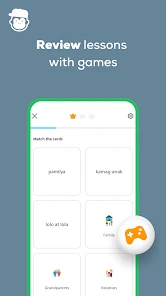
Moreover, the app includes quizzes and games to test your knowledge as you progress. It’s like playing a game where the prize is fluency. Who knew learning could be this enjoyable?
Use exercises as prompts, not proof of fluency
In my view, the most useful way to approach an exercise is to notice what kind of recall it demands. If I can recognise a phrase when it appears but cannot produce it later, I need more active practice, not simply another quick run through the same material. I’d say new answers aloud where appropriate and try to recall them before checking the screen. That is a simple way to make a short session more demanding without needing extra study tools.
More From Our News Desk

Weather by Xiaomi Review: Clear at a Glance, Less Clear Up Close

X Under Pressure: Can It Recover When Posting Goes Wrong?

Clash of Clans Is Won Between the Battles

Android Auto Makes the Case for Quieter Car Software

MobiOffice: Transforming Mobile Productivity with Seamless Integration

EA SPORTS FC™ Mobile Soccer: Redefining Mobile Sports Gaming
The chat-style format can make a first encounter with a phrase feel less abstract than a bare list, but a guided exchange is still different from a conversation with a person who can respond unpredictably. I would pair Ling with real listening and speaking when those skills matter—for instance, by practising a greeting with a friend or paying attention to how speakers use familiar phrases. This distinction is important for beginners: finishing lessons can build a base, but it does not by itself show that I’m ready for every real-world conversation.
Personalized Learning Paths
Another great aspect of Ling is its ability to tailor the learning experience to each user. As you interact with the app, it tracks your progress and adapts the lessons accordingly. This personalized approach ensures that you're always learning at a level that's right for you, which is a huge confidence booster.
Plus, the app sends you reminders to practice daily, ensuring that you stay on track with your language learning goals. It’s like having a personal coach who’s always there to motivate you.
Keep a routine without letting reminders run it
Reminders can be helpful if I tend to forget a new habit, but they are not a substitute for choosing a realistic pace. I’d set a personal target I can actually keep, then use a reminder as a nudge rather than a measure of whether I’m succeeding. If a lesson feels difficult, slowing down and repeating the material is a better choice than rushing through just to preserve a streak or satisfy a notification. The useful question is whether I can remember and apply what I practised, not whether I opened the app every day.
Progress tracking can also help me decide what to revisit, but I would not assume that a course’s sense of progression automatically matches a particular goal. Someone preparing for a formal test, needing professional vocabulary, or aiming for advanced fluency may need a structured class, a tutor, or dedicated exam material alongside—or instead of—an app. Ling makes more sense when I want approachable beginner practice and can supply the extra context myself.
Offline Mode and Convenience
For those times when you're on the go and don't have access to Wi-Fi, Ling has you covered with its offline mode. You can download lessons in advance and learn at your convenience. This feature is a lifesaver for frequent travelers or anyone with a busy lifestyle.
Plan ahead when a session matters
If I expect to study somewhere with unreliable internet, I’d prepare before leaving rather than wait until I’m offline to sort out the session. I’d also check that the lesson I intend to use is available for offline study, then keep expectations modest: downloaded practice can fill a quiet stretch, but it does not replace the benefit of hearing language in its natural setting. For travel, I’d use offline lessons to review useful basics before arriving and treat them as preparation, not as a guarantee that every travel situation will be covered.
Where setup or progress can feel confusing
If something seems stuck, I’d first check the simple things: whether I selected the intended language, whether the device has a working connection for the task, and whether I’m trying to use material I prepared for offline access. I’d close and reopen the app if a screen stops responding, then return to the lesson and see whether progress is clear. These are ordinary troubleshooting steps, not a promise that every issue has the same cause. If the difficulty continues, I’d avoid repeatedly tapping through answers; pausing and trying again later is less likely to turn a temporary hiccup into a frustrating session.
Sometimes the friction is not technical at all. A lesson may feel difficult because the language’s sounds or sentence patterns are unfamiliar, or because I’m tired and rushing. In that case, I’d repeat a small section, say the examples aloud, and come back when I can focus. If I’m expecting open-ended conversation, advanced grammar, or specialised vocabulary, the mismatch may be about my goal rather than the app’s setup. A tutor or a course designed for that specific purpose would be a better fit.
Make the first week a useful test
I’d use the first few sessions to answer a practical question: does the course give me material I can recall later, and does its pace suit the time I actually have? After a lesson, I might write down one phrase from memory, then check it against the app rather than copying everything into a notebook. This is a small but revealing test. If I can remember a useful expression the next day, the routine is doing something worthwhile; if I only recognise answers while they are on screen, I may need shorter sessions and more deliberate recall.
For a trip, I’d also separate language practice from travel planning. I can use a lesson to become less hesitant about greetings or basic requests, then prepare a few destination-specific words separately if I need them. That avoids expecting a general beginner course to anticipate every restaurant, transport, or accommodation situation. Ling works best as a foundation I can adapt, not as a ready-made script for every interaction.
What it costs and who will enjoy it
Ling is free to download, and its age rating is Everyone, so it is approachable for a broad audience. It has a 4.6 average from around 22,000 ratings, with over a million installs. Optional in-app purchases range from $0.99 to $349.99 per item, so I’d review the purchase details in the app before committing to anything. The current version is 7.9.2, and it requires Android 7.0 or later. Those details make it easier to judge whether it suits my device and budget, but the most important question is whether its beginner-oriented practice fits what I actually want to learn.
Before choosing a paid option, I’d first spend enough time with the free experience to see whether I like the lesson style and whether my chosen language is the right fit. A purchase is only useful if it supports a routine I will keep. The range of possible item prices is broad, so I would read the exact purchase description and total carefully instead of assuming every option costs the same or that I need one to begin. If I’m sharing a device or helping a younger learner, I’d also check purchase controls with the person responsible for the account.
Who benefits most, and who may need something else
I see Ling as a particularly sensible choice for curious beginners who want to try a language that mainstream courses may not foreground, and for people who prefer a guided sequence to building their own deck of flashcards. It can also suit a learner who has a little time most days but does not yet want a class or a conversation partner. The low-pressure format gives me a place to start before I decide whether I want to invest more effort elsewhere.
It is less compelling if I already understand the basics and need nuanced correction, professional phrasing, or practice reacting to a fast, unscripted speaker. A flashcard app can be more efficient when I already have a word list and only want repeated recall; a live teacher is better when I need someone to explain why a sentence sounds wrong. For a formal exam, I’d use exam-focused material rather than treating a general beginner course as a complete study plan. These alternatives are not necessarily better in every way—they answer different needs.
Compare progress with real communication
One useful habit is to set a small outcome beyond completing a lesson. I might aim to recognise a greeting when I hear it, or to say a simple introduction without reading. That gives me a more meaningful measure than a completed screen. If I’m studying a language with unfamiliar sounds, I’d take extra time to listen carefully and repeat slowly instead of treating quick recognition as mastery. The app can make the first steps less intimidating, but the effort of connecting those steps to actual speech remains mine.
For a realistic everyday routine, I could practise during a quiet part of lunch, then use the walk back to recall a phrase without opening the app. On a travel day, I might review basic material before leaving home and save the more demanding learning for when I can concentrate. Those choices make the app easier to fit into life without turning every spare moment into a lesson. They also help me notice when I’m too distracted to learn well, which is a good reason to stop rather than rush through answers.
Wrapping It Up
In conclusion, Ling - Learn Languages Now is more than just an app; it's a comprehensive language learning experience. Its engaging, interactive lessons, personalized learning paths, and offline capabilities make it a must-have for anyone serious about learning a new language. With Ling, language barriers become a thing of the past, and the world becomes a little more connected.
My more measured recommendation is to see it as a practical starting point, especially if the language you want to explore is one you do not easily find elsewhere. The strongest results are likely to come from pairing its guided exercises with your own recall, listening, and low-stakes attempts to use what you learn. I’d try it if I wanted a structured beginner routine and had realistic expectations; I’d choose a tutor, a specialist course, or a flashcard tool instead if my needs were already narrow or advanced. That distinction is what makes Ling useful: it can lower the barrier to beginning, while leaving room for a more personal learning plan as my goals become clearer.
Ling - Learn Languages Now Frequently Asked Questions
Is Ling - Learn Languages Now free to download?
Yes. Ling is free to download, so you can install it without paying upfront and explore its language-learning offering. Optional in-app purchases are available, with prices ranging from $0.99 to $349.99 per item. If you are managing spending or setting up the app for someone else, review the purchase controls on your device and check the terms shown in the app before choosing any paid option.
Is Ling suitable for children and families?
Ling has an Everyone content rating, making it suitable for a broad audience, and its subject is language education. Families may find it useful as a way to explore another language together or support individual study. Since optional in-app purchases are available, it is sensible for parents or guardians to check device purchase settings and discuss paid options before a child uses the app independently.
What languages can I study with Ling?
Ling's language-learning range includes examples such as Thai, Tagalog, Serbian, and Khmer, as well as other languages. Its store summary describes it as a beginner-focused app for learning these and more. If you have a particular language in mind, look through the course choices after installation to see whether it is included and whether the available material suits your learning goal.
Who develops Ling - Learn Languages Now?
The app is developed by Ling Learn Languages and sits in the education category. That context is helpful if you are comparing language-learning tools and want to know who publishes the one you are considering. Its focus is language study, with the store description highlighting beginner learning and a selection that includes less commonly taught languages as well as other options.
Is Ling a good choice if I want to learn a less commonly taught language?
Ling is presented as a language-learning app for beginners, with options such as Thai, Tagalog, Serbian, and Khmer alongside more familiar languages. That makes it worth considering if your goal is to explore a language that may be harder to find in general-purpose learning apps. The app is free to download, and its education focus makes it suitable for building language study into a regular routine.
Pros
- Wide range of languages available.
- User-friendly interface design.
- Effective learning exercises.
- Offline mode supported.
- Regular updates with new content.
Cons
- Limited free content access.
- Subscription required for full features.
- Occasional app crashes reported.
- Some features need internet.
- Pronunciation guides could improve.
- Category
- Education
- Version
- 7.9.2











