Lidl Plus
- 741.00
- 3.7
- Installs
- 100.00M
- Price
- Free
Screenshots
Analysis by Reviewed
When I’m heading to Lidl, I’d rather decide what to buy before I reach the checkout than try to remember every offer at the last minute. That is the practical appeal of Lidl Plus: it brings Lidl’s shopping discounts into a phone app, so I can check what might be useful and make a plan around it. It is free, and Lidl develops it as a companion for people who already shop at its stores.
My view is that it works best as a small part of a Lidl shopping routine, not as a general-purpose shopping app. If Lidl is already where you buy groceries, having its offers in one place can be worthwhile. If you shop there only occasionally, or prefer to avoid checking discounts before a trip, the benefits may not justify adding another app to your phone.
Checking offers before the shopping trip
Before I leave home, I find it useful to decide what the list is for: a planned meal, a few essentials, or a quick top-up. That gives me a simple filter for the offers and helps me avoid treating every discount as a reason to buy. With that in mind, I can look at how Lidl Plus fits the moments when a shopping day gets hectic.
A useful stop before making a list
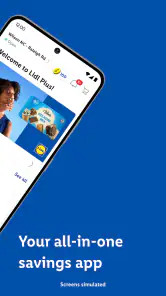
The app’s main job is straightforward: help shoppers find advantages and discounts connected with Lidl. I’d open it before writing my list, rather than wait until I’m in the aisle. That order makes it easier to distinguish between something I already intended to buy and something that only looks tempting because it is presented as an offer.
That distinction matters. A discount is useful when it applies to something I need or would reasonably buy anyway; it is less useful if it persuades me to add extra items without a plan. I’d treat the app as a way to refine a grocery list, not as a reason to replace one. The strongest habit is to check the offers, choose the relevant ones, and then stop browsing.
For a busy household, that can make a quick visit feel more deliberate. Someone planning meals can check whether an offer fits the week’s menu before leaving home. A shopper making a short trip can focus on the few items that matter, instead of trying to recall every promotion while moving through the store. The app is most convincing when it supports that preparation rather than turning shopping into a hunt for discounts.
How it compares with other ways to shop
Compared with a paper leaflet, an app is easier to carry and consult while planning on a phone. Compared with a general shopping or grocery app, this one is specifically tied to Lidl, which is both its strength and its limit. It is not the tool I’d choose to compare every supermarket, manage a broad household budget, or organize purchases across several retailers. Its value depends on how often Lidl is part of your normal routine.
More From Our News Desk

Weather by Xiaomi Review: Clear at a Glance, Less Clear Up Close

X Under Pressure: Can It Recover When Posting Goes Wrong?

Clash of Clans Is Won Between the Battles

Android Auto Makes the Case for Quieter Car Software

MobiOffice: Transforming Mobile Productivity with Seamless Integration

EA SPORTS FC™ Mobile Soccer: Redefining Mobile Sports Gaming
If you already use Lidl regularly, keeping the offers close to your shopping plans may be more convenient than checking a separate source. If you are choosing between stores based on the full cost of a weekly shop, though, you will still need to compare the overall basket and not just the highlighted deals. A single attractive offer does not tell you whether the whole trip is the best fit for your budget.
Making a discount useful without overbuying
One practical trick is to check the app after deciding what you need, then let relevant offers adjust the list rather than create it from scratch. For example, if I’m already planning a grocery trip, I can look for offers that match the meal plan and leave unrelated promotions alone. This keeps the app from nudging the trip away from its purpose.
Another useful routine is to check before setting out rather than assume I’ll remember to open the app at the checkout. That small step reduces last-minute fumbling and makes the offers part of the decision, not an interruption. I’d also avoid relying on a vague memory of what I saw earlier: if a particular offer matters to my plan, I would review it in the app again before shopping.
Using it during a busy shopping day
On a rushed visit, I would keep the phone’s role narrow: check a relevant offer if it could change a decision, then return to the list and the shop. A small, prepared list is also a handy fallback if I get distracted or need to postpone browsing. The next question is whether this focused routine feels dependable and practical on the device I use every day.
Speed is about the whole routine
For a shopping companion, perceived speed is not just how quickly a screen appears. It is whether I can get to the information I need without losing my place in the trip. The simplest workflow is to browse before leaving, make a short list, and use the app only when there is a reason to check an offer again. That is likely to feel smoother than opening it repeatedly for every aisle decision.
I would not make a promise about how fast it runs on every phone or connection. Phones differ, and a shopping trip can involve distractions, weak connectivity, or other apps running in the background. The useful expectation is modest: this is a discount companion, so it should support a quick check, but I would not build an urgent checkout routine around an assumption that every screen will always load instantly.
When the app competes with the shopping itself
The app is less helpful when the store is busy and I’m trying to move quickly. Browsing offers while navigating a crowded shop can divide attention, and repeatedly switching between a list and promotions can make a simple trip feel fiddly. I’d do most of the browsing at home and keep in-store checks to the offers that could genuinely change what I buy.
A realistic example is a shopper stopping at Lidl on the way home with only a few minutes to spare. If the list is already set and the relevant offers have been checked beforehand, the app can serve as a useful reference. If that shopper opens it for the first time at the till, the same app may feel like an unnecessary delay. The difference is less about the number of features and more about when they enter the routine.
There is also a trade-off for people who enjoy browsing promotions. More time spent exploring can uncover something relevant, but it can also encourage unplanned purchases. I’d use a clear stopping point: check the offers that relate to the list, then put the phone away. That approach makes the app serve the shopper instead of letting the promotions set the agenda.
What to do if a check does not go smoothly
If the app feels slow or stops responding during a trip, I would avoid making it the only place I keep track of what I need. A basic shopping list written elsewhere can keep the visit on course while I try again later. This is a sensible backup for any phone-based shopping aid, especially when a discount is not essential to the purchase.
For a smoother recovery, I’d first leave the offer browsing until I’m stationary and then reopen the relevant screen when I have time. If the problem continues, I would update the app through the usual store process and check whether the phone itself has enough working room for the apps I’m using. Those are general troubleshooting steps, not a guarantee that every issue has the same cause.
Reliability, compatibility, and everyday fit
I judge a retailer’s app by whether it earns a place in my routine without becoming another chore. Lidl Plus is most at home alongside Lidl trips, while a paper list or a broader grocery tool may suit people who shop across several stores. I’d also consider the phone’s operating-system compatibility before relying on it, then weigh whether the offers genuinely help me plan.
A focused tool, with focused limits
Because Lidl Plus is centered on Lidl, I would judge its reliability by whether it fits naturally into those store visits. Its focus can make the app easy to understand: I’m not opening it to plan a holiday, compare electronics, or shop across a marketplace. But that same focus means it has little reason to stay open when I’m shopping elsewhere. It belongs in the toolkit of a Lidl customer, not necessarily on every shopper’s home screen.
There is no need to keep the app open for an entire shopping trip. Checking it beforehand and returning only when needed is a more comfortable pattern, and it avoids draining attention even if the app itself is not demanding. I would not claim a particular battery or storage impact without testing the app on a specific device. In practical terms, the main resource cost for many users may simply be the time spent checking offers and deciding whether they matter.
If something goes wrong, a shopper should still be able to complete an ordinary trip using a list and their own judgment. That is why I see the app as an aid rather than a requirement. A deal can be a welcome extra, but I would not let the success of a grocery run depend on having the app ready at exactly the right moment.
Who is likely to appreciate it
I’d recommend trying it if Lidl is a regular stop and you are willing to check discounts before shopping. It may also suit someone who likes to plan meals and wants to see whether an offer fits a real need. The app’s free price lowers the barrier to trying it, though free does not automatically mean it is useful for everyone; the deciding factor is whether the offers influence trips you were already going to make.
It is a weaker fit for shoppers who rarely visit Lidl, avoid promotional browsing, or want one app to cover several grocery chains. It may also frustrate anyone who expects every discount to translate into meaningful savings across the complete shop. In those cases, a simple list or a broader comparison approach may be more useful than a retailer-specific offers app.
The app is rated for Everyone, so its stated age suitability is broad. That does not change the practical question of whether it belongs in a particular household’s routine. I’d decide based on shopping habits, not the promise of discounts alone: if Lidl is already part of the week, a quick pre-trip check is easy to test; if it is not, there may be little reason to add another shopping tool.
What the wider adoption suggests—and what it does not
Lidl Plus has a 3.7 average from around 1.8 million ratings and has passed 100 million installs. That tells me it is widely used, but popularity alone is not proof that it will suit every phone or shopping style. I’d weigh those figures alongside my own needs: a Lidl regular can judge it by whether relevant offers are easy to work into a routine, while an occasional visitor may not benefit much from broad adoption.
The current version is 17.11.5, and the app’s stated minimum operating-system requirement is version 9. If your phone meets that requirement, compatibility is one less basic concern, but it does not guarantee identical performance across devices. Keeping software current is a reasonable step when an app feels unreliable, while avoiding unnecessary background use is sensible if your phone is already struggling with several demanding apps.
Lidl, the developer, has built a focused shopping app rather than a universal grocery planner. That distinction helps set expectations: I would look here for Lidl-related discounts, not for a complete record of household spending or a cross-store comparison. The more clearly I separate those jobs, the more useful the app becomes—and the less likely I am to judge it for tools it was not designed to replace.
My performance verdict
As a shopping app, Lidl Plus makes the most sense when I treat it as a quick planning stop: check relevant discounts before leaving, keep a separate list of essentials, and use the phone in-store only when a specific offer could affect a decision. That workflow limits distraction and gives the app a clear purpose without making the whole trip depend on it.
I would recommend it to people who shop at Lidl often enough to notice and use its offers. I would skip it if Lidl is an occasional destination or if promotions tend to make me buy more than I planned. Its focused design is useful precisely for the right shopper, but it is not a substitute for comparing a full grocery basket or keeping a dependable shopping list.
Overall, Lidl Plus is a practical extra rather than an essential shopping companion. Its free access makes it easy to try, and its Lidl-specific focus can help regular customers prepare more thoughtfully. My advice is to test it against a real shopping list: if the offers help you make a better-planned trip, keep it in your routine; if they add browsing without changing what you buy, you can shop just as comfortably without it.
Lidl Plus Frequently Asked Questions
What is Lidl Plus, and how does it work?
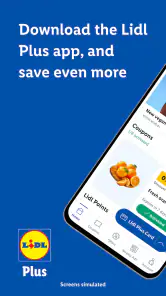
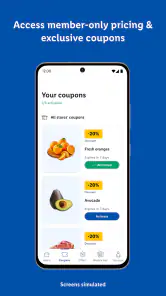
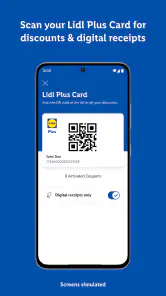
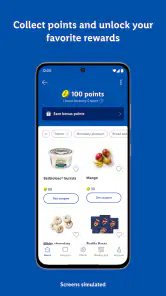
Lidl Plus is Lidl’s free digital loyalty app, designed to provide participating customers with access to coupons, promotions, and other benefits. After creating an account, you can browse offers in the app and activate eligible coupons before shopping. At checkout, scan your Lidl Plus digital card so the system can apply the relevant discounts. Available features and promotions can vary by country and may change over time.
Is Lidl Plus free to download and use?
Yes. Lidl Plus is generally free to download and use, and signing up does not normally require a subscription. You will need an internet connection to register, browse current offers, and use many app features. Some benefits depend on your location, local Lidl stores, and the conditions shown for each promotion, so check the offer details before relying on a discount at checkout.
How do I use Lidl Plus coupons when I shop?
Open the app and review the available coupons before you visit a store. Some coupons must be activated manually, so check their status and any minimum-spend or product requirements. At checkout, present your Lidl Plus digital card for scanning; eligible offers should then be applied according to their terms. Keep the app available in case you need to confirm an offer, and check your receipt to make sure the discount was recorded.
Does Lidl Plus work in every country and at every Lidl store?
Lidl Plus is intended for use in participating Lidl markets, but the app’s offers, features, and store coverage are not identical everywhere. Benefits are usually tied to the country associated with your account, and a coupon available in one market may not work in another. Before downloading or travelling, check the app listing and local Lidl website for availability, supported regions, and any restrictions at individual stores.
What personal information does Lidl Plus collect?
Like many retail loyalty apps, Lidl Plus may request account details and process information related to app use, coupons, and shopping activity. The exact data collected and how it is used can depend on your country, settings, and Lidl’s current privacy policy. Review the privacy information during registration, choose optional permissions thoughtfully, and check your account settings if you want to manage preferences or request changes to your personal data.
Pros
- Digital coupons can be activated before shopping and scanned at checkout.
- Receipts are stored in the app
- making past purchases easier to review.
- Weekly offers and promotions are available in one place.
- The app can show nearby Lidl stores and their opening hours.
- A digital Lidl Plus card means no need to carry a separate loyalty card.
Cons
- Some coupons require manual activation before checkout.
- Rewards and offers may vary by country or region.
- You may need an internet connection to access current offers.
- Location access can help with nearby-store features
- but may raise privacy concerns.
- The app is most useful for shoppers who regularly visit Lidl.
- Category
- Shopping
- Version
- 17.11.5











