Legacy Academy – Learn Success
- 117.00
- 4.1
- Installs
- 500.00K
- Price
- Free

Screenshots
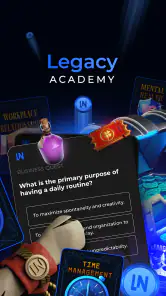
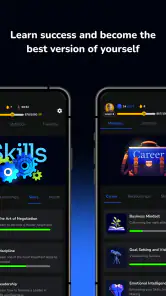
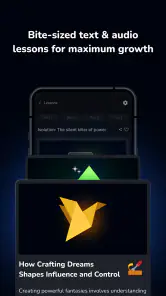
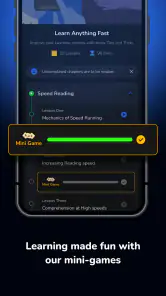

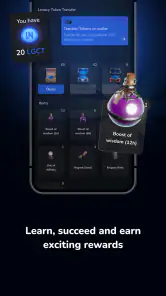
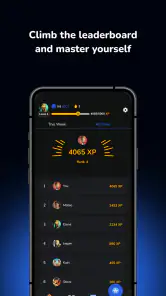

Analysis by Reviewed
I approached Legacy Academy as a first-time learner who wanted to make progress without turning self-improvement into another demanding project. It is an education app from LEGACY NETWORK AG, and its focus is practical personal growth: the kind of learning that can be useful when you want to communicate more confidently, develop a skill, or bring more intention to your goals. My main advice is to begin with one specific need rather than trying to overhaul your whole routine at once.
First Impressions Matter
When I first downloaded Legacy Academy – Learn Success, I wasn't sure what to expect. But right off the bat, the clean interface and intuitive design caught my attention. It's like the app invites you in with open arms, ready to guide you on a journey to personal growth. The layout is simple yet effective, with everything you need just a few taps away. No need to hunt around for features or get lost in a maze of confusing menus.
Content That Packs a Punch
The real magic of this app lies in its content. Imagine having access to a treasure trove of courses that cover everything from building confidence to mastering public speaking. Each module is well-structured and packed with valuable insights that can really make a difference. The lessons are engaging, and the bite-sized format means you can learn at your own pace without feeling overwhelmed.
What sets Legacy Academy apart is the quality of the material. It's not just fluff or generic advice. The courses are crafted by experts who've been there and done that, so you're getting tips and strategies that are tried and true. Plus, the app keeps things fresh with regular updates and new content, so there's always something new to learn.
Choosing a First Course That Fits
For a useful first session, connect a course topic to something already on your calendar. If you have a presentation coming up, for example, a lesson related to confidence or public speaking gives you a clear reason to pay attention and a chance to try one idea soon afterward. I find that more effective than browsing broadly and saving several courses for “later,” when it is easy to forget why they seemed interesting.
That approach also helps answer a practical question: who is this app for? It makes the most sense for someone who enjoys guided learning and wants prompts for personal development, especially when a small amount of focused study feels manageable. If you prefer to build skills through books, formal classes, or direct coaching, those options may offer more depth or personal feedback. An app can help you get started, but it cannot make decisions or practice difficult conversations on your behalf.
Interactive and Engaging
One of the things I absolutely love about this app is its interactive features. You're not just passively reading or watching videos. The app includes quizzes and exercises that challenge you to put what you've learned into practice. It's like having a personal coach by your side, pushing you to apply the concepts and see real results in your life.
More From Our News Desk

Clash of Clans Is Won Between the Battles

Android Auto Makes the Case for Quieter Car Software

MobiOffice: Transforming Mobile Productivity with Seamless Integration

EA SPORTS FC™ Mobile Soccer: Redefining Mobile Sports Gaming

How Microsoft OneDrive Became a Mobile Productivity Giant

How Google Translate Breaks Language Barriers Effortlessly
A useful habit is to treat an exercise as a rehearsal, not a test. After a lesson, write down one action you can take in a real situation, then try it before moving to another topic. For instance, someone preparing for a work discussion could practise a clearer opening or a more confident way to express a point. This turns learning into something observable, while keeping expectations realistic: a quiz can check understanding, but progress still depends on using the idea outside the app.
Making Learning Fit an Ordinary Day
Imagine having a few quiet minutes before your day gets busy. You can open a lesson, focus on one concept, and leave yourself with a small action to test later. On the commute, during a break, or at home before planning the week, that kind of short session can be easier to sustain than setting aside a long block of study. The trade-off is that brief lessons may introduce a concept without giving you the depth you would get from a full course or a specialist’s feedback.
Compared with the usual alternatives in self-improvement, Legacy Academy sits between browsing free advice online and committing to a structured class. A video search can be quicker for one narrow question, but the material may be scattered; a book can offer more sustained argument, but it asks you to find and follow your own path. I would use this app when I want a guided starting point, then turn to a book, workshop, or mentor if the subject needs more nuance.
Costs, Access, and Expectations
The app is free to install, with optional in-app purchases ranging from $0.49 to $119.99 per item. I’d explore the learning experience and decide whether its approach suits you before spending money; check the price attached to any purchase carefully so it matches what you intend to get. The broad range means it is especially sensible to make a specific choice rather than treating every paid option as necessary. Its Everyone age rating makes the intended audience broad, though the personal-growth topics will be most useful to people ready to apply them.
Legacy Academy has a 4.1 average from around 2,200 ratings, and it has been installed over 500,000 times. Those figures suggest that it has reached a sizable audience, but they cannot tell you whether its teaching style will click for you. It launched on July 10, 2024, and version 1.4.14 is listed for Android 6.0 and later. If you use an older device, checking compatibility before planning a learning routine is a straightforward way to avoid frustration.
Community and Personal Boundaries
And let's not forget about the community aspect. Legacy Academy offers a platform where you can connect with like-minded individuals. Share your progress, exchange tips, and even find accountability partners who can help keep you on track. It's a supportive environment that fosters growth and encourages you to push your limits.
For a first-time user, I’d keep shared progress focused on a learning goal rather than personal details. Accountability can make a habit feel less solitary, but it works best when you choose what you are comfortable discussing and treat other people’s experiences as perspectives, not expert advice. If you would rather learn privately, the course material and exercises are the more relevant parts to explore.
Wrapping It Up
In a world where personal development apps are a dime a dozen, Legacy Academy – Learn Success truly stands out. It's more than just an app; it's a gateway to becoming the best version of yourself. Whether you're looking to boost your career, improve your personal skills, or simply gain a new perspective, this app is a fantastic starting point.
So, if you're ready to take charge of your success journey, give this app a try. Trust me; you won't regret it. It's like having a pocket-sized mentor that's always ready to guide you towards greatness. Happy learning!
My Recommendation for a First Week
I would keep the first week deliberately modest: choose one course that relates to a current situation, complete a lesson when you have a realistic window, and try one takeaway in daily life. Then ask yourself whether the format helped you act more confidently or simply gave you another item to consume. That quick check is a better guide than collecting courses, because it tells you whether the app’s style fits your goals and schedule.
Overall, I’d recommend trying Legacy Academy if you want an accessible nudge toward personal development and are willing to practise beyond the screen. I would skip it if you need accredited instruction, individualized professional guidance, or detailed coverage of a specialized subject. Used with a clear purpose, it can be a convenient starting point; used as a substitute for action, no course library can do the work for you.
A Low-pressure Route from Install to First Result
Once the app is installed, I would resist the urge to explore every topic at once. Start by naming a small problem in plain language: perhaps you hesitate before speaking in a meeting, struggle to organize a goal, or want to feel more at ease introducing yourself. Then look for a course that seems directly connected to that situation. This simple filter makes the first choice less abstract and keeps the app from becoming another library you browse without using.
For a realistic first result, picture a busy weekday with a team discussion later in the afternoon. I would use a short learning window to focus on one relevant idea, then write a reminder in my own words—something like “state the point first” or “ask one clear follow-up question.” Before the discussion, glance at that note; afterward, reflect on whether it helped. The success here is not suddenly becoming a brilliant speaker. It is trying a specific behavior once and noticing what happened.
How to Keep the Learning Useful
One trade-off with short lessons is that they can make progress feel faster than it really is. A finished module is a useful milestone, but it is not proof that a habit has changed. I would pair each lesson with one offline attempt and avoid moving to a new topic until I have tried the previous idea in a situation that matters. This is especially helpful for communication and confidence topics, where the real test is how you respond to another person, not how familiar a concept sounds on screen.
If a lesson leaves you with several suggestions, choose the one that feels both practical and low-risk. Trying a small adjustment in a routine conversation is easier to evaluate than making a dramatic change at work or in a personal relationship. Keep a brief note about what you tried and what you would change next time. That gives the course a role as a prompt for deliberate practice rather than a substitute for your own judgement.
What the App Can—and Cannot—Replace
For someone who learns best with a clear sequence and a nudge to act, Legacy Academy can be more approachable than searching through unrelated articles or videos. Its course-based approach gives a learner a place to begin, while exercises and quizzes can encourage active participation. Still, a guided app is not the same as a teacher who can notice a misunderstanding, adapt an explanation, or respond to your specific circumstances. If the stakes are high or the subject is specialized, I would use the app as a starting point and seek a qualified person or more comprehensive material.
It may also be a poor fit if you already know exactly what you need and want a precise answer immediately. In that case, a focused reference, a well-chosen book chapter, or a direct conversation with an experienced colleague may be more efficient than taking a broader course. Conversely, if you are unsure where to begin with personal development, the structure can help turn a vague intention into a manageable next action. The difference is whether you want a guided path or a direct answer.
Making a Deliberate Choice About Purchases
Because the app is free to start but includes optional purchases, I would treat payment as a separate decision rather than part of the setup. First see whether the teaching style works for you and whether you actually return to a lesson after the initial visit. Before confirming any purchase, read its in-app description and price carefully, and consider whether it addresses the goal you chose. This prevents an understandable first-week enthusiasm from turning into spending on material you may not use.
Another sensible checkpoint is to ask what would count as value for you. It might be a course you complete and apply, not simply a larger collection of topics. If you are uncertain, continue with what is available without paying and revisit the decision only when you can identify a specific learning need. This is a practical way to keep the app’s optional costs in proportion to the benefit you expect.
Who Is Most Likely to Enjoy It?
I can see this being a good match for people who want a gentle structure around self-improvement: a new professional who wants to build confidence, someone returning to work who wants to refresh communication habits, or a learner who prefers short guided sessions to an unstructured search. It is also a reasonable choice for people who need a reminder to pause and practise rather than collect advice. The strongest fit is someone willing to bring an idea from a lesson into an ordinary conversation or task.
I would be more cautious about recommending it to a person who expects a personal coach, formal credentials, or a complete curriculum for a demanding professional skill. It is also less suited to anyone who dislikes app-based lessons or learns best through extended reading and discussion. Knowing that before downloading helps set a fair expectation: this is a convenient self-improvement companion, not a replacement for every form of education.
A Practical Way to Decide Whether to Continue
After a few visits, ask yourself three things: Did I find a topic that relates to a real situation? Did the lesson give me an action I could try? Did I make time to try it? If the answer to the first two is yes but the last is no, the obstacle may be your schedule rather than the course itself; choose a smaller action or a more realistic moment. If the lessons do not connect to what you need, it may be better to use another learning resource instead of forcing a routine.
That check keeps the goal modest and personal. You do not need to finish a long list of courses to benefit from a learning app, and there is no reason to measure yourself against other users. For me, the most useful outcome would be one idea remembered and applied when it counts. If Legacy Academy helps you reach that point consistently, it has earned a place in your routine; if not, stepping away is a sensible choice rather than a failure.
Legacy Academy – Learn Success Frequently Asked Questions
Is Legacy Academy – Learn Success free to download, and can purchases add to the cost?
Legacy Academy – Learn Success is free to download, so you can install it without paying upfront. The app also offers in-app purchases, with prices ranging from $0.49 to $119.99 per item. Review the price and terms shown for an individual purchase before confirming it, especially if you are downloading the app for a child or want to keep spending within a set budget.
Which devices can run Legacy Academy – Learn Success?
Legacy Academy – Learn Success is available for Android and iOS devices. On Android, the minimum requirement is Android 6.0, so checking your device’s software version before downloading can help avoid compatibility problems. If you use an iPhone or iPad, look for the app in the Apple App Store and check its compatibility details there before installing.
Who makes Legacy Academy – Learn Success, and is it widely used?
Legacy Academy – Learn Success is developed by LEGACY NETWORK AG and is an education app focused on self-improvement courses. It has passed 500,000 installs and has an average rating of 4.1 from about 2,200 ratings, with 117 written reviews. Those figures offer a broad sense of its reach and user feedback, though your own experience will depend on the courses and features that suit you.
What is Legacy Academy – Learn Success?
Legacy Academy – Learn Success is an educational app designed to help users develop essential skills for achieving success in various aspects of life. The app offers a wide range of courses and interactive content that cover topics like personal development, leadership, productivity, and financial literacy. It's an excellent tool for anyone looking to improve their personal and professional life.
How can I access courses on Legacy Academy – Learn Success?
To access courses on Legacy Academy – Learn Success, you need to download the app from either the Google Play Store or Apple App Store, depending on your device. Once installed, you can sign up for a free account to browse available courses. Some courses may require a subscription or one-time payment to access premium content.
Pros
- Comprehensive success-oriented curriculum.
- Engaging and interactive learning modules.
- Personalized progress tracking.
- Expert mentors available for guidance.
- User-friendly interface and design.
Cons
- Limited free content available.
- Requires internet for full functionality.
- Occasional app crashes reported.
- Subscription model may be expensive.
- Notifications can be overwhelming.
- Category
- Education
- Version
- 1.4.14











