Learn Languages - Lucida AI
- 277.00
- 4.7
- Installs
- 1.00M
- Price
- Free

Screenshots

Analysis by Reviewed
The quickest way to judge a language app is not by how polished its first lesson feels, but by whether it gives you a reason to return after the novelty wears off. I found Learn Languages - Lucida AI most appealing when I treated it as a place to practise speaking regularly, rather than as a complete substitute for every part of learning a language. That distinction matters: a lively prompt can get me talking, but lasting progress still depends on coming back and using what I have practised.
A useful fit for speaking practice
I would especially consider Lucida AI if you know some words and grammar already but hesitate when it is time to say them aloud. Its conversation-focused approach offers a more active alternative to a flashcard routine, where recognition can feel comfortable without preparing you to respond in real time. If your main goal is to build a daily speaking habit, that difference is meaningful.
It is less compelling as your only learning tool if you need a carefully structured course, detailed grammar explanations, or in-depth material for an advanced level. In those situations, I would pair it with a textbook, class, or another resource that handles systematic study. The app’s value is clearest when speaking is the gap you want to work on, not when you expect one app to cover every skill equally well.
First Impressions
When I first launched Learn Languages - Lucida AI, I was immediately greeted by its clean and user-friendly interface. The app doesn't bombard you with too many options right off the bat, which is a relief for anyone who wants to jump straight into learning without the hassle of navigating through complex menus. It's like having a friendly guide who shows you exactly where to start.
Features That Catch the Eye
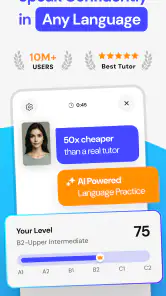
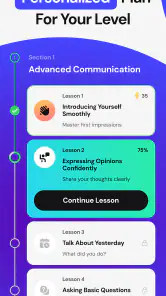
One of the standout features of Lucida AI is its AI-driven personalized learning path. The app assesses your current proficiency level and tailors the lessons accordingly. This personalization ensures that you're not wasting time on content that's too easy or too challenging. It feels like the app truly "gets" you and your learning needs.
Another cool feature is the app's use of gamification to keep you engaged. With rewards, badges, and daily challenges, it's hard not to get hooked. I found myself eagerly logging in each day just to see what new challenges awaited me. It's a smart way to turn learning into an addictive game.
Interactive and Immersive Learning
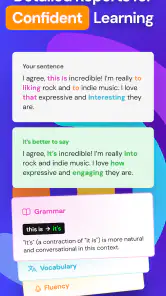
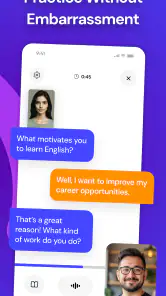
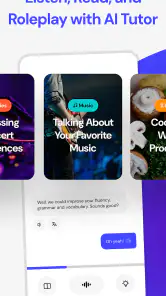
Lucida AI also brings in interactive elements like voice recognition and interactive dialogues. This means you’re not just passively absorbing information but actively participating in conversations. I found this particularly helpful in improving my pronunciation and confidence in speaking the new language.
More From Our News Desk

Clash of Clans Is Won Between the Battles

Android Auto Makes the Case for Quieter Car Software

MobiOffice: Transforming Mobile Productivity with Seamless Integration

EA SPORTS FC™ Mobile Soccer: Redefining Mobile Sports Gaming

How Microsoft OneDrive Became a Mobile Productivity Giant

How Google Translate Breaks Language Barriers Effortlessly
A practical way to make those speaking exercises count is to pause after a dialogue and try to restate the exchange without looking at the prompt. Then say the same idea another way. That small step tests whether you can retrieve and adapt the language, rather than simply repeat a line while it is fresh. I would also keep a short note of phrases that repeatedly slow me down; those are better candidates for later review than words I already recognise instantly.
For example, imagine you have a few minutes before a commute or during a quiet break. You can use one short practice session to rehearse a familiar situation, such as greeting someone or asking a basic question, then notice where pronunciation feedback feels unreliable. If a spoken answer is marked wrong despite sounding right to you, try once more at a slower pace and move on rather than spending the whole session arguing with the microphone. Voice recognition is useful feedback, but it should not be treated as an infallible judge of your accent.
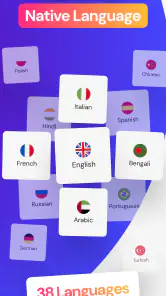
Moreover, the app offers a plethora of languages. From popular ones like Spanish and French to less commonly spoken languages, there's something for every aspiring polyglot. It's like having a world of languages at your fingertips.
What to expect over time
Lucida AI is an education app developed by Lucida AI Teknoloji Anonim Sirketi. It is free to install, with in-app purchases ranging from $2.49 to $99.99 per item, so I would check the purchase options before making it part of a longer routine. It is rated for Everyone and has a 4.7 average from around 77,000 ratings, with over 1 million installs. Those figures suggest it has attracted a substantial audience, but they cannot tell you whether its teaching style will suit your goals.
The app was released on June 21, 2024, and version 2.5.1 requires Android 8.0 or later. If you are deciding whether it deserves a permanent spot on your phone, give it a fair trial based on consistency rather than a burst of first-week enthusiasm. A modest routine—practising a few times each week and revisiting phrases you struggled to say—will reveal more than chasing every badge or challenge. Gamification can help establish a habit, but the real payoff is whether you can use the language beyond the app.
Room for Improvement
Now, while I’m quite fond of Lucida AI, it's not without its shortcomings. One thing I noticed is that some of the advanced language modules could benefit from more depth. For those who are already quite proficient, the content might feel a bit surface-level. But hey, no app is perfect, right?
Another point I'd mention is the occasional glitch in the voice recognition feature. It's rare, but there were moments when I'd say a phrase perfectly, and the app would still mark it incorrect. A bit frustrating, but not a deal-breaker.
There is also a habit trade-off to consider. Daily challenges and rewards can make it easier to open the app, yet they can become the goal in themselves. I would use them as a reminder to practise, not as a measure of fluency. If the routine starts to feel like checking off tasks, switch the focus to a specific speaking objective—such as answering without reading or repeating a phrase with clearer pronunciation. That keeps the session purposeful without demanding a long study block.
Compared with conventional language-learning apps built around vocabulary drills and fixed lesson sequences, Lucida AI puts more emphasis on interactive speaking and personalized coaching. That makes it a stronger fit for someone who wants to practise responding aloud, while a structured course may be the better choice for learners who need explicit grammar progression or a fuller path from beginner to advanced study. I would also avoid relying on it alone when preparing for an exam or a high-stakes conversation; supporting study materials can fill gaps that conversational practice may leave.
Making a routine that lasts
For a realistic routine, I would attach a short speaking session to something I already do, such as settling in after breakfast or taking a quiet break between tasks. The point is not to squeeze in the maximum number of exercises; it is to make speaking feel ordinary rather than like a special event. I would choose one practical theme for the session, then finish by saying a useful phrase again without looking. That gives the practice a clear endpoint and makes it easier to notice whether a phrase is becoming more accessible.
On a busy day, I would not treat a missed session as a reason to abandon the habit or compensate with an oversized study session later. A spoken-language routine works better when it remains manageable. Likewise, if I am tired or in a noisy place, I would save voice practice for a quieter moment instead of interpreting poor recognition as evidence that I have forgotten everything. The app is most useful when the conditions let me concentrate on what I am saying.
A learner who already studies with a class can use Lucida AI as a rehearsal space between lessons: take a topic from class and practise expressing its ideas aloud, rather than expecting the app to replace the teacher’s explanations. Someone learning for travel could focus on everyday exchanges and use the dialogues to reduce the initial awkwardness of speaking. By contrast, a learner who needs formal writing feedback, exam-specific preparation, or a carefully sequenced grammar syllabus should make another resource the centre of their plan.
What the coaching can and cannot do
Personalized coaching sounds most valuable when it helps me spend less time deciding what to practise and more time actually speaking. Still, a tailored path is not the same as a complete curriculum. I would periodically check whether the material is challenging the skill I care about, rather than assume that every suggested exercise is automatically the best use of my study time. If I keep meeting familiar prompts but still struggle to form my own sentences, I would add independent speaking or structured lessons instead of simply repeating the same kind of session.
Voice recognition also has a specific role: it can encourage me to speak and offer a response to what I said, but it cannot replace a human listener in every situation. A microphone may misread an answer, and a correct exercise response does not guarantee that I will understand a fast conversation or be understood by every speaker. I would treat feedback as a clue to investigate, not a final verdict. When a phrase keeps causing trouble, listening to a trusted pronunciation example or asking a teacher can provide useful context that a score alone cannot.
That distinction helps answer a practical question: can a beginner use the app? I think it can be approachable for someone starting out, especially if the guided prompts make speaking less intimidating. But a total beginner may still need explanations and a clear sequence for foundational grammar and vocabulary. I would not assume personalization removes the need to build those basics; I would use it alongside a structured beginner resource if the early material feels too conversational or leaves questions unanswered.
Deciding whether it earns a place on your phone
The app is free to install, which makes it reasonable to try before deciding whether its style deserves a lasting place in your routine. I would look closely at the available in-app purchase choices before committing to continued use, since the options range from $2.49 to $99.99 per item. The useful test is not whether the first sessions feel entertaining, but whether the practice still serves a clear purpose after the novelty of rewards and new prompts fades.
For a learner comparing it with flashcard apps, the main trade-off is straightforward: flashcards are efficient for reviewing words and recognition, while Lucida AI is better suited to getting those words into spoken responses. Neither approach covers everything. If I had limited study time, I would choose based on the bottleneck: use a vocabulary-focused tool when I cannot recall basic words, and turn to conversational practice when I know the words but freeze while speaking. A course with explicit lessons remains preferable when systematic progression is the priority.
There is no need to make every practice session a test. I would alternate between a little repetition for accuracy and a more open attempt to express the same idea in my own words. That balance can help prevent the exercises from becoming rote, while keeping the app’s speaking focus intact. It also gives me a more useful measure of progress than a streak: can I produce a simple response with less hesitation than before?
The Final Verdict
So, what's the bottom line? Learn Languages - Lucida AI is a solid choice for anyone eager to dive into learning a new language. Its personalized approach and engaging features make it a strong contender in the language app arena. Sure, it has its hiccups, but the pros far outweigh the cons. If you’re looking for a new way to explore languages, give Lucida AI a shot. It might just be the app that makes language learning a fun and rewarding experience for you too.
For me, its long-term appeal comes down to a simple question: does speaking practice make me more willing to return, and can I carry anything I say in the app into everyday conversation? If you enjoy interactive prompts and want a low-friction way to practise aloud, it is worth trying and judging by that standard. If you mainly want comprehensive advanced instruction, reliable pronunciation scoring every time, or a course that removes the need for other study, I would look elsewhere or use Lucida AI alongside a more structured resource.
Learn Languages - Lucida AI Frequently Asked Questions
How much storage space should I have available before downloading Learn Languages - Lucida AI?
It is sensible to check the available storage on your device before installing any language-learning app, especially if you plan to keep study materials on your phone. Learn Languages - Lucida AI is a free app, and its current version is 2.5.1. Leave room for the installation and any updates, then review the app’s storage use on your device as you begin using it.
Can I use Learn Languages - Lucida AI on an iPhone or iPad?
Learn Languages - Lucida AI is an app for learning languages, but compatibility depends on the requirements of the version available for your device. The minimum operating-system requirement listed for this app is Android 8.0, which is relevant to Android users. If you use an iPhone or iPad, check the app’s page in the iOS store before downloading to confirm it is available for your device.
Is Learn Languages - Lucida AI free to download, and are there in-app purchases?
The app is free to download, with in-app purchases available for users who want to access paid options. These purchases range from $2.49 to $99.99 per item, so it is worth checking the price shown for an individual option before buying. You can start with the free app and decide whether any paid features suit your learning needs.
What is Learn Languages - Lucida AI?
Learn Languages - Lucida AI is an innovative language learning application designed to help users master new languages using AI-driven techniques. The app offers a personalized learning experience, interactive lessons, and a wide variety of languages to choose from, making it suitable for learners of all levels. Its store summary describes it as an AI language tutor offering personalized coaching to help users speak fluently.
How does Lucida AI personalize the learning experience?
Lucida AI uses advanced algorithms to analyze users' learning patterns and preferences. It adjusts the difficulty of lessons, suggests new topics, and provides personalized feedback to enhance the learning experience. This customization ensures that users stay engaged and motivated as they progress. The app’s central idea is to offer coaching shaped around the learner rather than a single identical path for everyone.
Pros
- User-friendly interface enhances learning
- Wide variety of languages available
- Interactive lessons keep engagement high
- Offline mode for learning on the go
- AI-driven personalized learning paths
Cons
- Limited free content access
- Occasional app crashes
- Pronunciation feature needs improvement
- Ads can be intrusive at times
- Some languages lack depth in lessons

- Category
- Education
- Version
- 2.5.1