Learn Coding/Programming: Mimo
- 19.86K
- 4.7
- Installs
- 10.00M
- Price
- Free

Screenshots
Analysis by Reviewed
When I start learning a new skill on my phone, the first week is usually the easy part: short sessions feel fresh, and it’s satisfying to finish a lesson. The harder question is whether the app still earns a place in my routine once that novelty wears off. Learn Coding/Programming: Mimo makes a friendly first impression, but its lasting value depends on treating those quick lessons as a starting point—not as a substitute for building and debugging software on your own.
A low-friction first week
Mimo is an education app from Mimo: Learn to Code, and its appeal is easy to understand if you’re curious about programming but unsure where to begin. You can start with no coding background and explore topics including Python, JavaScript, and HTML. The app is free to download, rated for Everyone, and has a 4.7 average from around 683,000 ratings. That broad audience makes sense: its bite-sized format asks for less commitment than a full course or a desktop development setup.
For a realistic first week, I’d use it during a commute, a lunch break, or the few minutes before bed. A short lesson is easier to fit into those gaps than opening a laptop and setting up a project. The key is to pause after a concept and try to explain it in your own words, or write a small example elsewhere. That little step helps reveal whether I’ve understood the idea or only followed the on-screen prompts.
What a phone-sized lesson can and cannot teach
On a phone, I find it easiest to learn one compact idea at a time: notice how a piece of syntax is written, try a small change, and see whether I can predict the result. That is useful preparation for coding, but it is not the same as working through a whole program. A mobile lesson can reduce the intimidation of a blank screen; it cannot remove the need to practise making choices when there is no prompt telling you what to type next.
One practical way to check whether the lessons are sticking is to close the app after a session and recreate the idea from memory. I might write a tiny HTML structure or sketch how I would use a Python condition, then reopen the lesson only to check what I missed. This small retrieval exercise takes the focus off finishing quickly and gives me a better signal about what I can actually recall.
A Handy Companion for Aspiring Coders
So, you've decided to give coding a shot—good choice! The Mimo app is designed with beginners in mind, making it super approachable. You don’t need to have any prior experience to get started. The app breaks down complex concepts into bite-sized lessons that are easy to digest. It's perfect for those short breaks during the day when you just want to learn a little bit more.
Step-by-Step Learning
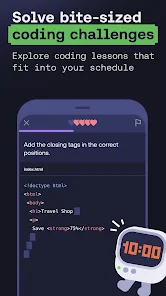
One of the things I love about Mimo is how it structures its lessons. They're interactive, meaning you're not just passively reading but actively engaging with the content. Each lesson builds on the previous one, reinforcing what you’ve learned. It’s kind of like stacking up Lego bricks—before you know it, you've built a solid foundation.
More From Our News Desk

Weather by Xiaomi Review: Clear at a Glance, Less Clear Up Close

X Under Pressure: Can It Recover When Posting Goes Wrong?

Clash of Clans Is Won Between the Battles

Android Auto Makes the Case for Quieter Car Software

MobiOffice: Transforming Mobile Productivity with Seamless Integration

EA SPORTS FC™ Mobile Soccer: Redefining Mobile Sports Gaming
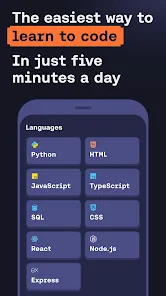
The app covers a wide range of programming languages. Whether you're interested in web development with HTML, CSS, and JavaScript, or you want to dive into Python, Mimo has got you covered. The quizzes and challenges are especially helpful in cementing your knowledge. Plus, they make learning fun!
From lesson to useful practice
The most useful habit I’d add is to keep a small “what I tried” note after a session: record the idea, the result, and what confused you. This is especially helpful when switching between languages. A basic Python concept and a JavaScript concept may look similar in a lesson, but the syntax and the way you use them in a project can differ. Keeping a note of your own examples makes those distinctions easier to revisit than relying on a streak or a progress bar.
Mimo can be a good fit if you want guided structure before tackling a bigger learning resource, or if you’re testing whether coding interests you enough to pursue it. It is less suited to someone who already knows the basics and wants deep technical documentation, open-ended projects, or detailed debugging practice. In those cases, a textbook, reference documentation, or a computer-based course with substantial project work will usually be a better main tool.
Track Your Progress
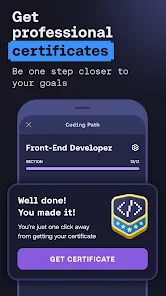
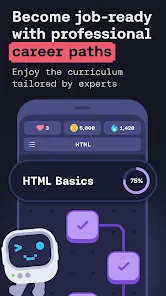
Who doesn’t love seeing their progress? In Mimo, you can keep track of your learning journey. The app provides a neat progress report that shows how much you’ve learned and what's next on your coding adventure. It’s super motivating to see those bars fill up, and it definitely gives you a sense of accomplishment.
Another cool feature is the community aspect. You can connect with other learners, share insights, and even help each other out. It's like being part of a coding club, without the need to leave your couch.
Keeping momentum without chasing the streak
For month-to-month value, I’d judge progress by what I can make or explain, not by how often I open the app. A useful routine could be a few short lessons during the week followed by one longer session at a computer, where I recreate an idea without step-by-step prompts. That exposes gaps early: if I can recognize an answer but can’t produce it myself, I need more practice before moving on.
The app’s short format is convenient, though convenience has a trade-off. Phone-sized exercises can make coding feel more linear and tidy than real work, where you may need to search for an error, rethink an approach, or combine several ideas. I’d use Mimo to build familiarity and keep a learning habit alive, then deliberately move beyond the app for practice that requires making decisions independently.
A routine that survives busy weeks
I would keep the routine deliberately modest rather than promise myself a long daily study session. On a busy day, one lesson can preserve contact with a topic; on a quieter day, I can spend longer rebuilding an example or trying a small variation. If I miss a day, I would simply resume where I left off. Treating every interruption as a failure makes a learning app feel like another chore, while a flexible rhythm leaves room for the actual work of understanding.
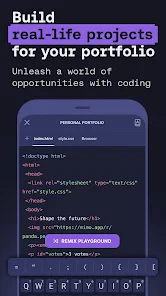
For instance, someone curious about making a personal web page could use a short session to review an HTML idea, then later try arranging a heading, a paragraph, and a link in a separate practice environment. The useful question is not whether the result looks polished; it is whether the learner can explain what each piece does and find the relevant lesson when something is unclear. That turns a vague interest into a manageable experiment without expecting a phone course to produce a finished portfolio on its own.
Why Mimo Stands Out
There are a lot of coding apps out there, so why choose Mimo? For starters, it's incredibly user-friendly. The interface is clean and intuitive, making it easy to navigate through different sections. Plus, the lessons are designed to fit into your schedule, whether you have 5 minutes or an hour to spare.
Another highlight is the way Mimo keeps you engaged. The content is regularly updated with new lessons and challenges, so you’re always learning something new. And the gamified experience makes it feel less like traditional schooling and more like a fun game. You earn points and badges as you progress, which is a nice little incentive to keep going.
Choosing the right learning tool for the moment
Compared with a video course, Mimo’s interactive approach gives me an immediate reason to apply an idea instead of only watching someone else demonstrate it. Compared with documentation, it offers more direction for a newcomer who may not yet know which terms to search. Those alternatives become stronger when I need a longer explanation, a precise reference, or a complete project brief. I’d choose the app for guided entry and short practice, then reach for those resources when a topic calls for more context or freedom.
That distinction matters if a learner’s goal is a job, a class, or a specific software project. A sequence of short lessons can help build vocabulary and familiarity, but it should not be mistaken for proof of readiness. I’d pair it with writing code in a suitable environment, reading and changing examples, and working through mistakes that are not prearranged as a quiz. If I wanted a course built around extended assignments and feedback on substantial work, I would make that course the centre of my plan instead.
What to expect as the habit settles
Compared with learning from free videos or reading documentation, Mimo offers a more guided, interactive path: it gives beginners a defined next step rather than asking them to choose among a large pile of material. That structure is helpful when I have little time or don’t yet know which concepts matter. The trade-off is that videos and documentation can offer more context, while project-based courses provide more room to make mistakes and solve problems without a prompt. I’d combine approaches rather than expect one app to do every job.
There is also a practical difference between downloading the app and using every part of it. It is free to start, while in-app purchases range from $9.99 to $299.99 per item, so I’d explore the learning experience first and decide whether a paid option fits my needs before spending. The app is currently at version 6.16 and requires iOS 9 or later. Its scale—over 10 million installs—suggests many people use it, but popularity alone won’t tell you whether its format suits your learning style.
Deciding whether a paid option is worthwhile
I would first spend enough time with the free experience to learn whether the lesson style matches how I study. The relevant test is not simply whether I enjoy opening the app, but whether I can recall and use the ideas after leaving it. If I am consistently practising and have a clear reason to continue, I can then weigh an in-app purchase against other learning resources. If I only open it out of habit and cannot apply what I have covered, paying is unlikely to solve the underlying problem.
Because the app is aimed at a broad range of learners, the best route through it depends on the learner’s goal. Someone comparing Python and web basics out of curiosity can sample topics before committing to one direction. Someone with a specific project in mind should avoid jumping between tracks simply because each new subject feels fresh; choosing one practical goal and returning to it makes it easier to see whether lessons are helping. The app’s breadth is most useful when it supports a decision, not when it becomes a reason to keep restarting.
When I’d keep it—and when I’d move on
Some learners may tire of the repeated lesson-and-quiz rhythm, especially if they prefer to understand a topic through longer explanations or want to create something personal right away. If that happens, I wouldn’t force daily use just to preserve a streak. I’d pick one small project that matters to me, such as a simple web page or a short script, and use lessons only when I hit a specific knowledge gap. That turns the app into a reference point for learning rather than another task to maintain.
The maintenance burden is fairly low if I keep the app in its proper role: a short guided session when I need direction, followed by practice elsewhere when I want to build independence. The burden rises if I try to complete every available lesson, track every indicator, and learn several languages at once. A narrower plan—one subject, one small goal, and occasional checks of what I can reproduce without help—is less demanding and more likely to produce useful progress.
In practical terms, I’d recommend it most to a curious beginner who wants a gentle entry point, likes short interactive exercises, and is willing to practise away from the phone. I’d suggest skipping it as a primary resource if you already code comfortably, need deep explanations of advanced topics, or learn best by spending long stretches on open-ended projects. For those learners, documentation, a book, or a project-led course is likely to offer more of what they need.
For a beginner who benefits from structure and wants coding practice that fits around everyday life, I think Mimo can earn a lasting place as a companion. It is not the whole journey: independent projects and deeper explanations still matter. But if you use its progress tracking as a guide rather than a goal, and regularly test what you’ve learned away from the lesson screen, it can help turn initial curiosity into a steady, practical habit.
Overall, if you're looking to start your coding journey, Learn Coding/Programming: Mimo might just be the app for you. It’s a fantastic way to learn at your own pace, gain practical skills, and maybe even spark a lifelong passion for coding. So, why not give it a try and see where your coding adventure takes you?
Learn Coding/Programming: Mimo Frequently Asked Questions
Can Mimo help me build practical coding skills, not just memorize terms?
Mimo is designed around coding lessons and practice, with a focus on learning through hands-on activities. Its store summary highlights learning Python, JavaScript, and HTML, as well as building real software with AI. That practical emphasis can help learners connect programming ideas with the kinds of tasks they may want to explore beyond definitions and terminology.
Does Mimo teach AI or help users create software with AI?
Mimo’s store summary describes learning coding in Python, JavaScript, and HTML while building real software with AI. This makes AI-supported software creation part of the app’s stated learning focus. If that is the main reason you are considering Mimo, it may be useful to explore the app’s lessons and projects to see how that approach fits your interests and preferred way of learning.
Is Mimo available for my Android or iOS device?
Mimo is a mobile education app for learning coding and programming. It is available on Android and iOS, so you can use it on a compatible phone or tablet. Before downloading, check that your device meets the app’s operating system requirements; Mimo requires iOS 9 or later. Its mobile format makes it practical to fit short learning sessions into your day.
Who makes Mimo, and is it a well-established learning app?
Mimo is developed by Mimo: Learn to Code and focuses on teaching programming through lessons and practice. It has been available since June 19, 2018, and has reached over 10 million installs. The app has a 4.7 average from around 683,000 ratings, giving prospective learners a useful sense of its reach and reception before they decide whether to try it.
What is Mimo and how can it help me learn coding?
Mimo is an educational app designed to help individuals learn coding and programming in an interactive and engaging way. It offers bite-sized lessons and practical exercises across various programming languages such as Python, JavaScript, and HTML/CSS. Mimo is suitable for beginners as well as those looking to enhance their coding skills, providing a structured learning path and real-world projects to practice.
Pros
- User-friendly interface simplifies learning.
- Offers interactive coding exercises.
- Supports multiple programming languages.
- Offline mode for learning on-the-go.
- Daily challenges keep you motivated.
Cons
- Requires subscription for full access.
- Limited free content available.
- Not suitable for advanced programmers.
- Some languages missing advanced features.
- Occasional app performance issues.
- Category
- Education
- Version
- 6.16











