Launcher iOS16 - iLauncher
- 335.00
- 4.0
- Installs
- 10.00M
- Price
- Free

Screenshots
Analysis by Reviewed
I judge a phone launcher by what it changes day to day, not just by a screenshot. Launcher iOS16 - iLauncher is aimed at Android users who want their home screen to take on an iPhone-like appearance, and it makes the most sense when you are curious about that visual shift but are not ready to change phones. I would treat it as a change to the way Android looks and feels, rather than a replacement for iOS or a guarantee that every part of the phone will behave like an iPhone.
What a network connection changes
The most noticeable part of a launcher is its home screen, so the basic appeal is visual: icons, layout and navigation take on a different style. But a phone’s overall experience also depends on connectivity. Wi-Fi and Bluetooth controls, for example, are useful only when the phone itself can connect to networks or accessories. A launcher can present familiar-looking controls, but it does not turn an Android connection into an Apple service or remove the device’s existing network settings.
I would keep that distinction in mind when deciding whether the iOS-inspired control area suits you. It can make commonly used controls feel easy to reach, while the actual connection still depends on Android and the phone’s settings. If you switch between Wi-Fi networks, pair accessories or rely on mobile data throughout the day, check how the launcher’s shortcuts fit with the controls you already use. Familiar styling is convenient, but it should not make a routine connection task harder.
Choosing it for a particular phone routine
The best test is not whether the home screen looks convincing in a still image, but whether it works with the way you use your phone. If you open the same handful of apps all day and enjoy a visual change, an iPhone-like layout can make those familiar actions feel newly organized. If your routine depends on manufacturer-specific panels, carefully placed widgets or a very particular gesture, take time to check those habits before making the launcher your everyday setup.
For example, imagine arriving at a café, needing to join its Wi-Fi, and then opening a navigation app while messages continue to come in. A useful home screen should get you to the right app quickly; a familiar-looking control area should not become a detour when you need to manage the actual connection. I would try this sort of ordinary sequence at home or somewhere low-pressure first, rather than discovering an unfamiliar layout when you are rushing.
Where its style fits among launcher choices
Android’s built-in launchers are usually the simplest choice for someone who values continuity: their layout and controls are already familiar, and they match the visual language of the phone. Other Android launchers often appeal to people who want a highly tailored arrangement without committing to an iPhone-inspired look. This app makes a more specific choice: it is for someone who wants that particular visual direction, not just a general collection of home-screen tweaks.
That focus is both the point and the trade-off. If the iOS-like presentation is what you are after, a broad customization tool may take more work to shape into the look you want. If you simply want faster access to apps or a layout that follows your own habits, the default launcher may already do the job with less adjustment. I would choose based on the screen style you genuinely enjoy looking at every day, not on the assumption that a different appearance automatically makes a phone easier to use.
More From Our News Desk

Weather by Xiaomi Review: Clear at a Glance, Less Clear Up Close

X Under Pressure: Can It Recover When Posting Goes Wrong?

Clash of Clans Is Won Between the Battles

Android Auto Makes the Case for Quieter Car Software

MobiOffice: Transforming Mobile Productivity with Seamless Integration

EA SPORTS FC™ Mobile Soccer: Redefining Mobile Sports Gaming
Small choices that make testing easier
When trying a new launcher, I find it helpful to keep the first pass conservative. Start with the home-screen arrangement and the apps you reach for most, then see whether the new navigation feels natural before spending time on additional visual adjustments. This gives you a clearer sense of whether the core change suits you, rather than confusing a busy setup with a good fit.
It is also worth keeping a mental note of the Android route to important settings, especially network and Bluetooth settings. That is not because the launcher necessarily causes connection problems; it is simply a practical fallback when a new presentation makes a familiar control harder to find. A launcher changes how you approach the phone, so knowing how to reach the underlying settings keeps the experiment low-risk and reversible in your routine.
A New Look for Your Android
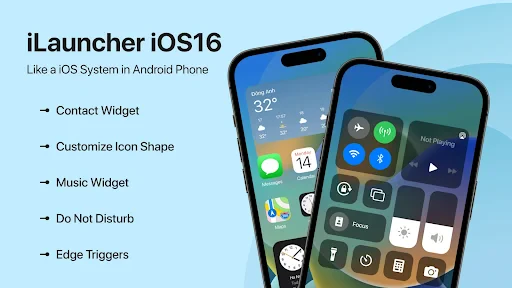
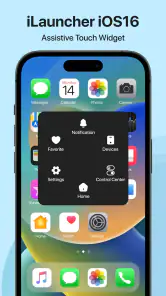
First things first, Launcher iOS16 - iLauncher transforms your Android interface into one that closely mimics Apple's iconic iOS 16. From the moment you install it, you'll notice a significant change in your home screen layout. The app icons, the smooth transitions, and even the control center all scream iOS. It's like getting a new phone without spending a single dime. Installing and setting it up is a breeze. Just download the app, and it pretty much does the rest for you.
Features That Stand Out
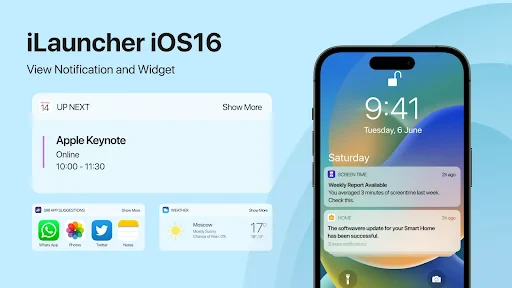
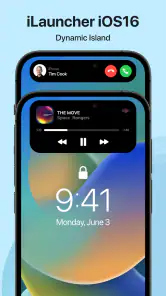
What makes this launcher stand out is its remarkable ability to mimic iOS features. The Control Center is one of my favorites. Swipe down from the top right corner and voila, there it is! You can easily access settings like Wi-Fi, Bluetooth, brightness, and volume. It's intuitive and incredibly easy to use. Another cool feature is the Lock Screen customization. You can change wallpapers, add widgets, and even adjust the clock style just like on an iPhone. It gives a genuinely authentic feel to your Android phone.
Using it on the move
A launcher is especially easy to judge during a busy day: you might check a message while walking, connect to Wi-Fi at work, then use Bluetooth in the car. In that kind of routine, a familiar-looking screen can make the phone feel fresh, but muscle memory matters more than appearance. I recommend trying your usual tasks soon after setup—opening your most-used apps, reaching connection controls and returning to the home screen—before deciding whether the new arrangement actually saves time.
It may suit someone who enjoys changing their phone’s appearance every so often, or an Android user who wants a visual taste of iOS without buying another device. It is less suitable if you depend on a carefully arranged Android home screen, prefer the manufacturer’s own shortcuts, or expect a launcher to reproduce Apple’s complete ecosystem. If your priority is practical control over layouts and shortcuts rather than an iPhone-like look, your phone’s built-in launcher or another Android-focused option may be a better fit.
Performance and Usability
Now, let's talk about performance. I was pleasantly surprised by how smoothly it runs. The transitions are fluid, and there's no noticeable lag, even on mid-range devices. The app is lightweight, so it doesn't hog your phone's resources, which is a massive plus. The app drawer also organizes your apps in an iOS-style grid, making navigation straightforward and familiar to iPhone users. It's a user-friendly experience through and through.
When connections falter
If Wi-Fi drops or an accessory refuses to reconnect, I would first check the phone’s regular Android settings rather than assume the launcher caused or can fix the problem. That separation is a useful troubleshooting habit: it helps you tell whether the issue is with the connection itself or simply with where a control appears. If the launcher’s presentation gets in the way during a connection problem, use the phone’s standard settings route and return to the customized home screen once things are working again.
For a smoother first setup, I would also make one change at a time. Settle the home-screen arrangement, try the controls you actually reach for, then adjust the visual details. This makes it easier to spot which change helps and which one adds friction. If you use mobile data carefully, remember that changing the appearance of a control panel is not the same as changing your data plan or connection behavior; keep an eye on Android’s own network indicators and settings.
Customization Options
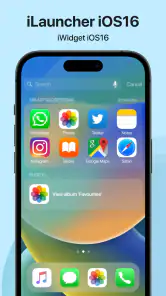
If you're someone who loves tweaking your phone’s appearance, you'll enjoy the customization options available. You can change icon shapes, sizes, and even the overall theme. While it stays true to the iOS look, it offers enough flexibility for you to make your device truly yours. Plus, the fact that it's compatible with a wide range of Android devices means almost anyone can enjoy this experience.
Who will get the most from it
Phoneix Master develops this free personalization app. It has a 4.0 average from around 47,000 ratings and has passed 10 million installs, which suggests that many Android users are interested in this particular style. The app is rated for Everyone, and version 1.0.23 supports Android 7.0 and later. Optional in-app purchases range from $0.99 to $99.99 per item, so I would check the purchase details before paying for anything; the basic download is free.
A practical use case is someone who wants a clearer visual reset before handing a phone to a family member who is used to iPhone-style navigation. I would still show them where Android’s own network settings live, especially if they need to join a new Wi-Fi network or reconnect an accessory. The launcher’s look may feel familiar, but a little orientation can prevent a cosmetic change from becoming a daily obstacle.
Compared with a standard Android launcher, this one prioritizes the iOS-inspired presentation rather than keeping the phone’s default visual language. That is a meaningful trade-off: you gain a distinct look and a more iPhone-like arrangement, but may lose some familiarity with the layout you already know. If you enjoy experimenting, try it and give yourself a few days to see whether the controls become natural. If speed, established habits or close integration with your phone maker’s tools matter more, sticking with the default is a sensible choice.
What to consider before making it your default
A visual launcher is easiest to keep when its everyday benefits outweigh the small retraining cost. I would pay particular attention to the first screen you see, the route back home, and the way you locate apps you do not use often. Those details determine whether the makeover remains pleasant after the novelty passes. If you share your phone or rely on someone else to help troubleshoot it, consider whether they can still find Android’s standard settings without relying on the altered presentation.
Another sensible question is whether you need the look all the time or only enjoy experimenting with it. You can treat the app as a trial of a different visual style rather than a permanent commitment: spend time with it during normal calls, messages, and network changes, then decide whether it has earned a lasting place on your phone. That approach is especially useful if your usual launcher has a layout you have refined over time. A distinctive appearance is worthwhile only if it does not make routine actions feel like work.
Making a careful choice about purchases
The free download makes it possible to judge the basic experience before deciding whether the app belongs on your phone. Since optional purchases vary considerably in cost, I would not buy anything simply to complete the visual makeover. First identify what you actually want to change, see what the free setup already lets you do, and review the purchase details on the item you are considering. That simple pause helps keep a personalization experiment proportionate to the value it brings you.
For someone who wants a familiar-looking interface for a relative, I would also set expectations clearly: the launcher can change the presentation, but the phone remains Android. That matters for app behavior, account setup, connection troubleshooting, and the settings people may need to find later. If the relative mainly wants larger or simpler controls, an accessibility setting or a straightforward default layout may be more useful than reproducing an iPhone-like style.
For me, the appeal is the chance to refresh an Android phone’s appearance without replacing the device. The strongest reason to try it is the combination of an iOS-style home screen and adjustable visual details; the main reason to hesitate is expecting those looks to change how Android handles connections or to reproduce Apple’s full software experience. Launcher iOS16 - iLauncher is worth considering if you want that specific visual makeover and are happy to keep Android’s underlying settings in charge. Try the free version first, make sure your everyday controls remain convenient, and only spend on an optional purchase if it clearly adds something you want.
Launcher iOS16 - iLauncher Frequently Asked Questions
Will this launcher replace Android or affect my phone’s operating system?
No. Launcher iOS16 - iLauncher changes the appearance of your Android home screen; it does not replace Android itself. Your phone remains an Android device, and the launcher provides an iOS-inspired interface on top of it. This distinction matters if you want a different visual style but still need your device and its apps to run on Android.
Can I return to my previous home screen if I stop using the launcher?
Yes. A launcher changes the home-screen experience, not the underlying Android system, so you can switch back to your previous launcher through your phone’s home-screen or default-app settings. If you decide the iOS-inspired look is not for you, changing the default launcher or uninstalling iLauncher lets you return to using another available home screen.
What Android version do I need to use Launcher iOS16 - iLauncher?
Launcher iOS16 - iLauncher requires Android 7.0 or later. Before downloading, check your phone’s Android version in its settings to make sure it meets that requirement. The app is a personalization launcher for Android, so it changes the appearance of the home screen rather than replacing the Android operating system itself.
What is Launcher iOS16 - iLauncher and what does it do?
Launcher iOS16 - iLauncher is an application designed to transform the interface of your Android device to resemble Apple's iOS16. This launcher replicates the iOS user experience, including the layout, icons, and system navigation. It simplifies the transition for users who prefer the aesthetics and functionality of iOS but use Android devices, offering an iOS-inspired look on an Android platform.
Is Launcher iOS16 - iLauncher safe to use on my Android device?
Yes, Launcher iOS16 - iLauncher is generally safe to use, as it is available on trusted platforms like the Google Play Store. However, users should ensure they download the app from reputable sources to avoid malicious software. It's also important to read the app permissions carefully and only allow necessary access to ensure your privacy and security are maintained.
Pros
- Smooth iOS-like interface
- Customizable widgets
- Enhanced app organization
- Frequent updates
- User-friendly navigation
Cons
- Limited free features
- Occasional ad interruptions
- May drain battery faster
- Incompatible with older devices
- Limited theme options
- Category
- Personalization
- Version
- 1.0.23











