Language Learning | Pimsleur
- 3.78K
- 4.2
- Installs
- 1.00M
- Price
- Free

Screenshots
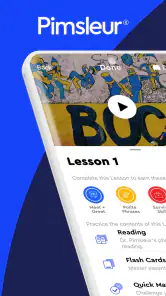
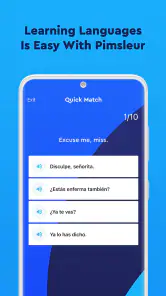
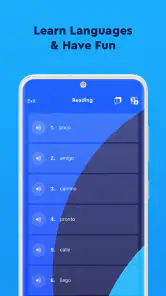
Analysis by Reviewed
I approach Pimsleur as a spoken-language tool first, rather than a complete course for every part of learning. That distinction matters: if my goal is to get comfortable understanding and saying useful phrases, its audio-led lessons make sense; if I want a screen full of grammar explanations and written exercises, I would look elsewhere or pair it with another resource.
Who gets the most from the audio-first format
I’d recommend it most to people who can give a lesson their attention while walking, commuting, or doing a quiet chore. A useful routine is to listen at a time when you can answer aloud, then revisit a tricky lesson later instead of letting it play in the background. The speaking prompts are the point, so passive listening alone is unlikely to give the same benefit.
It is less suited to someone who learns best by studying spelling, grammar tables, or visual examples. Audio can help build a feel for a phrase, but it does not automatically explain why a sentence is formed that way. If you need detailed written instruction or extensive reading practice, a textbook or a more visually structured language app may be a better fit alongside it.
A realistic routine, and a useful trade-off
For example, I might use a lesson during a morning walk, pausing mentally to answer before the speaker gives the next prompt. Later, I’d repeat any expressions that felt hesitant rather than simply counting the session as done. That small change turns spare time into active practice and helps reveal whether I can retrieve a phrase without hearing it first.
The trade-off is that audio learning asks for a setting where speaking is practical. On a crowded bus, in a shared office, or while caring for someone who needs attention, answering aloud may be awkward or distracting. Offline lessons help when a connection is inconvenient, but they do not solve the need to focus and participate. I would choose a quieter moment rather than expect every short gap in the day to work.
How it fits beside other learning options
Compared with flashcard apps, Pimsleur puts more weight on listening and producing a response than on repeatedly recognizing a written word. Compared with classroom lessons or a tutor, it is easier to fit into a personal routine, but it cannot provide the same live exchange or tailored correction. I see it as especially useful for practicing speech between lessons, not as proof that I can handle every real conversation.
A practical way to judge progress is to notice whether familiar phrases come to mind more readily and whether I can answer prompts without waiting for the model. I would not use a smooth performance on a lesson as the only measure of fluency: spontaneous conversation brings unfamiliar replies, accents, and topics that rehearsed audio practice cannot fully reproduce.
More From Our News Desk

Clash of Clans Is Won Between the Battles

Android Auto Makes the Case for Quieter Car Software

MobiOffice: Transforming Mobile Productivity with Seamless Integration

EA SPORTS FC™ Mobile Soccer: Redefining Mobile Sports Gaming

How Microsoft OneDrive Became a Mobile Productivity Giant

How Google Translate Breaks Language Barriers Effortlessly
Making the spoken practice transfer to real situations
One useful test after a lesson is to describe a small part of your day using whatever language you can recall, even if the result is only a few short phrases. I would do this without replaying the audio first. It exposes a difference that can be easy to miss: recognizing a phrase when prompted is easier than choosing it yourself. If I repeatedly get stuck on the same kind of response, I’d note the gap and look for written examples or a conversation partner to fill it.
For travel preparation, I’d also avoid treating a rehearsed dialogue as a script to memorize word for word. I’d listen for the pieces I can reuse, such as a question pattern or a polite response, and practice changing one part at a time. That makes the audio lesson more useful when a real person answers differently from the lesson voice. It still isn’t a substitute for handling unpredictable conversation, but it gives me a more realistic bridge from practice to use.
If you’re anything like me, the idea of learning a new language is both exciting and a tad daunting. That’s where Pimsleur comes into play. Having tried my fair share of language learning apps, I can confidently say that Pimsleur stands out, and here’s why.
The Pimsleur Approach
First off, let’s talk about what sets Pimsleur apart. This app uses a scientifically proven method designed by Dr. Paul Pimsleur, which focuses on auditory learning. Basically, it’s like having a language coach whispering in your ear, guiding you through each phrase and pronunciation. For those who thrive on listening and speaking, this is a game-changer.
User Experience
Using the app is a breeze. The layout is intuitive and user-friendly, making it easy to navigate through different language courses. You can choose from over 50 languages, which is pretty impressive. Whether you’re learning Spanish for an upcoming trip or Mandarin for business, Pimsleur has got you covered.
One thing I love about the app is its offline mode. Yep, you heard that right! You can download lessons and practice your language skills even when you’re off the grid. This feature is perfect for those of us who are constantly on the move.
Choosing a course without overcommitting
Before building a routine, I’d spend a little time checking that the course matches the language variety and goal I actually have in mind. Someone preparing for basic travel interactions may need a different kind of practice from someone hoping to follow conversations with relatives or colleagues. The app’s audio emphasis is appealing, but it is worth being honest about whether I enjoy learning by listening; persistence is harder when the core format feels like a chore.
I’d also treat the first few sessions as a trial of the study method, not a promise to finish a whole course. Can I stay focused while responding? Do I remember anything later in the day? Am I willing to say the answers out loud? Those questions tell me more about fit than the fact that I can launch a lesson easily. If the format clicks, it can become a dependable routine; if not, a visual course or live class may keep me more engaged.
Learning on the Go
What really sold me on Pimsleur is the flexibility it offers. You don’t have to be glued to a screen. The app encourages you to learn while doing other activities, whether it’s commuting, exercising, or even cooking. It’s like multitasking, but with a linguistic twist!
Plus, the app tracks your progress and reminds you when it’s time to review old lessons, ensuring that you’re always in touch with your learning journey. It’s a little nudge that keeps you on track without feeling overwhelming.
Using offline lessons deliberately
Offline access is most useful when I prepare before leaving home: I can download the lesson I plan to use, then avoid relying on a connection during a walk or journey. I would still choose the session based on the surroundings. A quiet walk is a better fit than a crowded ride if I need to answer aloud, and a lesson that demands attention is a poor companion to a task where missing a cue could cause trouble.
There is a small planning trade-off here. Downloading ahead makes the routine more dependable, but it does not turn every spare minute into good study time. I’d rather complete one focused session than let audio run while my attention is elsewhere. If a lesson is interrupted, I’d return to it when I can respond properly instead of assuming that merely hearing the material counts as practice.
Speaking with Confidence
One of the biggest hurdles in language learning is speaking with confidence. Pimsleur addresses this by focusing heavily on pronunciation and conversational skills. The lessons are structured in a way that you’re constantly practicing speaking, which boosts your confidence over time.
After a few sessions, you’ll find yourself naturally falling into conversations. It’s a fantastic feeling when you realize you’re able to communicate in another language without second-guessing yourself.
What the version history can—and cannot—tell me
The app is currently at version 7.2, and it first appeared on July 13, 2018. Those details give me a useful point of reference for its history, but they do not tell me exactly which changes arrived in each release. If I already use it, I would focus on whether my lessons, saved progress, and usual routine still work well after an update rather than assume a version number means the teaching approach has changed.
Developed by Simon & Schuster, this free education app has an average rating of 4.2 from around 15,000 ratings, with roughly 3,800 written reviews and over 1 million installs. It is rated Everyone, and in-app purchases range from about $0.49 to $479.99 per item. I’d check the purchase details in the app before committing to anything: “free” makes it easy to try, but it does not mean every course or option necessarily comes at no cost.
What I’d check before settling into a course
If I were starting now, I’d first confirm that the language I want is available and that the lesson style suits how I learn. I’d also check that my device meets the app’s minimum operating-system requirement of version 7.0 or later. Then I’d try a short session in the place I expect to study most often, because a lesson that works on a walk may feel very different at a desk or in a noisy commute.
One question worth asking is whether this alone will make me fluent. I wouldn’t count on any single app to do that: Pimsleur can support listening and spoken responses, while real conversation, reading, and writing need their own practice. Another practical question is whether I can learn without internet access; downloaded lessons are useful for that, provided I prepare them before going offline. If I want a quiet, screen-based activity or detailed grammar guidance, I’d choose a different tool for that part of my study.
What existing learners should watch after an update
For someone already using the app, I’d judge an update by its practical effect on the routine rather than by its version label. Check that the course and lesson you expect to continue are easy to find, and make sure any lessons needed offline are ready before heading out. That is a simple way to catch a disruption before it lands in the middle of a commute or a planned study session.
I’d also keep expectations measured when comparing a familiar course with a newer app version. The available version number is a current reference point, not a changelog, so it does not establish that the teaching method, course material, or review behavior has changed. If your routine still works, there may be no reason to alter it; if something feels different, use that as a cue to check the app itself and adjust your study plan based on what you can actually observe.
Where I’d place it in a longer learning plan
I’d use Pimsleur as a consistent speaking habit and add reading or writing practice when those skills matter to my goal. For an upcoming trip, I’d concentrate on responding to everyday prompts and replay phrases I struggle to recall. For work, I’d treat it as preparation rather than a substitute for practicing the vocabulary and situations I actually expect to encounter.
The best thing to watch over time is not just whether I finish lessons, but whether I can retrieve a useful expression without a cue and adapt it when the situation changes. That is a more demanding test than repeating a line, and it helps me decide whether to keep the same routine or add a tutor, conversation group, or written course. My overall view is that Pimsleur is a worthwhile choice when speaking practice is the priority and audio fits the day; it is not the right one-app answer for every learner.
Who should choose another tool, and what to watch next
I would skip this as my main resource if my immediate priority were reading novels, writing accurately, or understanding grammar in detail. I’d also look elsewhere if I need frequent correction from a person or practice responding to unpredictable questions. A flashcard tool can be more convenient for quick, silent recall drills, while a tutor or language exchange is better for back-and-forth conversation. Those options solve different problems, so I’d choose based on the skill I need to build rather than expecting one app to cover them all.
For someone who enjoys audio and wants a repeatable way to practice speaking, this is a sensible choice to try, especially when a quiet walk or another focused stretch of time already exists in the day. I’d watch whether the prompts become easier to answer independently, whether I can reuse phrases outside the lesson, and whether I’m adding the missing reading or writing practice my goal requires. Those are useful signs of fit; finishing audio sessions alone is not enough to show that the whole learning plan is working.
In conclusion, if you’re serious about learning a new language and want an app that provides a comprehensive, flexible, and effective approach, give Pimsleur a shot. It’s more than just an app; it’s a gateway to speaking a new language with ease and confidence. So, why not take the plunge and start your language learning journey today?
Language Learning | Pimsleur Frequently Asked Questions
Does Pimsleur suit people who prefer learning by listening and speaking?
Pimsleur is built around audio lessons that emphasize listening and speaking, so it may suit learners who want to practice hearing and producing a language rather than relying mainly on reading. Its approach is particularly useful to consider if you want to build practical conversational skills. If you prefer a more visual or text-heavy learning experience, think about whether an audio-centered format matches the way you learn best.
Can I try Pimsleur before committing to a purchase?
Pimsleur is free to download, so you can install the app and explore it before deciding whether it suits your learning style. In-app purchases are available, and the listed options range from $0.49 to $479.99 per item. Review the purchase details shown in the app before confirming anything, and consider whether its learning format and available courses fit what you want.
Is Pimsleur free to download, and what might I need to pay for?
Pimsleur is free to download, so you can install the app before deciding whether it suits your learning style. The app also offers in-app purchases, with listed purchase options ranging from $0.49 to $479.99 per item. Check the purchase details shown in the app before confirming anything, and consider whether its learning format and available courses fit what you want.
Who develops Pimsleur, and what kind of app is it?
Pimsleur is an education app developed by Simon & Schuster. Its focus is foreign-language learning, with the app described as offering lessons and practice through a smart language partner. That makes it worth considering if you want a dedicated language-learning tool rather than a general study or translation app. The app is rated for Everyone.
What languages can I learn with Pimsleur?
Pimsleur offers a broad range of language courses, covering more than 50 languages including popular choices like Spanish, French, German, and Mandarin Chinese, as well as less commonly studied languages such as Swahili and Tagalog. This makes it a versatile option for language learners interested in both widely spoken languages and more niche ones.
Pros
- Effective audio-based learning.
- Offline download available.
- Lessons are concise and focused.
- Supports hands-free learning.
- Wide range of languages.
Cons
- Subscription model might be costly.
- Limited visual content.
- No interactive exercises.
- Requires consistent practice.
- Limited grammar explanations.
- Category
- Education
- Version
- 7.2











