Language Learning | Jumpspeak
- 1.20K
- 4.1
- Installs
- 500.00K
- Price
- Free
Screenshots
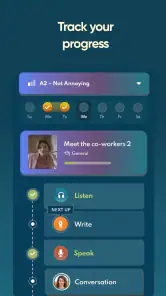
Analysis by Reviewed
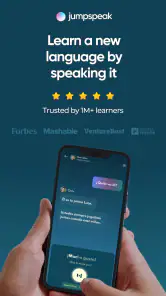
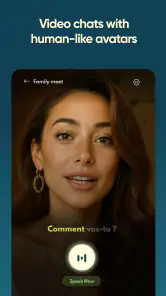
Learning a language usually fails for a practical reason: there is a big difference between recognizing a sentence and producing one when somebody is waiting for an answer. Jumpspeak focuses its experience on closing that gap through AI-supported language practice. I found it most useful when I treated it less like a traditional course and more like a private place to rehearse everyday conversations without the embarrassment of making mistakes in front of another person.
The app is an education tool from Jumpspeak.com, and its central appeal is the chance to work with conversational language across Spanish, French, German and more than twenty other languages. It is free to install, rated for Everyone, and available on Android devices running version 7.0 or later. The current release is 5.4.2, so users with older phones should still have a reasonable chance of compatibility.
What makes the experience stand out is not simply the size of its language selection. The important question is whether an AI language partner can make speaking practice feel easy enough to repeat every day. In my experience, that is where the app has its strongest argument. It gives hesitant learners a lower-pressure way to form sentences, test vocabulary and notice which parts of a conversation still feel slow.
AI conversation is the feature that changes the learning routine
Many language apps are built around lessons, flashcards, translation exercises or short quizzes. Those formats are useful for building recognition, but they can leave a learner unprepared for a real exchange. Jumpspeak puts more attention on active use. Instead of waiting until I feel perfectly prepared, I can use a practice session to try a phrase, adjust it and continue.
That distinction matters because speaking anxiety often appears before a learner has a serious grammar problem. I may know the words for ordering food, asking for directions or introducing myself, yet still hesitate because I have never assembled them quickly. Practicing with an AI partner gives me room to make that first attempt. The benefit is psychological as much as educational: the cost of being wrong is low, so I am more willing to keep going.
I would not describe this as a replacement for a teacher. A teacher can understand a learner’s history, explain a confusing rule in several ways and notice subtle pronunciation or cultural issues. Jumpspeak is better viewed as an always-available practice layer. It helps turn passive study into short moments of speaking, especially when a formal class or conversation partner is not available.
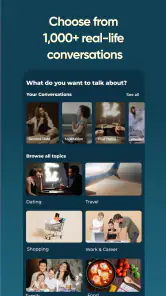
The broad language support also changes how the app can fit into a household or a mixed study routine. Someone preparing for a trip to Spain can use it differently from someone maintaining French after school, while another learner may use German for work-related confidence. The same conversational idea serves each person, but the useful vocabulary depends heavily on the learner’s immediate goal.
More From Our News Desk

Clash of Clans Is Won Between the Battles

Android Auto Makes the Case for Quieter Car Software

MobiOffice: Transforming Mobile Productivity with Seamless Integration

EA SPORTS FC™ Mobile Soccer: Redefining Mobile Sports Gaming

How Microsoft OneDrive Became a Mobile Productivity Giant

How Google Translate Breaks Language Barriers Effortlessly
One practical tip is to choose a narrow situation before opening the app. “Improve my Spanish” is too vague for a single session. “Practice checking into a hotel” or “rehearse a short self-introduction” gives the conversation a purpose. I found that this approach makes it easier to remember what I practiced later because the language is attached to a scene rather than a disconnected list.
What the AI approach feels like during ordinary practice
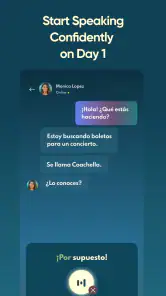
The most valuable part of an AI conversation is the opportunity to respond in your own words. A multiple-choice answer can show that I recognize the correct phrase, but an open response reveals whether I can retrieve it under pressure. That makes the practice more revealing. If I repeatedly pause around the same kind of sentence, I know what deserves attention next.
There is also a useful trade-off here. An AI partner is more patient than a human conversation partner, but that patience can make the exercise less demanding. Real people interrupt, change topics, use unexpected wording and sometimes speak too quickly. Jumpspeak can prepare me for the structure of common exchanges, yet I still need real listening and speaking practice to handle the unpredictability of daily life.
I recommend saying answers aloud rather than silently composing them. Even when I already know what I want to say, speaking exposes problems with word order, endings and pronunciation that reading can hide. A short session becomes much more active when I treat the app as a speaking rehearsal instead of another screen-based reading exercise.
Another effective workflow is to repeat a situation in stages. On the first attempt, I focus on getting the meaning across. On the next, I try to make the answer shorter and more natural. Finally, I reuse a few useful expressions in a slightly different context. This prevents the session from becoming a one-time performance and helps turn a convenient phrase into something I can actually recall.
That workflow is especially helpful for learners who collect vocabulary but struggle to use it. A word is easier to retrieve when it has been used in a sentence connected to a personal need. For example, someone preparing for a restaurant visit can practice asking about ingredients, responding to a recommendation and requesting the bill. Those connected exchanges are more useful than memorizing isolated food terms without a speaking purpose.
A realistic travel routine where the app makes sense
Imagine I am leaving for a trip in a few weeks and can spare ten minutes after dinner. I would not try to cover an entire language course in that time. I would choose one travel situation, practice a basic exchange, then write down the two or three phrases that felt hardest to produce. The next session would begin with those phrases before moving to a related situation.
On one day, the focus might be arriving at a hotel. Another session could cover asking whether a card is accepted, and a later one could rehearse explaining a simple problem. The point is not to create perfect dialogue. It is to make the first response feel familiar enough that I do not freeze when the real conversation starts.
Jumpspeak is particularly suitable for this kind of preparation because AI practice does not require coordinating schedules with a tutor or friend. I can use an awkward spare moment, stop after a short exchange and return later. That flexibility is more important than it sounds. A language routine that fits around work is more likely to survive than an ambitious plan that requires a fixed hour every day.
There is a second benefit for travelers who dislike studying in public. Speaking to a phone can still feel slightly self-conscious, but it is usually less intimidating than speaking to a stranger while trying to remember a phrase. I can repeat an answer privately until it feels manageable. That makes the app a good bridge between silent preparation and actual interaction.
Still, I would not rely on it as the only preparation for a trip. I would pair it with listening to natural speech, checking practical phrases for the destination and learning basic courtesy expressions. AI rehearsal helps with confidence and sentence formation, but it cannot guarantee that every local accent, speed or cultural expectation will feel easy in person.
Where the experience can become frustrating
The biggest limitation is that conversational practice can feel less structured than a conventional course. Learners who want a clearly numbered path through grammar may find the experience less satisfying than an app built around sequential lessons. Jumpspeak is strongest when I already know what I want to practice and need opportunities to use it. It is less compelling for someone who wants every topic selected and explained in a fixed order.
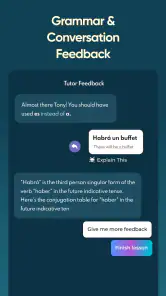
Beginners should also be realistic about the role of AI. A conversation can encourage output, but it does not automatically create a complete foundation. I still need to pay attention to recurring mistakes and study the underlying pattern. If I simply move from one exchange to another without reviewing what went wrong, I may become more comfortable speaking while continuing to repeat the same errors.
The free entry point is helpful for trying the concept, but the app includes in-app purchases ranging from $12.99 to $499.99 per item. That is a wide range, so I would inspect the available options carefully before committing to anything. The sensible approach is to test whether the conversation style actually suits my learning habits first, then decide whether paid access offers enough value for my goals.
That pricing structure also means the app is not automatically the best choice for every learner. Someone who only wants a basic phrasebook may prefer a simpler tool. A person who needs detailed grammar explanations may get more from a textbook, classroom or course with a strong lesson sequence. A learner who mainly wants live correction from a human should spend time with a tutor or language exchange instead of expecting AI to provide the same kind of feedback.
Another trade-off is attention. Conversational tools can feel engaging, but engagement is not the same as progress. I get better results when I set a small target for each session and keep a record of phrases that I could not produce smoothly. Without that discipline, it is easy to enjoy the interaction while avoiding the difficult vocabulary that would actually improve my ability.
I would also avoid treating the app as a test of fluency. A successful practice exchange can show that I handled one context, not that I am ready for every conversation. Progress should be judged by whether I can respond more quickly, express the same idea in different ways and recover when I do not know a word. Those are more meaningful signs than simply finishing a session.
Who will get the most from Jumpspeak
The best match is a learner who understands that speaking requires repetition and wants a private way to get more of it. Travelers, busy adults, returning learners and students who know plenty of vocabulary but hesitate to use it can all benefit. The app is also a sensible option for people who find traditional drills dull but still need a regular reason to produce language.
It works especially well for an intermediate learner who can understand simple material but needs confidence in everyday exchanges. That person can use the AI practice to stretch answers, try alternate wording and identify gaps. A complete beginner can use it too, but should combine it with foundational pronunciation, vocabulary and grammar work rather than expecting conversation practice alone to explain everything.
People choosing among languages should think about commitment rather than novelty. Having access to Spanish, French, German and many additional options is convenient, but starting several languages at once can dilute progress. I would pick one language, define a situation that matters to me and build a repeatable routine before exploring another option.
The app has reached over 500 thousand installs and holds a 4.1 average from around 7.7 thousand ratings, with roughly 1.2 thousand written reviews. Those figures suggest an established user base, but they do not decide whether the method fits a particular learner. The more useful question is whether I will actually speak during practice and return often enough to benefit from repetition.
Because the content rating is Everyone, it can suit a broad range of learners, although parents should still choose study goals appropriate to the child’s age and ability. The app’s value depends more on motivation and routine than on age alone. A curious learner who practices consistently is likely to gain more than someone with access to many resources but no regular speaking habit.
My verdict after weighing the everyday value
I see Jumpspeak as a practical speaking companion rather than a complete language school. Its AI-centered approach addresses a real weakness in language study: the lack of low-pressure opportunities to form answers. When I use it with a specific scenario, speak aloud and review the phrases that caused trouble, it becomes much more useful than a casual chat session.
I would recommend trying it to anyone who has studied a language passively and now wants to become more active. It is particularly appealing when scheduling a tutor is difficult or when embarrassment has become the main barrier. The free installation makes experimentation straightforward, while the paid options deserve careful consideration based on how often the learner will use the practice.
I would skip it if my priority were a fully guided grammar curriculum, expert human correction or a simple reference tool with no conversational element. In those cases, a structured course, teacher or phrasebook may serve me better. For everyone else, the app is worth judging through a focused routine rather than a quick glance: choose one real-life situation, practice aloud several times and see whether the next attempt feels easier.
My main recommendation is to use Jumpspeak as a bridge to real conversations, not as a substitute for them. Its strongest contribution is giving me a place to rehearse before the stakes feel high. Used that way, it can turn language knowledge into quicker, more confident responses—and that is the part of learning that many conventional study methods leave untouched.
Language Learning | Jumpspeak Frequently Asked Questions
Is Jumpspeak free to download, and what should I know about purchases?
Jumpspeak is free to download, but it offers in-app purchases ranging from around $13 to $500 per item. Before starting a trial or choosing a plan, review the price, billing frequency, renewal terms, and cancellation instructions shown in the app store. This helps you understand any ongoing costs and avoid an unexpected charge if a trial converts to a paid subscription.
What is Language Learning | Jumpspeak, and how does it work?
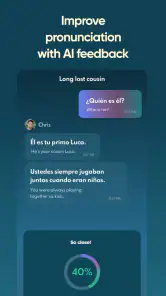
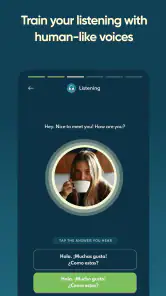
Language Learning | Jumpspeak is a language-learning app focused on helping users practice conversational skills through interactive lessons and speaking exercises. Its approach emphasizes real-world phrases, listening comprehension, and guided conversations rather than memorizing vocabulary alone. Depending on the selected language and subscription, the app may provide personalized practice, pronunciation feedback, progress tracking, and AI-powered conversation features.
Which languages can I learn with Jumpspeak?
Jumpspeak is designed for learners who want to practice Spanish, French, German, and more than 20 other languages. The app’s language-learning experience focuses on helping users build practical communication skills. Before committing to a plan, check that your preferred language is available and review which lessons and conversation tools it includes, since the features offered may differ between courses.
Is Jumpspeak suitable for complete beginners?
Yes, Jumpspeak can be useful for beginners because lessons generally focus on practical expressions and everyday conversations instead of assuming advanced grammar knowledge. New learners can start with basic phrases and gradually build confidence through repetition and speaking practice. However, users who prefer detailed grammar explanations, writing exercises, or a traditional textbook-style course may want to use Jumpspeak alongside another learning resource for a more complete study plan.
Does Jumpspeak require a subscription or offer in-app purchases?
Jumpspeak commonly includes premium content, subscription options, or in-app purchases, so users should review the pricing details carefully before starting a trial. Check the billing frequency, renewal terms, trial duration, and cancellation instructions shown in the Google Play Store or Apple App Store. If you activate a free trial, remember that it may automatically convert into a paid subscription unless it is canceled before the stated deadline.
Pros
- Short
- practical lessons fit easily into busy schedules.
- AI conversation practice helps build confidence speaking aloud.
- Personalized topics make practice feel more relevant.
- Useful for learners who want to focus on everyday communication.
- Progress tracking can encourage consistent study habits.
Cons
- Many features require a paid subscription after the trial period.
- AI responses may occasionally feel repetitive or unnatural.
- The app is less suitable for learners seeking detailed grammar lessons.
- Speech recognition can struggle with accents or background noise.
- A stable internet connection may be needed for several activities.
- Category
- Education
- Version
- 5.4.2











