Language Learning - Duo Speak
- 52.00
- 4.4
- Installs
- 1.00M
- Price
- Free

Screenshots




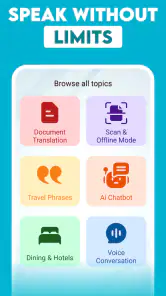
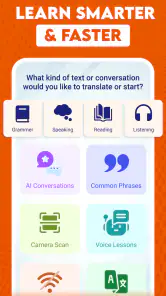


Analysis by Reviewed
When an English-speaking exercise feels awkward, it is tempting to blame your vocabulary. With Language Learning - Duo Speak, I would first ask a more practical question: are you comfortable speaking aloud to an AI tutor, and have you given yourself enough quiet to do it? This education app is built around spoken practice, so the experience depends as much on your setting and willingness to try as on the lessons themselves. That makes it appealing for learners who want to practise producing English, but less suitable if you mainly want silent reading or a structured grammar reference.
What makes speaking practice feel different
Published by Visionary AI, Duo Speak is a free app for learning English through conversation with an AI tutor. Its store summary promises a route to more fluent speech, but I would treat that as an aim rather than a guarantee: regular speaking practice can help you get more comfortable forming sentences, while fluency still takes time and use beyond any single app.
The appeal is straightforward. Many language tools make it easy to collect vocabulary or complete short exercises without ever having to say much. A conversation-focused format puts the act of speaking nearer the center. That can be useful if you understand more English than you can comfortably produce, or if you hesitate because you are unsure how to begin a sentence.
There is also a real trade-off. Speaking to an AI tutor is still different from talking with a person who can react to your tone, clarify a misunderstanding, or take the conversation somewhere unexpected. I see Duo Speak as a low-pressure place to practise getting words out, not as a full replacement for human conversation, listening to varied speakers, or studying grammar in depth.
Where learners can get stuck
The first hurdle may be less about the app than about speaking out loud. If you are practising in a shared room, on public transport, or somewhere noisy, you may feel self-conscious or struggle to concentrate. A short session in a quiet place is a more realistic starting point than trying to turn every spare minute into a spoken lesson.
Another common snag is expecting an AI conversation to work like a textbook. A textbook usually makes the next task obvious; an open speaking exercise can feel less comfortable because you have to respond in your own words. If you freeze, use a simple sentence rather than waiting for the perfect one. The useful habit is attempting a response, noticing where you hesitated, and trying again later.
Beginners may also need to keep expectations modest. Speaking practice can expose gaps that passive study hides: you may recognize a word but not recall it quickly enough to use it. That is not proof that the exercise is failing. It is a sign to make the next attempt simpler, perhaps by describing one familiar activity or giving a short answer before trying a longer explanation.
Make the first session easier
Before you begin, choose a place where you can speak without rushing. If the app seems not to respond as expected, check the basics first: make sure the phone is not muted in a way that affects your setup, reduce nearby noise, and speak clearly at a natural pace. These are sensible checks for any spoken practice; they do not require assuming that a particular feature or setting exists in Duo Speak.
Give yourself a small goal for the first session, such as answering in complete but simple sentences. That keeps the focus on using English rather than trying to impress the tutor. If you are returning after a break, start with familiar topics and rebuild comfort before pushing into complicated explanations.
It is also worth checking that your device can run the app. Duo Speak requires Android 8.0 or later, so an older Android version may be the reason it cannot be installed or updated. The current version is 9.9, but version numbers alone do not tell you whether a particular problem comes from the app, the device, or the connection. When something goes wrong, note what you were doing and whether the issue repeats; that makes troubleshooting more useful than repeatedly restarting without a clear test.
A practical way to recover a stalled session
If a conversation stops feeling productive, do not keep repeating the same difficult answer. Change the task: shorten your response, use words you already know, or switch to a topic you can explain more easily. This is a useful recovery strategy because it gives you a way back into speaking instead of turning one awkward moment into a reason to quit.
For example, imagine you are preparing for a casual conversation at work. You might practise introducing your role, describing what you are working on, and asking a simple follow-up question. If you stumble over a long explanation, reduce it to two short sentences. Later, try the longer version again. That sequence makes practice relevant to an actual situation without requiring you to master everything in one sitting.
Another helpful approach is to keep a tiny note outside the conversation: one phrase you struggled to produce and one sentence you managed comfortably. Do not turn this into a transcript or a large vocabulary project. The point is to give your next session a clear starting point and see whether the phrase comes more easily. This kind of self-review is especially useful when you practise in brief, irregular sessions.
If the app behaves inconsistently, separate a technical problem from a learning problem. A response that feels difficult may simply mean you need an easier prompt or a slower pace. A session that fails to proceed at all deserves basic checks such as confirming the connection and trying again later. Avoid assuming that every pause means your pronunciation was wrong; there can be several ordinary reasons for a disrupted interaction.
When a different tool is the better choice
Duo Speak is not the right fit for every English learner. If you need careful explanations of verb forms, punctuation, or sentence structure, a grammar book or a course organized around explicit instruction may serve you better. If your priority is hearing many accents and natural exchanges, podcasts, videos, and conversations with people provide variety that an AI tutor alone cannot supply.
It may also be a poor match if you cannot comfortably speak where you usually study. Silent flashcards or reading exercises are easier to use in a crowded environment. You can still reserve spoken practice for home or another quiet place, but there is little value in forcing yourself into a format that makes you anxious or distracted.
Compared with the usual mix of language-learning apps, Duo Speak has a narrower, more practical role: it gives you a place to practise saying things, rather than asking you to rely only on recognition exercises. I would pair it with reading or listening, not expect it to cover every skill. A balanced routine might use a spoken session to rehearse a topic, then use real-world listening to hear how people express similar ideas.
Cost, audience, and day-to-day value
The app is free to download, with in-app purchases ranging from $2.99 to $59.99 per item. That range makes it sensible to try the free experience before spending anything. Think about whether you are actually returning to speak and whether the practice suits your routine; do not pay simply because you hope a purchase will solve hesitation or create a study habit for you.
Duo Speak has a 4.4 average from around 11,000 ratings, and it has passed 1 million installs. Those figures suggest that many people have tried it, but they cannot tell you whether its conversation style will suit your level or personality. It is rated for Everyone and was released on October 18, 2022. For compatibility, the Android minimum is version 8.0, so checking that before troubleshooting an installation problem can save time.
The app’s version 9.9 indicates that it has continued through multiple updates, but I would still judge it by how well it fits your own practice. The best sign is not whether a session feels effortless. It is whether you are willing to come back, speak a little more freely, and take one useful phrase into a real conversation.
My verdict for learners deciding what to try
I would recommend Language Learning - Duo Speak to someone who already knows some English but wants a less intimidating way to practise forming spoken replies. Its strongest use case is a short, focused session before a real interaction: rehearsing a self-introduction, explaining a routine, or finding the words to ask a question. That kind of preparation can make the first sentence easier when the real conversation arrives.
I would skip it, or use it only as a supplement, if you want a complete course with detailed grammar teaching, prefer silent study, or need the unpredictability of speaking with people. The AI-tutor approach can help build repetition and confidence, but it cannot stand in for every kind of English exposure. My practical advice is to start with a quiet setting, keep answers simple, and treat each session as speaking practice rather than a fluency test. If that routine feels useful, the app has a clear place in your learning day; if it feels like a chore, another format may be a better fit.
Language Learning - Duo Speak Frequently Asked Questions
What is Language Learning - Duo Speak?
Language Learning - Duo Speak is presented as a language-learning app for people who want to practise speaking and build language skills on a mobile device. Before downloading, check the app-store listing to confirm which languages, lesson types, and practice features are currently available. App features can vary by version, region, and device, so do not assume that every advertised course or tool is included in every installation.
Is Language Learning - Duo Speak free to use?
The app may be available to download without an upfront charge, but that does not necessarily mean every lesson or feature is free. Some language-learning apps offer optional subscriptions, in-app purchases, or limited free practice. Review the current store listing and the app’s purchase details before signing up, and check the renewal price and cancellation terms carefully if you start a trial or subscription.
Which languages can I learn with Language Learning - Duo Speak?
The languages offered may depend on the app’s current catalogue and the language you choose as your starting language. Check the app-store description and, where possible, the course-selection screen before committing to a particular learning plan. Availability can change as the app is updated, and a language may have fewer lessons or practice options than another. Confirm that your target language is supported on your device.
Does Language Learning - Duo Speak require an internet connection?
An internet connection may be needed to download the app, access lessons, sync progress, or use online speaking and audio features. Whether any content works offline depends on the app’s current design and the specific lesson. If you plan to study while travelling or with limited data, check the listing for offline support and test the relevant features before relying on them. Data charges may apply.
Is Language Learning - Duo Speak suitable for beginners, and does it protect my privacy?
The app may suit beginners if its available lessons start with basic vocabulary and language practice, but its level range and teaching approach should be confirmed in the store description. Also review the privacy policy and requested permissions before creating an account or enabling microphone access for speaking exercises. Data collection and account requirements can differ by version, platform, and region, so check the current details before use.
Pros
- Short practice sessions fit easily into a busy day.
- Speech exercises help learners practice speaking aloud.
- A simple interface makes it easy to get started.
- Progress tracking can help learners stay motivated.
- Useful for reviewing vocabulary and basic phrases.
Cons
- Automated speech feedback may not catch every pronunciation issue.
- Free access may include ads or limits on some features.
- Speaking practice works best in a quiet environment.
- The app may not provide enough depth for advanced learners.
- A stable internet connection may be needed for some activities.

- Category
- Education
- Version
- 9.9











