Langla: AI Language Tutor
- 76.00
- 4.6
- Installs
- 5.00M
- Price
- Free

Screenshots
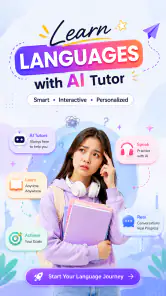
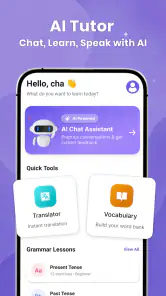
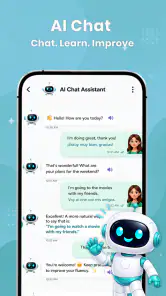
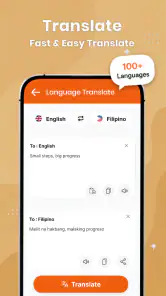
Analysis by Reviewed
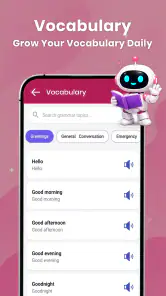
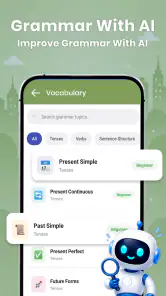
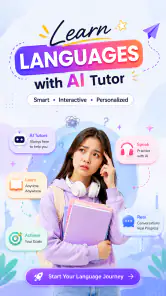
I like language tools that help me move past the awkward moment when I know what I want to say but cannot put it into a natural sentence. Langla: AI Language Tutor is built around that practical problem: it brings AI chat practice together with translation, grammar help, and vocabulary support. That mix can make it useful for short study sessions, especially when I want to try expressing an idea rather than simply review a list of words.
It is an education app from Aquaworld Infotech, available free to start, with optional in-app purchases. Its broad appeal is reflected in an average rating of 4.6 from around 15,000 ratings and more than five million installs. Those figures suggest that plenty of learners have tried it, though they do not tell me whether its teaching style will suit every level or goal. The app is rated for everyone, and I would treat it as a flexible practice aid rather than a complete replacement for structured instruction.
Getting past the first points of friction
Language-learning apps can feel confusing when several tools appear to compete for attention. A chat tutor, translator, grammar checker, and vocabulary aid each solve a different problem, so the useful first step is to decide what you need right now. If I am preparing to speak, I would begin with a simple chat prompt. If I am stuck on a sentence, I would use translation or grammar support to understand the obstacle, then return to composing in the language I am learning.
That order matters. A translator can quickly remove a block, but relying on it for every sentence may leave me with polished output and little practice producing language myself. I get more learning value by first attempting the sentence unaided, then checking the result and noting one change I can reuse. In a chat session, I would also keep the topic narrow—ordering lunch, describing my commute, or asking for directions—rather than asking for an open-ended conversation before I know what I want to practise.
A second common sticking point is knowing what to do with a correction. Seeing a corrected sentence is not the same as learning why it changed. When grammar help is involved, I would look for the specific part that caused trouble, such as a verb form or word order, and write a fresh example of my own. That small follow-up turns a correction into active practice. If I just accept a revised sentence and move on, the same mistake can easily appear again.
Because the app combines several kinds of help, I would avoid treating every response as a final authority. AI explanations and translations can be useful starting points, but language often depends on context, tone, and regional usage. For a high-stakes message or a phrase where politeness matters, I would cross-check rather than copy blindly. Langla is better suited to practising and untangling everyday language than to guaranteeing that every nuance is perfect.
Make a small setup plan before you practise
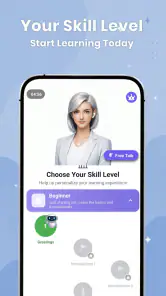
Before opening a session, I would choose one concrete goal and a level of difficulty that feels slightly challenging rather than overwhelming. For example, I might decide to practise asking follow-up questions instead of trying to discuss an unfamiliar subject. A short, defined goal makes it easier to judge whether a chat was useful and helps prevent the session from turning into a string of translations.
It also helps to have a real situation in mind. Someone learning for travel could rehearse asking whether a dish contains an ingredient, then practise understanding a possible reply. A learner using the language at work could draft a brief status update and examine the grammar choices. These are more actionable than entering a vague request to “teach me the language,” because they give the conversation a purpose and produce phrases that are easier to revisit later.
Langla is listed as free, but in-app purchases range from $9.49 to $229.99 per item. I would check the purchase details in the app before committing to anything and decide whether the free experience already covers my intended routine. That spread is a reason to be deliberate, not an indication that a particular plan is necessary. If I only need occasional translation or a few practice exchanges, I would first see how far I can get without paying.
The current version is 1.0.70, and the minimum operating system listed is Android 8.0. That is useful to check before troubleshooting: if the app is not behaving as expected, I would first make sure the device meets that requirement and that the installed app is current. The release date is Apr 23, 2026, so the product is relatively new in its current release history; I would allow for the possibility that the experience can evolve rather than assuming every workflow is already polished.
Recover a session without losing the learning goal
If a chat response seems irrelevant, I would not keep pushing the same broad prompt. I would restate the situation in one sentence and ask for a specific kind of help, such as a natural way to phrase a request or an explanation of one grammar choice. This is a general way to get a language assistant back on track, and it also gives me a clearer answer to evaluate. The goal is not to make the conversation longer; it is to make the next exchange more focused.
When a translation feels too formal or oddly phrased, I would add the context that changes the meaning: who I am speaking to, whether the message is casual, and what I want the other person to understand. Then I would compare the suggested wording with a simpler version I can confidently say aloud. This is especially useful for learners who know the vocabulary but struggle to judge tone. A grammatically possible sentence may still not be the one I would naturally use.
For a productive recovery after an interruption, I would save the lesson mentally with a tiny recap: one phrase I can now use, one correction I want to remember, and one question for next time. Even without turning a session into formal homework, this gives the next practice round a clear starting point. It also helps me notice whether I am repeatedly asking the translator to solve the same kind of problem, which may signal that I need more focused grammar or vocabulary practice.
A realistic everyday routine could fit into a few spare minutes before a trip or during a quiet break. I might rehearse a café interaction, try answering a follow-up question without translating first, and then check one sentence that felt uncertain. I would finish by repeating the improved version in my own words. That loop—attempt, check, reuse—is more valuable than collecting a long list of translated sentences I never practise saying.
When the problem is outside the app
Not every frustrating session means the tutor has failed. If I cannot explain what I am trying to say, the response may be hard to use because the prompt itself is unclear. If I ask for too much at once—translation, a detailed grammar lesson, pronunciation guidance, and a full conversation—I may get an answer that does not serve the immediate task. Breaking the request into smaller steps is often the better fix.
My own study habits can also create a false impression that an app is not helping. A learner who only reads translations may understand more without becoming quicker at speaking or writing. Someone who jumps between unrelated topics may struggle to remember new vocabulary. I would use Langla as a place to practise producing language, not merely as a lookup box, and pair it with listening or real conversation if those are important goals.
That distinction matters when comparing it with the usual alternatives. A conventional course or textbook is often better for a carefully sequenced curriculum, explicit progression, and systematic coverage of grammar. A basic dictionary or translator is faster when I need one word or a quick conversion and do not want a tutoring-style exchange. Langla’s appeal is the middle ground: it can help me move from a question about a phrase into a little contextual practice. It is not automatically the best tool for every language task.
I would also choose another option if my priority were live feedback from a human teacher, formal exam preparation with a defined syllabus, or a speaking partner who can respond with personal and cultural nuance. An AI tutor can offer convenient practice, but convenience is not the same as a teacher noticing every misunderstanding or adapting a complete course around me. For beginners who need a very structured path, I would use Langla alongside a course rather than expecting the chat experience to supply the whole learning plan.
Who will get the most from Langla
I can see it fitting learners who already have some basics and want low-pressure opportunities to form sentences, test vocabulary, and get help when grammar becomes a barrier. It may also suit people who prefer learning through examples tied to ordinary situations. The combination of chat and language utilities gives me a way to move between trying a phrase and checking it, without having to treat every question as a separate study task.
It is less compelling for someone who wants a single-purpose translator, dislikes AI-generated conversation, or needs a transparent course with a fixed sequence of lessons. It may also frustrate learners who expect instant certainty about subtle phrasing. In those cases, a dictionary, a structured class, or human feedback can be a better match. I would not choose an app just because it includes several tools; the real test is whether I use those tools to practise rather than to avoid the difficult part of learning.
My practical recommendation is to try Langla with one small, repeatable goal: rehearse a real exchange, make an independent attempt before translating, and carry one corrected phrase into the next session. Aquaworld Infotech’s app has a useful blend for that style of study, and its free entry point makes it easy to see whether the approach suits me before considering an in-app purchase. I would keep expectations grounded: it can make everyday language practice more accessible, but it works best as a companion to consistent effort, not a shortcut around it.
Overall, Langla: AI Language Tutor is worth considering if I want one place to practise conversation and get quick language support without turning every study session into a formal lesson. Its strongest use is helping me take a hesitant sentence, examine it, and try again with more confidence. The trade-off is that I still need to guide the session, check important nuances, and bring in other resources when I need structure or human expertise. For a learner willing to do that, it offers a practical way to make small pockets of time count.
Langla: AI Language Tutor Frequently Asked Questions
What is Langla: AI Language Tutor, and how does it help with language learning?
Langla: AI Language Tutor is a language-learning app built around AI-powered practice. It is intended to help learners work on skills such as conversation, vocabulary, and grammar through interactive activities rather than relying only on static lessons. The exact tools and available learning materials can vary by app version, language, and subscription, so check the current store listing to confirm what is included before downloading.
Which languages can I learn with Langla?
The languages available in Langla may depend on the current app version and the learner’s region. Before starting, look through the language choices in the app or its store description to confirm that your target language is supported. Also check whether the app offers explanations in a language you understand, as that can make instructions and feedback easier to follow, especially for beginners.
Is Langla: AI Language Tutor free to use?
Langla may offer free access to some features, while other lessons or AI practice options could require a subscription or in-app purchase. Pricing and trial terms can change, so review the app’s store page and subscription screen carefully before paying. Pay particular attention to renewal frequency, cancellation instructions, and whether a free trial automatically converts to a paid plan.
Can I use Langla to practise speaking and get feedback?
AI language tutors are designed to make practice more interactive, and Langla may provide conversation activities or feedback depending on the features available in your version. Treat automated corrections as useful guidance rather than a guarantee that every nuance is right; pronunciation, context, and regional usage can be complex. For the best results, practise regularly and compare important explanations with trusted learning resources.
Does Langla work offline, and what should I know about privacy?
Offline access is not guaranteed, particularly for features that rely on AI processing, so plan to use an internet connection unless the app clearly identifies downloadable content. Since language practice may involve typed or spoken input, review Langla’s privacy policy and permissions before sharing personal details or recordings. Availability, data handling, and offline options can change with updates, so check the latest information in the app store.
Pros
- AI conversation practice lets you rehearse real-world dialogues at your own pace.
- Personalized feedback can help identify areas to focus on while learning.
- Short practice sessions are easy to fit into a busy routine.
- A low-pressure setting can make speaking practice feel less intimidating.
- Useful for supplementing lessons with extra language practice.
Cons
- AI feedback may miss context or nuances in a learner’s response.
- It cannot fully replace conversation with fluent speakers.
- Speech recognition may struggle with accents or background noise.
- The learning experience may depend on an internet connection.
- Some features or learning content may require a paid subscription.

- Category
- Education
- Version
- 1.0.70











