Klover - Instant Cash Advance
- 52.78K
- 4.6
- Installs
- 5.00M
- Price
- Free

Screenshots

Analysis by Reviewed
When a bill lands before payday, I first ask whether the gap is small and short-lived or a sign that my monthly budget needs attention. Klover - Instant Cash Advance is aimed at the first situation: it’s a free finance app from Klover Holdings, released in 2020, for people looking for a bridge between expenses and their next paycheck. Its 4.6 average from around 134,000 ratings and more than a million installs suggest it has reached plenty of users, but I’d still treat a cash advance as a temporary tool, not extra income.
Start with the bill, not the borrowing button
Before opening an advance app, I’d write down the expense, its due date, and the date I expect my next paycheck. That quick check makes a useful difference: a small timing mismatch can be manageable, while a gap that appears every month usually needs a different response. I’d also look at what else is scheduled to leave my account before payday, so I don’t solve one bill only to make another payment harder.
A realistic example is a necessary household purchase that can’t wait until payday. If the amount is modest and the next paycheck is close, an advance may help bridge the timing. If the expense is rent, a major repair, or several bills at once, I would not assume a small advance will solve it. In that situation, I’d contact the biller, ask about a payment arrangement, or compare options that address the larger shortfall directly.
From a cash squeeze to a decision
In a typical use case, I’d open the app because a necessary expense is due before my pay arrives, then work through the setup and decide whether the amount and timing make sense. The app’s current version is 4.78.0 and it’s rated for Everyone, but those details don’t change the basic question: will using an advance leave enough money for the next round of bills? I’d answer that before requesting anything.
Getting Acquainted with Klover
At first glance, the setup process for Klover is pretty straightforward. You download the app, punch in some basic info, and link your bank account. The app is designed to be user-friendly, and I found navigating through it to be a breeze. It promises to provide cash advances without any credit checks, which is a huge plus for anyone who might have a less-than-perfect credit score.
That initial bank connection is a handoff between the app and the account where my income and spending show up. I’d slow down here rather than tap through on autopilot: choose the financial account I actually use for regular cash flow, review the access prompts, and make sure I understand what I’m agreeing to. If I keep separate accounts for bills and day-to-day spending, I’d think carefully about which one gives the app the right picture for its process.
I’d also approach setup when I have a few uninterrupted minutes, not while standing at a checkout with a payment due. That gives me time to check the information I enter and read each screen. An app can make a process feel quick, but the important part is not simply getting through it; it’s knowing what account is connected and what the next step asks me to do.
More From Our News Desk

 Bolt: Request a Ride
Bolt and the Shift from One-Tap Rides to More Legible Trips
Bolt shows how ride-hailing is shifting from a one-tap taxi request toward a more legible, choice-driven trip, while leaving the hardest questions of price and reliability unresolved.

 Farm Land - Farming life game
Farm Land Review: A Small Island Farm with a Satisfying Loop
A bright, breezy island farm turns a few quick chores into a satisfying cycle of planting, harvesting, expanding, and deciding what to build next.

 Android Auto
’s Community Takes Shape in the Passenger Seat
Its most valuable network is not a public feed but a shared set of routes, voice habits, app integrations, and advice that make driving less isolating—and sometimes more complicated.

 My Talking Angela
 Makes the Virtual Pet Feel Personal
A polished pet-raising game built on small rituals, playful customization, and a character who gives everyday screen time a surprisingly personal rhythm.

 Google Translate
 Review: A Pocket Tool for the Small Frictions of Travel
From menus and signs to quick conversations, Google Translate earns its place by cutting the little delays that make unfamiliar language feel like a barrier.

 Shazam: Find Music & Concerts
Shazam’s Best Trick Is Turning a Song Into a Night Out
A few seconds of recognition can settle an argument, rescue a half-remembered chorus, and point toward a live show. Shazam’s real trick is what happens after the match.
Latest News



What the advance can—and cannot—solve
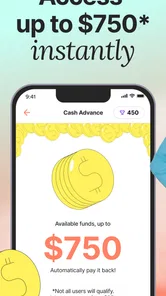
One of the standout features of Klover is its ability to offer cash advances up to $100. While this might not cover all your expenses, it’s a decent cushion for those unexpected costs that pop up out of nowhere. Plus, the app doesn’t charge interest, which is a breath of fresh air compared to other payday loan services.
That small ceiling is also a useful boundary. I’d consider it for a modest, urgent gap, such as a household necessity, but not for a large repair, rent shortfall, or recurring monthly deficit. Before moving ahead, I’d compare the amount I need with what I can safely repay from my next paycheck. If the numbers only work when nothing else goes wrong, I’d look for another solution.
A practical way to make that decision is to treat the next paycheck as already spoken for: subtract rent, utilities, food, transport, and any scheduled payments first. Then see whether repaying an advance still leaves a workable cushion. This is more cautious than focusing only on whether the app can provide money, but it helps prevent a short-term fix from creating another squeeze a few days later.
The interest-free point is helpful, but I wouldn’t use that phrase as a shortcut for “cost-free in every sense.” I’d review the choices and terms shown in the app before confirming, including any optional services or timing-related choices that may affect the experience. If I’m comparing it with borrowing elsewhere, I’d compare the whole transaction and the repayment impact, not just the interest label.
Points, privacy, and the handoff to your bank
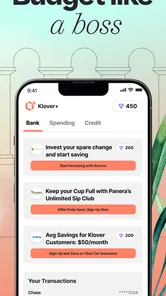
Moreover, Klover has a unique rewards system. By sharing data or engaging with the app’s content, users can earn points, which can be redeemed for additional cash or other perks. This gamification aspect makes the experience a little more fun and engaging. I found myself checking the app more often just to see how many points I could rack up.
I’d treat points as a bonus, not as money I can count on for an urgent bill. The trade-off is worth thinking through: if earning rewards involves sharing information or spending time in the app, I’d weigh that against the value of the perk and my comfort with the exchange. I also wouldn’t assume that points will make a larger cash need disappear; they’re a side benefit, not a substitute for a realistic budget.
My tip would be to decide in advance how much attention I’m willing to give the rewards side. If I’m already opening the app to check an advance, I might look at the available point-earning activities, but I wouldn’t keep returning just because a progress counter is there. The useful question is whether a particular activity feels worthwhile to me, given the time and information involved.
The bank handoff matters again when it’s time for money to move and repayment to affect the account. I’d check the account balance and upcoming transactions around the expected repayment period rather than assuming the advance sits outside my usual budget. Any cash received now is still connected to money I’ll need to manage later, so I’d keep a note of the repayment date and leave room for essential expenses.
Security and Privacy
In today’s digital age, security is paramount, and Klover seems to take this seriously. The app uses bank-level encryption to protect your data, which gives users peace of mind. And while it does ask for access to your bank transactions to analyze your spending habits, Klover promises that this data won’t be sold to third parties. It’s always a bit of a leap of faith when sharing personal info, but the app’s transparency about its privacy practices is reassuring.
Linking a bank account is a meaningful step, not a minor setup chore. I’d read the app’s current privacy information carefully and make sure I’m comfortable connecting the account I use for everyday finances. If I’m unwilling to share transaction access, or if I want a cash option that doesn’t involve an app and bank connection, I’d skip this route and consider asking a biller about a payment arrangement or turning to a trusted person instead.
For someone deciding whether to install it, the key question is not simply whether an app uses security measures; it’s whether the overall exchange feels acceptable. I’d consider how I feel about sharing financial activity for a service intended to help with cash flow, and I’d avoid connecting an account I don’t want involved. If I change my mind later, I’d look in the app and the relevant account settings for the available ways to manage that connection.
Where the workflow can fall short
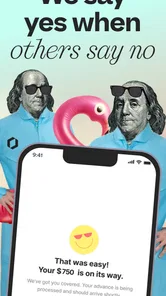
The smooth setup described above doesn’t remove the need to check what happens at each step. I’d confirm the amount available, any timing details shown in the app, and the repayment implications before relying on an advance for something time-sensitive. A digital request is convenient, but convenience alone can’t guarantee that the money will arrive when a particular bill is due. If the deadline is immediate, I’d contact the provider directly rather than assume the app can solve it in time.
This is also where Klover differs from a credit card or a bank overdraft: it’s a small, paycheck-oriented bridge rather than a revolving line for ongoing spending. A credit card may suit someone who can reliably pay the statement balance and needs broader purchasing flexibility; a bank option may be preferable for someone who wants to keep financial activity with their existing provider. For a larger or repeated shortfall, I’d favor talking to a lender or biller about longer-term choices instead of stacking quick fixes.
Compared with asking a friend or family member, an app can feel more private and structured, but it introduces account linking and an automated process. Asking a biller for extra time may be less immediate, yet it can address the actual due date without adding another advance to repay. I’d choose based on the problem: Klover is more relevant when the shortfall is small and temporary, while a conversation or longer-term plan is better when the budget itself no longer balances.
There are a few points I’d want answered while using it: what amount is currently available to me, when would it reach my account, and how will repayment fit with my next paycheck? I’d look for those details inside the app before making a request rather than relying on a general description of how advances work. I’d also check whether the amount offered covers the expense I’m actually trying to handle; a partial solution can still be useful, but only if it doesn’t tempt me to borrow more elsewhere without a plan.
For a time-sensitive bill, I’d build in a fallback. I would not wait until the final hour to find out whether an app-based transfer fits the biller’s deadline. If timing is uncertain, calling the company that issued the bill can clarify whether a short extension is possible. That small step helps separate two questions that are easy to blur: whether I can request money and whether the money will solve the immediate problem in time.
The app is a poor fit if I need a substantial amount, want to avoid linking a bank account, or already know that my next paycheck is committed to essentials. It’s also not a good replacement for a spending plan when advances are becoming routine. In those cases, I’d rather look at a bill adjustment, community support, or a more suitable financial product than keep patching the same gap with small, short-term borrowing.
My Two Cents
So, what’s my take after using Klover for a bit? Well, it’s a solid option for those needing a quick financial boost without the hassle of interest fees or credit checks. The cash advance feature is incredibly convenient, and the lack of interest fees is a game-changer. However, like any financial tool, it’s important to use it responsibly and not rely on it as a long-term solution.
Ultimately, Klover - Instant Cash Advance is a handy app to have in your financial toolkit. Whether you’re facing an unexpected bill or just need a little extra to tide you over until payday, it’s worth checking out. Just remember to keep an eye on your spending habits and use the app’s features to your advantage. Happy spending!
For me, its clearest value is as a backup for a narrow timing problem, not as a way to stretch a paycheck that is already too small. I’d use it only after checking the cash flow on both sides of the advance: what needs paying now and what must still be covered after payday. If that quick calculation leaves enough room, the app may be worth considering; if not, I’d step back and solve the underlying shortfall instead.
The app is free to download, belongs to the finance category, and is rated for Everyone. Those basics make it easy to try, but the important choice is whether its bank-connected, paycheck-oriented approach suits my circumstances. I’d recommend it to someone who wants to assess a modest, temporary cash gap and is comfortable reviewing the terms and account access. I’d point someone with recurring bills, a larger emergency, or strong privacy concerns toward a different option.
Klover - Instant Cash Advance Frequently Asked Questions
Does Klover require a bank account, and what information should I have ready?
Klover connects with your bank account to review financial activity and assess eligibility for a cash advance. The existing qualification guidance also calls for a checking account that receives direct deposits and a regular income. Before signing up, make sure you are comfortable linking your financial information and have the relevant account details available.
Can I use Klover if I am under 18?
The stated qualification requirements say that users need to be at least 18 years old to qualify for a cash advance. Klover’s Everyone content rating describes the app’s store age classification, but it does not change that borrowing requirement. If you are under 18, you should not expect to qualify for an advance through the app.
Is Klover free to download, and what devices can run it?
Klover is a free finance app from Klover Holdings. It is available for Android devices running version 7.0 or later, and its content rating is Everyone. Before downloading, check that your device’s operating system meets that requirement and that you are choosing the official app, since a cash-advance service will involve connecting financial information.
What is Klover and how does it work?
Klover is a financial app that provides users with instant cash advances up to $100 without any interest, credit checks, or hidden fees. The app connects to your bank account to analyze your spending habits and determine your eligibility. After approval, you can receive your funds instantly or within a few days, depending on your preference.
Is Klover safe to use?
Yes, Klover prioritizes user security by employing advanced encryption and secure data handling practices. The app only requests necessary information and ensures that your data is protected with industry-standard security measures. Furthermore, it does not store your bank login credentials, instead using secure connections to access your financial data.
Pros
- Instant cash access without credit check
- User-friendly interface for easy navigation
- No hidden fees or interest charges
- Connects directly to bank account for quick access
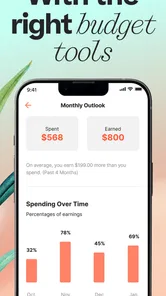
- Offers financial insights and tips
Cons
- Limited to $100 cash advance per transaction
- Requires access to personal bank details
- Cash advance fees can accumulate
- May not support all banks
- Frequent ads within the app