King James Bible - KJV Offline
- 13.14K
- 4.7
- Installs
- 10.00M
- Price
- Free

Screenshots



Analysis by Reviewed
I often reach for a Bible app when I have a few quiet minutes but not a printed book nearby, or when I want to check a passage without relying on a connection. King James Bible - KJV Offline is built around that straightforward need: it brings the King James text together with reading and reference tools in one place. I find it most useful when I already know I want the KJV; readers who prefer a different translation should look for an app centered on that version instead.
Starting with the right expectations
Before I settle into a reading routine, I ask one simple question: am I looking for the King James wording, or do I want to compare translations and study a topic from several angles? This app makes sense for the first need. If I am unsure what a passage means, its dictionary and notebook can support a closer read, but I would pair that work with a trusted commentary or another reference when I need historical background or a more detailed interpretation.
That distinction is useful for new readers, too. The KJV’s older vocabulary can be rewarding, but it may slow you down if you are encountering biblical language for the first time. I would not choose it as my only reading resource if plain, contemporary phrasing is the priority. On the other hand, someone who already reads the KJV can move straight into the text without first sorting through a large collection of translations and study materials.
Who will get the most from it
This Books & Reference app suits people who read the King James Bible regularly, want access while travelling or away from Wi-Fi, or like to alternate between reading and listening. It is free to install, rated for Everyone, and developed by The Holy Bible App and Bible Resource Company. Its 4.7 average from around 153,000 ratings and more than 10 million installs suggest it has reached a large audience, though popularity alone cannot tell you whether its style will fit your habits.
The KJV’s traditional wording is part of the appeal for many readers, but it can be less comfortable if you are new to the Bible or prefer contemporary language. I would treat this as a focused KJV reader rather than a broad study library: its dictionary and notebook add useful reference and reflection tools, but they do not make it a substitute for a translation-comparison resource or a deep academic commentary.
The First Impressions
Opening the King James Bible - KJV Offline feels like stepping into a serene space. The interface is smooth and user-friendly, making it easy even for tech novices. It has a clean design that won't overwhelm your senses. When I first opened it, I was pleasantly surprised by how everything was neatly organized. I didn't have to dig through menus to find what I needed. It’s like having a well-organized bookshelf right in your pocket.
From a quick search to a useful note
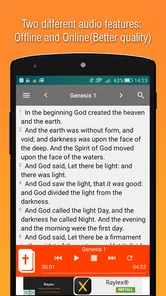
What sets this app apart is its offline capability. We live in an age where connectivity can sometimes be a luxury, and having access to the Bible offline is a blessing. You can read your favorite verses anytime, anywhere without worrying about internet access.
More From Our News Desk

Weather by Xiaomi Review: Clear at a Glance, Less Clear Up Close

X Under Pressure: Can It Recover When Posting Goes Wrong?

Clash of Clans Is Won Between the Battles

Android Auto Makes the Case for Quieter Car Software

MobiOffice: Transforming Mobile Productivity with Seamless Integration

EA SPORTS FC™ Mobile Soccer: Redefining Mobile Sports Gaming
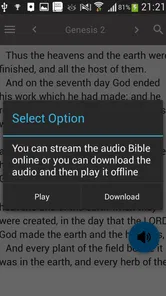
The app also offers daily verses that pop up like little nuggets of wisdom, perfect for those busy mornings when you need a quick spiritual boost. And let’s not forget the audio Bible feature! It’s a game-changer for those long commutes or when you just want to rest your eyes and listen to the soothing words of the scriptures being read aloud.
A realistic day with the app
Imagine starting a busy morning with a short reading before leaving home. I can read a few verses while I have a moment, save the reference that I want to revisit, and then switch to audio on the commute. Later, when I have a longer break, I can return to the passage, check a word that stood out, and jot down a question in the notebook. Each step serves a different purpose: the quick read gives me a starting point, audio fits the journey, and the later return gives me room to think rather than trying to do everything at once.
That routine also helps avoid a common listening trap. Audio is convenient when my attention is divided, but I may not catch every phrase the first time. I treat listening as a way to stay with a passage, not as a replacement for careful reading. If a line raises a question, I make a note and come back to it when I can give it my full attention.
A practical routine is to start with a short passage, use search when you have a specific phrase or reference in mind, then keep a bookmark for anything you want to revisit. The dictionary can help when an unfamiliar word interrupts your reading, while the notebook gives you somewhere to collect a question or reflection before it slips your mind. I would keep notes brief and tied to a passage; that makes it easier to return later without turning a simple reading session into a project.
For example, on a commute I might listen rather than read, then open the passage later when I have a moment to look at the wording closely. That handoff from audio to text is useful because listening is convenient but makes it easier to miss a phrase. Offline access is especially helpful for the reading itself when a connection is unavailable; I would still prepare anything that depends on connectivity before setting off rather than assume every part of an app works offline.
Making the tools work together
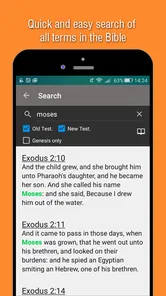
The most useful handoff is from search to context. When I remember a distinctive phrase but not its location, search can help me get to a likely passage quickly. I then read beyond the matching line instead of treating the result as a complete answer. If I find a word that interrupts the flow, the dictionary gives me a way to look into it without abandoning the reading entirely. A short notebook entry can capture what I want to consider later.
For a more useful note, I would record the reference along with the thought rather than leave a sentence without context. A question such as “What is happening around this verse?” is easier to act on later than a vague reaction. This small habit turns the notebook into a bridge between a quick phone session and a more deliberate study, without pretending that a personal note is the same thing as a commentary or a researched explanation.
Bookmarks are helpful in a different way: they reduce the effort of returning to a passage, especially when I am reading in short stretches throughout the day. I would keep them for passages I genuinely plan to revisit, not every verse that catches my eye. Too many saved items can make a simple reader feel cluttered, while a few purposeful bookmarks make the next session easier to start.
Using it in everyday reading
Navigation through the app is as simple as pie. I love how you can bookmark your favorite passages, making it easy to return to them later. The search function is quite robust, allowing you to find specific verses or topics quickly. It's like having a personal assistant to guide you through your spiritual journey.
One useful search habit is to try a distinctive word or a known reference first, then narrow your reading by opening the surrounding passage. A search result can point you toward a line, but the verses around it provide context; I avoid treating a match as an answer on its own. If I am studying a theme across different translations, I would move to a comparison-focused Bible resource, since this app’s KJV emphasis is a strength only when that is the text I want.
The app also offers a night mode, which is easy on the eyes during late-night reading sessions. Trust me, your eyes will thank you for this feature!
One trade-off is that a compact phone screen is convenient for a quick check but less comfortable for a long study session, especially if you want to keep several passages in view. I use bookmarks to reduce repeated searching, and I would make a note of a chapter or reference before switching tasks. Those small habits matter more here than elaborate organization: the app works best as a pocket reading companion, not as a replacement for every kind of study setup.
Choosing it over other reading options
A printed Bible remains a good choice when I want to read without a screen, mark pages by hand, or spend a long stretch with the text open in front of me. This app is better for carrying one KJV reader in my pocket, finding a known phrase quickly, and listening when reading is inconvenient. A general Bible app may be the stronger option for someone who regularly compares translations or relies on extensive study aids. The choice is less about one format being universally better and more about which task I need to handle today.
I would also think about how I read rather than choosing by feature count. If I mostly want to hear a passage, the audio option is a practical part of the experience. If I usually read slowly with several reference books open, this focused app may be a useful companion but not my main study desk. And if older English makes me stop at every other sentence, a modern-language translation will likely keep the habit more enjoyable.
Where it fits—and where it does not
Compared with a printed Bible, this app is easier to carry and search, and its audio option offers another way to take in a passage. Compared with broader Bible apps, it is more appealing if you specifically want the KJV available offline, but less suitable if your usual workflow depends on switching between translations or building a detailed study library. If you mainly want a quiet reading session, its focused approach is an advantage; if you need extensive cross-references or scholarly tools, I would choose a resource designed around those needs.
The app is free, with optional in-app purchases ranging from $0.99 to $10.99 per item. I would start with the free experience and decide whether anything beyond it is useful for my routine rather than paying on assumption. It is version 577 and requires Android 7.0 or later, details worth checking against your device before installing. Its age rating is Everyone, making it suitable for a broad audience, though parents should still choose reading material in a way that fits their household.
Small frictions to keep in mind
Offline access is a meaningful convenience, but it is best not to assume every tool behaves the same way without a connection. I would open the app and confirm that the reading material I need is available before leaving home, particularly if I am planning to rely on it during a trip. That quick check is a sensible habit for any offline reader and avoids finding out at the wrong moment that a part of the experience needs preparation.
The KJV focus also shapes what the app can do for me. Search can locate wording within the text, but it does not replace reading the passage in context; the dictionary can help with vocabulary, but it is not a full interpretive guide. These are not reasons to dismiss the app. They are reminders to use its tools for what they are good at and reach for another resource when the question calls for comparison or deeper research.
There is a similar trade-off with convenience and attention. A daily verse can be a pleasant prompt when I have little time, but a short excerpt is only a starting point, not a complete reading plan. I prefer to use it as an invitation to open the surrounding passage when I can. That keeps a quick notification from becoming my only contact with the text on a busy day.
My Personal Take
Overall, the King James Bible - KJV Offline app provides a comprehensive and user-friendly experience that's hard to beat. Whether you’re a daily reader or someone who occasionally seeks spiritual guidance, this app caters to all. It’s a solid companion for anyone looking to deepen their understanding of the scriptures without the hassle of needing an internet connection.
So, if you’re in the market for a Bible app that combines simplicity, functionality, and accessibility, look no further. Download it, explore its features, and let it accompany you on your spiritual journey. Trust me, you won't regret it!
I would recommend giving it a try if the KJV is already the version you reach for and you want a practical way to read, listen, search, and save thoughts in one place. If you are still deciding which translation suits you, or you need a desktop-style study environment with substantial scholarly references, I would start elsewhere and return to this one if its focused approach matches your reading life. For a short passage at home, a quick lookup between errands, or a planned offline reading session, it offers a straightforward route from opening the text to returning to something worth thinking about.
King James Bible - KJV Offline Frequently Asked Questions
Is King James Bible - KJV Offline suitable for someone who prefers the King James Version?
Yes. The app is centered on the King James Bible, so it is a natural option for readers who want to use that translation for personal reading or reference. Its focus is narrower than a general e-book app, and the description also highlights a dictionary, audio, and a notebook. If you prefer another Bible translation, this app’s stated focus may not match your needs.
Can I use the app for Bible study as well as everyday reading?
The app’s Bible text, dictionary, audio, and notebook can support different ways of engaging with scripture. You can read passages, listen to the audio feature, and use the notebook to keep personal notes. These tools may be useful for study as well as regular reading, though the app is best understood as a King James Bible resource rather than a general-purpose study library.
Who publishes King James Bible - KJV Offline, and what kind of app is it?
King James Bible - KJV Offline is a Books & Reference app from The Holy Bible App and Bible Resource Company. It focuses on the King James Bible, with a store description highlighting offline access, a dictionary, audio, and a notebook. The app is rated for Everyone, making it a general-audience option for people who want a Bible app for reading or reference.
What features does the King James Bible - KJV Offline app offer?
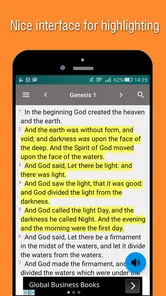
The King James Bible - KJV Offline app provides users with access to the complete text of the King James Version of the Bible without requiring an internet connection. Key features include daily reading plans, verse highlighting, bookmarking, and note-taking capabilities. Additionally, users can enjoy the convenience of an audio Bible, and the app often includes search functionality to easily find specific passages.
Is the King James Bible - KJV Offline app truly free to use?
Yes, the King James Bible - KJV Offline app is free to download and use. While the core features are available at no cost, some advanced features or ad-free experiences might require in-app purchases. Optional purchases are listed at prices ranging from $0.99 to $10.99 per item, so check the purchase details before buying anything.
Pros
- Offline access to the entire Bible.
- User-friendly interface for navigation.
- Includes daily devotionals and prayers.
- Search function for quick verse lookup.
- Audio feature for hands-free listening.
Cons
- Contains ads that disrupt reading.
- Limited customization options.
- No option for multiple translations.
- Occasional app crashes reported.
- Requires frequent updates.











