KeyConnect Digital Car Key
- 2.44K
- 4.6
- Installs
- 1.00M
- Price
- Free
Screenshots
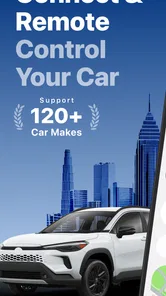
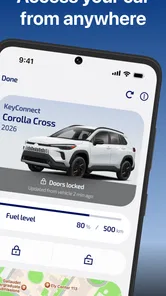
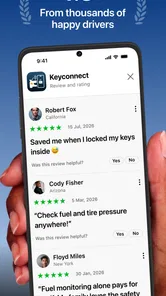
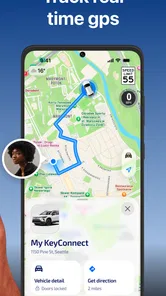
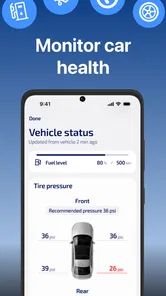
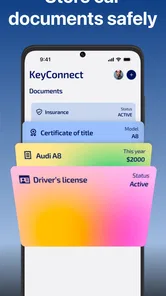
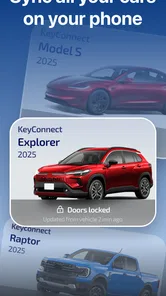
Analysis by Reviewed
I tend to judge a digital car key by one practical question: does it make getting into the car easier without becoming another thing I have to troubleshoot? KeyConnect Digital Car Key is built around remote car access, so its appeal is clearest when your vehicle and phone work well together. I’d think of it as a convenience layer, not a reason to put away every backup key before you’ve tested the setup in your normal routine.
Check the fit before changing your routine
Before installing a car-access app, I’d start with the part that matters more than any promise of convenience: whether it can connect to the vehicle I actually drive. KeyConnect is intended for remote locking and unlocking, but that does not make it a universal replacement for every car key. If you are considering it for a family car, a work vehicle or an older model, check compatibility for that specific vehicle first. A quick check can save you from setting up your routine around a connection that does not suit your car.
This is also where the app differs from the usual alternatives. A physical key is simple and does not depend on a phone connection, while a vehicle maker’s own access feature may be a more natural choice if you already use it and it meets your needs. KeyConnect makes most sense when your car is supported and you value having a phone-based way to lock or unlock it. If you mainly want remote access for a feature your existing vehicle app already handles well, switching may add little.
What speed should you expect?
Fast access matters most when you’re standing at the car with shopping bags, a child in tow, or rain coming down. The app’s purpose is to let you lock or unlock remotely, but response time in practice depends on the phone, connection and vehicle setup. I wouldn’t assume every tap will feel instant in every location. Before relying on it for a rushed departure, try locking and unlocking at home and again where you usually park.
I’d test from the places where the app will be most useful, rather than judging it only beside the car during setup. Try the same command from your driveway, your usual parking spot and any other place where you regularly approach the vehicle. If it responds differently across those situations, that tells you whether the convenience is dependable in your real routine. A smooth test in one location is encouraging, but it should not be treated as a guarantee everywhere.
Heavy-use moments and practical habits
A useful test is not simply opening the app once. Try the full routine you expect to use: open it, select the intended control, check that the car responds, then confirm the vehicle is secure before walking away. If you share driving duties, agree on who is responsible for checking the lock rather than treating a quick tap as proof. That small habit is especially worthwhile when you’re distracted or carrying things.
For a busy morning, I can see the value in having phone-based access ready before reaching the car, instead of searching through a bag for keys. But I’d keep a conventional key available until I knew the digital method behaved consistently with my own vehicle. That is not a criticism unique to this app; it’s sensible preparation whenever access depends on a phone.
More From Our News Desk

Weather by Xiaomi Review: Clear at a Glance, Less Clear Up Close

X Under Pressure: Can It Recover When Posting Goes Wrong?

Clash of Clans Is Won Between the Battles

Android Auto Makes the Case for Quieter Car Software

MobiOffice: Transforming Mobile Productivity with Seamless Integration

EA SPORTS FC™ Mobile Soccer: Redefining Mobile Sports Gaming
A realistic use case is coming back from a grocery run with bags in both hands. If the phone is already in a pocket you can reach, a remote unlock can spare you the awkward search for keys. The useful detail is to decide in advance what “ready” means: keep the phone charged, know where the control is in the app, and check that the car has responded before you approach with your hands full. If you have to stop and navigate around while balancing bags, the app may not save much time.
For a household with more than one driver, I’d also agree on a simple fallback routine before anyone depends on phone access. Make sure each person knows where the physical key is and who should use it if the app or phone is unavailable. This is less about complicated coordination than avoiding a frustrating moment when one driver assumes another has the backup. Digital access is most helpful when it reduces small hassles without creating uncertainty about who can get into the car.
Unlocking Convenience
The first thing that strikes you about the KeyConnect Digital Car Key is the sheer convenience it offers. Imagine this: You're rushing out, hands full, and all you need to do is whip out your phone to unlock your car. No more fumbling for keys! The app syncs seamlessly with your car, offering a smooth, keyless entry experience. It's like having a magic wand for your vehicle.
Easy Setup and User-Friendly Interface
Setting up the app is a breeze. It walks you through each step, ensuring even the least tech-savvy among us can get it going without a hitch. The interface is sleek and intuitive, designed with the user in mind. Everything is laid out clearly, from locking and unlocking to accessing vehicle information. It’s all about making your life easier, one tap at a time.
KeyConnect is an auto and vehicles app from Apponfire Co. Ltd. It’s free to install, while optional in-app purchases range from $8.99 to $99.99 per item. I’d treat those purchases as a reason to check what an individual option does before paying, rather than assuming every driver needs one. The app is rated for everyone, and its current version is 2.3.0; phones need Android 9 or newer. That Android requirement matters if you plan to use an older spare phone as a backup: confirm it meets the minimum before counting on it.
The free install makes it possible to assess the basic experience before spending, but I would read each paid option carefully and decide whether it solves a real need for my setup. The purchase range is broad enough that I would not tap through a payment screen casually. First establish that the car connects and that the core lock-and-unlock routine is useful; only then consider whether any optional purchase is worth it. That keeps the decision tied to your own use rather than to features you may never need.
KeyConnect was released on May 27, 2021, and its current version is 2.3.0. It has an average rating of 4.5 from around 41,000 ratings, with more than 1 million installs and around 1,600 written reviews. Those figures show that many people have tried it, but they cannot predict how it will behave with a particular car, phone or parking location. I’d treat the rating as a useful starting point, then let a hands-on test decide whether the app fits.
Reliability, recovery and the alternatives
Compared with carrying only a physical key, remote phone control can be more convenient when your hands are full or the key is buried in a bag. Compared with a vehicle maker’s own access option, KeyConnect’s value depends on whether it supports your particular car and how well that pairing works for you. Compatibility should be checked before you build a routine around it; a broad promise of car access is not a substitute for confirming your own vehicle can connect.
If a command does not seem to work, I’d avoid repeatedly tapping in a hurry. Check the phone’s connection, reopen the app, and try once more while staying near the car; if access still fails, use the physical key and troubleshoot later. Keeping that fallback nearby is the most useful recovery plan, especially before a trip or when someone else needs the car. I also wouldn’t assume the phone can replace every key-related task: the main appeal here is remote lock and unlock, not a guaranteed replacement for all vehicle controls.
For recovery, it helps to distinguish a delayed response from a failed command. I’d pause long enough to see whether the car reacts, then make one careful retry rather than sending several commands in quick succession. If the result remains unclear, use the physical key and check the app later when there is no pressure to leave. This avoids relying on guesswork about whether the vehicle is locked, and it makes troubleshooting a separate task instead of part of an already rushed departure.
The app may also be the wrong tool if your main requirement is a hands-free experience or a dependable method that works when your phone is unavailable. In those situations, a physical key is the clearer fallback, and a car maker’s own system may be preferable if it is already integrated with your vehicle. I see KeyConnect as an extra route to access, not an automatic upgrade over every existing option. The right choice depends on what your car supports and which method you can count on when plans are tight.
Safety First
Now, I know what you’re thinking - how safe is it to ditch the traditional key for a digital one? Rest assured, KeyConnect takes security very seriously. The app uses advanced encryption technologies to protect your car from unauthorized access. Plus, you can set up biometric verification, like fingerprint or facial recognition, adding an extra layer of security. So, you can enjoy peace of mind knowing your car is safe and sound.
I’d still make phone security part of the routine: use the lock screen you already trust, avoid leaving an unlocked phone in the car, and keep a physical key accessible during your first few days. Those are practical precautions rather than a claim about a particular security setting. They also help answer a common concern: if your phone is misplaced or unavailable, you should have another way to reach the vehicle.
One small but useful habit is to separate “I sent the command” from “I know the car is secure.” When locking up, look for a clear response from the vehicle rather than pocketing the phone immediately after a tap. This is especially sensible in a shared driveway or a busy parking area, where distraction makes it easy to walk away before checking. The point is not to make every lock-up complicated; it is to build confidence through a quick confirmation during the period when you are still learning how the app behaves.
Compatibility and Performance
One of the standout features of this app is its compatibility. It works with a wide range of car models, making it accessible to many users. The performance is top-notch, with quick response times ensuring you’re never left waiting. Whether you’re unlocking the car or starting the engine, the app responds swiftly, making it a reliable companion on your drives.
For resource demands, I’d keep expectations modest: a remote-control app is most useful when it is available at the moment you need it, but I wouldn’t infer battery use or background activity without testing on your own phone. If you are comparing it with a physical key, the trade-off is clear: less key juggling in exchange for depending on a charged, working phone and a successful connection. If your phone is often low on battery, or you need a solution that works without opening an app, a regular key may suit you better.
When deciding whether to keep it installed, I’d pay attention to the whole interaction rather than the apparent speed of a single tap: how easily I can find the control, whether the car responds in my usual parking place, and whether I can tell the action completed. Those are practical indicators of fit, not promises that the app will behave identically on every phone. If the process feels cumbersome or inconsistent on your setup, the theoretical convenience does not outweigh the key you already know works.
The app is listed for Android phones running version 9 or newer, so an older device may not be suitable even if it is otherwise available as a spare. That matters if you plan to keep a second phone charged for emergencies: check the operating system before assigning it that role. On iOS, I would check the current app-store compatibility details before installing, since phone support can affect whether the app is an option for you at all.
Who will get the most from it?
I’d recommend giving KeyConnect a look if you have a compatible car, often arrive with your hands full, or regularly misplace keys inside a bag. It is also worth considering if you want a phone-based way to lock or unlock without making a digital key your only method. By contrast, it is an easy skip if your car cannot pair, your phone is frequently dead, or you are already happy with a physical key and have no recurring access hassle to solve.
It is less suited to someone who needs certainty before checking compatibility, dislikes using a phone around the car, or wants one app to replace every vehicle control. I would not choose it solely because a digital key sounds modern. The practical test is whether it removes a small, repeated annoyance without adding more steps, uncertainty or expense than it saves.
So, if you're looking to embrace the future of car access, give the KeyConnect Digital Car Key a whirl. It’s a blend of convenience, safety, and modern tech that’s hard to beat. Plus, it's a great way to impress your friends with your tech-savvy ways. Whether you're a gadget lover or just someone looking to simplify life, this app is worth checking out. Happy driving!
My performance verdict
My practical verdict is that KeyConnect is worth considering when remote access solves a recurring nuisance, not just because phone keys sound futuristic. Its best case is a compatible car, a dependable phone and a familiar parking routine where you can verify each command. I’d start with ordinary lock-and-unlock tests, keep the physical key close, and only then decide whether the convenience earns your trust. If you prefer a no-phone routine or need certainty before checking compatibility, stick with the usual key for now.
KeyConnect Digital Car Key Frequently Asked Questions
Can KeyConnect Digital Car Key replace my physical car key completely?
KeyConnect Digital Car Key is designed to support remote car access through a smartphone, including locking and unlocking. Whether that is enough to replace a physical key depends on your vehicle and how it connects with the app. Before relying on your phone as your only means of access, confirm that your car works with KeyConnect and keep a practical backup available.
Does KeyConnect Digital Car Key need an internet connection to control a car remotely?
The app is described as a way to connect with and control cars from afar, including remote locking and unlocking. Remote commands therefore depend on the app being able to communicate with your vehicle, so check the connection and pairing guidance during setup. If dependable access is important, test the functions you plan to use before counting on them away from the car.
Can I use KeyConnect Digital Car Key with CarPlay?
CarPlay is mentioned in the app’s store summary, alongside remote locking and unlocking. This makes CarPlay relevant to the app’s connected-car experience, but it does not by itself establish which CarPlay functions are available or how they work with each vehicle. Review the app’s screens and setup instructions after installing, and check that your car and phone meet the requirements for the features you want.
Is KeyConnect Digital Car Key available for iPhone as well as Android?
KeyConnect Digital Car Key is presented as an app for connecting to and controlling cars remotely, but device support can vary by platform. Before downloading, check the app’s availability and operating-system requirements in the store you use. Make sure your phone meets the stated minimum system version there, and confirm that the app’s features work with your vehicle before depending on it for access.
What should I check before connecting KeyConnect Digital Car Key to my vehicle?
Start by confirming that your car can pair with KeyConnect, since compatibility can depend on the vehicle and its installed technology. Then check that your phone meets the app’s operating-system requirement, and read the in-app setup guidance before attempting to connect. It is sensible to test the access functions you need while you still have your regular key available.
Pros
- Seamlessly integrates with most car models.
- User-friendly interface for quick setup.
- Enhances vehicle security with encryption.
- Allows sharing keys with family or friends.
- Works offline after initial setup.
Cons
- Limited compatibility with older car models.
- Requires a stable internet for setup.
- Battery drain with prolonged use.
- Subscription needed for premium features.
- May face occasional connectivity issues.











