Keyboard Font & Keyboard Theme
- 187.00
- 3.4
- Installs
- 5.00M
- Price
- Free

Screenshots


Analysis by Reviewed
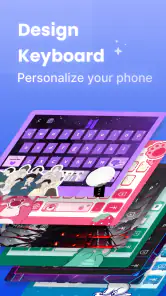
I approached Keyboard Font & Keyboard Theme as a small way to make everyday typing feel more personal, rather than as a tool that would change how I use my phone. That is the right expectation for this personalization app: its appeal is the look and feel of the keyboard, with fonts, backgrounds and emoji as the central idea. A different keyboard can make a familiar screen feel less generic, but it still has to be comfortable enough to use for ordinary messages.
The first decision is whether you actually want to change the keyboard you see throughout the day. If you mostly type short replies, a visual refresh may be enough to make the app worthwhile. If you write long notes or work messages, readability and a layout you can use without thinking matter more than a dramatic design. I would start with a theme that keeps the keys easy to distinguish, then try more decorative choices once I know the basic setup suits me.
Who will enjoy a keyboard makeover
This is most appealing if you like matching your phone’s interface to your personality, or if you are bored with the same keyboard appearance in every chat. It can also be a nice fit for someone who enjoys changing small details seasonally or coordinating a keyboard with a phone wallpaper. The app is free, rated for Everyone, and developed by BUSSID PRODUCT; its broad audience makes sense for a straightforward customization tool rather than a specialist writing app.
I would be more cautious if your priority is a particular typing system, deep productivity tools, or a keyboard you have already tuned carefully for speed and accessibility. In that case, the familiar keyboard may be the better choice. Changing its appearance is fun, but it is not automatically an improvement if the new design makes letters harder to spot or slows down a routine you have already built.
Unleashing Creativity at Your Fingertips
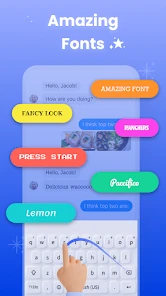
From the moment I installed Keyboard Font & Keyboard Theme, I was greeted with a vibrant splash screen that screamed customization. The app promises a plethora of options to tweak your keyboard’s appearance and functionality, and boy, does it deliver! First off, the array of fonts available is nothing short of impressive. Whether you’re feeling fancy with cursive or want something minimalist, there’s a font style to suit every mood.
Theme Galore
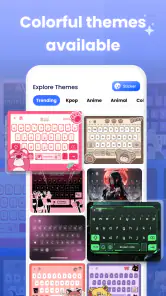
Diving into the themes, I felt like a kid in a candy store. The app offers an extensive collection of themes ranging from chic and elegant to quirky and fun. I found myself constantly switching between themes, unable to pick a favorite because they’re all so darn cool! Plus, the themes are not just static images; many are dynamic, bringing a little movement and life to your typing experience.
For a first try, I would resist choosing a design just because it looks striking in a preview. A background with busy colors or low contrast can become tiring when you are reading and correcting text, even if it looks lovely at a glance. I find it more useful to test a theme in a real conversation: type a few sentences, check whether the keys remain clear, and see how it feels under the lighting where you normally use your phone. That quick check can save you from settling on a style that is attractive but awkward for daily use.
More From Our News Desk

Weather by Xiaomi Review: Clear at a Glance, Less Clear Up Close

X Under Pressure: Can It Recover When Posting Goes Wrong?

Clash of Clans Is Won Between the Battles

Android Auto Makes the Case for Quieter Car Software

MobiOffice: Transforming Mobile Productivity with Seamless Integration

EA SPORTS FC™ Mobile Soccer: Redefining Mobile Sports Gaming
Ease of Use
One of the things I appreciated was how user-friendly the app is. Navigating through the options is a breeze, thanks to its intuitive design. You don’t need to be a tech guru to customize your keyboard. Just a few taps and voila, you’ve got a keyboard that’s truly your own.
The practical path is simple: explore the available choices, settle on one font and theme, then use the keyboard for a few everyday tasks before making more changes. I would avoid changing several visual elements at once, because it is harder to tell which choice improved the experience and which one made it less readable. If the app presents a setup or activation step, take a moment to follow what it shows on your own device rather than assuming that selecting a design alone has changed every keyboard you use.
That last distinction can be confusing for first-time users. Choosing a look inside a customization app and making that keyboard active for typing are not necessarily the same action. When a new design does not appear in a message field, check the keyboard selection options available on your phone and confirm that the intended keyboard is selected. Menus and labels can differ between devices, so I would follow the on-screen instructions rather than rely on a guide written for another phone.
A useful first success is not simply seeing a pretty preview; it is sending a normal message with the new keyboard and finding that you can still type comfortably. Try a short note with punctuation, a name, and a correction or two. That gives you a better sense of whether the font is legible and whether the theme distracts from the text. If it feels too busy, switching back to a simpler design is a sensible adjustment, not a failure to customize.
Another feature that caught my eye is the custom key sounds. You can select different sounds for your key taps which adds a bit of fun and personality to your typing. Imagine typing out a message and having each key sound like a piano note or a gentle tap on glass. It’s those little touches that make this app stand out.
Sounds are best treated as an optional finishing touch. They may make typing feel more playful at home, but they can be distracting in a quiet room, during a meeting, or when you are trying to send a quick message without drawing attention. I would test them briefly, then decide based on where I type most. A visual theme can remain personal without adding sound, and turning a flourish off can make the keyboard easier to live with.
Making it fit real routines
Imagine replying to a family chat while waiting for a bus, then switching to a work message a few minutes later. A high-contrast, uncomplicated theme is likely to work better across both situations than one chosen only for its novelty. If you prefer a more expressive look, keep it for casual use and check that you can still spot punctuation and correct mistakes quickly. That is the trade-off I would make: a design should feel like yours without making a routine task slower.
The app’s emphasis on appearance also makes it different from the usual alternatives. A phone’s built-in keyboard is often the easiest option when reliability and familiarity matter most, while a feature-heavy keyboard may be a better fit for people seeking extensive writing or language tools. This app is more naturally suited to someone whose main goal is changing the keyboard’s visual character. I would choose it for a personal touch, not on the assumption that it will replace every capability of a keyboard built around speed or advanced input.
Performance and Compatibility
Performance-wise, I didn’t notice any lag or glitches, which is a huge plus. The app runs smoothly without hogging your phone’s resources. Compatibility is also top-notch; whether you’re on Android or iOS, Keyboard Font & Keyboard Theme has got you covered.
For Android users, the current version is 1.3.9 and the minimum operating-system requirement is Android 7.0. The app has passed five million installs, with an average rating of 3.4 from around 7,700 ratings and 187 written reviews. Those figures give a sense of its reach, but they do not tell me whether a particular theme will suit your screen or typing habits. The most useful test is still trying a design in the apps where you normally write.
Because a keyboard is used to enter personal text, I would also make a deliberate choice about whether a third-party keyboard is right for me before making it my everyday option. I would read the setup screens carefully and consider my comfort level, especially if I type private messages or account details. That is not a reason to avoid customization altogether; it is a reminder that keyboards are different from ordinary wallpaper apps because they sit directly in the typing process.
If you are wondering whether you have to commit to one look, I would treat the choices as experiments rather than permanent settings. Try one style for a normal day, then switch if it feels tiring or makes mistakes harder to notice. For a more decorative theme, a quick preview is useful, but actual typing is the better test. If the keyboard is not active where you expect, revisit the phone’s keyboard selector instead of repeatedly choosing the same theme inside the app.
Now, while the app itself is free, there are some premium features that require a purchase. However, the basic version offers plenty to play around with, so you’re not missing out if you decide to stick with the free version.
That distinction matters if you only want to try a few looks before deciding whether customization is part of your routine. I would explore the free experience first and only consider a paid option if a specific extra is clearly useful to me. There is little point paying just to chase novelty if I tend to return to the same comfortable layout after a day or two.
Choosing your next step
Keyboard Font & Keyboard Theme was released on December 11, 2023, and its current version is 1.3.9. I would keep the app updated through the normal route on my device and revisit its options when I want a change, rather than constantly switching designs while I am still learning one. A stable setup is especially helpful if you use the keyboard for work, school, or longer messages, where muscle memory is part of what makes typing effortless.
Ultimately, I would recommend trying it if you enjoy personalizing small parts of your phone and want a more distinctive keyboard without turning the process into a technical project. I would skip it if you are satisfied with your built-in keyboard, need specialized typing tools, or would rather not use a separate keyboard at all. The best outcome is modest but real: a look you enjoy, clear keys, and no extra friction when you sit down to write.
Overall, Keyboard Font & Keyboard Theme is a fantastic app for anyone looking to spruce up their smartphone’s keyboard. It’s fun, easy to use, and offers a level of customization that’s hard to beat. So why not give it a try and let your keyboard express your style? Happy typing!
Keyboard Font & Keyboard Theme Frequently Asked Questions
Who develops Keyboard Font & Keyboard Theme, and what is it designed for?
Keyboard Font & Keyboard Theme is a personalization app developed by BUSSID PRODUCT. It is designed for people who want to change the look of their on-screen keyboard, with options centered on fonts, keyboard backgrounds, and emoji. If you are mainly looking for a way to customize the keyboard’s appearance rather than a general-purpose productivity tool, its focus is easy to understand.
What features does Keyboard Font & Keyboard Theme offer?
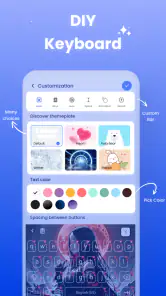
Keyboard Font & Keyboard Theme offers a variety of features including customizable keyboard themes, a wide selection of fonts, and emoji options to enhance your typing experience. Users can personalize their keyboards by choosing different colors, styles, and backgrounds, making it a versatile tool for those looking to add a personal touch to their device's interface.
Is Keyboard Font & Keyboard Theme free to use?
While Keyboard Font & Keyboard Theme is free to download and use, it does offer in-app purchases for additional features and themes. Users can access basic functionalities without any cost, but to unlock premium themes or advanced options, a purchase might be necessary. This allows users to try the app before deciding whether to invest in extra features.
How can I install and set up Keyboard Font & Keyboard Theme on my device?
Installing and setting up Keyboard Font & Keyboard Theme is straightforward. After downloading the app from the Google Play Store or Apple App Store, users need to open the app and follow on-screen instructions to enable the keyboard. This usually involves navigating to your device's settings to allow the app to function as your default keyboard.
Can I use Keyboard Font & Keyboard Theme on both Android and iOS devices?
Yes, Keyboard Font & Keyboard Theme is available for both Android and iOS devices. This cross-platform compatibility ensures that users can enjoy a seamless typing experience regardless of their device. Both versions offer similar features and functionalities, allowing users to switch between devices without losing their customizations.
Pros
- Wide variety of fonts available
- Customizable keyboard themes
- Easy to switch between fonts
- Supports multiple languages
- User-friendly interface
Cons
- Contains in-app purchases
- Ads can be intrusive
- Some fonts require premium access
- May slow down older devices
- Limited free customization options
- Category
- Personalization
- Version
- 1.3.9











