Jurassic World Play
- 2.48K
- 4.2
- Installs
- 5.00M
- Price
- Free

Screenshots
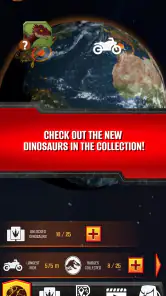
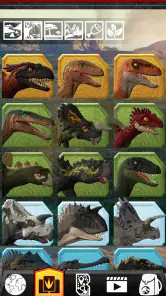
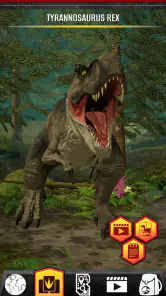

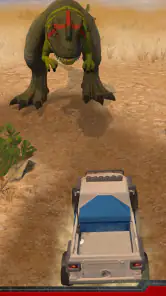
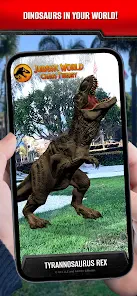
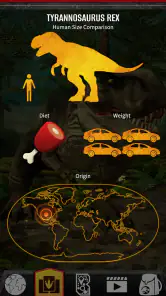
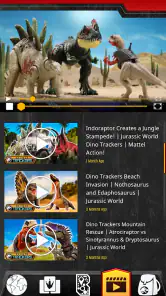
Analysis by Reviewed
If you're anything like me, you probably grew up with a fascination for dinosaurs. And let me tell you, the Jurassic World Play app taps right into that childhood wonder with just a few taps on your screen. It's like having your own pocket-sized dinosaur park, minus the risk of getting accidentally eaten by a velociraptor (phew!).
A dinosaur app built around toys
There is an important distinction to keep in mind before downloading: this is an education app from Mattel, designed around its Jurassic World dinosaur toys. That makes it a different proposition from a general dinosaur encyclopedia or a standalone park-management game. The appeal is strongest when a child already has a compatible toy to bring into the experience; without one, the app may not offer the same reason to return. It is free, rated for Everyone, and has reached over five million installs, so it is easy to try, but I would set expectations around its toy-linked focus rather than treating it as a complete dinosaur reference guide.
Readability and navigation in everyday use
The store describes the app as offering augmented-reality features and games for Mattel’s dinosaur toys. In practice, that kind of toy-centered setup is easiest to approach when an adult helps with the first launch: open the app, explore its available activities, and follow the prompts connected to the toy in hand. I would avoid assuming that every activity works the same way with every dinosaur figure. A useful first step is to check the packaging for any app-related instructions, then keep the toy nearby while exploring so a child does not have to remember what to do next.
That simple routine can make a short play session feel more purposeful. For example, after school, a child can choose one dinosaur, explore the activity associated with it, then put the phone away and continue imaginative play with the physical figure. The screen becomes a companion to the toy rather than the whole activity. This is also a practical way to see whether the app holds a child’s interest before making it part of a regular routine.
Making a first session easier to follow
I would keep the first visit exploratory rather than treating it like a test with a right answer. Let the child look through what is available, then help them connect an on-screen prompt to the dinosaur they brought along. That gives them a concrete reference point and makes it easier to pause, ask what they want to try, or return to the same activity later. If reading on a small screen is tiring, an adult can read a prompt aloud and let the child make the choices; that simple division of effort may be more comfortable than asking them to manage every step alone.
There is also a useful distinction between learning the controls and enjoying the play. A child who is excited by dinosaurs may want to move quickly, while a first-time user may need time to inspect each screen. I would resist taking over just to make the session faster. Instead, keep the toy and device within easy reach, give one instruction at a time, and stop if the app’s flow becomes confusing. This approach is especially helpful for younger children who are still learning to navigate apps, though it does not make every interface element equally easy for everyone.
How the experience fits different abilities and settings
Motor and sensory considerations
Augmented reality can make a dinosaur feel present in a room, which is an exciting idea, but it can also ask users to point and reposition a device while keeping the toy in view. That may be awkward for a child who finds sustained hand movement difficult, has limited use of one hand, or needs help holding a phone or tablet steady. I would have an adult set up the device on a stable surface where possible and let the child take turns directing the activity, rather than making precise movement the price of joining in.
More From Our News Desk

Clash of Clans Is Won Between the Battles

Android Auto Makes the Case for Quieter Car Software

MobiOffice: Transforming Mobile Productivity with Seamless Integration

EA SPORTS FC™ Mobile Soccer: Redefining Mobile Sports Gaming

How Microsoft OneDrive Became a Mobile Productivity Giant

How Google Translate Breaks Language Barriers Effortlessly
Sound and visual effects can add atmosphere, but they are not essential to enjoying a dinosaur toy itself. If a child is sensitive to sudden sounds or busy visual activity, begin with the volume low and stay alongside them while they explore. A parent can also pause the experience and switch back to hands-on play if the screen becomes tiring. These are sensible ways to adapt a session, not guarantees that every child will find the app comfortable.
Sharing the device without making movement a barrier
A practical workaround is to separate setup from participation. An adult can hold or position the device while the child chooses which dinosaur to feature, points out details, or directs what to try next. Taking turns can also prevent one person from having to keep the device raised for the whole session. I would try this at a table or another steady surface before attempting a more active AR session, because a comfortable starting position makes it easier to judge whether the interaction itself is enjoyable.
For sensory comfort, the useful question is not simply whether a child likes dinosaurs, but whether the combination of screen, movement, sound, and camera-based play feels manageable that day. A child may enjoy looking at the toy and talking about it while preferring not to handle the device. That is still a worthwhile shared activity, even if the app is only used briefly. If the experience is uncomfortable, returning to the physical toy is a sensible choice rather than a sign that the child has failed to use the app correctly.
When it works well—and when it does not
This is a better fit for families who already own Mattel Jurassic World dinosaur toys and want an extra activity to try together. It may also suit a child who enjoys moving between a physical object and a screen. By contrast, if the goal is a quiet reading resource, a broad science lesson, or dinosaur content that works independently of a toy, a book or a dedicated educational reference app will probably be more useful. Compared with a typical mobile game, the toy connection is the defining trade-off: it can make play feel more tangible, but it also narrows who gets the fullest experience.
For a realistic first try, I would choose a calm moment rather than handing over a phone during a rushed car ride or a noisy waiting room. Let the child pick a toy, check that there is enough room to use the device comfortably, and keep the session short enough to stop if positioning the camera or following the activity becomes frustrating. If the child asks whether the app can replace the figure, I would say no: the figure is central to the idea, and the app is an additional way to play with it.
Situations where the toy link matters most
At home, the app makes the most sense when a child already has a dinosaur in hand and wants to extend a play session without needing a whole new activity. It can also be a shared option for a caregiver and child who enjoy taking turns: one person handles the device, while the other chooses the toy or decides when to switch back to imaginative play. The physical figure gives the session a clear starting point, which is a different experience from opening a general game and browsing until something catches a child’s attention.
That same dependence is a reason to skip it in some situations. If you need an activity that works immediately with no relevant toy nearby, a dinosaur book, drawing materials, or a general learning resource may be a better fit. Likewise, if the child’s main interest is reading detailed facts about prehistoric animals, a toy-focused app should not be expected to take the place of a reference source. I see this as a focused add-on, not an all-purpose answer to every dinosaur-related question.
Limits worth knowing before you start
The app’s average rating is 4.2 from around 47,000 ratings, and its current version is 5.0.2. Those figures suggest that many people have tried it, but they do not tell me whether it will suit a particular child, device, or toy. Compatibility is the practical question to settle first: check the toy’s instructions and the app’s prompts rather than assuming every Jurassic World figure unlocks the same experience. The minimum operating-system requirement is version 10, so an older device may not be suitable.
I would also treat the app as an optional extension, not as a promise of unlimited new activities. Its central appeal is the link between digital play and a physical dinosaur toy; if that connection is not available or does not hold a child’s attention, the experience may feel narrow. Mattel is the developer, and the app is free, which lowers the barrier to trying it, but parents should still supervise device use and decide whether the activity is a good fit for their household.
Questions I would settle before handing it over
Does a child need to own a dinosaur toy? The toy connection is central, so I would treat an appropriate Mattel Jurassic World figure as the best starting point and check its packaging before expecting a particular activity to work. Can it be used as a quiet learning app on its own? I would not choose it for that purpose; a book or a dedicated dinosaur reference resource is a more direct match for reading and fact-finding.
Will it suit a child who finds camera movement or screen effects uncomfortable? That depends on the child. I would try a brief, supervised session in a calm setting, keep the device steady where possible, and stop if the interaction feels tiring. Is it suitable for an older device? The operating-system requirement is a useful first check, but the device also needs to be comfortable to hold or position. These practical checks are more helpful than assuming the same experience will work for every family.
A measured recommendation for dinosaur fans
My verdict is that Jurassic World Play is most worthwhile when a child already loves a Mattel dinosaur figure and enjoys exploring it through a screen as well as through pretend play. I like the idea of using a toy as the starting point for a shared activity, especially when an adult can help with setup and adapt the pace. I would not choose it as a standalone learning tool or assume it suits every motor or sensory need, but for the right toy-owning family, it can add a playful layer to an ordinary afternoon.
Before installing, check the device’s operating system and the toy’s instructions, then try one activity together in a comfortable setting. That small bit of preparation makes it easier to spot whether the app is genuinely enjoyable or whether the physical dinosaur alone is the better option. Either way, the child can keep the dinosaur adventure going without needing the screen to be the star.
Welcome to Dino Paradise
The first thing that hits you when you open the app is the stunning graphics. I mean, we're talking jaw-droppingly realistic dinosaurs here. From the mighty T-Rex to the gentle Brachiosaurus, it's like the Jurassic era has been brought back to life in vivid detail. The app developers have truly outdone themselves in creating a visual feast for dino enthusiasts.
As you navigate through the app, you get to build and manage your very own dinosaur park. It's got this cool simulation vibe where you strategize the best ways to keep your dinosaurs happy and your visitors entertained. And trust me, there's nothing quite like watching your park thrive with life as you add new species and attractions.
Gameplay That Keeps You Hooked
Now, I know what you're thinking – is the gameplay as exciting as it sounds? Oh, it definitely is. The app offers a mix of challenges and rewards that keep you glued to your screen. You get to hatch dinosaur eggs, evolve them into their majestic adult forms, and even take part in epic battles. Yes, you heard that right – dinosaur battles! It's like Pokémon, but with way more teeth and claws.
One of my favorite features is the interactive elements. You can zoom in to get up close and personal with your dinosaurs, and the attention to detail is mind-blowing. The sound effects, the movements – everything is designed to immerse you completely in the Jurassic World experience.
Keeping It Real
While the app is a treasure trove of fun, it's not without its quirks. Sometimes, the in-app purchases can feel a bit pushy. If you're not careful, you might find yourself tempted to splurge on those shiny extra features. But hey, as long as you keep a watchful eye, you can enjoy the game without burning a hole in your pocket.
Another thing to keep in mind is the occasional bug. It's nothing game-breaking, but every now and then, you might encounter a dino that decides to take a nap instead of roaring into action. The developers are pretty good with updates, though, so these issues usually get sorted out quickly.
Final Roar
In the end, the app is a dino lover's dream come true. It's got the perfect blend of adventure, strategy, and a sprinkle of nostalgia that keeps you coming back for more. Whether you're a seasoned gamer or just someone looking to escape into a prehistoric world, this app has something for everyone.
So, if you're ready to unleash your inner dino enthusiast, give it a download and embark on an epic journey through time. Just remember to keep your park in check, or you might end up with a T-Rex on the loose!
Jurassic World Play Frequently Asked Questions
What kind of experience does Jurassic World Play offer?
Jurassic World Play is an education app built around Mattel Jurassic World dinosaur toys. Its store summary highlights augmented reality features, games and other activities, so the appeal is tied to exploring digital experiences alongside the toy range. It is intended for people interested in dinosaurs, Jurassic World and interactive play rather than a general-purpose learning tool.
What operating-system version does my device need?
Before downloading Jurassic World Play, check that your device is running a supported operating-system version. The app requires Android or iOS version 10 or later. Keeping your device’s software current can also help you use apps smoothly, but the key compatibility check is whether your operating system meets that minimum.
Does Jurassic World Play work with dinosaur toys?
Jurassic World Play is made to bring Mattel Jurassic World dinosaur toys into the app experience, with AR features, games and more. If you have one of these toys, the app may offer ways to interact with it through its digital features. The experience is centered on the Jurassic World toys, so check that your device meets the app’s operating-system requirement before downloading.
What is Jurassic World Play?
Jurassic World Play is an interactive mobile game that allows users to immerse themselves in the Jurassic World universe. Players can build and manage their own dinosaur park, collect various species of dinosaurs, and engage in exciting battles. The game provides a rich storyline and numerous challenges to keep players entertained.
How do I start playing Jurassic World Play?
To start playing Jurassic World Play, you need to download the app from the Google Play Store or Apple App Store. Once installed, you can create an account or log in using your social media credentials. The game will guide you through a tutorial to help you understand the basics of park management and dinosaur care.
Pros
- Immersive dinosaur adventure
- High-quality graphics
- Wide range of dinosaurs
- Engaging storyline
- Regular updates
Cons
- Large app size
- In-app purchases
- Battery drain
- Requires constant internet
- Limited offline features
- Category
- Education
- Version
- 5.0.2











