Jerry: Insurance & Car Care
- 11.01K
- 4.4
- Installs
- 1.00M
- Price
- Free

Screenshots



Analysis by Reviewed
Before I choose a car-cost app, I ask what I need it to do in the next few weeks, not what its broadest feature list promises. If my policy is coming up for renewal, insurance comparisons matter most; if I keep forgetting routine service, maintenance organization may be more useful. Jerry brings insurance shopping, car-cost tools, and driving rewards into one finance app from Jerry, Inc. It’s free, rated for Everyone, and has a 4.2 average from around 14,000 ratings, with over a million installs. That reach suggests plenty of drivers have tried it, but whether it earns a place on my phone depends on which parts I’d genuinely use.
Choosing the Right Tools for Your Car
I’d start by deciding what I want to improve: the amount I pay for coverage, how prepared I feel for upkeep, or how clearly I can see my vehicle expenses. A comparison tool is most useful when I’m willing to check the policy details rather than chase the lowest number. Maintenance prompts are valuable when I need help remembering what to look into, while a spending record is worthwhile only if I’ll review it often enough to spot a pattern. Thinking about that first keeps an all-in-one app from becoming one more place to tap without changing anything.
Insurance comparisons are a starting point
One of the standout features of Jerry: The AllCar™ App is its insurance management capabilities. The app offers a comprehensive comparison tool that allows you to view and compare insurance quotes from multiple providers. It's like having your own personal insurance agent at your fingertips! I was amazed at how easy it was to switch my insurance provider and save a few bucks, all within minutes. No more tedious paperwork or endless phone calls.
The useful way to approach a comparison is to treat the displayed price as a starting point, not an automatic reason to switch. Check that the coverage limits and deductibles match what you already have, and compare the same drivers and vehicles wherever possible. A lower premium can look attractive while shifting more of the cost onto you after an accident. I’d keep my current policy details nearby and read the final terms before making a change; convenience does not replace checking what a policy covers.
A small but important habit is to compare one thing at a time. If I change a deductible, coverage limit, or driver detail between options, I can no longer tell whether the price difference reflects the insurer or the changed protection. I’d write down the few policy terms I care about before opening a comparison, then check each quote against that short list. This takes away some of the quick-tap appeal, but it makes the result more useful when I’m making a decision that could affect a future claim.
Maintenance prompts need a real-world check
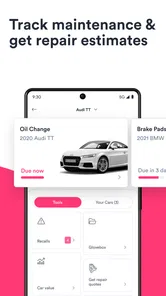
Keeping your car in top-notch condition is crucial, and this app makes it a breeze. With a plethora of maintenance tips and reminders, you'll never miss an oil change or tire rotation again. The app sends timely notifications about upcoming service appointments, helping you keep track of your vehicle’s health without breaking a sweat. Plus, the repair tips are detailed enough for even the least car-savvy among us to understand. It's like having a mechanic in your pocket!
For a practical routine, I’d use reminders as prompts to check the schedule in the owner’s manual rather than assume every vehicle follows the same service interval. Driving conditions, mileage, and the car itself affect what maintenance is due. When a repair warning appears, noting the symptom, when it started, and any dashboard message before visiting a shop can make the conversation more useful. The app can help me stay organized, but it should not replace a mechanic’s inspection when a problem affects safe driving.
More From Our News Desk

 Bolt: Request a Ride
Bolt and the Shift from One-Tap Rides to More Legible Trips
Bolt shows how ride-hailing is shifting from a one-tap taxi request toward a more legible, choice-driven trip, while leaving the hardest questions of price and reliability unresolved.

 Farm Land - Farming life game
Farm Land Review: A Small Island Farm with a Satisfying Loop
A bright, breezy island farm turns a few quick chores into a satisfying cycle of planting, harvesting, expanding, and deciding what to build next.

 Android Auto
’s Community Takes Shape in the Passenger Seat
Its most valuable network is not a public feed but a shared set of routes, voice habits, app integrations, and advice that make driving less isolating—and sometimes more complicated.

 My Talking Angela
 Makes the Virtual Pet Feel Personal
A polished pet-raising game built on small rituals, playful customization, and a character who gives everyday screen time a surprisingly personal rhythm.

 Google Translate
 Review: A Pocket Tool for the Small Frictions of Travel
From menus and signs to quick conversations, Google Translate earns its place by cutting the little delays that make unfamiliar language feel like a barrier.

 Shazam: Find Music & Concerts
Shazam’s Best Trick Is Turning a Song Into a Night Out
A few seconds of recognition can settle an argument, rescue a half-remembered chorus, and point toward a live show. Shazam’s real trick is what happens after the match.
Latest News



There’s also a difference between remembering maintenance and building a complete service history. If I want a record that helps me explain a recurring issue, I’d keep the date, mileage, work performed, and receipt details together instead of relying on a reminder alone. A simple note after a shop visit can make a future conversation clearer, especially if the same sound or warning returns. Jerry can support the habit of paying attention, but I wouldn’t treat a notification as proof that a repair has been completed or that a car is safe.
Roadside help is most useful when prepared
Getting stranded on the side of the road is every driver’s nightmare. Thankfully, Jerry: The AllCar™ App offers 24/7 roadside assistance. Whether it’s a flat tire or a dead battery, help is just a tap away. I had a flat tire experience, and the app quickly connected me to a nearby service provider, making the ordeal much less stressful. It's a comforting thought to know you’re never alone on the road.
That kind of help is most valuable when I’ve prepared before an emergency: I’d make sure the app is set up, keep my vehicle and contact details current, and know where to find the assistance option. If I’m comparing it with a service already included through insurance, a vehicle club, or a warranty, I’d check which route applies before requesting help. Overlapping coverage can make a second option unnecessary, and roadside service should not be confused with insurance coverage for damage or injuries.
In an actual breakdown, I’d make personal safety the first decision, not the app workflow. I’d get to a safe place if possible, follow local emergency guidance if anyone is at risk, and only then arrange assistance. Knowing in advance what information I may need to provide can reduce friction when I’m stressed. I’d also keep another way to reach help in mind, since depending on any single app is a poor plan when a phone battery is low or the connection is unreliable.
Fuel and parking fit best as supporting tools
If you’re like me and often find yourself in need of a gas station or parking spot, this app is a lifesaver. It features a fuel price comparison tool and a handy parking locator, ensuring you save time and money. The app even tracks your fuel expenses, helping you budget better each month. Trust me, this feature alone makes the app worth downloading.
For everyday budgeting, I’d use expense tracking to spot patterns rather than expect it to explain every change in fuel spending. A longer commute, different routes, or a one-off trip can affect a monthly total. A quick note about unusual journeys makes the record easier to interpret later. When I already rely on a dedicated navigation or parking app, I’d compare the convenience of keeping those tasks together against the detail I get from my usual tools.
For example, imagine I’m driving across town after work and realize I need fuel before tomorrow’s commute. A price comparison can help me decide whether a nearby stop is worth the detour, but I’d weigh the extra drive against the apparent saving rather than choose a station on price alone. On a busy evening, finding a practical parking option may matter more than hunting for the cheapest one. The useful question is whether these tools simplify a trip I already make, not whether I can use every feature every day.
A good fit for drivers who want one starting point
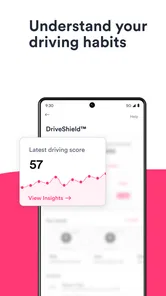
A realistic use case is a driver reviewing costs before a policy renewal: compare coverage carefully, set a maintenance reminder, and use the expense record to understand what owning the car has been costing. That makes Jerry most appealing to people who want insurance shopping and basic car-cost organization in one place. Its driving rewards may also interest someone who is already looking for ways to recognize careful driving, though rewards alone would not be my reason to choose a financial app.
Compared with going directly to insurers, a comparison app can make it easier to review options in one workflow; contacting an insurer directly may suit someone who prefers a longer conversation or already knows which company they want. A spreadsheet can be better for a driver who wants complete control over a custom budget, while a specialist maintenance log may suit someone focused on detailed service records. Jerry’s advantage is the mix, not a guarantee that it will replace every dedicated tool.
The same trade-off applies to how I handle car spending. An all-in-one workflow can make it easier to connect a policy decision with the everyday costs around owning a car, but a dedicated budgeting method may offer more flexibility if I track several vehicles or want categories tailored to my household. I’d try Jerry as a practical front door to these tasks, then keep any specialized tool that gives me a clearer record. There’s no benefit in moving a system that already works just to make every car task live in one app.
What setup and switching really involve
Changing how I handle car expenses has a small setup cost: I need to enter accurate vehicle and policy details, check what information a quote uses, and review any final terms rather than tapping through on autopilot. I’d also think about how many of the app’s tools I will actually use. If I only want a single insurance quote, going directly to an insurer may be simpler. If I already have a trusted system for service history and budgeting, moving everything may not be worth the effort.
Before starting, I’d gather the information I already have instead of guessing at vehicle or coverage details. That makes a comparison more meaningful and reduces the chance that I’m evaluating options based on inconsistent inputs. I’d also leave time to review the policy documents outside the app before committing. The app can make the shopping process feel faster, but the decision still deserves the same care I’d give it if I were speaking to an insurer directly.
Jerry is rated for Everyone, and its current version is 3.123.1, with Android support starting at version 8.0. It was released on October 25, 2017, and its average rating reflects a generally positive reception, but individual results will depend on the driver’s needs and choices. I’d treat the app as a convenient place to begin comparing and organizing—not as a substitute for reading policy terms, following the car maker’s service guidance, or using emergency services when a situation calls for them.
One practical way to judge whether it belongs in my routine is to try it around a real decision rather than browse without a goal. I could begin with a renewal comparison, then see whether a reminder or expense record is useful enough to return to. If I only open it once, that tells me I may be better served by the insurer or maintenance system I already use. If it helps me make a clearer comparison and remember a task I would otherwise miss, the combined approach has earned its space.
My recommendation depends on what you need
In conclusion, Jerry: The AllCar™ App is more than just an app; it's a comprehensive car management tool that simplifies and enhances your driving experience. From handling insurance matters to providing emergency roadside assistance and everything in between, it's built with the modern driver in mind. Download it today and transform the way you manage your vehicle. You’ll wonder how you ever lived without it!
My more measured recommendation is to give it a look if you’re actively comparing coverage and would also use a few of its car-cost tools. It may be a poor match if you want only a detailed maintenance archive, prefer to deal directly with a known insurer, or already have a budgeting setup you trust. I’d keep the policy comparison careful, treat reminders as prompts rather than mechanical advice, and use the app’s convenience where it genuinely reduces effort. That makes Jerry a useful option for an organized car-cost routine, not an automatic replacement for every service a driver relies on.
Jerry: Insurance & Car Care Frequently Asked Questions
What does Jerry: The AllCar™ App help drivers do?
Jerry is a finance app for car owners, built around comparing car insurance and maintenance and repair costs. It also promotes rewards for driving well, giving drivers a way to explore several car-related money matters in one place. If those are the tools you are looking for, the app’s focus is easy to understand before you install it.
Who develops Jerry: The AllCar™ App?
Jerry: The AllCar™ App is developed by Jerry, Inc. The company’s app is centered on helping drivers compare insurance and vehicle-care costs, with rewards connected to good driving. That makes it relevant to people who want a car-focused finance tool rather than a general budgeting app. Its name and developer are useful details to check when choosing the correct app to download.
Is Jerry: The AllCar™ App free to download, and what is its age rating?
Yes, Jerry: The AllCar™ App is free to download, and its content rating is Everyone. That makes it accessible to a broad audience, although drivers should still review the app’s terms and any costs that may apply to services they choose to use. The free download is a convenient way to explore its insurance and car-cost comparison tools before deciding whether they suit your needs.
Is Jerry: The AllCar™ App available for both Android and iOS?
Jerry: The AllCar™ App is offered for Android and iOS, so drivers can use it on either platform. For Android, the app requires version 8.0 or later. It is a finance app from Jerry, Inc., focused on comparing car insurance and maintenance and repair costs, along with rewards for good driving.
What Android version do I need to run Jerry?
On Android, Jerry requires Android 8.0 or later. Check your device’s software version before downloading so you can confirm it meets that requirement. Jerry is also available on iOS, but the app’s Android compatibility information applies specifically to Android devices. The app is free to download, and its age rating is Everyone.
Pros
- User-friendly interface simplifies navigation.
- Comprehensive car maintenance tracking.
- Wide range of supported car models.
- Real-time traffic updates.
- Secure data encryption ensures privacy.
Cons
- Limited offline functionality.
- Subscription required for premium features.
- Occasional app crashes reported.
- High battery consumption.
- Lacks customization options.