IXL
- 8.89K
- 3.9
- Installs
- 5.00M
- Price
- Free

Screenshots
Analysis by Reviewed
If you're a parent or educator looking for a comprehensive educational tool, you might want to check out IXL. Let me walk you through what makes this app a noteworthy choice for both kids and adults aiming to bolster their learning. I’d also weigh how it fits into a family’s routine and what to consider before making it part of a child’s study time.
Who benefits from structured practice?
IXL is most useful when a learner already has a topic to work on and needs a clear place to practise it. A student who understands a classroom explanation but needs more repetition can use a short session to test that understanding. A parent supporting homework can help choose a relevant skill, then step back while the child works. The same approach can suit an older student who wants to revisit a weak area without waiting for the next class.
It is less suitable as the only source of instruction for someone encountering a subject for the first time. Practice questions can help reveal what a learner understands, but they are not the same as a teacher building an idea from the ground up. If a student needs a long, guided explanation, a textbook, classroom support, or a lesson-focused resource may be a better starting point. I’d use IXL to reinforce learning, not to replace the conversations and examples that make a difficult concept click.
A realistic way to use a session
Picture a child finishing homework and having a short stretch of time before dinner. Rather than asking them to work through several unrelated topics, I’d connect one practice choice to what they covered at school that day. The child can attempt questions, pause when an answer is wrong, and read the explanation before trying again. A parent can then ask them to describe the correction in their own words. That small step helps distinguish genuine understanding from simply remembering which button to press.
There is a useful trade-off here: a focused exercise gives a learner a concrete task, while an open video platform can be easier when they need a different explanation or visual demonstration. A workbook may be preferable when a screen is unwelcome or when a child benefits from writing out each step on paper. IXL’s role is strongest when the next need is practice and feedback, rather than a broad search for a lesson or a break from devices.
For younger children, I’d stay close enough to help select an appropriate skill and interpret a confusing mistake, without turning every answer into a parent-led exercise. Older students can take more ownership by naming the topic they want to improve and reviewing errors at the end. In either case, one purposeful session is more useful than clicking through options without a goal.
What’s the Buzz About IXL?
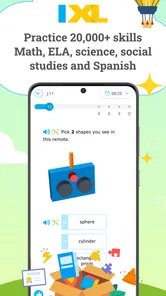
IXL is more than just an app; it’s a complete learning platform that covers a wide range of subjects like math, language arts, science, and social studies. It’s designed for learners from kindergarten through to grade 12, making it a versatile resource. IXL Learning makes this education app, which is free to download and rated for Everyone. It has a 4.3 average from around 39,000 ratings, with more than 5 million installs. Those figures suggest plenty of families have tried it, though popularity alone cannot tell you whether its practice style suits your child.
More From Our News Desk

 Bolt: Request a Ride
Bolt and the Shift from One-Tap Rides to More Legible Trips
Bolt shows how ride-hailing is shifting from a one-tap taxi request toward a more legible, choice-driven trip, while leaving the hardest questions of price and reliability unresolved.

 Farm Land - Farming life game
Farm Land Review: A Small Island Farm with a Satisfying Loop
A bright, breezy island farm turns a few quick chores into a satisfying cycle of planting, harvesting, expanding, and deciding what to build next.

 Android Auto
’s Community Takes Shape in the Passenger Seat
Its most valuable network is not a public feed but a shared set of routes, voice habits, app integrations, and advice that make driving less isolating—and sometimes more complicated.

 My Talking Angela
 Makes the Virtual Pet Feel Personal
A polished pet-raising game built on small rituals, playful customization, and a character who gives everyday screen time a surprisingly personal rhythm.

 Google Translate
 Review: A Pocket Tool for the Small Frictions of Travel
From menus and signs to quick conversations, Google Translate earns its place by cutting the little delays that make unfamiliar language feel like a barrier.

 Shazam: Find Music & Concerts
Shazam’s Best Trick Is Turning a Song Into a Night Out
A few seconds of recognition can settle an argument, rescue a half-remembered chorus, and point toward a live show. Shazam’s real trick is what happens after the match.
Latest News



Features That Make IXL Stand Out
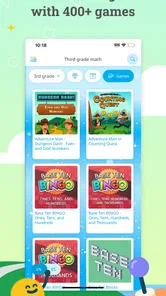
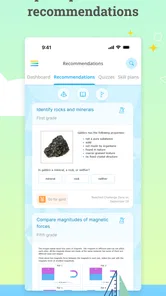
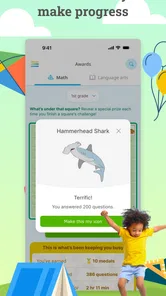
One of the coolest features of IXL is its vast library of problems—over 8,000 skills are available for practice! You’ll never run out of new challenges. Plus, the questions are adaptive, meaning they get harder or easier based on your performance, ensuring that you're neither bored nor overwhelmed.
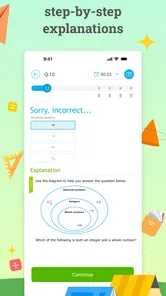
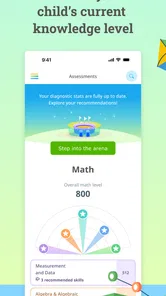
The app also provides detailed explanations for each problem, helping you understand where you went wrong. It’s like having a tutor in your pocket. For parents, the analytics feature is a godsend. It provides insights into your child’s progress, showing where they excel and where they might need a bit more practice. I find those explanations most useful when a learner pauses to work through the reasoning rather than tapping quickly to finish. A practical routine is to review one missed question together, ask the child to explain the correction in their own words, and then let them continue independently. That turns a score into a small lesson instead of treating practice as a race.
Choosing a sensible place for it in the routine
For a child who needs regular practice across school subjects, IXL can be a handy companion between lessons. Imagine having a short window after homework: a parent can help the child choose a skill connected to a current class topic, let them work, then use the explanation to discuss one mistake. This is more focused than opening a broad video library and hoping the right lesson appears, while a workbook may offer less immediate feedback. On the other hand, a teacher’s explanation or a textbook may be a better fit when the learner needs a full introduction to a new idea rather than repeated practice.
The breadth can also make choosing a starting point feel less obvious. I’d avoid letting a learner jump randomly between subjects just because the app offers many options. Pick one goal for the session, and treat progress indicators as clues about what to revisit, not as a judgment of ability. If a child becomes frustrated by repeated questions, shorten the session or switch to a conversation about the underlying concept; persistence is useful, but forcing a long drill can make learning feel like a chore.
User Experience and Accessibility
For an app with such a wide array of features, IXL is surprisingly easy to navigate. The interface is clean and intuitive, which means more time focused on learning and less on figuring out how to use the app. It’s available on both Android and iOS, so you can take learning on the go, whether you’re on a tablet or a smartphone. That convenience is especially helpful for a quick practice session away from a desk, though I’d still choose a quieter setting for activities that need close reading or careful working.
However, I should mention that some users find the subscription model a bit pricey. But considering the depth and breadth of content available, many feel it’s worth the investment, especially if you're serious about education. The app is free to download, but that does not mean every learning option is free to use; I’d check the current in-app choices before building a routine around features that may require payment. With around 8,200 written reviews alongside its ratings, there is a sizable body of user feedback, but individual experiences can differ, so I’d judge the fit through your own trial rather than assume every family will value the same parts.
Trust, choices, and a cautious approach
When an app is used by a child, I think it is sensible to look at the permission requests, privacy information, and account settings shown on the device and within the service before entering personal details. I won’t assume what information IXL collects or what controls it offers without checking those screens. A parent can make that review part of setup, decide which account details are appropriate to provide, and revisit the available choices later. If the controls or terms do not feel clear enough for your household, it is reasonable to use a school resource or an offline workbook instead.
For younger learners, I’d also keep the first sessions within reach of an adult, not because every answer needs supervision, but because a child may need help choosing a suitable skill and making sense of a wrong answer. Older students who can set their own study goals may be more comfortable using the app independently. In either case, I would use it as one source of practice, not as a substitute for a teacher, discussion, reading, or hands-on activities.
Making the choice fit your household
A common practical question is whether a free download means a family can use everything without paying. I would not assume that: the app costs nothing to download, while some learning options may involve a subscription. Before a child builds a daily habit around a particular activity, I’d check what is currently available in the app and decide whether the ongoing cost makes sense for your household. That is especially important if you are comparing it with free school materials or a workbook you already own.
Another question is whether it works for independent study. It can, particularly for learners who can choose a goal and slow down to review mistakes, but independence depends on age and confidence. A child who tends to guess quickly may need an adult to help turn feedback into learning. I would also avoid using practice scores as a stand-alone measure of ability: they are more helpful as prompts for deciding what to revisit than as a verdict on a student.
IXL is aimed at kindergarten through grade 12, but that wide range does not mean every age should use it in the same way. Younger children often benefit from an adult helping them navigate and connect questions to classroom learning. Older students may prefer to choose a skill themselves and work through it at their own pace. If a learner finds the practice repetitive or becomes anxious about getting answers wrong, I’d reduce the session and bring in another teaching method rather than insist that more questions are always better.
The app is a stronger match for families who value structured, subject-based practice and can make room for a paid option if the free experience is not enough. It may be the wrong choice for someone looking for a completely screen-free routine, a free resource with no paid elements, or extended instruction before any practice begins. In those cases, a library book, classroom materials, a teacher, or a paper workbook may fit better. The right comparison is not which tool has the most content, but which one meets the learner’s immediate need.
Final Thoughts
Overall, IXL is a powerhouse of an educational app. It’s packed with features that are beneficial for learners of all ages. Whether you're a parent wanting to give your child a leg up in their studies, or a student looking to improve your skills, IXL is worth a shot. Just remember, while it’s a great tool, it should complement traditional learning methods rather than replace them entirely.
If you’re ready to dive into a world of learning, you might want to give IXL a try. Happy learning! For me, it makes the most sense for families who want structured practice and are willing to guide children toward a clear goal. I’d look elsewhere if you need a fully free resource, a screen-free activity, or a teaching format built around long explanations rather than practice. Used with realistic expectations, it can add useful repetition to a child’s learning day without pretending to do the work of a teacher.
IXL Frequently Asked Questions
Can a student use IXL independently, or will they need help getting started?
IXL is designed around personalized learning across K–12 subjects, so students can use it to practice skills suited to their learning needs. Younger learners may benefit from an adult helping them get started and choosing suitable material, while older students may prefer to work more independently. How much guidance is useful depends on the student’s age, confidence, and goals.
What subjects can students study with IXL?
IXL is an education app focused on personalized learning across K–12 subjects. Its broad school-level scope can make it useful for students looking to practice learning material in different subject areas. Families can consider the learner’s grade and study goals when deciding whether IXL’s subject coverage is a match for their needs.
Is IXL free to download, and does using it require payment?
IXL is a free education app from IXL Learning, so you can download it without paying upfront. The app focuses on personalized learning across K–12 subjects. Before relying on it for regular study, check the app’s current purchase and access details in the store, since what is included after installation can affect whether it suits your needs.
What is IXL and what educational levels does it cover?
IXL is a comprehensive online learning platform designed to support students from kindergarten through 12th grade. It offers a wide range of subjects, including math, language arts, science, and social studies. The platform is structured to help students practice and master various skills through interactive questions and personalized learning paths.
How does IXL personalize learning for each student?
IXL uses an adaptive learning technology that personalizes the educational experience for each student. It assesses the student's current skill level through diagnostic assessments and tailors the practice questions accordingly. This ensures that students work on areas that need improvement and gradually build their proficiency in different subjects.
Pros
- Comprehensive learning tool
- Adaptive learning technology
- Covers multiple subjects
- User-friendly interface
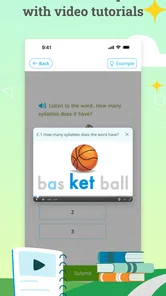
- Interactive exercises
Cons
- Requires subscription fee
- Limited offline access
- Can be repetitive
- Performance anxiety for some
- Lacks social interaction